
What if a single technical glitch during your software migration cost you five years of client history and a decade of built-up trust? You’ve spent years building your practice, and the fear of losing prior-year data during a tax software data conversion is a valid concern that keeps many EROs awake at night. It’s not just about the files. It’s about the continuity of your business and the peace of mind of your clients.
We understand that learning a new system during the heat of tax season feels overwhelming, especially with increasing IRS security mandates like the Written Information Security Plan (WISP). You deserve a partner who treats your data with the same care you do. As a firm trusted by tax professionals nationwide, we’ll show you how to transition your practice data safely and efficiently without losing a single client record.
This 2026 guide shows you how to achieve a 100% accurate transfer while maintaining zero downtime for your office. We’ll walk through the essential steps for a secure migration and the professional support available to handle technical hurdles. Whether you need APEX Cloud Pro for remote 1040 teams or APEX Corporate Desktop Premium for complex business entities, you’ll discover how to move forward with total confidence.
Key Takeaways
- Understand why a professional tax software data conversion is essential to protect your practice from the risks of manual entry and data loss.
- Identify the specific tax forms—including 1040, 1065, and 1120—that can be migrated to keep your historical client records intact.
- Learn how to choose the right migration path between the cloud-based efficiency of APEX Cloud Pro and the local control of APEX Corporate Desktop Premium.
- Follow a proven five-step checklist to inventory, back up, and securely transfer your database without interrupting your office operations.
- Discover how a dedicated Service Bureau partner provides personalized, script-free support to ensure your migration meets federal security standards.
What is Tax Software Data Conversion and Why Does it Matter?
Tax software data conversion is the specialized process of moving your clients’ prior-year tax records from your old software into a new, professional system. Think of it as a digital bridge that carries your hard work forward. This technical data migration ensures that you don’t start from zero every January. By automating the transfer of names, addresses, and EINs, you protect your practice from the inevitable errors that come with manual entry.
Relying on manual data entry is a significant risk to your office’s efficiency and overall accuracy. Even the most careful preparer can mistype a Social Security number or miss a carryover loss when re-keying hundreds of files. A professional tax software data conversion handles the heavy lifting by pulling in complex details like depreciation schedules, prior-year adjusted gross income (AGI), and dependent information. You gain the emotional relief of knowing your client history remains intact before the first W-2 even arrives at your office.
The Role of Data Conversion in Your Practice Growth
A seamless migration does more than just save time; it empowers you to focus on client acquisition and retention. When you aren’t buried in administrative paperwork, you have the bandwidth to provide high-level advisory services that clients value. Historical data is a goldmine for year-over-year tax planning. It provides a clear roadmap for mentoring new preparers and ensuring they understand a client’s long-term financial trajectory. Ultimately, a successful tax service bureau partnership relies on this data conversion as its foundational step for scaling your revenue and expanding your service offerings.
Common Challenges Preparers Face When Switching
Many tax professionals hesitate to switch systems because of the fear of the unknown regarding software compatibility. You might worry about whether your old files are compatible with modern, cloud-based platforms. Self-service or “DIY” transfers often lead to data corruption, where files become unreadable or fields are mapped incorrectly. There is also the valid concern of downtime. You can’t afford to have your office offline during peak filing periods. Your practice relies on consistent access to records, and any delay in the migration process can lead to frustrated clients and lost revenue. These hurdles often stop preparers from upgrading to better tools, but professional support can eliminate these risks entirely.
The Mechanics of a Secure Tax Data Migration
A secure tax software data conversion requires a precise technical approach to ensure every field lands where it belongs. You aren’t just moving folders; you’re migrating complex 1040 individual returns along with 1041, 1065, 1120, and 1120S business records. It’s essential to distinguish between your backup files and your converted files. Backup files serve as your raw safety net, whereas converted files are the optimized records formatted specifically for your new APEX environment. To maintain IRS compliance, every transfer must use high-level encryption. We always recommend starting with a test conversion. This small-scale migration allows you to verify accuracy and field mapping before committing your entire database to the move.
Standard Supported Formats for Professional Software
Professional software typically supports common industry formats from most major providers. If you’re moving individual records to APEX Cloud Pro, the process is streamlined for remote access and multi-office efficiency. For those migrating partnership or corporate data like 1065s and 1120s, APEX Corporate Desktop Premium provides the robust local control and Windows-based suite your office needs. Before you begin the process, ensure your PTIN and EFIN credentials are active and verified. This step prevents administrative delays when you’re ready to start e-filing. You can discover how APEX simplifies your data transition by speaking with our support team today.
Maintaining Cybersecurity During the Transfer
Your data migration must align with your Written Information Security Plan (WISP) to meet federal mandates. Following IRS security guidelines is non-negotiable when handling sensitive Social Security numbers and bank information. Encryption acts as a digital vault during the transfer process, keeping client identities safe from unauthorized access. We integrate these protections into our cybersecurity training for tax offices, helping you build a practice that is both efficient and legally compliant. Protecting your clients’ data is the most important part of your professional reputation and long-term success.
Comparing Conversion Paths: 1040 Cloud vs. Full Corporate Desktop
The path you choose for your tax software data conversion depends entirely on your specific business model. Your software choice dictates the complexity of the migration process because different tax forms require different data mapping strategies. APEX solutions empower you to handle high-volume migrations without the hidden burden of per-return fees. Whether you prioritize the mobility of the cloud or the local control of a desktop suite, the migration process remains a strategic step in your practice growth. You can focus on the user experience that fits your team best while we handle the technical heavy lifting.
Migrating to APEX Cloud Pro
APEX Cloud Pro is the premier choice for remote or multi-office teams that focus exclusively on 1040 individual returns. The conversion process for this 100% cloud-based solution is streamlined to get your team up and running quickly from any location. You gain the freedom of remote access without sacrificing the security of your client records. One of the most significant benefits of switching to this platform is the flat $999 season price. This predictable cost structure allows you to scale your business and retain more of your revenue without worrying about fluctuating software expenses. You can explore the full feature set by reviewing our APEX Cloud Pro guide.
Migrating to APEX Corporate Desktop Premium
If your office handles complex business entities like 1120, 1065, or 1041 returns, APEX Corporate Desktop Premium is your ideal destination. This migration path requires a more detailed transfer of complex depreciation schedules and historical business data. You maintain total local data control within a Windows-installed environment, which is vital for established offices requiring offline capabilities. This suite provides the robust tools needed for full business entity filing while ensuring your office remains efficient during the busiest weeks of the season. You can find more information on these specialized features in our guide to corporate tax software solutions.
Regardless of the path you select, maintaining compliance with legal protections for taxpayer privacy is our top priority. We ensure that your sensitive client data is protected during every stage of the migration. Our team understands the regulatory framework that governs your practice and builds these protections into the software. You get the peace of mind that comes from working with a partner who values your clients’ privacy as much as you do. This commitment to security is what makes APEX a trusted partner for tax professionals nationwide.
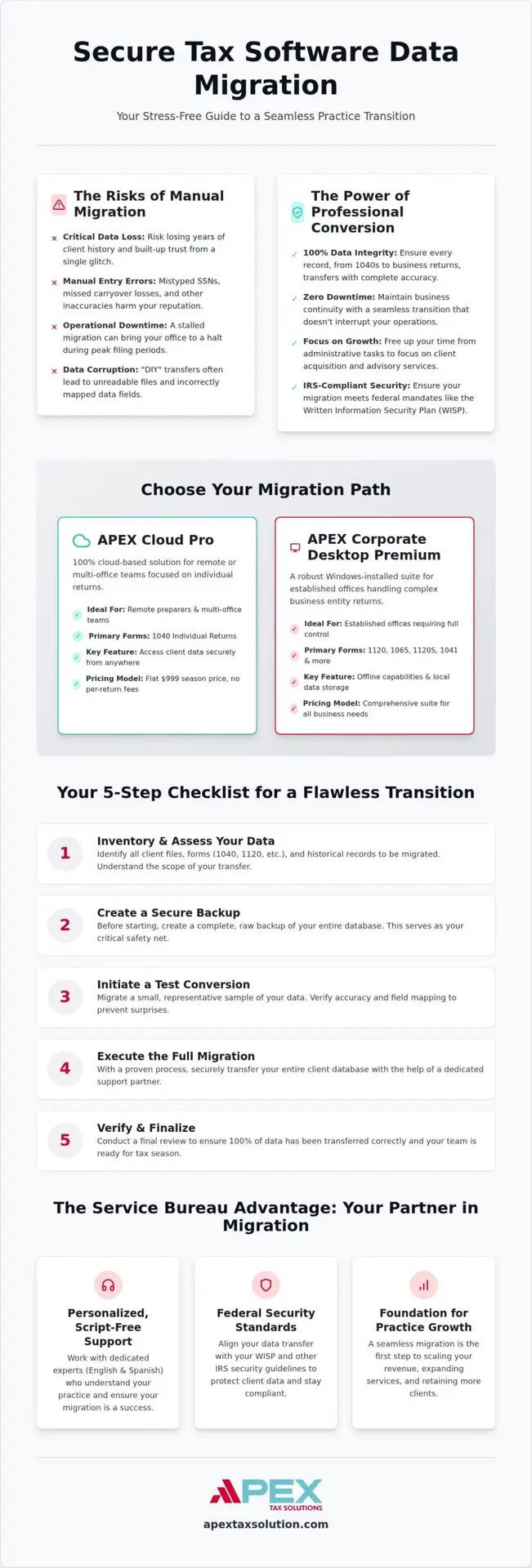
Your 5-Step Checklist for a Stress-Free Software Transition
A successful tax software data conversion begins long before you click the import button. You need a structured plan to ensure your client records move safely from your old database to your new APEX environment. We’ve developed this five-step checklist to help you manage the technical transition with confidence and zero downtime.
- Step 1: Inventory your data. Identify exactly which tax years your practice needs to move. Most offices prioritize the last three years to maintain continuity for current clients.
- Step 2: Secure your backup. Create a full backup of your current database on a secure, encrypted drive. This step is a critical part of your Written Information Security Plan (WISP).
- Step 3: Select your APEX solution. Choose APEX Cloud Pro for 1040-only remote teams, or select APEX Corporate Desktop Premium if you prepare business entity returns like 1120s or 1065s.
- Step 4: Execute a test conversion. Start with a small, varied batch of returns. This allows you to verify that fields are mapping correctly before you migrate your entire database.
- Step 5: Verify for 100% accuracy. Compare the carried-over data against your original records to ensure every digit is correct.
Preparing Your Current Software for Export
You should clean up your client lists before you start the export process. Don’t waste time migrating dead files from clients who haven’t used your services in several years. Locate your specific backup directories within your current software’s settings menu. You must finalize any pending returns before you begin. Migrating a return that is still in progress often leads to data corruption or missing schedules.
Post-Conversion Verification and Training
Once the tax software data conversion is complete, your first priority is checking carry-forward amounts. Verify that depreciation schedules and capital loss carryovers appear exactly as they did in your previous system. Check basic demographics like Social Security numbers and bank routing info for a random sample of clients. Training should happen immediately after your data is live. We recommend running a parallel return by entering a complex 2025 file into both systems to confirm the results match perfectly. You can Partner with APEX Tax Solutions today to start your secure migration process with expert guidance.
Why APEX Tax Solutions is Your Partner in Data Migration
APEX Tax Solutions understands that switching platforms is a major business decision for your practice. We position ourselves as your dedicated partner because your growth directly reflects our expertise. A successful tax software data conversion serves as the gateway to a long-term relationship built on trust and reliability. Unlike vendors who disappear after the sale, we provide continuous support to help you navigate every technical and regulatory hurdle. We’re an IRS-authorized e-file provider committed to your year-round success.
Professional Support Without the Scripts
Larger corporations often rely on impersonal call centers and rigid scripts that don’t address your unique needs. At APEX, you receive personalized service from experts who understand the specific hurdles independent EROs face daily. Our Dallas-based team has empowered tax professionals nationwide since 2015. We don’t just provide software; we provide a partnership that values your time and your reputation.
We offer bilingual support in both English and Spanish to ensure every office in our community has the resources it needs to thrive. As a Latino-owned business, we take pride in serving a diverse community of preparers and their clients. This human-centered approach ensures you never feel like just another ticket number during your migration. We treat your business with the same care we give our own because we’ve built our practice on your results. Whether you are moving to APEX Cloud Pro or APEX Corporate Desktop Premium, our team ensures your data arrives safely.
Scaling Your Business Beyond the Switch
Completing your tax software data conversion is just the first step in our comprehensive Service Bureau model. This transition sets the stage for advanced tools like GHL for Tax Offices, which automates your client communication and lead management. You gain the ability to manage your office more efficiently while we handle the backend technical complexities.
Our Service Bureau Partner Program allows you to retain more revenue while benefiting from our professional training and mentorship. You join a nationwide community of tax professionals who have successfully scaled their operations using our end-to-end service model. This program provides the tools you need to grow your own brand while leaning on our deep industry expertise.
We provide the software, support, and training under one roof so you can focus on building a legacy for your family. Our goal is to move you from being a preparer to becoming a business owner with multiple revenue streams. You get the stability of a partner who understands the multicultural identity of the modern tax landscape. We stand by you during every tax season to ensure your practice remains compliant, profitable, and ready for the future.
Secure Your Practice Future with a Proven Migration Strategy
Transitioning your firm to new software represents a significant milestone in your professional growth. You’ve learned how a secure tax software data conversion preserves your client history while keeping you compliant with federal security mandates. By choosing the right path between APEX Cloud Pro and APEX Corporate Desktop Premium, you ensure your office operates at peak efficiency from day one. You don’t have to face technical hurdles alone when you have a dedicated partner by your side.
APEX Tax Solutions supports your journey as an IRS-authorized e-file provider since 2015. We offer bilingual support for English and Spanish speakers and a flat-fee software model with no per-return charges. Our team provides the personalized, script-free guidance you need to protect your reputation and scale your revenue. We focus on empowering your practice through continuous learning and reliable technology that grows with you.
Take the next step toward a more efficient and secure tax season. Discover the APEX advantage and start your seamless data conversion today. Your success is our mission, and we’re ready to help you build a more profitable future for your business and your community.
Frequently Asked Questions
How long does tax software data conversion typically take?
Most tax software data conversion requests are completed within 24 to 72 hours. The exact timing depends on the volume of records and the complexity of the data being moved. Our team prioritizes your migration to ensure you experience zero downtime during the transition. You’ll receive a notification as soon as your client files are ready for review in your new APEX environment, allowing you to start preparing returns immediately.
Is my client data secure during the migration to APEX software?
Your client data remains fully secure throughout the entire migration process. We use high-level encryption for all transfers to maintain strict IRS compliance and protect sensitive information like Social Security numbers. This process aligns with your Written Information Security Plan (WISP) and federal data protection mandates. As an IRS-authorized e-file provider, we implement the same rigorous security protocols that we use for our own professional software every day.
Which professional tax software programs are compatible for conversion?
Our system supports data migration from most major professional software providers in the industry. Whether you’re moving from a legacy desktop program or a newer cloud-based platform, our technical team can usually map your fields accurately. We recommend performing a test conversion with a small batch of returns to verify compatibility. This ensures that names, EINs, and carryover amounts transfer perfectly before you commit your full database for the upcoming season.
Does the conversion include business entity returns like 1120 or 1065?
Yes, we support the conversion of business entity returns, including 1120, 1120S, 1065, and 1041 forms. These complex files are best handled through APEX Corporate Desktop Premium, which provides the robust local control needed for partnership and corporate data. Our conversion process includes the transfer of detailed depreciation schedules and historical business records. This ensures that you have all the necessary information to maintain continuity for your business-entity clients without manual re-entry.
Can I convert my data in the middle of the tax season?
You can technically convert your data mid-season, but we strongly recommend completing the migration before the IRS e-file opening date. Moving your database during the peak filing period can create unnecessary stress and potential downtime for your office. Completing your tax software data conversion in the fall or early winter allows you enough time to verify records and train your staff. This preparation ensures a smooth, uninterrupted workflow when your clients start arriving in January.
What happens if some client data does not carry over correctly?
If you notice any discrepancies after the migration, our dedicated support team is available to assist you without using call-center scripts. We recommend verifying a random sample of returns against your original records immediately following the transfer. Most minor issues can be resolved quickly by our technical experts who understand the mechanics of data mapping. We stand by our promise of an accurate transfer and will work with you until every record is correct.
Is there a fee for data conversion when I switch to APEX Tax Solutions?
We provide data conversion services as part of our commitment to your long-term success. When you partner with APEX Tax Solutions, you gain access to our end-to-end service model, which includes software, support, and training under one roof. Our pricing for APEX Cloud Pro remains a flat $999 for the season with no per-return fees. This approach allows you to focus on scaling your business and retaining more revenue instead of worrying about hidden technical costs.
Do I need to be a technical expert to handle the data migration?
You don’t need to be a technical expert to manage your software transition. Our Service Bureau Partner Program provides hand-held support throughout the entire process, from the initial backup to the final verification. We handle the heavy lifting of the technical migration so you can focus on managing your office and serving your clients. Our bilingual support team is always ready to guide you through each step in either English or Spanish to ensure your total confidence.