
A tax scam can start with one convincing email, but the damage can reach far beyond one employee’s inbox. Employee cybersecurity awareness for tax firms helps your team recognize phishing, fake payroll or W-2 requests, and other attempts to steal information or account access.
If you’re asking whether the IRS requires staff training, the answer depends on your firm’s circumstances and the rules that apply to it. Either way, training is a practical way to protect taxpayer information, your firm’s reputation, and business continuity. A policy alone won’t show employees what to do when a message seems urgent or an account behaves unexpectedly.
You’ll learn to recognize common tax-related scams, strengthen account security habits, and promptly report suspicious messages or possible disclosures. Ongoing awareness can make cybersecurity a shared responsibility across your firm, rather than a task left to one person.
Key Takeaways
- Verify requests to change employee or payment information through a trusted channel, especially when they arrive unexpectedly.
- Use unique passwords and a password manager, and turn on multifactor authentication to better protect work accounts.
- Learn the signs of tax-related phishing, including unusual messages from supposed clients, and report suspicious activity promptly.
- Build regular security reminders and staff training into your firm’s routine so employees know how to respond under pressure.
- Prepare clear reporting and recovery steps to help limit disruption and protect client trust if a security incident occurs.
1. Phishing, fake invoices, and W-2 scams targeting payroll and HR
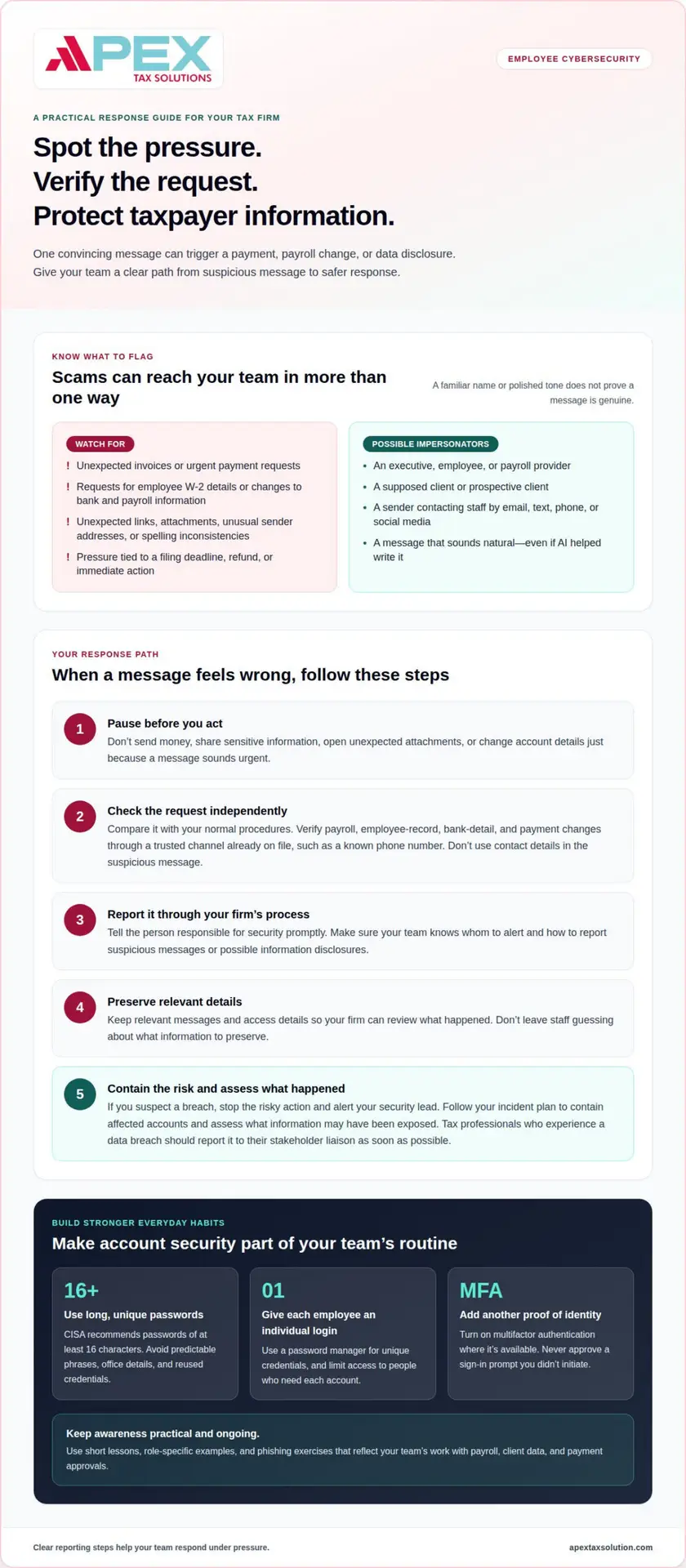
A convincing message can pressure your staff to send money, expose taxpayer data, or change payroll details. Watch for unexpected invoices, urgent payment requests, and emails asking for employee W-2 information. A scammer may pose as an executive, payroll provider, employee, or prospective client. The message may use familiar names and business details to appear legitimate.
Train payroll and HR staff to pause before acting on requests involving sensitive information. Verify changes to employee records, bank details, or payment instructions through a trusted channel already on file, such as a known phone number. Don’t use contact details provided in the suspicious message. This separate verification step can expose fake invoice instructions and payment-change scams before money moves.
Phishing can arrive by email, text, phone, or social media. The IRS normally contacts taxpayers by mail first and doesn’t send direct messages through social media. Teach staff to watch for unexpected links or attachments, spelling inconsistencies, unusual sender addresses, and pressure to act immediately. A message mentioning a filing deadline or refund can still be fraudulent.
AI-generated messages can make social engineering more convincing by imitating natural writing or adapting a request to its recipient. A polished tone doesn’t prove a message is genuine. Ask employees to check the sender’s address, compare the request with normal procedures, and verify unusual instructions independently. Include realistic examples in security awareness training, such as a fake invoice with changed bank details or a W-2 request from an apparent manager.
For a small tax firm, useful training combines short lessons, role-specific examples, and phishing exercises that teach staff to spot and report suspicious messages. Working with an experienced digital learning consultancy like Knowledgefront can help design interactive modules tailored to these specific workflows. Choose content that addresses payroll, client data, payment approvals, and threats employees actually encounter. Compare the training format, staff coverage, and included support, rather than judging by price alone.
The most common employee risks include phishing, stolen credentials, fraudulent payment changes, and mistaken disclosure of employee or taxpayer information. The FTC Safeguards Rule provisions cited for security programs, MFA, and notification requirements are at 16 CFR § 314.4, according to the Electronic Code of Federal Regulations. Your written response process should tell staff whom to alert and how to preserve relevant messages.
If you suspect an employee-caused breach, stop the risky action, report it promptly through your firm’s established security procedures, and preserve relevant messages and access details. Alert the person responsible for security so they can contain affected accounts, assess what information may have been exposed, and follow the firm’s incident plan. Tax professionals who experience a data breach should report it to their stakeholder liaison as soon as possible.
2. Strong, unique passwords and password managers
A unique password limits the damage if another website suffers a breach. If an employee reuses the same password for tax software and personal email, a stolen login could expose both accounts. Ask staff to create separate passwords for every work system containing taxpayer records. The Cybersecurity and Infrastructure Security Agency recommends passwords of at least 16 characters.
Length matters, but predictable patterns weaken a password. Avoid names, office details, seasonal phrases, and simple substitutions such as replacing “a” with “@.” A longer passphrase made from unrelated words can be easier to remember. Don’t base it on a client’s name or a familiar filing term.
A password manager can generate and store unique credentials, reducing the temptation to reuse passwords or save them in unsecured notes. The IRS recommends different strong passwords for important accounts and suggests considering a password manager. Choose an approach your team can use consistently, with access limited to those who need each account.
- Separate accounts: Give each employee an individual login instead of sharing one office password. That makes access easier to manage when someone changes roles.
- Store credentials carefully: Use an approved password manager rather than a spreadsheet or an unprotected document. Keep its master password separate and strong.
- Protect recovery routes: Review the email address and phone number used to reset each account. A weak recovery account can undermine a strong work password.
- Remove outdated access: When a staff member leaves or changes duties, update access to systems and records they no longer need.
Pair strong passwords with multifactor authentication wherever it’s available. MFA requires another proof of identity beyond a password, such as an authentication code. It can make a stolen password less useful, but employees must still protect sign-in approvals and codes. Never approve a prompt for a sign-in they didn’t initiate.
Build password habits into staff routines. During onboarding, show tax professionals how to create unique credentials and use the firm’s chosen storage method. In refresher discussions, work through a practical example: an employee receives a sign-in alert after closing the tax system. They should deny an unfamiliar request and report it through the firm’s established process.
Make password changes purposeful. If an employee suspects a credential was exposed, change it promptly and review the account’s recent activity. Avoid arbitrary changes that encourage predictable variations, such as adding a new season to an old password. Your security awareness process should explain who handles access concerns and how staff can report them.
Clear procedures help employees protect taxpayer records without relying on memory alone. Reinforce the same expectations across email, tax preparation tools, payroll systems, and file storage. A short, role-specific lesson can cover password creation, password manager use, MFA prompts, and account recovery. Regular practice makes these steps part of everyday work.
3. Recognizing and reporting scams
Train employees to assess suspicious emails before clicking, replying, or forwarding. A message may use a familiar client name but come from an unfamiliar address. Check the full sender address, unexpected wording, and requests that differ from normal procedures. Even a polished message can be a phishing attempt. Strong employee cybersecurity awareness for tax firms gives staff a consistent way to pause and assess these warning signs.
Links and attachments deserve the same caution. Hover over a link to inspect its destination before opening it, and don’t enter tax-system credentials through an email link. If an attachment arrives unexpectedly, confirm its purpose through a separate, trusted channel. Verify unexpected messages claiming to come from a government agency using contact information obtained independently.
Some tax-related messages target professionals directly. A scammer may pose as a prospective client and send a document, or use a compromised email account to request taxpayer information. Train intake staff to treat unusual file requests cautiously, especially when the sender presses for sensitive records before normal identity checks.
Suspicious communications can also arrive by text, phone, social media, or postal mail. The IRS doesn’t send direct messages through social media and normally contacts taxpayers by mail first. Teach employees to treat urgency, threats, unexpected refund claims, and demands for immediate payment as reasons to stop and verify.
Give every employee a clear reporting path. Staff should promptly report suspicious messages, unexpected account activity, or possible information disclosures through the firm’s established security procedures. Include the message, sender details, time received, and any action taken. If someone clicked a link or opened a file, reporting that fact helps the security lead respond quickly.
- Stop interacting with the message, and don’t reply or open more attachments.
- Report it through the designated internal channel, including relevant details.
- Follow the firm’s instructions for the affected email account or device.
For a suspected tax scam, employees should avoid forwarding the message widely, which could expose more staff. The designated security contact can preserve the original and alert the team with a safe description. If an employee entered credentials, they should report it immediately so the firm can assess the account and take protective steps.
Recognition improves when teams discuss real examples without blame. In a staff meeting, review a disguised invoice, a fake client inquiry, or a message requesting employee records. Ask which details raised concern and what verification step would resolve it. A well-designed employee cybersecurity awareness for tax firms program connects these examples to everyday decisions.
Reward useful reporting, not just perfect detection. Thank employees who flag suspicious requests, even when a message turns out to be legitimate. Recognition can be a manager’s direct acknowledgment or a brief mention in a team meeting. This reinforces that early reporting supports colleagues, protects taxpayer information, and helps the firm respond before a threat spreads.
4. Multifactor authentication
A password alone may not stop criminals who steal or guess login credentials. Multifactor authentication, or MFA, asks users to prove their identity another way. That second step can help protect sensitive taxpayer records if a password falls into the wrong hands. The IRS recommends enabling MFA for online accounts whenever it’s available.
For example, after entering a password, an employee might approve a sign-in prompt or enter a code. The additional factor should be controlled by the authorized user, not someone contacting them unexpectedly. Never share a code over email, text, or phone. A caller claiming to be trusted support may still be trying to take over an account.
Tax preparation firms covered by the FTC Safeguards Rule must use MFA to access customer information. The rule allows a Qualified Individual to approve an equivalent secure access control in writing. The Electronic Code of Federal Regulations lists the relevant FTC Safeguards Rule provisions for security programs and MFA at 16 CFR § 314.4.
Start by identifying systems that store or provide access to customer information. Include tax preparation software, email, file storage, payroll tools, and remote access accounts. Then enable MFA for each account where it’s available and include setup in employee onboarding. Test the sign-in process with staff before busy filing periods so they recognize a legitimate prompt.
Choose an available authentication method that suits your systems and work routines. An authenticator app may generate a code; some services send a prompt to a registered device. Keep recovery options current and limit access to them. If an employee loses a device, follow the firm’s account recovery process rather than informally bypassing MFA.
- Approve only familiar requests: Deny a prompt you didn’t initiate, even if it arrives during work.
- Report repeated prompts: Unexpected sign-in requests may signal that someone has your password.
- Protect codes: Enter them only into the account sign-in flow you started.
- Review access: Remove old devices and accounts when staff roles change.
Train employees to recognize MFA fatigue, a tactic that pressures users with repeated approval requests. Employees should deny unfamiliar prompts and report them through the firm’s established security process. Don’t encourage staff to approve a request simply to clear a notification.
Clear instructions make MFA practical across offices and devices. Document who handles enrollment, lost-device recovery, and suspected account misuse. During security awareness sessions, have staff practice denying an unexpected prompt and reporting it. This makes authentication a repeatable safeguard rather than a confusing interruption during client work.
5. Reputation and business continuity risks
A cyberattack can disrupt tax preparation while your team works to protect client identity information. If employees can’t access tax software, email, or accounting records, filing work may slow. A compromised account can also expose sensitive documents and undermine client confidence. Plan for both outcomes: protecting information and keeping essential work moving.
Build your response around clear roles. Identify who leads incident handling, assesses affected systems, and communicates with clients. A written escalation path helps employees act quickly instead of guessing. Include practical examples, such as a lost work device, an unexpected account login, or files that suddenly won’t open.
Protect records before an incident. The IRS recommends securely storing digital tax records, encrypting sensitive files, and backing up important information. Encryption makes readable information difficult to use without the correct key. Backups provide a separate copy for recovery, but your team should know who can access them and how to restore files.
Test recovery steps before tax season. Have the staff responsible for technology restore a sample file from backup and confirm that authorized employees can access it. Record which systems support filing, payroll, client communication, and accounting. This helps your firm prioritize recovery if an attack affects multiple tools.
Reputation also depends on accurate, timely communication. Designate a spokesperson and prepare a process for sharing confirmed information with affected clients. Avoid speculating about the cause or scope while your response team investigates. Keep a record of decisions, system changes, and communications so your firm can coordinate follow-up.
Notification requirements depend on coverage and the type of information involved. Under the FTC Safeguards Rule, covered financial institutions must notify the FTC as soon as possible and no later than 30 days after discovering qualifying unauthorized acquisition. The requirement applies when unencrypted customer information relating to at least 500 consumers is involved. The FTC Safeguards Rule provisions cited for security programs, MFA, and notification requirements are at 16 CFR § 314.4, according to the Electronic Code of Federal Regulations.
Give employees a simple incident path: report the concern, preserve relevant evidence, and avoid altering affected files or messages. Your response lead can then assess systems, contain access, and determine which records need attention. Clear instructions reduce confusion when an employee discovers a possible disclosure during a busy filing day.
Rehearse the plan with a realistic scenario, such as a compromised email account exposing client records. Ask staff to identify the first internal contact, the systems that need review, and the work that can continue safely. Update the plan when software, roles, or record-handling procedures change. That preparation connects security awareness with continuity, client trust, and a more coordinated response.
Apex Tax Solutions: Wisp & Cybersecurity Training
APEX Tax Solutions offers WISP and cybersecurity training to help strengthen staff awareness and security planning. Turn to this training when your firm needs practical support in developing employee habits for protecting taxpayer information and reporting threats.
Cybersecurity training can help your team build a shared understanding of safe habits, from handling sensitive records to responding to suspicious activity. Connect those lessons with the safeguards and response procedures your firm already uses, so employees understand how their actions support client trust and business continuity.
To build a more security-aware team, contact APEX Tax Solutions to discuss WISP and cybersecurity training.
Make safer habits part of your firm’s future
Make security awareness part of how your team works, not a task reserved for busy season. Choose someone to coordinate training, reinforce the procedures your staff rely on, and make reporting concerns a normal part of daily work. Consistent employee cybersecurity awareness for tax firms can help foster a more security-minded workplace as your business grows.
Apex Tax Solutions LLC offers WISP and cybersecurity training alongside APEX Cloud Pro and APEX Corporate Desktop Premium. These offerings give tax professionals access to training and software from one company.
Take a practical next step for your team. Contact Apex Tax Solutions LLC to discuss your training needs and keep building a confident, security-aware firm.
Frequently Asked Questions
Does the IRS actually require employee security training for tax firms?
IRS Publication 4557 describes annual cybersecurity training for employees, and federal law requires firms covered by applicable rules to create and maintain a Written Information Security Plan. Your firm should document its training approach within its broader security practices. The rules that apply can also depend on whether your business falls under the FTC Safeguards Rule, so assess your firm’s coverage and responsibilities rather than assuming every provision applies identically.
How often do employees need to be retrained?
Retrain employees when their responsibilities or work systems change, or when an incident reveals a gap in understanding. For example, a staff member newly assigned to payroll may need instruction on the firm’s approval controls before taking on that task. Keep a record of the date, subject, and attendees. This helps managers identify roles that need a targeted refresher without repeating every lesson for every employee.
What happens if an employee clicks a phishing link after training?
A click doesn’t automatically mean an account or record was compromised, but your response should establish what happened. Ask the employee whether they entered information, downloaded a file, or saw an unexpected sign-in screen. Don’t blame or discourage disclosure; prompt, accurate details help your security lead decide what to investigate. Then use the incident to clarify confusing training examples or reporting instructions.
Why Is Security Awareness Training Important?
Security awareness helps employees apply firm policies in real work situations, including when a request doesn’t follow an established process. It also helps managers identify unclear procedures before they cause confusion. For example, if staff disagree about who can approve a vendor payment change, training can reveal the need for a clearer approval path. That shared understanding supports consistent decisions across your office.
What cybersecurity awareness training do tax firms need for employees?
Choose training that matches employees’ access and responsibilities instead of giving every role identical examples. A preparer who handles client documents needs different practice from a manager who oversees staff access or approves payments. Include role-relevant scenarios, then check whether employees can explain the right next step. WISP and cybersecurity training can support your efforts to build staff awareness and strengthen security planning.
What IRS and FTC cybersecurity rules apply to tax preparation firms?
Firms covered by applicable federal rules must create and maintain a Written Information Security Plan. IRS Publication 5708 helps practices develop and maintain that plan. Firms covered by the FTC Safeguards Rule also need to follow its applicable safeguards and security-program provisions. The Electronic Code of Federal Regulations identifies provisions at 16 CFR § 314.4. Determine which requirements apply to your firm and reflect them in its written security program.
How often should tax firm employees receive cybersecurity training?
Use annual training as a baseline, then schedule additional refreshers to keep procedures current. Quarterly sessions can give teams regular opportunities to practice, while brief reminders can address timely concerns during tax season. Keep the format practical: discuss a scenario, ask staff to identify the appropriate action, and clarify the firm’s procedure. This cadence is separate from retraining prompted by a role change or a specific learning gap.
What topics should cybersecurity training for tax professionals cover?
Build the curriculum around decisions employees make, not just a list of security terms. For instance, a lesson for a new preparer can use a sample client workflow to explore safe document handling, account access, and escalation choices. Cover how staff should protect work devices and where to find current internal procedures. Close with a short scenario that asks employees to explain their next action.