
A network checklist is useful only when it leads to practical safeguards. Securing tax office networks means protecting remote connections with a VPN, tightening access point settings, managing firewalls, and preparing to respond to threats. Each measure addresses a different part of your office’s digital environment.
Taxpayer information needs careful protection. The challenge is managing network security across the devices, staff, and systems your practice relies on, while understanding how those pieces work together.
This guide shows how to use a network checklist to review VPNs and access points, strengthen intrusion prevention and application controls, manage firewall settings, and plan a response to suspicious activity. You’ll learn what each safeguard does and how to make it part of an ongoing approach to protecting your tax office.
Key Takeaways
- Use encrypted remote connections and multi-factor authentication to add protection when you or your staff access tax systems.
- Configure access points with strong authentication and keep guest Wi-Fi separate from systems that handle client information.
- Document how your practice will identify, contain, and respond to suspicious network activity.
- Layer firewalls with intrusion prevention and application controls to help block harmful traffic while allowing necessary work to continue.
- Assess cybersecurity costs by considering your office’s systems, staffing, and support needs, not just software fees.
VPN encryption and multi-factor authentication
A virtual private network (VPN) creates a protected connection for remote access to your tax office systems. Configure remote-access VPNs to use AES-256 encryption and multi-factor authentication (MFA). Encryption scrambles data so unauthorized parties cannot readily read it while it travels across external networks. For example, staff working away from the office should connect through the VPN before accessing internal resources.
Encryption protects information in transit and at rest, but those safeguards address different risks. The FTC Safeguards Rule requires covered firms to encrypt customer information at rest and in transit over external networks, with a limited alternative when encryption is infeasible. The Federal Trade Commission’s rule also requires covered firms to designate a Qualified Individual to oversee and implement the information security program, under 16 CFR §314.4(a). That person can coordinate how the firm applies encryption and reviews access controls.
MFA adds a verification step beyond a password. For example, signing in may require a staff member’s password and a security code sent to a mobile phone. Enable MFA for email, tax software, remote access, and other password-protected accounts wherever it’s available. This makes a stolen password alone less useful to someone trying to access an account.
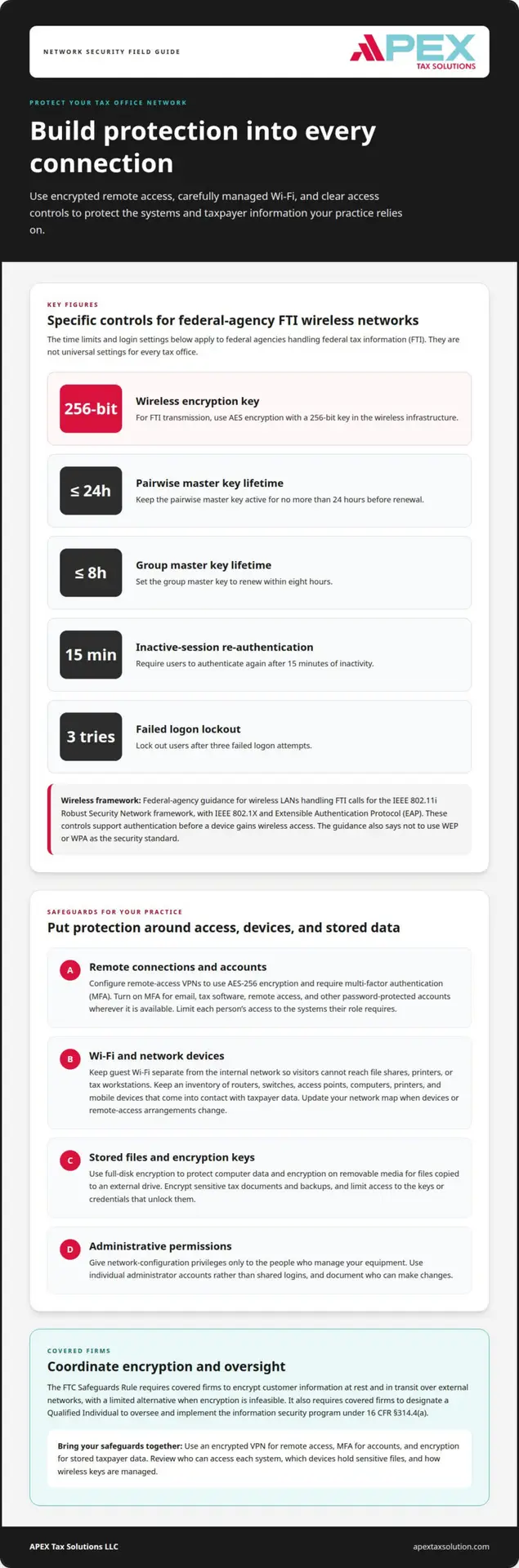
Wireless safeguards need careful configuration, especially when a wireless local area network handles federal tax information (FTI). IRS guidance for agencies handling FTI calls for the IEEE 802.11i Robust Security Network framework, with IEEE 802.1X and Extensible Authentication Protocol (EAP). These controls support authentication before a device gains wireless access. For FTI transmission, the wireless infrastructure must use AES encryption with a 256-bit key.
Key lifetimes also matter for FTI wireless transmission. The pairwise master key must have a lifetime of 24 hours or less, while the group master key must have a lifetime of 8 hours or less. These limits govern how long each key remains active before renewal. Keep these federal-agency specifications distinct from general recommendations for a tax practice; apply requirements according to the information and systems involved.
Protect stored files as well as network traffic. Full-disk encryption helps protect a computer’s data if the device is lost or stolen, while encryption on removable media can safeguard files copied to an external drive. Encrypt sensitive tax documents and backups, and limit access to the keys or credentials that unlock them. A password-protected drive without encryption may not protect its contents if someone connects it to another computer.
Bring the safeguards together: require VPN encryption for remote access, MFA for accounts, and encryption for stored taxpayer data. Review who can access each system, which devices hold sensitive files, and how wireless keys are managed. A documented process gives your Qualified Individual a clear basis for overseeing these safeguards.
Access point configuration and administration
Each access point connects wireless devices to your office network, so its settings affect who can reach business systems. Review equipment, permissions, and remote connections together, especially after changes to staff or technology.
Office Network Components and Access Points
Map the components that connect to taxpayer information: routers, switches, access points, computers, printers, and mobile devices. IRS Publication 5708 recommends cataloging devices that come into contact with taxpayer data. That inventory helps you see which equipment needs secure configuration and who uses it.
For each access point, record its location, administrator, and connection to the internal network. Don’t treat every wireless device as equally trusted. A staff laptop used for tax preparation, for example, needs a different access path from a visitor’s phone. Update the map when you add devices or change remote-access arrangements.
Wi-Fi and Remote Access Permissions
Separate guest Wi-Fi from the firm’s internal network. Visitors may need internet access, but their phones should not be able to reach file shares, printers, or tax workstations. Limit staff access to the systems and information their roles require, and remove permissions when someone leaves or changes responsibilities.
For federal agencies handling federal tax information (FTI) over wireless LANs, access points must require re-authentication after 15 minutes of inactivity and lock out users after three failed logon attempts. These are specific FTI agency controls, not universal settings for every tax office. Federal FTI wireless networks also cannot use WEP or WPA as their security standard.
VPN and MFA for Remote Access
Remote staff should use an approved, protected route to office resources rather than exposing internal systems directly to the internet. A VPN creates a protected connection, while multi-factor authentication (MFA) verifies identity beyond a password. Require both where appropriate for your setup, then limit each user’s access to the tools needed for their work.
Include session logging and encryption in your remote-access design, and decide how access ends when a work session finishes. For example, a preparer working from home should connect through the authorized route and access only assigned systems. Review remote-access arrangements when staff roles or devices change.
Administrative Access Controls
Keep access point administration separate from everyday staff access. Give configuration privileges only to people responsible for managing network equipment, and use individual administrator accounts so you can trace changes to a person. Avoid sharing a login across staff, since shared credentials make it harder to identify who changed a setting.
Document who can change wireless names, passwords, and device permissions. Review that list after departures, new devices, or shifts in remote work. NIST SP 800-153, Revision 4, provides guidance for securing wireless local area networks. Staff education can reinforce careful handling of access and devices through cybersecurity training.
How do you handle network security threats?
An effective threat response combines clear responsibilities, useful system records, and recoverable data. Your plan should cover suspicious activity across office hardware, cloud services, and internet connections.
Breach Indicators and Incident Response
Tax offices face phishing messages, ransomware that locks files, and tax identity theft involving stolen personal information. Unexpected account activity, unfamiliar software, or inaccessible files may signal a security incident. Train staff to report suspicious messages and unusual device behavior promptly, rather than clicking links or investigating on their own.
Establish a response process that names who will isolate affected devices, preserve records, and assess which information the incident may have exposed. The Federal Trade Commission requires a covered firm to report a security event affecting 500 or more people within 30 days of discovery. Keep response steps accessible to the people responsible for acting.
Data Protection Requirements and Resources
The Federal Trade Commission’s Safeguards Rule requires covered firms to develop, implement, and maintain a written information security program with administrative, technical, and physical safeguards appropriate to the firm, under 16 CFR §314.3(a). Your program should connect written procedures to actual controls, such as access restrictions, staff training, and protected systems.
IRS Publication 5708 helps tax professionals create a Written Information Security Plan, while IRS Publication 5293 is the Data Security Resource Guide for Tax Professionals. NIST’s Small Business Information Security: The Fundamentals offers another resource for shaping practical protections. State requirements and tax-agency guidance may also affect your practice, so include the states relevant to your work when reviewing obligations.
Cloud-based tax preparation still requires you to manage authorized users, devices, and access. Limit accounts to approved staff, apply available security settings, and understand how your procedures protect data that you send through internet-connected services. A cloud platform does not replace your office’s information-security responsibilities.
Financial Data VLAN Segmentation
A virtual local area network, or VLAN, separates traffic on the same physical network. Use separate network segments for financial systems and guest access so visitor devices do not share a pathway to tax workstations or file storage.
For example, place staff computers and tax-related hardware on a restricted segment, and guest Wi-Fi on a separate segment. Configure network rules to allow only necessary connections between segments. Segmentation can limit unnecessary access, but it does not replace authentication, encryption, or monitoring.
Backups and Ransomware Recovery
Back up tax data regularly to a separate destination, and encrypt backup files containing taxpayer information. Where your backup process allows, store a protected copy offline, away from everyday network access. This separation can help preserve recovery options if ransomware reaches office computers.
After a ransomware incident, isolate affected devices from the network and follow your documented response plan. Identify a clean backup, restore data in a controlled way, and confirm that restored systems work before returning them to normal use. Record the incident, actions taken, and any required notifications as part of your recovery process.
Intrusion prevention and application control
Layered controls help identify suspicious network traffic and limit what unfamiliar applications can do. Pair monitoring with clear rules for handling messages, software, and wireless connections.
Wireless Intrusion Detection and Prevention
Wireless monitoring can help identify unfamiliar devices, unexpected access points, and unusual traffic on your office Wi-Fi. Review alerts in context: a new device may belong to an employee, while an unrecognized access point could indicate an unauthorized connection. Keep an inventory of approved equipment so staff can distinguish expected activity from a possible threat.
Use firewall rules and intrusion prevention features to block traffic associated with suspicious locations or applications while allowing necessary business connections. CISA describes firewalls as tools that can filter data this way. Pair these measures with network monitoring, and assign someone to review alerts and document the response.
Application Control
Application control helps limit which software can run or communicate across office devices. For example, restrict tax workstations to approved tax, operating-system, and security applications. Review permissions when installing software, and remove tools staff no longer need. This reduces the chance that an unapproved program can access client files or transmit data.
Keep operating systems and security software updated, since outdated applications can expose devices to known weaknesses. Enable built-in operating-system firewalls even if your office uses an external firewall. A firewall filters network traffic, but it does not verify a user’s identity or encrypt stored files, so use separate controls for those risks.
Phishing can trick staff into opening harmful attachments, entering a password on a fraudulent page, or installing spyware that monitors activity. The IRS advises against clicking messages that request personal, tax, or financial information, even when they appear to come from a trusted organization. Train staff to go directly to a service instead of following an unexpected sign-in link.
Public Wi-Fi hotspots may expose tax or financial information sent through websites or mobile apps. Ask staff to avoid tax work on public wireless networks and use an approved secure connection for remote work. If a message or connection seems suspicious, staff should stop, report it through your incident process, and avoid sending client data until you’ve assessed the risk.
Choose security measures that work together: network firewalls filter traffic, intrusion prevention can block suspicious activity, and application controls restrict software behavior. Review alerts and access rules when you add devices or change office systems. A documented review process helps your team notice changes to approved tools, users, or network patterns.
What are the costs of cybersecurity software and services for a small tax office?
Your cybersecurity budget depends on the systems you use, the data you protect, and who manages each safeguard. Compare the full operating cost, not just a software subscription. A tax office using cloud tax preparation, local computers, and remote staff may need different protections from a solo practice with fewer devices.
Identify the Cost Drivers
Start by listing which tools cover which tasks. A firewall protects network traffic, endpoint security runs on individual computers, and log management organizes records of system activity. These tools serve different purposes, so buying one does not automatically replace the others.
Next, map the office’s practical needs. The number of staff accounts, devices, locations, and remote connections affects setup and ongoing administration. A multi-office practice may need more access controls and support than a preparer working from one computer. Data storage and backup needs also shape the budget.
Compare Software and Support
Separate recurring software charges from setup, maintenance, and support costs. For example, a tool may require staff time to review alerts, install updates, or manage user permissions. Include that work in your comparison, even if it doesn’t appear as a separate invoice.
Ask what each service covers in practice: configuration, monitoring, incident support, user training, or routine reviews. Avoid paying twice for overlapping functions, but don’t assume two products offer the same protection because vendors label both products “security.” A written list of features and responsibilities makes gaps easier to spot.
Build a Practical Budget
Use your network inventory to group expenses by purpose: protect devices, secure access, monitor activity, and recover data. Then identify who maintains each control. If an employee handles updates, account reviews, and alerts, budget for that time alongside software and outside support, such as partnering with an IT specialist like Aspire Computing for workstation setup and troubleshooting.
Prioritize safeguards based on the information and systems involved. For instance, a practice that stores client files locally should account for device protection and secure backups. A remote team should also consider the tools and administration needed to control off-site access. Your Written Information Security Plan should document safeguards and responsibilities, not just purchases.
Review the budget when you add staff, devices, or locations, since these changes can alter support needs. Compare renewal terms, included services, and the work your team must perform before choosing a tool. A cybersecurity budget works best when it funds both the technology and the people who keep its protections operating.
Apex Tax Solutions: GHL for Tax Offices
Apex Tax Solutions LLC brings tax software, support, and training together to help you build and manage your tax business. Its personalized service avoids call-center scripts, and the team provides bilingual support in English and Spanish.
As a Latino-owned business, Apex Tax Solutions LLC has served you since 2015 as an IRS-authorized e-file provider. You can explore GHL for Tax Offices for business tools, alongside APEX Cloud Pro or APEX Corporate Desktop Premium for tax preparation.
Contact Apex Tax Solutions to discuss the support and software that fit your office.
Make your next security decision count
Protecting your tax office is an ongoing business practice, not a one-time technology purchase. As staff, systems, and workflows change, connect security decisions to how your office operates and serves clients. A considered approach to securing tax office networks can help establish consistent practices while supporting your team’s work.
Choose the Apex Cloud Pro or Apex Corporate Desktop Premium software that fits your preparation needs, then strengthen your team’s ability to use technology responsibly. Contact Apex Tax Solutions LLC to discuss the software, training, and support that suit your tax business.
Contact Apex Tax Solutions LLC to discuss the right fit for your tax office. Keep building with care, clarity, and confidence.
Frequently Asked Questions
How Can Tax Preparers Use This Office Network Checklist?
Use the checklist to test whether written procedures match daily work, not simply to mark controls as present. Walk through a routine task, such as preparing a return from client intake through submission, and note where staff handle information differently from the documented process. Turn those differences into specific updates, then revisit the workflow after a meaningful change. A checklist is a starting point, not a full compliance audit.
How should a small firm think about network access?
Plan access around how work moves through your practice, including seasonal staffing and delegated administrative tasks. For example, give a temporary preparer access only for the period and duties assigned, rather than leaving a permanent account after the season. Make access decisions part of onboarding and role changes. This keeps permissions tied to current responsibilities instead of outdated work arrangements.
What Does Network Security for Tax Preparers Protect?
Network security supports the confidentiality, accuracy, and availability of information your practice relies on. That includes more than completed returns: appointment details, intake records, client communications, and work in progress can also matter. Consider how an outage would affect filing workflows and client service, as well as how unauthorized changes could affect records. This broader view accounts for business continuity alongside privacy.
What do MFA, encryption, VPNs, and firewalls each do?
Think of these tools as controls for different points in a workday, not interchangeable products. A remote preparer may need a protected route into office resources, a verified account sign-in, and safeguards for files stored on a device. Network filtering addresses traffic entering or leaving systems. When reviewing a proposed setup, ask which risk each control addresses and which risks remain outside its scope.
What is a practical next step if gaps remain?
Choose one unresolved gap and define what successful correction will look like before making changes. For example, if former staff may retain access, identify the affected accounts and establish a documented closure process. Record who is responsible and what evidence will show you have resolved the issue. If the gap involves several systems or unclear responsibilities, cybersecurity training can help your team understand the process before implementation.
What are the best practices for securing tax office networks?
Make security part of routine business decisions. Include a security review when you introduce a device, change how staff work remotely, or alter a client-data workflow. Document exceptions and the reason for each, then set a review point so temporary arrangements don’t become permanent by default. This change-focused approach helps written procedures stay relevant as your practice and technology evolve.
What cybersecurity requirements apply to U.S. tax preparers and tax offices?
Requirements depend on your business activities, the information you handle, and applicable federal and state rules. Don’t assume every detailed technical specification for federal agencies handling federal tax information automatically applies to a private tax office. Identify the requirements that govern your practice, distinguish them from recommended practices, and document the basis for your security decisions. This gives your team a clearer compliance picture than relying on a generic checklist alone.
How do IRS Publication 4557 and the FTC Safeguards Rule apply to tax firms?
Use IRS Publication 4557 as tax-professional-focused guidance and the FTC Safeguards Rule as a regulation that may apply to covered firms. To make both useful, map relevant recommendations and obligations to your own written procedures, responsible roles, and actual business processes. Keep that mapping current when your systems or operations change. A publication can inform your approach, but it doesn’t replace assessing which regulatory duties apply to your firm.