
The feature-richest tax software may be the wrong fit for your practice. When choosing professional tax software for your business, start with the returns you prepare and the way your team works, not a long list of features. It’s understandable to want a solution that can keep up, especially when you’re weighing cloud access against desktop control and considering what support will look like after setup.
This guide offers a practical framework for comparing return coverage, deployment, support, and training. It also explains how APEX Cloud Pro, a 100% cloud-based solution for 1040 returns, differs from APEX Corporate Desktop Premium, a Windows-installed option that supports business-entity returns, offline capabilities, and local data control.
Your choice should reflect your workflow, whether you work remotely, across multiple offices, or from an established office handling entity returns. APEX Tax Solutions brings tax software, service bureau support, and professional training together, with bilingual support in English and Spanish. Use the comparisons ahead to identify what your team needs and what to ask a provider before you commit.
Key Takeaways
- Start choosing professional tax software for your business by defining the returns you prepare and how your team works.
- Compare cloud and desktop options against your office setup, offline needs, and essential workflow requirements.
- Separate must-have capabilities from preferences so appealing extras don’t distract from practical fit.
- Before you commit, ask who handles product questions and what professional training is available.
- Match your return scope to the right APEX software path, then consider how support and training can help your practice grow.
Choosing Professional Tax Software Starts With Your Business Requirements
The wrong software fit can turn routine tax work into avoidable friction. A program may look polished in a demonstration yet lack the return coverage your clients need, clash with how your team works, or leave you unsure where to get help. Start choosing professional tax software for your business by defining your requirements before comparing interfaces and feature lists.
Professional tax preparation software supports preparers working on client returns. Direct-to-consumer filing products, by contrast, are designed for individuals filing their own taxes. Your office needs tools built around professional workflows and the types of returns you handle, so keep that distinction in mind as you compare options.
Which returns does your business prepare?
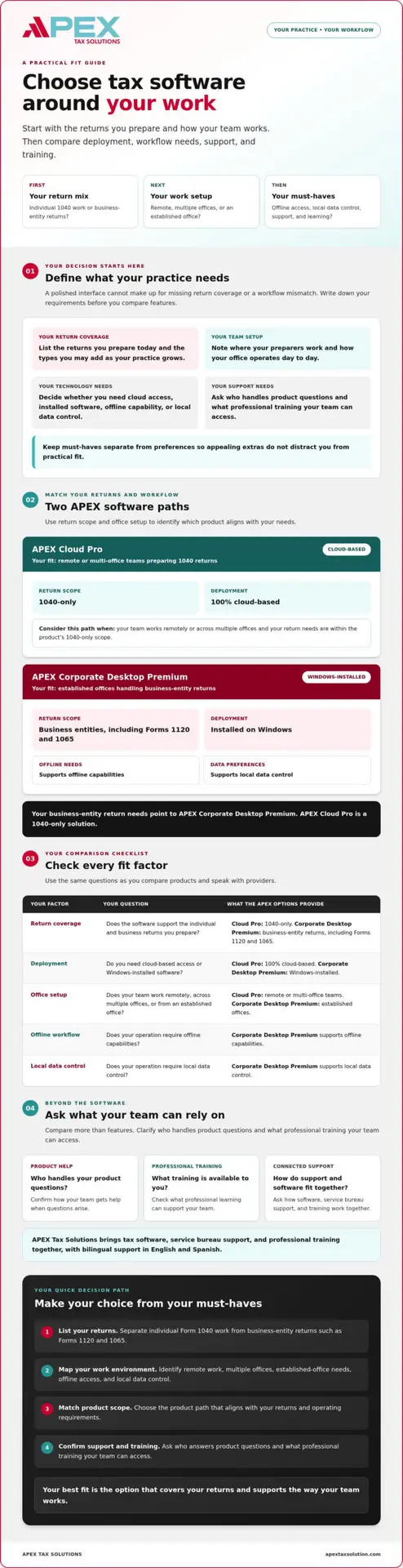
List the returns your office prepares today, then note the return types you may add as your practice grows. Separate individual Form 1040 work from business-entity returns, such as Forms 1120 and 1065. This can narrow your options quickly because products do not all support the same return types.
Confirm coverage before weighing other features. An appealing interface won’t make up for a product that doesn’t handle the returns your business needs. For example, APEX Cloud Pro is a 1040-only solution, while APEX Corporate Desktop Premium supports business-entity returns.
How does your team work day to day?
Map out where your preparers work and how your office operates. Do team members prepare returns remotely, work across multiple offices, or share an established office? Identify whether your work depends on offline access or local data control, too. These details help you compare cloud and desktop options against actual operating needs.
Software fit begins with return scope and work environment. Use those two criteria to guide vendor conversations before considering extra features.
Before comparing vendors or booking a product demonstration, write down your must-haves. A short checklist makes it easier to assess options consistently and ask direct questions:
- Return coverage: Which individual and business-entity returns must the software support?
- Team setup: Will one preparer, a remote team, or multiple offices use it?
- Work location: Do you need cloud access, an installed desktop solution, or offline capability?
- Data preferences: Does your operation require local data control?
- Support and learning: What help and professional training will your team need?
Separate essential requirements from preferences before your demo. Then compare each product against the same checklist. This keeps the discussion focused on your current workflow while accounting for how your practice may grow.
Compare Tax Software by Return Coverage, Deployment, and Workflow
Once you’ve listed your requirements, compare products against the work your office actually performs. Cloud and installed software serve different operating needs, and neither is right for every practice. The 2025 tax software survey offers broader industry context, but your return mix, office setup, and support expectations should lead your decision.
Use the comparison below to separate product fit from preferences. Confirm each detail with the provider, especially return coverage and what support includes.
| Comparison point | What to confirm | APEX product fit |
|---|---|---|
| Return coverage | Does it support the individual and business returns you prepare? | APEX Cloud Pro: 1040-only. APEX Corporate Desktop Premium: business-entity returns, including Forms 1120 and 1065. |
| Deployment | Do you need cloud-based access or Windows-installed software? | APEX Cloud Pro is 100% cloud-based. APEX Corporate Desktop Premium is installed on Windows. |
| Office setup | Does your team work remotely, across multiple offices, or from an established office? | APEX Cloud Pro fits remote or multi-office teams. APEX Corporate Desktop Premium fits established offices. |
| Offline needs | Does your workflow require offline capabilities or local data control? | APEX Corporate Desktop Premium supports both. |
| Support | What product help and professional training can your team access? | Ask how software, service bureau support, and training fit together. |
Mark each item as a must-have or a preference. Return coverage, deployment requirements, and essential workflow needs should outweigh features that don’t solve a real problem. This keeps your comparison focused when choosing professional tax software for your business.
When does cloud-based 1040 software fit?
APEX Cloud Pro is a 100% cloud-based solution for 1040 returns, with a stated fit for remote or multi-office teams. If your business prepares only individual returns and your team’s working arrangement matches that model, it may suit your requirements. If you need business-entity filing, a 1040-only solution won’t meet that requirement, so compare a different product path.
When should you consider desktop business-entity software?
APEX Corporate Desktop Premium is installed on Windows and supports business-entity returns, including Forms 1120 and 1065. It also supports offline capabilities and local data control, making it worth considering for established offices that need those operating characteristics. If entity returns are part of your workload, evaluate this route rather than a 1040-only product. See the professional corporate tax software guide for more context.
After identifying your must-haves, explore APEX tax software options and compare each product with your team’s workflow.
Look Beyond Features: Evaluate Support, Training, and Security
Tax software affects more than return preparation. Your team also needs clear answers when questions arise, guidance as workflows change, and training that supports professional development. Include these needs when choosing professional tax software for your business instead of assuming a feature list tells you what working with a provider will be like.
What support should a tax software provider explain?
Ask what support the provider includes, how you contact the team, and what kinds of questions it handles. Clarify whether help covers setup, product questions, or specific topics, and ask how preparers can access support throughout the year. Use a practical example: if a preparer encounters a workflow issue, who responds and what guidance can they expect?
Notice how the provider responds. Do they ask about your office’s process and explain next steps, or offer only general product descriptions? APEX Tax Solutions emphasizes personalized service rather than call-center scripts, alongside software, service bureau support, and professional training. As you compare providers, look for a support approach that leaves your team informed about where to turn and what help is available.
How should training and security fit the decision?
Ask whether training addresses the way your office works, how preparers learn, and which topics your team needs to strengthen. If cybersecurity education matters to your practice, check whether the provider offers relevant training and what it covers. APEX offers WISP and cybersecurity training. Ask how those options fit your team’s learning needs, without assuming that training alone determines your compliance.
Security also deserves specific vendor questions. Ask what information the provider shares about its software and e-file readiness, and review the IRS software approval process for an official explanation of how the IRS approves tax preparation software for electronic filing. Use authoritative guidance to shape your questions, then confirm product-specific details directly with the provider.
Software selection should include an ongoing support plan, not just a setup decision. Before choosing, write down who your team will contact, what support covers, and what training is available. You can also ask whether the provider offers cybersecurity training for tax offices that aligns with your learning priorities.
Use a Step-by-Step Tax Software Checklist Before You Commit
A structured review can help you catch a mismatch before it affects your office workflow. Ask every provider the same questions and record which details they confirm, which need follow-up, and which remain assumptions. This gives you a clearer basis for choosing professional tax software for your business.
What should you confirm before selecting a product?
Bring your return list and team requirements to each vendor conversation or product demonstration. Ask the provider to confirm capabilities directly, especially where your business has a firm requirement. If an answer is unclear, record the question and request clarification before deciding.
- Return coverage: Does the product support every individual and business-entity return your office prepares?
- Deployment: Is the software cloud-based or installed on a computer, and does that model suit your team’s locations and work preferences?
- Operating needs: If offline capabilities or local data control matter to your office, can the provider confirm them?
- Setup and support: What guidance is available as you get started, and who answers product questions?
- Training: What professional learning options can your team access, and do they address your practical needs?
Beside each answer, note confirmed, needs clarification, or not a fit. This prevents a confident demonstration or appealing extra from being mistaken for a capability your business has verified.
How can you test the fit with your real workflow?
Use a demonstration to explore representative office tasks, not just a prepared overview of features. Ask the provider to show how the product supports steps your team performs, and raise questions about workflows that matter day to day. Include both the people who prepare returns and those who manage the office, since they may assess fit differently.
Then compare each option against your written requirements. An individual preparer may focus on return coverage and daily preparation tasks, while an office manager may prioritize deployment, support access, and training. Capture their observations in the same checklist instead of relying on memory or first impressions.
When you’ve gathered your questions, discuss your business requirements with APEX Tax Solutions. A focused conversation can help clarify product fit and how software, service bureau support, and professional training align with your practice.
Choose an APEX Tax Software Path That Fits Your Practice
Your software decision becomes clearer when you match return scope and operating needs first, then consider the support and training your team wants. APEX offers two distinct paths, so focus on the one that fits your practice rather than choosing by feature count alone.
- Remote or multi-office team preparing only 1040 returns: Consider APEX Cloud Pro, a 100% cloud-based, 1040-only solution.
- Established office preparing business-entity returns: Consider APEX Corporate Desktop Premium, which is installed on Windows and supports business-entity returns, offline capabilities, and local data control.
If your practice prepares entity returns such as Forms 1120 or 1065, evaluate APEX Corporate Desktop Premium rather than a 1040-only solution. Once you’ve confirmed the product fits your return mix and work environment, consider how provider support and tax preparer training can help your team use the software and continue learning.
How does APEX support the wider business relationship?
APEX Tax Solutions brings tax software, service bureau support, and professional training together. You can consider the software alongside the support and learning your practice may need, rather than treating each as an unrelated decision. Ask how these offerings align with your team’s priorities and what details to confirm before choosing.
APEX is an IRS-authorized e-file provider and offers bilingual support in English and Spanish. The company is Latino-owned and has operated since 2015. These details can help you understand who you’re considering as a business partner, while your product choice should still rest on verified fit for your returns and workflow.
What is the next step for your tax business?
Before starting a conversation, prepare a short summary of the returns you handle, where your team works, whether you need offline capabilities or local data control, and what support or training you’re looking for. You can also review the tax service bureau partner program guide as you consider the broader support relationship alongside your software needs.
Choosing professional tax software for your business doesn’t have to mean making the decision alone. Discuss the right software path for your business with APEX Tax Solutions and share your requirements to explore which option fits your practice.
Choose a Tax Software Partner That Can Grow With Your Practice
Choosing professional tax software for your business starts with the returns you prepare and the way your team works. Confirm that the software fits your return scope and work environment, then evaluate the support and training available to help your team use it effectively.
APEX Tax Solutions brings tax software, service bureau support, and professional training together. APEX is Latino-owned, has operated since 2015, and is an IRS-authorized e-file provider. You can also access bilingual support in English and Spanish as you assess your practice’s needs.
Share your return types, team setup, and support priorities to explore a suitable path with APEX. Discuss the right software path for your business and take a practical next step toward a tax software partnership that supports your goals.
Frequently Asked Questions
How do I choose professional tax software for my business?
Start by listing the returns you prepare, how your team works, and what support you expect. Compare products against those requirements rather than choosing by feature count alone. Confirm whether the deployment model fits your team, what training is available, and how the provider handles questions. If your office prepares business-entity returns, verify that the software supports the specific forms you need before moving forward.
What is the difference between cloud-based and desktop tax software?
Cloud-based software runs through an online environment, while desktop software is installed on a computer. The right model depends on your workflow and office requirements. APEX Cloud Pro is 100% cloud-based and supports 1040 returns for remote or multi-office teams. APEX Corporate Desktop Premium is installed on Windows and supports business-entity returns, offline capabilities, and local data control. Confirm product details against your requirements before selecting a solution.
Can one tax software product handle both individual and business returns?
Don’t assume every professional tax software product supports every return type. Check the forms your office prepares and confirm coverage directly with the provider. APEX Cloud Pro is 1040-only, so it isn’t the fit for business-entity filing needs. For returns such as Forms 1120 and 1065, consider APEX Corporate Desktop Premium. Confirm that the product covers your specific return mix before choosing.
Is cloud tax software right for a multi-office tax business?
Cloud software may fit a multi-office business if your team needs a cloud-based working environment, but confirm that the product supports your return scope and office processes. APEX Cloud Pro is 100% cloud-based and designed for remote or multi-office teams, with 1040-only coverage. If you also prepare business-entity returns, discuss that requirement with the provider and verify which product supports it before deciding.
What should I ask a tax software provider before buying?
Ask which returns the product supports and whether its deployment model fits your team. Clarify what help is available for setup and product questions, how support works throughout the year, and what training the provider offers. Keep written notes. If a capability matters to your office, ask the provider to confirm it clearly rather than relying on assumptions from a demonstration or feature list.
Does tax software include support and training?
Support and training vary by provider, so ask what each offering includes before you choose. Find out how your team can get help, whether guidance extends beyond setup, and what professional learning is available. APEX Tax Solutions brings software, service bureau support, and professional training together. Its offerings include WISP and cybersecurity training. Discuss your support and learning needs directly with APEX to understand which options fit your practice.