
What if your slow tax software isn’t the real performance problem? Before upgrading tax software for better performance, identify where work is getting stuck. A sluggish computer, network issues, overloaded processes, or a mismatch between your software and the returns you prepare may all affect your workflow. Choosing an upgrade before diagnosing the cause can leave the same bottleneck in place.
You’re right to expect your tax software to keep pace with busy-season demands, your team, and the returns your office handles. This guide will help you pinpoint slowdowns, compare upgrade options, and weigh practical factors such as product fit, support, training, and security. You’ll also learn how to plan a change without overlooking the impact on your staff and daily operations.
Your return mix and work setup matter. TaxSlayer Pro Web provides web-based technology that lets tax professionals manage their office and file returns from anywhere with an internet connection. Apex Tax Solutions LLC also offers corporate software for tax professionals. Compare each option against the returns you prepare and the way your office operates. Apex Tax Solutions LLC brings software, service-bureau support, and professional training together, so you can choose a next step that fits your practice and supports its growth.
Key Takeaways
- Before upgrading tax software for better performance, trace delays to the application, devices, network, office processes, or support needs.
- Start your comparison with the returns you prepare and how your team works, then assess access, operating requirements, training, and data control.
- Compare web-based and other software options by fit. Modern cloud solutions let tax professionals manage their office and file returns from anywhere with an internet connection.
- Reduce disruption by documenting requirements, preparing users, and testing key workflows before making a change.
- Ask providers to clarify data migration and handling, and consider how connected software, service-bureau support, and training can support your practice over time.
Upgrading tax software for better performance starts with finding the slowdown
Slow tax software can turn routine work into a frustrating stop-and-start process, especially when your office is busy. But the application may not be the cause. A device with limited capacity, an unreliable connection, an unclear handoff, or a support issue can also interrupt your team. Before upgrading tax software for better performance, look for a pattern you can verify.
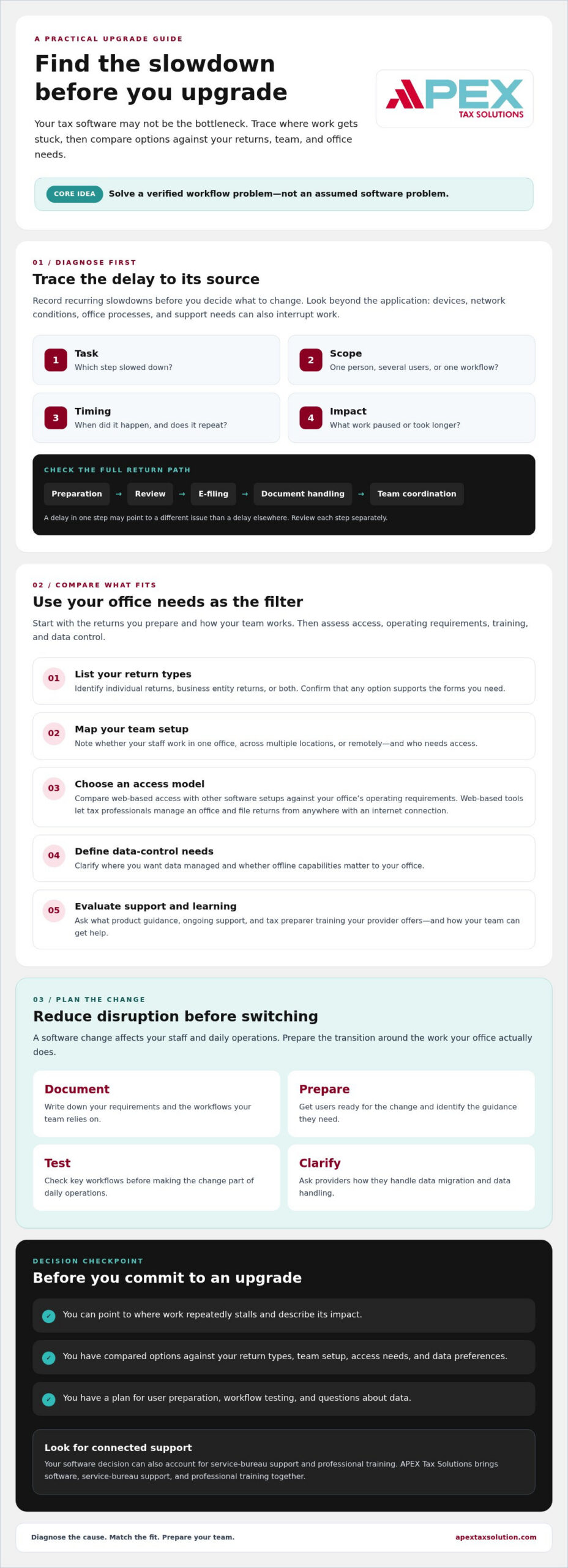
Start by tracking each recurring delay. Note the task, who experienced it, when it happened, and what was happening in the office at the time. A short record can help you distinguish a software issue from a problem that affects only one device, one connection, or one part of your process.
- Task: Identify the step that slowed down.
- Scope: Record whether one person, several users, or a particular workflow was affected.
- Timing: Note when it occurred and whether it repeats.
- Impact: Describe what work paused or took longer to complete.
Which tax office tasks reveal a performance problem?
Review the full path of a return, from preparation and review to e-filing, document handling, and team coordination. A delay while opening or saving a return may point to a different issue than a slow document handoff or a backlog at the review stage. Look at each step separately so you can pinpoint where work slows instead of treating the entire process as one problem.
Separate occasional disruptions from recurring barriers. If a delay repeatedly holds up the same task, record how it affects your team’s ability to move work forward. If it appears once and doesn’t return, keep it in your notes, but don’t assume it justifies a software change.
Is your software the bottleneck or is the workflow?
Check the conditions around the slowdown before you blame the application. Does it happen on one workstation or across several? Does it coincide with a weak or interrupted connection, or does it occur during a particular office process? These clues can guide your investigation, but they don’t prove the cause on their own.
Compare your current process with your actual staffing and return volume. For example, a growing review queue may reflect how work moves between preparers and reviewers, not how quickly the software responds. Ask your provider or technical support contact what information they need to assess a recurring issue, and avoid assuming an upgrade will fix it before you understand the bottleneck.
An upgrade should solve a verified workflow problem, not just replace the tool your office already knows. Once you identify where work stalls, you can compare options against a clear need instead of expecting an unverified speed improvement.
Evaluate tax software upgrade criteria before comparing products
Once you’ve identified what your office needs to improve, set your selection criteria before reviewing products. This keeps a familiar interface or a promising feature from distracting you from the work your software must support. Start with the returns you prepare and the way your team works.
Match return types and office structure to the software
Use this sequence to narrow your options:
- 1. List your return types. Identify whether you prepare individual returns, business entity returns, or both. If you handle business entities, confirm that the software supports the forms you need.
- 2. Map your team setup. Note whether staff work from one office, multiple locations, or remotely, and who needs access to the software.
- 3. Confirm the access model. Decide whether web-based access or another software setup better fits your office and operating requirements.
- 4. Define data-control needs. Clarify your preferences for where your data is managed and whether offline capabilities matter.
- 5. Evaluate support and learning. Ask what product guidance, ongoing support, and tax preparer training the provider offers, and how your team can get help.
TaxSlayer Pro Web is web-based and lets tax professionals manage their office and file returns from anywhere with an internet connection. APEX Tax Solutions also provides corporate software for tax professionals. Compare the products against the return types, access needs, and operating requirements of your office. For a deeper look at business-return requirements, read this corporate tax software guide.
Compare support, training, and access requirements
Use the comparison below to focus on fit, not assumptions about which setup is faster. Confirm product scope, operating requirements, and data-handling details directly with the provider before you decide.
TaxSlayer Pro Web: Web-based software that lets tax professionals manage their office and file returns from anywhere with an internet connection.
Corporate software: APEX offers corporate software for tax professionals. Confirm the product’s supported returns, requirements, and capabilities with the provider.
Security belongs in your evaluation, too. Ask how a provider’s practices align with your office’s risk-management needs; the voluntary NIST Cybersecurity Framework offers a structured reference for assessing cybersecurity. Don’t assume a product meets your requirements without reviewing its specific details.
APEX brings tax software, service-bureau support, and professional training together. If you want to discuss which option fits your return mix and team structure, explore APEX tax software and support as you compare your criteria.
Compare cloud and desktop upgrades by fit, not assumptions
Web-based and desktop software can serve different office needs. Neither model is automatically faster or better for every tax practice. As you consider upgrading tax software for better performance, compare how each option handles your return types, team access, operating needs, and preferences for data control.
When a cloud-based tax software upgrade may fit
A web-based setup may suit your office if preparers need to work across locations or access the software remotely. TaxSlayer Pro Web lets tax professionals manage their office and file returns from anywhere with an internet connection. Before choosing it, confirm that its product scope and workflows fit your team’s needs. Ask the provider which returns the software supports and whether it meets your office’s operating requirements.
Think through how your team actually works. For example, consider whether staff in different offices need access to the same workflow and whether the product supports all the returns you prepare. Ask the provider to clarify any access, operating, or data-handling details that matter to your practice.
When desktop tax software may fit an established office
If you’re considering desktop software, confirm its system requirements and how it handles the return types and workflows your office needs. APEX Tax Solutions offers corporate software for tax professionals. Ask the provider whether the product supports your business entity returns and whether its features align with your office setup, data-control preferences, and need for offline access.
Use these questions to compare the trade-offs:
- Deployment: Do you need web-based access across locations, or does desktop software better fit your office?
- Return scope: Do you prepare only individual returns, or do you also need business entity returns?
- Connectivity: How important are offline capabilities to your daily work?
- Data control: What are your preferences for managing and controlling office data?
Don’t assume a deployment model alone will resolve a slowdown. A better fit depends on the work your office handles and the way your team needs to access and manage it. Confirm product details with the provider, especially if you have specific operating or data-control requirements.
Support also matters. If you’re weighing help with ongoing operations or plans to grow your practice, this tax service bureau guide can help you consider how service-bureau support fits into your decision. Choose the setup that addresses your actual needs, not a general belief that web-based or desktop software must perform better.
Plan a tax software upgrade without disrupting your office
A clear transition plan helps you protect daily work while your team learns a new system. Upgrading tax software for better performance involves more than choosing a product: document your needs, confirm the fit, prepare your staff, and test key workflows before relying on the new setup.
- Document requirements: List the returns you prepare, the tasks you need software to support, who needs access, and the office’s operating and data-control needs.
- Confirm product fit: Review the provider’s product scope and requirements against that list. Ask directly about any details you can’t verify.
- Prepare users: Assign an internal point person to coordinate questions and keep staff informed. Schedule training that reflects each person’s responsibilities and experience.
- Test workflows: Use practice scenarios to check familiar tasks, such as preparing, reviewing, and handling documents, before moving those workflows into regular use.
Build time for the team to learn and raise questions. If you’re also adjusting how work moves between preparers and reviewers, review these ideas for tax office workflow automation. A software change can be a useful point to examine office processes, but keep the scope manageable and test each change against how your staff actually works.
Prepare your team and workflows before changing systems
Map essential workflows and identify who needs access at each step. Then tailor training to the work each person performs, rather than asking every team member to learn every feature at once. Practice scenarios can help staff rehearse familiar tasks and flag questions before the transition affects regular work.
Choose a point person who can gather staff feedback and direct unanswered questions to the provider. That person can also track which workflows the team has tested and where staff may need more guidance.
Questions to ask before committing to an upgrade
Get important details from the provider before you commit. Don’t assume data will transfer automatically or that your current devices, processes, and access needs will carry over unchanged. Ask for clear answers you can review with the people responsible for your office’s technology and data.
- What data migration options are available, and how will the provider handle your data during a transition?
- What product scope, operating requirements, and access conditions should your office confirm?
- What transition guidance, ongoing support, and training can your team expect?
- Which workflows should you test, and how can you raise issues you find?
Confirm migration options and data handling directly with the provider, and request key product and support details in writing. For help assessing your requirements and available options, discuss your tax software needs with APEX.
Choose an upgrade partner that supports long-term tax office performance
If you’ve identified a recurring slowdown and defined what your office needs, choose a partner who can help you assess the full picture. Upgrading tax software for better performance works best when you consider product fit, support, and how your team will continue learning after the transition.
APEX Tax Solutions provides professional tax software, service-bureau support, and training. Its Service Bureau Partner Program includes software setup, dedicated bureau support, and year-round mentorship for tax business owners. Consider which kinds of support match your needs, and ask the provider to explain the scope of what’s included.
What an end-to-end support model can add
Software, service-bureau support, and tax preparer training address different parts of running a tax office. Together, they give you connected resources to consider as your practice evaluates its software and support needs. Ask what assistance is available for your situation, and confirm its scope rather than assuming a particular response time or outcome.
Security should remain part of your upgrade planning. If you’re reviewing staff awareness as part of the process, explore cybersecurity training for tax offices. APEX offers WISP and cybersecurity training to help tax offices meet regulatory requirements and protect sensitive client data. Consider how training fits your team’s responsibilities and existing security practices.
Make the next step fit your practice
Let your return mix and work setup guide the product conversation. TaxSlayer Pro Web is web-based and lets tax professionals manage their office and file returns from anywhere with an internet connection. APEX also offers corporate software. Confirm the supported returns, operating requirements, and features of each option with the provider.
Before reaching out, summarize the workflow issue you want to address and the criteria you’ve established. Share the return types your office prepares, how your team works, your operating and data-control preferences, and the support or training your staff needs.
These details can help you discuss a practical next step without assuming a software change alone will resolve every workflow issue. Learn about APEX Tax Solutions’ software, service-bureau support, and training.
Make your next software decision with confidence
A more effective upgrade starts with evidence. Identify where work slows down, then compare options against your return types, team access, operating needs, and data-control preferences. The right setup depends on your practice, not on assumptions that web-based or desktop software will always perform better.
Before making a change, confirm product fit and ask how the provider handles data, transition questions, and staff training. APEX Tax Solutions brings professional tax software, service-bureau support, and training together. Its offerings include TaxSlayer Pro Web, corporate software, a Service Bureau Partner Program, and WISP and cybersecurity training. These resources can help you evaluate your next step with your team’s needs in view.
If you’re considering upgrading tax software for better performance, share the workflow problem you’re trying to solve, the returns you prepare, and how your team works. Contact APEX Tax Solutions to discuss software and support for your practice. With a clear plan and a fitting partner, you can move forward with greater confidence as your office grows.
Frequently Asked Questions
How do you know when it is time to upgrade tax software?
Consider an upgrade when recurring problems interfere with your team’s ability to complete essential work. Track which tasks slow down, when issues occur, and whether they affect one user or several. Then check device, connection, and office-process factors before deciding the software is responsible. A consistent record helps you identify the problem and choose an upgrade based on a verified need, rather than frustration alone.
Can upgrading tax software improve a tax office’s workflow?
It can support a smoother workflow if the upgrade addresses a confirmed bottleneck and fits how your office prepares, reviews, and handles returns. For example, software that matches your return types and team access needs may better support your existing processes. But upgrading tax software for better performance won’t automatically fix slow devices, connectivity issues, or unclear handoffs. Identify the cause first, then test essential workflows before relying on a new setup.
What should you compare when choosing professional tax software?
Compare return types first, including whether you prepare individual returns, business entity returns, or both. Then assess web-based or desktop access, operating requirements, data-control preferences, support, and tax preparer training. Ask providers to clarify product scope and data-handling practices before you commit. A useful comparison focuses on how each option fits your actual team and work, not just its feature list or deployment model.
Is cloud-based tax software right for every tax preparer?
No. Web-based software may suit you if your team needs access across multiple offices or remote work, but confirm that the product supports your return mix and workflows. TaxSlayer Pro Web lets tax professionals manage their office and file returns from anywhere with an internet connection. Ask the provider to confirm its supported returns and operating requirements. Consider access needs alongside product scope and your data-control preferences.
Can tax software handle both individual and business entity returns?
Some professional tax software options support different return types, but you should verify each product’s scope before choosing. APEX Tax Solutions offers TaxSlayer Pro Web and corporate software for tax professionals. Ask the provider which returns each product supports and whether the software fits your office’s operating needs and data-control preferences. Confirm that the option you choose covers the specific returns your practice prepares.
What should a tax office ask before changing software providers?
Ask about product scope, operating requirements, access, and available support. Confirm directly with the provider whether data migration options exist, how they handle your data during a transition, and what guidance or training they offer. Request key details in writing so you can review them with your team. Also identify the workflows you’ll need to test and who will coordinate questions during the change.
How can tax preparers prepare their team for a software upgrade?
Prepare your team by documenting essential workflows, identifying who needs access, and assigning an internal point person. Schedule training that reflects staff responsibilities and experience, then use practice scenarios to check familiar tasks such as preparing and reviewing returns. Gather questions and feedback before the new system becomes part of regular work. A clear plan helps your team understand the change and surface issues early.