
The right tax service bureau solutions can offer more than access to tax software. The difference between a software login and an operating partner can affect how you onboard your team, support your clients, and manage your practice as it grows.
Look beyond features to understand what support comes with the software, how training prepares you and your team, and how the provider approaches client data and day-to-day questions. The right fit depends on your current workflow, return mix, and plans for your business.
This guide offers a practical way to compare software-only access with broader service bureau support. Use the questions about onboarding, ongoing help, training, and growth to evaluate each model. Apex Tax Solutions LLC brings tax software, service bureau support, and professional training together, with support available in English and Spanish. Use the comparison to identify what you need now and what could support your plans for the future.
Key Takeaways
- Compare tax service bureau solutions by looking beyond software access to the support and training included in the partnership.
- Ask providers to clarify setup, support availability, security resources, fees, renewal terms, and how they handle your data.
- Map your return mix, team roles, office locations, and client communication needs before choosing software or planning onboarding.
- Test your proposed workflow before the season so your team can identify gaps and clarify responsibilities early.
- For remote or multi-office teams handling 1040-only work, assess whether APEX Cloud Pro fits your workflow and growth plans.
What Tax Service Bureau Solutions Do for an Independent Tax Business
Choosing systems and support that can grow with your tax business takes more than comparing software features. Find out who helps with setup, what support continues after onboarding, and how the relationship may work if you add preparers or locations.
A tax service bureau is a business model that combines tax software access with support for affiliated tax preparers. A software-only purchase provides the tool without necessarily including that broader partnership. Arrangements differ, so clarify what each party handles before committing.
What does a tax service bureau provide?
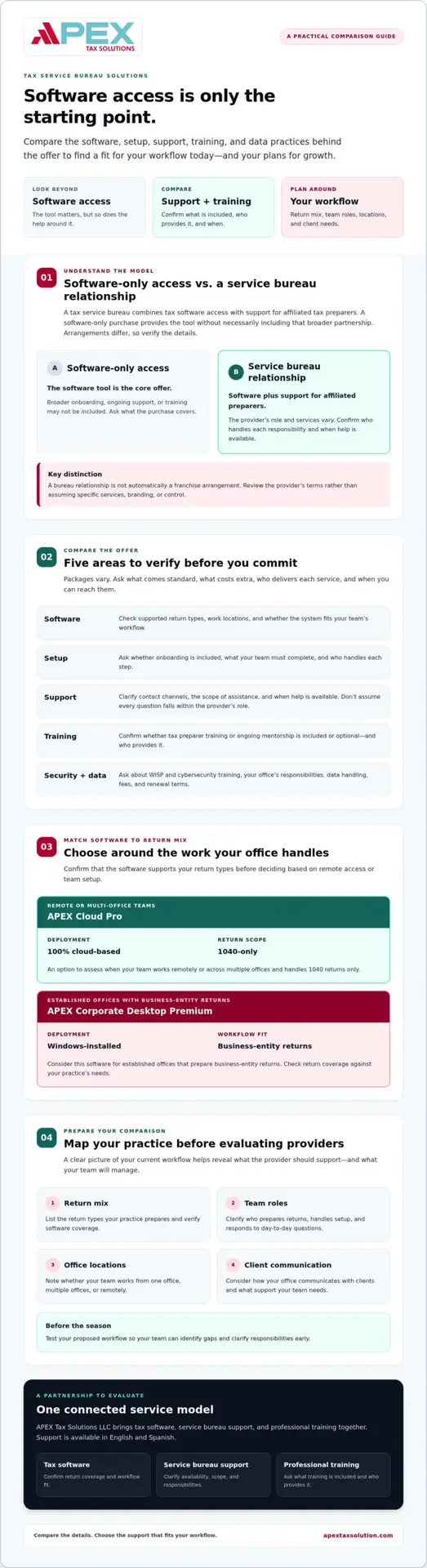
Assess the offer in three parts. Software provides tools to prepare and manage returns. Setup assistance helps you get started. Ongoing operational support may help your office address questions as work progresses. These are distinct services, and providers may offer different levels of each.
A bureau owner may also support affiliated preparers as they build or run their practices. Ask who provides that support, what it covers, and when it is available. For more background, read this tax service bureau guide. If you’re reviewing a preparer’s professional background, the IRS explains tax return preparer credentials and qualifications.
A bureau relationship also differs from a franchise. A franchise generally centers on operating under a specific brand and business arrangement, while a service bureau focuses on providing resources to affiliated preparers. The details vary. Review the provider’s terms rather than assuming either model includes particular services, branding, or control over your practice.
Who may benefit from a bureau relationship?
An independent preparer may value access to infrastructure and guidance without having to build every resource alone. An ERO, or Electronic Return Originator, may want to explore a bureau when expanding a team or supporting preparers across multiple locations. The value depends on whether the provider’s support matches your actual workflow.
Established offices should first check whether the software supports the types of returns they prepare. If your business handles entity returns, confirm that the product covers those workflows before choosing based only on remote access or team setup. For any model, verify inclusions, responsibilities, data-handling practices, and renewal terms in writing. A clear agreement shows what the provider supports, what your team manages, and whether the partnership fits your plans.
Compare Tax Service Bureau Solutions by Software, Support, and Training
Compare each part of the offer, not just the software. A good fit depends on whether the software supports your return types, the available help matches your needs, and the training applies to your day-to-day work.
Evaluate software and service coverage together. The right tools matter, but so does knowing who will help you set them up, use them, and address questions. Packages vary. Ask what comes standard, what costs extra, who delivers each service, and when you can reach them.
| Area | What to compare and confirm |
|---|---|
| Software | Check supported return types, work locations, and whether the system fits your team’s workflow. |
| Setup | Ask whether setup guidance or onboarding is included, what your team must complete, and who handles each step. |
| Support | Clarify available contact channels, the scope of assistance, and when help is available. Don’t assume every question falls within the provider’s role. |
| Training | Confirm whether tax preparer training or ongoing mentorship is included or optional, and who provides it. |
| Security resources | Ask whether the provider offers WISP and cybersecurity training, and what your office remains responsible for managing. |
Which tax software model fits your return mix?
Start by matching the software to the returns you prepare. APEX Cloud Pro is 100% cloud-based and limited to 1040 returns, making it an option for remote or multi-office teams with 1040-only workflows. APEX Corporate Desktop Premium is Windows-installed software for established offices that prepare business-entity returns.
If your practice handles entity returns, confirm that the software supports them before committing. For more detail, explore this corporate tax software guide.
What support and training should you evaluate?
Ask whether onboarding, year-round mentorship, and ongoing bureau assistance are available. Then clarify what each service covers and who provides it. APEX brings software, bureau support, and training together, including WISP and cybersecurity training. Confirm the exact scope and responsibilities directly with the provider.
Clarify how your team contacts support and when it is available. Don’t rely on assumptions about response times. If the relationship includes help related to tax preparation, the IRS guide to choosing a tax professional offers useful context for evaluating a tax professional’s credentials and services. To explore APEX’s connected resources, visit APEX tax software and service bureau support.
How to Evaluate a Tax Service Bureau Provider Before You Commit
A provider’s promises matter less than responsibilities and service terms you can verify. Before choosing among tax service bureau solutions, compare the written agreement with your return mix, team needs, and support expectations.
Which questions should you ask a bureau provider?
Use this checklist to guide the conversation, then request written answers. Documentation helps you see exactly what you’re purchasing and what your business must manage.
- Product fit: Which return types does each software option support? What operating system does it require?
- Service scope: What onboarding and ongoing support does the agreement include? What does your team handle?
- Training: Which tax preparer training or mentorship opportunities are available, and are they included or separate?
- Security: How does the provider manage user access and communicate data-handling responsibilities? Does it offer WISP or cybersecurity education?
- Terms: Where does the provider document fees, renewal conditions, cancellation terms, and each party’s responsibilities?
- Communication: Which support channels can you use, when are they available, and how do you escalate an unresolved issue?
Review the relevant agreement, product documentation, and data-handling terms before signing. Don’t rely on verbal assurances to fill gaps in the written scope.
How can you assess the relationship beyond software?
Pay attention to how the provider answers specific questions. Does the team explain responsibilities clearly, offer a defined escalation path, and describe training in terms of practical workflows and continued learning? If you’re evaluating the qualifications of a person who prepares returns, the IRS explains tax return preparer credentials and qualifications. For office security education, review this cybersecurity training guide.
| Provider information available | Questions to confirm before committing |
|---|---|
| APEX Cloud Pro is 100% cloud-based and limited to 1040 returns. | Does this fit your return mix, and what setup and support does your agreement include? |
| APEX Corporate Desktop Premium is Windows-installed software for business-entity returns. | Does it support the returns your office handles, and what system requirements apply? |
| APEX provides software, service bureau partnership support, and training. | Which specific services are included, who delivers them, and what are the terms? |
A bureau relationship may support your plans to grow, but results depend on your business, decisions, and execution. As you compare providers, review APEX’s tax software and service bureau resources and clarify the details that matter to your office.
Plan Your Tax Service Bureau Setup Around Returns, Teams, and Workflow
A smooth setup starts with your actual work, not a software demo. Before choosing among tax service bureau solutions, map the returns you prepare, who handles each step, and how your team works remotely or across offices. That overview helps you select tools and support that fit your operation.
How should you map your office requirements?
List your expected return mix, preparer roles, work locations, and client communication needs. Note where your current process slows down, whether staff need cloud access, and whether any workflow calls for offline capabilities or local data control. Identify onboarding and training gaps before choosing a provider.
Use this sequence to turn your notes into a setup plan:
- Review your returns: Separate individual 1040 work from business-entity returns, and account for any changes you expect in your practice.
- Map your team: List preparers, their responsibilities, and whether they work remotely or across offices.
- Match software to requirements: APEX Cloud Pro is 100% cloud-based and limited to 1040 returns. For business-entity return needs, evaluate APEX Corporate Desktop Premium, a Windows-installed option for established offices that need offline capabilities or local data control.
- Document your workflow: Outline how your team onboards, prepares work, communicates with clients, and gets help when a process question comes up.
Choose products based on return complexity and operating requirements, not a single feature. If your office prepares business-entity returns, consider APEX Corporate Desktop Premium for that need rather than assuming a 1040-only workflow will cover it.
How can you prepare for a smoother rollout?
Before implementation, confirm how your team will receive software access, which setup steps the provider handles, and what remains your responsibility. Assign an owner to each task, then plan staff orientation and workflow testing before using the setup with clients. Testing a sample process can reveal unclear handoffs and training needs early.
Consider whether GHL for Tax Offices fits your marketing and client communication plans. Clarify its intended use and implementation scope with the provider, and connect those decisions to your documented workflow. APEX brings tax software, service bureau support, and training together. Explore APEX resources for tax offices as you plan your setup.
Explore APEX Tax Service Bureau Solutions for Ongoing Business Support
Your tax business may need more than a software license as your team and workflows evolve. Apex Tax Solutions LLC connects professional tax software, service bureau support, and training, giving you resources to consider together as you plan your practice. Confirm current service details with Apex Tax Solutions LLC so you know what your partnership includes.
What does APEX bring to a bureau relationship?
Apex Tax Solutions LLC’s service model brings software, dedicated bureau support, and year-round mentorship together. These resources can provide a place to turn for operational guidance and professional learning, while making it important to define responsibilities between your office and the provider. Apex Tax Solutions LLC also offers WISP and cybersecurity training for tax offices. Training can support security education, but it doesn’t guarantee compliance or replace your office’s own security practices.
Product fit still matters. APEX Cloud Pro is 100% cloud-based and limited to 1040 returns, making it an option for remote or multi-office teams with 1040-only workflows. If your office prepares business-entity returns, explore APEX Corporate Desktop Premium, a Windows-installed option for established offices handling those returns and needing offline capabilities or local data control.
Apex Tax Solutions LLC is Latino-owned and has operated since 2015. The company offers support in English and Spanish, which can help you communicate with a team that understands the value of accessible, relationship-centered service. Verify current service terms and product capabilities directly before deciding.
What is a practical next step for your tax business?
Start with your return mix, team structure, and support needs. Compare those requirements with the available software, bureau assistance, training, and cybersecurity education. You can also review this web tax software guide for professional preparers as one resource in your research.
A focused conversation can help you identify what fits and what needs clarification. Ask about onboarding, responsibilities, support channels, and current service terms before committing. If you’re ready to explore a potential fit, partner with Apex Tax Solutions LLC and discuss the resources that align with your business plans.
Choose a Partner That Fits Your Next Stage
The right tax service bureau solutions should fit the returns you prepare, the way your team works, and the support you need. Compare software capabilities alongside onboarding, training, security resources, and written service terms before committing.
Apex Tax Solutions LLC brings tax software, service bureau support, and training together. The Latino-owned business has operated since 2015 and offers support in English and Spanish. Confirm current availability and service details as you evaluate your options.
Make your next step a practical conversation about fit. Share your return mix, team structure, and growth plans, then ask which resources align with your needs. Partner with Apex Tax Solutions LLC to discuss the right software, support, and training for your tax business.
Clear expectations and a partner aligned with your workflow can help you build a more confident foundation for your tax business.
Frequently Asked Questions
What are tax service bureau solutions?
Tax service bureau solutions combine professional tax software with a partnership model that may include setup assistance, bureau support, and training for affiliated preparers. The arrangement varies by provider, so check what each service covers and who delivers it. A software-only purchase gives you access to a tool, but may not include the operational guidance or ongoing mentorship you want as your practice develops.
What should a tax service bureau program include?
A program should clearly explain its software options, setup process, support channels, training, security resources, and contract terms. Ask which services come with the program and which require a separate agreement. Confirm how the provider handles user access and data responsibilities, too. APEX’s service model brings tax software, service bureau support, and training together, but verify current inclusions and terms before deciding.
How do I choose a tax service bureau provider?
Start with your return mix, team structure, and support needs. Check which returns each software option supports, whether it fits your operating environment, and what onboarding and training the provider offers. Request written details about fees, responsibilities, renewals, and data handling. Then assess how the provider communicates and how you can escalate questions. Compare the documented offer with your workflow rather than relying on general growth promises.
Can a new tax preparer join a service bureau?
A new tax preparer may be able to join a service bureau, but each provider sets its own participation terms and expectations. Before signing up, ask what experience or preparation the provider expects, what training is available, and what responsibilities you’ll take on. Clarify the software setup and support process as well. If you’re starting out, look for a relationship that explains the steps clearly and supports continued professional learning.
What is the difference between cloud and desktop tax software for a bureau?
Cloud software runs online and may suit teams working remotely or across offices, while desktop software installs on a computer and may better match offices with particular operating requirements. APEX Cloud Pro is 100% cloud-based and limited to 1040 returns. APEX Corporate Desktop Premium is Windows-installed and serves established offices preparing business-entity returns. Match the software to your return types and workflow, then confirm current capabilities with APEX.
Does a tax service bureau guarantee that my business will grow?
No. A service bureau can provide software, support, and training resources, but it can’t guarantee business growth. Results depend on your business decisions, client relationships, workflow, and how you use the resources available to you. Before joining, set practical goals and ask how the provider’s services connect to them. Review the terms carefully to understand what the bureau commits to and what remains your responsibility.
Can APEX Cloud Pro prepare business-entity returns?
No. APEX Cloud Pro is a 100% cloud-based solution limited to 1040 returns, so it isn’t suited to business-entity return preparation. If your office prepares business-entity returns, consider APEX Corporate Desktop Premium, a Windows-installed option for established offices. Review your return mix and operating requirements, then confirm current product capabilities and service terms with APEX before selecting software for your practice.