
What if a routine-looking client inquiry is designed to steal your team’s login details or expose sensitive tax information? A convincing email, text, or phone call can catch even a careful employee off guard, especially during a busy filing season. Effective phishing protection for tax offices combines practical safeguards with habits your team can use under pressure.
You already know that one mistaken click can create a serious concern for your office and your clients. You can make safer decisions easier with clear procedures, useful security controls, and regular practice. This guide explains common phishing tactics aimed at tax professionals, practical ways to reduce risk, and what to do if someone interacts with a suspicious message.
Apex Tax Solutions LLC provides specialized WISP and cybersecurity training that connects security guidance to the decisions your staff face at work. Your team can practice repeatable habits, learn a straightforward response process, and build confidence in handling suspicious messages. Make cybersecurity part of how your office works, not just another item on a checklist.
Key Takeaways
- Recognize the common pattern behind phishing attempts: impersonation, a requested action, and potential exposure of an account or data.
- Use layered phishing protection for tax offices, combining staff training with safeguards such as multifactor authentication and access controls.
- Give your team a calm, repeatable response for suspicious messages: stop interacting and report the incident promptly.
- Build security habits into onboarding, seasonal preparation, and your office’s ongoing Written Information Security Plan practices.
- Connect cybersecurity learning with day-to-day procedures so staff can recognize risks and respond with confidence.
Why phishing protection matters for tax offices
A message that looks routine can put sensitive information at risk. Phishing is a deceptive email, text, or other communication designed to get you to disclose information, send money, or take an unsafe action, such as opening a harmful attachment. Strong phishing protection for tax offices combines practical safeguards with clear procedures, so your team knows how to pause, verify, and report suspicious requests.
Your office handles information that deserves careful protection, including taxpayer records, identity details, and business account information. A phishing attempt that exposes an account or prompts an unsafe disclosure can affect your clients and disrupt your work. No single safeguard can guarantee prevention. A layered approach can reduce exposure and help your team respond effectively when a suspicious message gets through.
What phishing can look like in a tax office
A message may come from a lookalike email address, include an unexpected attachment, or send you to a login page that imitates a familiar service. An urgent payment request can also signal a need to pause. Attackers may pose as a client, colleague, vendor, or tax-related service to make a request feel ordinary and trustworthy.
Illustrative example: You receive an email that appears to come from a new client asking you to review an attached tax document before a meeting. The display name looks familiar, but the sender’s address differs from the one the client used previously. Don’t open the file. Verify the request through a contact method you already trust.
Polished writing and familiar branding don’t prove that a message is genuine. Consider whether you expected the request, whether the sender’s details match, and whether the requested action makes sense in context. Verify unusual requests before sharing information, signing in, opening attachments, or sending payment.
Why busy filing-season workflows can increase exposure
During filing season, high message volume and tight deadlines can make it harder to review each request carefully. A rushed click may feel like the fastest way to keep work moving, especially when a message claims that an account needs immediate attention. A simple pause-and-verify procedure gives staff a practical next step instead of leaving them to guess.
Make that procedure clear for owners, preparers, reception staff, and seasonal employees. Everyone who handles office messages should know how to flag a suspicious request and whom to notify. Tax-office phishing risk involves both people and processes: prepared staff need clear procedures to turn caution into consistent action.
APEX Tax Solutions’ WISP and cybersecurity training helps you connect everyday message decisions with stronger security habits. Use practical guidance to make phishing awareness part of how your office works throughout the season.
How phishing attempts work and what warning signs to notice
Phishing usually follows a simple pattern: someone impersonates a person or service you recognize, asks you to take an action, then tries to gain access to an account or information. The message may look polished and use familiar logos, names, or language. Those details can make a request feel routine, but they don’t confirm who sent it.
A phishing indicator is a detail that gives you a reason to pause and verify a message, but no single clue proves it’s fraudulent. Review the full context: who sent the message, what they want you to do, whether you expected the request, and whether it fits your usual process.
Common phishing patterns tax preparers may encounter
A link may lead to a lookalike sign-in page that asks for your account credentials. A fake document-sharing notice may urge you to open a file, while a payment message may ask you to change bank details. For example, a message appearing to come from a coworker might request a client file through an unfamiliar link. Treat a scenario like this as a reason to verify, not as proof that a specific sender’s account is compromised.
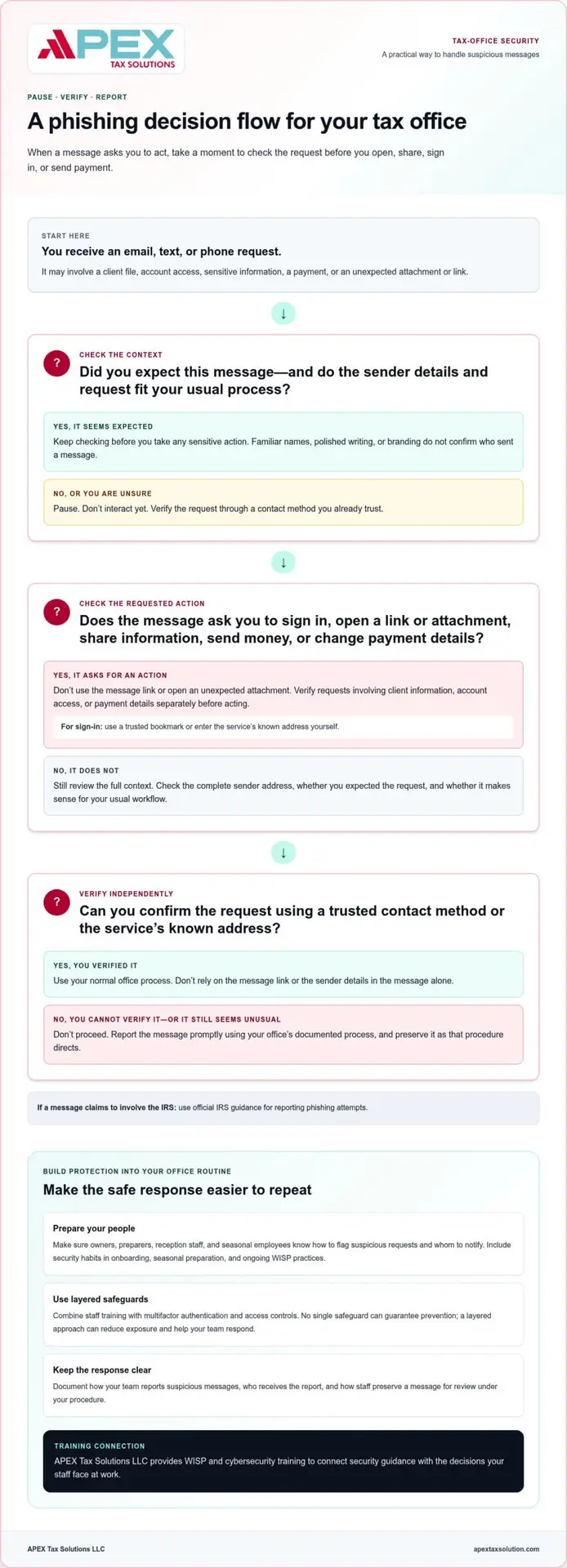
Check the sender’s complete email address, not just the display name. Notice unexpected attachments, links, urgent deadlines, and requests that fall outside your usual workflow. Independently verify any message involving client information, account access, or payment details through a contact method you already use.
How to assess a suspicious message safely
Don’t click a link or open an unexpected attachment to find out where it leads. If a message asks you to sign in, use a trusted bookmark or enter the service’s known address yourself rather than following the message link. If someone requests sensitive information or a payment change, verify the request separately before acting.
Then follow your office’s documented process for reporting suspicious messages. Make sure staff know whom to notify and how to preserve the message for review under that procedure. For suspicious communications claiming to involve the IRS, use the official IRS guidance for reporting phishing attempts.
Consistent practice helps your team apply careful judgment throughout busy workdays. APEX Tax Solutions provides WISP and cybersecurity training to help you build those habits into your office’s security procedures. Details about WISP and cybersecurity training explain how this learning can support a practical approach to phishing protection for tax offices.
Which phishing safeguards fit your tax office?
Effective phishing protection for tax offices doesn’t depend on one tool or a complicated security overhaul. Build a manageable routine by combining staff awareness, account protections, timely updates, limited access, and clear communication procedures. Each safeguard addresses a different point of risk, and together they can reduce exposure without promising to stop every attack.
Use this quick comparison to decide what to put in place and what to clarify for your team:
- Staff training: Helps employees recognize suspicious requests and practice reporting them. Use examples that reflect the messages your office handles.
- Multifactor authentication (MFA): Adds a verification step when someone signs in to a supported account. Enable it where available, and follow the service’s current setup instructions.
- Software updates: Help keep operating systems and applications current. Assign someone to oversee updates and follow each provider’s guidance.
- Access controls: Limit account and information access to what each person needs for their role. Review access when staff responsibilities change.
- Secure communication procedures: Give staff a consistent way to verify sensitive requests and report concerns. Keep the steps easy to follow during busy periods.
People and process controls that reduce avoidable mistakes
Start with a clear rule: independently verify requests to share client information or change payment details. Use a contact method your office already trusts, rather than details supplied in the unexpected message. Assign a specific person to receive reports and coordinate follow-up, so employees know where to turn.
Short, recurring awareness refreshers can keep these steps familiar. Use realistic examples, then let staff practice how they would pause, verify, and report. APEX Tax Solutions’ WISP and cybersecurity training can help you build practical security habits into your office’s ongoing learning.
Technical safeguards for safer workflows
MFA adds a second check beyond a password, but it doesn’t replace careful message handling or other safeguards. Keep software updated, use role-appropriate access permissions, and handle client information through secure, approved channels. For broader small-business practices, review the FTC’s cybersecurity guidance for small businesses.
Keep general principles separate from system-specific instructions. The exact steps for enabling MFA, applying updates, or changing access depend on the software or service your office uses, so follow its current documentation. A simple written routine makes those steps easier to repeat and review.
What to do when someone clicks a phishing link
A quick, calm response helps you understand what happened and decide what to secure next. A click alone doesn’t tell you whether an account or information was exposed, so focus first on stopping further interaction and notifying the person responsible for your office’s incident procedure.
Immediate actions after a suspicious click or disclosure
Ask the employee to stop interacting with the message. If they’re entering information, they should stop. They should also report whether they opened an attachment, entered credentials, or shared client information. Encourage prompt reporting without blame. Clear reporting helps your office assess the event accurately.
- Notify your designated lead: Share the message and describe what happened, including the time and actions taken.
- Assess what may be affected: Your lead can review the relevant account, device, and information based on the details reported.
- Secure accounts as appropriate: If someone entered credentials, change them through the legitimate service, not through a link in the message. Follow the service’s guidance for securing the account.
- Follow your incident procedure: Use the steps in your office plan to coordinate follow-up and determine whether additional review is needed.
Keep the response measured. Don’t assume that a click proves data exposure, but don’t dismiss a report before your designated lead has reviewed it either.
Document the event and strengthen your response plan
Record when the message arrived, who reported it, what it asked the recipient to do, what actions followed, and who took responsibility for follow-up. Save relevant message details according to your office procedure. A clear record helps you review the sequence and identify gaps in your response plan.
If taxpayer information may have been exposed, promptly review current IRS resources and authoritative guidance that applies to your situation. IRS Publication 4557, Safeguarding Taxpayer Data, is a resource for tax professionals. Verify the current publication and any applicable requirements before relying on specific instructions. Notification obligations can depend on the circumstances, so don’t assume a deadline or process without checking authoritative guidance.
After the immediate review, use the incident to improve a process, clarify reporting responsibilities, or practice a relevant scenario with your team. Focus on what the office can make clearer, not on blaming the person who reported the click. APEX Tax Solutions offers WISP and cybersecurity training to help you strengthen these practical response habits. Cybersecurity training for tax offices can help you make phishing protection part of your team’s ongoing preparation.
Build lasting phishing protection with tax-office training
Phishing protection for tax offices works best as a routine, not a one-time reminder. Include security steps in onboarding, seasonal preparation, and year-round office operations so every team member knows how to handle suspicious messages and protect client information.
Make security habits part of everyday office operations
Assign clear ownership. Decide who leads staff training, receives suspicious-message reports, and reviews procedures. If your office maintains a Written Information Security Plan (WISP), connect your phishing procedures to it where applicable, and review current IRS guidance as you update your plan.
Keep the routine practical and repeatable:
- During onboarding: Show new staff how to verify sensitive requests, handle client information, and report concerns.
- Before filing season: Refresh those steps and practice with realistic examples, such as an unexpected document request or a message asking for account access.
- Throughout the year: Review procedures when roles or workflows change, and remind staff who coordinates follow-up.
Adapt practice scenarios to the way your office works. An independent preparer may handle client communication directly, while an ERO may coordinate across a larger team. If you work with seasonal or remote staff, make sure they understand the same verification and reporting steps as everyone else. Practice helps staff follow the process confidently when a real message feels urgent.
How APEX supports tax professionals with cybersecurity learning
APEX Tax Solutions provides WISP and cybersecurity training as part of its support for tax professionals. Practical learning connects written procedures with everyday decisions, helping your team understand not only what steps to follow, but why they matter. Ongoing learning also gives you a way to reinforce good habits as your office’s needs evolve.
Training complements your office procedures and technical safeguards; it doesn’t guarantee that every phishing attempt will be prevented. Instead, it helps you build awareness, reinforce consistent actions, and prepare staff to report concerns.
Learn more about support and training from APEX Tax Solutions and how it can fit into your office’s security practices.
Make Safer Security Habits Part of Your Office
Strong phishing protection for tax offices comes from combining practical safeguards with clear procedures and a team that knows how to use them. Verify unusual requests, limit access to what each role needs, and make reporting a suspicious message a normal part of your office’s routine.
Keep those habits active through onboarding, seasonal preparation, and regular refreshers. A clear response process helps your staff act promptly if someone clicks a link or shares information, while ongoing review helps your office learn and improve without blame.
APEX Tax Solutions supports tax professionals with WISP and cybersecurity training designed to strengthen everyday security practices. APEX is a Latino-owned business founded in 2015.
Build your team’s confidence with practical learning and ongoing support. Explore support and training from APEX Tax Solutions, and take the next step toward a more prepared tax office.
Frequently Asked Questions
What is phishing protection for a tax office?
Phishing protection for tax offices combines staff awareness, security controls, and response procedures to reduce the risk of deceptive messages exposing accounts or information. Your approach can include training staff to verify unusual requests, using multifactor authentication, limiting access to client data, and documenting how employees report suspicious messages. No single measure guarantees prevention, so combine safeguards that fit your office’s workflow and review them as that workflow changes.
What are common phishing emails targeting tax preparers?
Common examples include messages that imitate a client sharing a tax document, a coworker requesting information, or a familiar service asking you to sign in. A suspicious email might include an unexpected attachment, link to a lookalike login page, or ask you to change payment details. Check the sender’s full address and the request’s context. Independently verify messages involving client information, account access, or payments before you act.
Can a tax office prevent every phishing attack?
No single control can guarantee that your office will prevent every phishing attack. Tax software, multifactor authentication, access controls, and staff awareness each address different risks, but none replaces the others. Combine those safeguards with clear reporting procedures and use service bureau support where it helps your office strengthen its operations. Review your approach as your tools, staff responsibilities, and workflows change.
What should I do if I clicked a phishing link at work?
Stop interacting with the message and report the incident promptly through your office’s procedure. Tell your designated lead whether you opened an attachment, entered account details, or shared information. If you entered credentials, change them through the legitimate service, not through the message link, and follow that service’s guidance for securing the account. Your office lead can assess potentially affected accounts, devices, or information and coordinate next steps.
Does a tax office need a Written Information Security Plan to address phishing?
The FTC Safeguards Rule requires covered financial institutions, including tax preparation businesses, to maintain a written information security program. Your Written Information Security Plan, or WISP, can document how your office manages security risks and responds to incidents, including phishing concerns. Review current FTC and IRS guidance, including IRS Publication 4557, to understand applicable expectations and keep your plan current.
How often should tax preparers receive phishing awareness training?
Include tax preparer training on security during onboarding, seasonal preparation, and ongoing office operations. Short refreshers can help staff practice verifying requests, handling client information, and reporting suspicious messages. Revisit the material when your office changes systems, staff roles, or procedures. This recurring approach keeps key steps familiar without relying on a single annual reminder or assuming one fixed schedule suits every tax office.
Can multifactor authentication stop phishing?
Multifactor authentication adds a verification step beyond a password and can help protect supported accounts if someone exposes a password. It can’t stop every phishing attempt or replace careful message review, access controls, and reporting procedures. Enable it where available and follow the service’s current instructions. Train staff to treat unexpected sign-in prompts with caution and report them through your office’s established process.