
A fraudulent tax return can disrupt an individual’s filing and expose a tax office’s sensitive records. Tax-related identity theft occurs when someone uses stolen personal information, often a Social Security number, to file a return and claim a refund. Preventing identity theft in tax preparation starts with protecting that information, spotting suspicious messages, and handling tax documents securely.
If you prepare returns or run a tax business, you handle information clients expect you to keep private. An impulsive response to an unexpected email or careless document disposal can expose that information, so practical safeguards matter throughout the preparation process.
This article covers practical ways to secure personal information, spot phishing attempts, and retain or dispose of sensitive records. You’ll also learn how tax-related identity theft affects individuals and businesses, what warning signs to watch for, and what to do if you suspect your information has been misused.
Key Takeaways
- Limit access to Social Security numbers and share personal details only through trusted, verified channels.
- Learn to recognize suspicious tax-related messages before clicking links or sharing information.
- Use secure storage for tax records and dispose of sensitive paperwork carefully.
- Understand how identity theft can disrupt both personal tax filing and business operations.
- Build consistent security practices into your tax preparation workflow to reduce avoidable risks.
What is tax-related identity theft?
- Recognize the filing risk. Tax-related identity theft occurs when someone uses stolen personal information, especially a Social Security number, to file a return and claim a fraudulent refund. For example, a thief may file in your name before you do. The IRS generally won’t accept a second federal return under the same Social Security number once a return has been filed. An e-file rejection may signal possible misuse, so review the rejection details carefully. Preventing identity theft in tax preparation includes understanding what that rejection could mean.
- Understand how detection works. Tax agencies screen returns for suspicious details, including patterns that may indicate fraudulent filing. From 2011 through 2014, the IRS detected 19 million suspicious returns. Its identity-theft detection filters numbered 11 in 2012, 80 in 2013, 114 in 2014, and 196 in 2015. In 2014, the IRS rejected 338,807 e-filed returns to help prevent fraudulent refunds. Screening can flag concerns, but protecting your information remains important.
- File promptly once your tax records are complete. Gather the statements you need, such as wage and income forms, then prepare and submit an accurate return. Filing early can reduce the time available for someone else to file first using your information. Don’t file before you have the documents needed to report income accurately. Keep a copy of your submitted return and filing confirmation so you can verify what you filed and when.
- Verify each return before filing. Compare names, Social Security numbers, income, withholding, and bank details against source documents. For example, confirm that the wage statement matches the employer and income entered on the return. Review dependent information and the refund destination, too. If you file electronically, save the submission confirmation and check for an acceptance or rejection message. For preparers, preventing identity theft in tax preparation also means reviewing key entries before submitting a return.
- Respond carefully to a possible identity-theft warning. If an e-file rejection says a return already exists under your Social Security number, don’t submit repeated copies electronically. Review the notice, contact the IRS using details from an official letter, and follow its instructions. The IRS, state tax agencies, and the tax industry formed the Security Summit in 2015 to help combat tax-related identity theft, according to the Internal Revenue Service. Keep related notices with your tax records.
Protecting Social Security numbers and personal information
Protect personal information by limiting access, securing records, and using trusted devices. These habits help prevent identity theft in tax preparation, both at home and in a tax office.
-
Protect Social Security Numbers and Tax Records
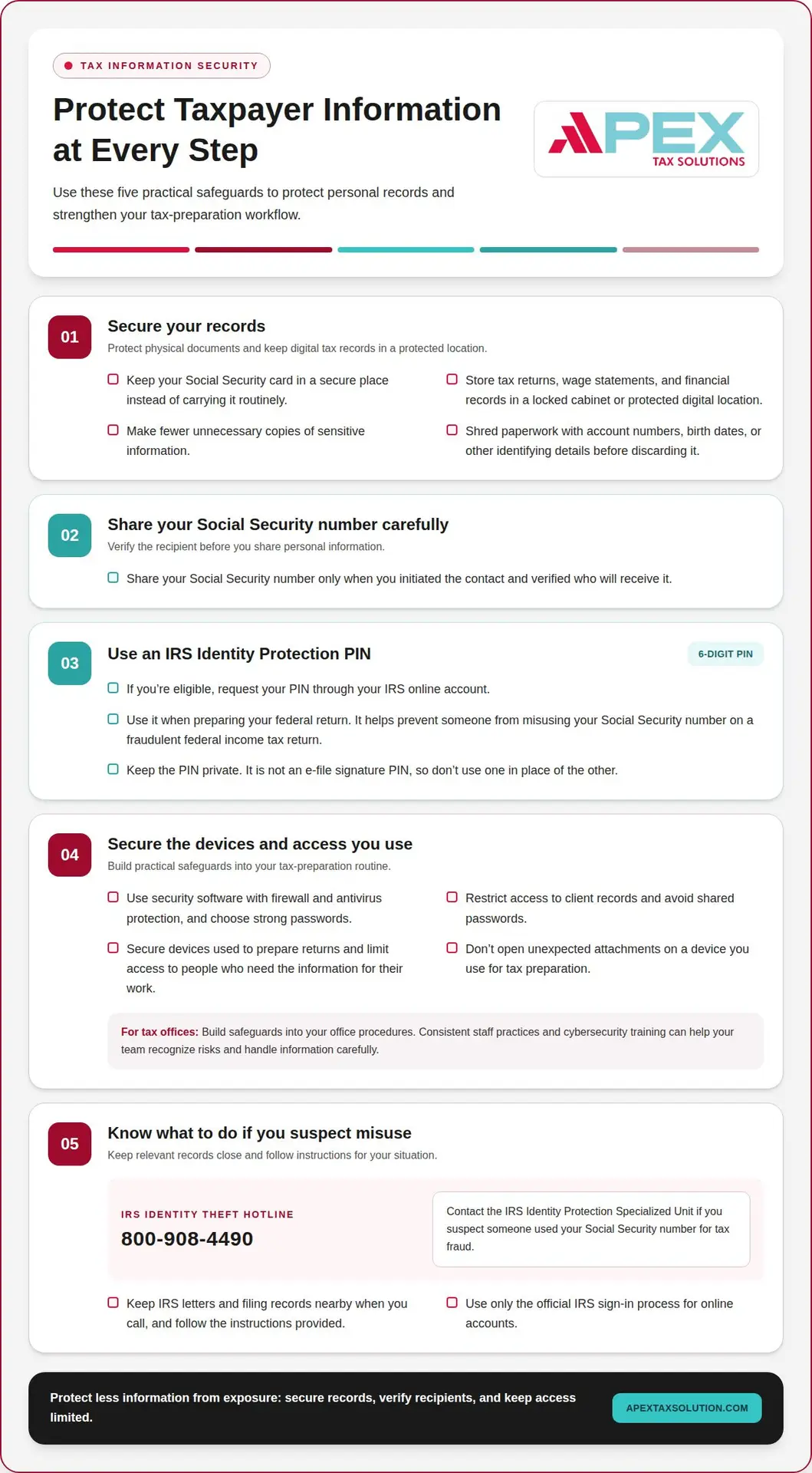
Keep your Social Security card in a secure place rather than carrying it routinely. Store tax returns, wage statements, and financial records in a locked cabinet or protected digital location. Share your Social Security number only when you initiated the contact and verified who will receive it. Before discarding paperwork, shred pages with account numbers, birth dates, or other identifying details. Making fewer unnecessary copies also limits what could be exposed.
-
Get an IRS Identity Protection PIN
Request an Identity Protection PIN through your IRS online account if you’re eligible. According to the Internal Revenue Service, this six-digit number helps prevent someone from misusing your Social Security number on a fraudulent federal income tax return. Keep the PIN private and use it when preparing your federal return. It is not an e-file signature PIN, so don’t use one in place of the other. Protecting the PIN is one practical part of preventing identity theft in tax preparation.
-
Understand IRS Information Security Rules
Use the IRS’s security recommendations as a baseline for protecting taxpayer information. The IRS recommends security software with firewall and antivirus protection, as well as strong passwords. For tax preparers, build those safeguards into office procedures: restrict access to client records, avoid shared passwords, and secure devices used to prepare returns. These are practical safeguards, not a substitute for applicable requirements governing your work.
- Contact the IRS Identity Protection Specialized Unit if you suspect someone used your Social Security number for tax fraud. The IRS identity theft hotline is 800-908-4490. Keep IRS letters and filing records nearby when you call, and follow the instructions provided for your situation. The IRS also offers online accounts, which can help prevent identity thieves from creating an account in your name. Use only the official IRS sign-in process.
- Protect computers that store or access tax records. Keep firewall and antivirus protection active, choose strong passwords, and limit access to people who need the information for their work. Don’t open unexpected attachments on a device used for tax preparation. If you manage a tax office, consistent staff practices can reduce avoidable exposure. Cybersecurity training for tax teams can help staff recognize risks and handle information carefully.
Recognizing phishing messages
Pause before responding to messages that ask for tax details, login credentials, or payment. The IRS does not initiate contact through email, text messages, or social media messages.
-
Recognize Phishing Emails and Malware
Inspect unexpected emails before opening links or attachments. Phishing messages imitate trusted organizations and pressure you to disclose a Social Security number, account password, or tax information. A fake notice might claim your refund is blocked and demand immediate action. Malware, or harmful software that can compromise a device, may arrive through an attachment or download. Opening it could expose stored tax records or login details.
Check for mismatched sender addresses, unusual wording, unexpected files, and links that don’t match the organization named in the message. An IRS logo does not prove the sender represents the agency. Treat urgent demands for payment or personal information as warning signs, especially if you weren’t expecting the message.
-
Avoid Phishing Messages
Verify tax-related requests through a contact method you already trust, not through details included in the message. The IRS uses the United States Postal Service for initial contact with taxpayers and may call only after contacting them by postal mail. Don’t reply, click a link, or share information in an unexpected email, text, or social media message claiming to come from the IRS.
Instead, open a separate browser window and use a familiar, trusted route to your account. If a message says you must confirm a refund, check your tax records and official correspondence independently. Never send a Social Security number or password in response to an unsolicited request. Pausing to verify can help prevent someone from using stolen information to file returns.
- Protect your work inbox as carefully as your personal account. Tax preparers may receive messages impersonating clients, software providers, or financial institutions. Before downloading a client document, confirm that you expected it and recognize the sender. If a request seems unusual, contact the person through a known channel. Don’t use a phone number or reply address provided in the suspicious message.
Keep spam filters and security software active on devices used for tax work. The IRS recommends security software that includes firewall and antivirus protection. These tools can help identify harmful files, but they don’t replace careful review. Even a message that reaches your inbox needs a sender and request check.
- If you clicked a suspicious link, stop entering information and close the page. Don’t download more files or forward the message to coworkers as an attachment. Follow your organization’s security process, change exposed passwords through the legitimate service, and watch for unusual account activity. A compromised mailbox at a tax office can expose taxpayer records and disrupt filing work or revenue operations.
Report suspicious messages through the appropriate channel for the organization being impersonated. Keep a record of the message and the action you took, but don’t share its links. A consistent reporting process helps your team respond quickly and recognize similar attempts before another employee is affected.
Retaining and securely disposing of sensitive documents
Protect tax records at every stage: storage, sharing, and disposal. Choose secure ways to send documents, restrict access, and keep records only as long as needed.
- Store paper tax and financial records in a locked filing cabinet or fireproof safe. Keep Social Security statements, tax returns, bank records, and refund details away from visitors and shared spaces. During tax season, return documents to secure storage after each use instead of leaving them on a desk or in an unlocked vehicle. Shred discarded papers showing account numbers, birth dates, Social Security numbers, or other identifying information.
- Choose tax preparation software with strong passwords, controlled access to taxpayer information, and secure document handling. These features can help limit who can view records and protect information as you work. When sending tax documents to a preparer, use a secure file-sharing or document-upload method intended for that purpose. Avoid ordinary email attachments and public Wi-Fi for sensitive forms.
- Secure every device that stores or opens tax records. Use a unique, strong password for each account, lock your screen when you step away, and limit device access to people who need it. Protect your home Wi-Fi with a password, and avoid sending tax documents over an open public network. The IRS recommends security software that includes firewall and antivirus protection.
- Review your mailbox and account statements regularly. Check your mail and credit union statements each month for missing correspondence, unfamiliar transactions, or signs that someone redirected your mail. Retrieve delivered tax documents promptly, and put outgoing sensitive mail in a secure collection point. Shred credit card solicitations before disposal, since discarded offers can expose personal details or invite fraudulent account activity.
- Set a consistent retention and disposal routine for the end of tax season. Keep records you still need in secure storage, then destroy unneeded copies with a cross-cut shredder or another secure shredding method. Don’t put intact tax forms, bank statements, or old labels in household recycling. In a tax office, assign responsibility for clearing work areas and safely disposing of printed client records.
Identity theft affecting individuals and businesses
Tax-related identity theft can disrupt personal filing and expose a business’s client records. Take practical steps to limit the damage and keep filing work on track.
- Assess the impact on both personal and business records. A fraudulent federal return may use an individual’s identity to claim a refund, while compromised tax-office files can expose information belonging to multiple clients. Tax identity theft was the most commonly reported form of identity theft for five years. For a business, consider which accounts, tax documents, and client communications an intruder could access.
- Keep filing and responding to tax obligations while an identity theft issue is being resolved. Taxpayers should continue filing on time; if identity theft prevents electronic filing, submit the affected return on paper. A preparer can use Form 8948 to explain why a return wasn’t filed electronically. Include relevant IRS correspondence and the e-file rejection notice with the paper return.
- Report suspected misuse and preserve the records. Contact the IRS using the number or instructions in its correspondence, and report identity theft to the Federal Trade Commission to create a recovery plan. Keep rejection notices, letters, and filed returns together. If the theft affected a business, document which systems and records appear involved so you can respond consistently with clients and financial institutions.
- Protect financial accounts as well as tax accounts. Contact a financial institution or creditor immediately if you find an account you didn’t open, an unfamiliar balance, or a purchase you didn’t make. Ask the institution to address unauthorized accounts or tampering. Victims should also file a report with law enforcement. These steps can help contain harm that a tax return alone won’t reveal.
- Build a response process for your tax office before an incident. Assign responsibility for gathering IRS notices, recording affected accounts, and communicating with impacted clients. The IRS prevented more than $63 billion in fraudulent refunds from 2011 through 2014, but businesses still need their own practical procedures for protecting records and maintaining operations. Use a service bureau partnership to support a more structured approach to your tax business’s ongoing needs.
Explore service bureau partnership support for your tax office.
Apex Tax Solutions
Apex Tax Solutions LLC helps you strengthen your tax practice with software, training, and support designed for tax professionals. As a Latino-owned business, it brings a community-minded approach and personalized support, so you can get help without scripted call-center interactions.
Choose from professional web software, desktop solutions, and corporate tools for your preparation needs. Cybersecurity training can help your team build sound information-handling practices, while the Service Bureau Partner Program supports tax professionals looking to grow their business. You can also access bilingual support in English and Spanish.
Contact Apex Tax Solutions LLC to discuss software, training, and support for your tax practice.
Make security part of your next season
Make secure habits part of your tax office’s everyday workflow, not a last-minute task during filing season. Consistent processes help your team handle information thoughtfully and keep your practice ready to adapt as it grows.
Review how your current workflow supports your team, then choose one practical improvement to make next. A small, deliberate change can strengthen how your office works over time.
For support as you plan that next step, connect with a tax practice partner. Keep building a more capable business through steady, thoughtful decisions.
Frequently Asked Questions
How can taxpayers protect personal information when preparing taxes?
Share only the records needed to prepare your return, and use a secure method to transfer them. Before sending a file, confirm the preparer’s name and destination, then check that you selected the intended documents. Avoid leaving tax forms in shared folders or on a printer. For example, move a downloaded wage statement out of a shared device’s downloads folder after you finish using it.
How can I verify that a tax preparer is legitimate and qualified?
Confirm the preparer’s identity, ask about relevant training and experience, and request a written explanation of the services they’ll provide. Verify professional credentials with the organization that issued them rather than relying only on a profile or advertisement. You can also review the preparer’s business reputation and complaint history. Established practices such as Cairns Quality Accounting prioritize this kind of transparency, and getting clear answers about fees, document access, and how the return will be reviewed can help you make an informed choice.
What information should I avoid sharing with a tax preparer or online?
Never share account passwords, email passwords, or one-time login codes with a preparer. A preparer may need tax documents and identifying details to complete your return, but not access to your personal email or bank login. Don’t send those details in an unsolicited message or public post. If a request seems unrelated to preparing or filing your return, pause and verify its purpose through a trusted contact method.
How can I spot tax-related identity theft and fraudulent tax returns?
Pay attention to signs that conflict with your filing records, such as an electronic return rejection saying a return was already filed under your Social Security number. An IRS notice about activity you don’t recognize also deserves prompt attention. Keep the notice and filing confirmation together, then follow the response instructions in the correspondence. Don’t assume an unfamiliar tax message is genuine just because it uses official-sounding language.
What should I do if someone files a tax return using my Social Security number?
Continue meeting your filing and payment obligations while you address the identity theft. If the IRS rejects your electronic return because someone already filed using your Social Security number, submit your affected return on paper and include Form 14039, Identity Theft Affidavit. Keep the rejection notice and IRS correspondence with your records. Follow the IRS’s instructions for your case, and retain copies of anything you submit.
How can I check whether a tax preparer has had data breaches or complaints?
Search the preparer’s business name alongside terms such as “data breach,” “complaint,” and “identity theft.” Review the Better Business Bureau profile and compare reported concerns with the preparer’s explanation. Look for consistent patterns rather than treating a single post as proof. You can also ask how the office informs clients about a security incident and what steps it takes to protect or restore affected records.
What are the risks of using public Wi-Fi or email for tax documents?
Public Wi-Fi can expose sensitive activity to risks beyond your control, while email attachments can be forwarded, misaddressed, or stored in multiple inboxes. Avoid sending tax forms through ordinary email or uploading them on an open network. Use a secure document-sharing method and a trusted private connection instead. Before sending, confirm the recipient and remove extra files so you disclose only what the preparer needs.