
Protecting client tax data takes more than a secure login. Tax preparer data security best practices start with a written information security plan (WISP) covering risk assessments, safeguards, access controls, staff training, and incident response. For professional tax preparers covered by the Gramm-Leach-Bliley Act, the FTC Safeguards Rule requires a written information security program.
Clients trust you with sensitive financial details, and protecting that information at every stage helps maintain that trust. This guide explains what a data security plan includes and how to put safeguards, WISP policies, and incident response procedures into practice. You’ll also learn how to communicate securely with clients, set expectations for messages they receive, and help them recognize suspicious contact.
Key Takeaways
- Build safeguards around how you collect, store, access, transmit, and back up client information.
- Use encryption for stored data and secure channels when sending sensitive information.
- Shape your WISP around your practice’s risks, safeguards, staff responsibilities, and incident response procedures.
- Recognize warning signs of possible data theft and define how your team will respond and communicate.
- Set clear expectations with clients about trusted communication methods and how to verify unexpected messages.
What Is a Data Security Plan?
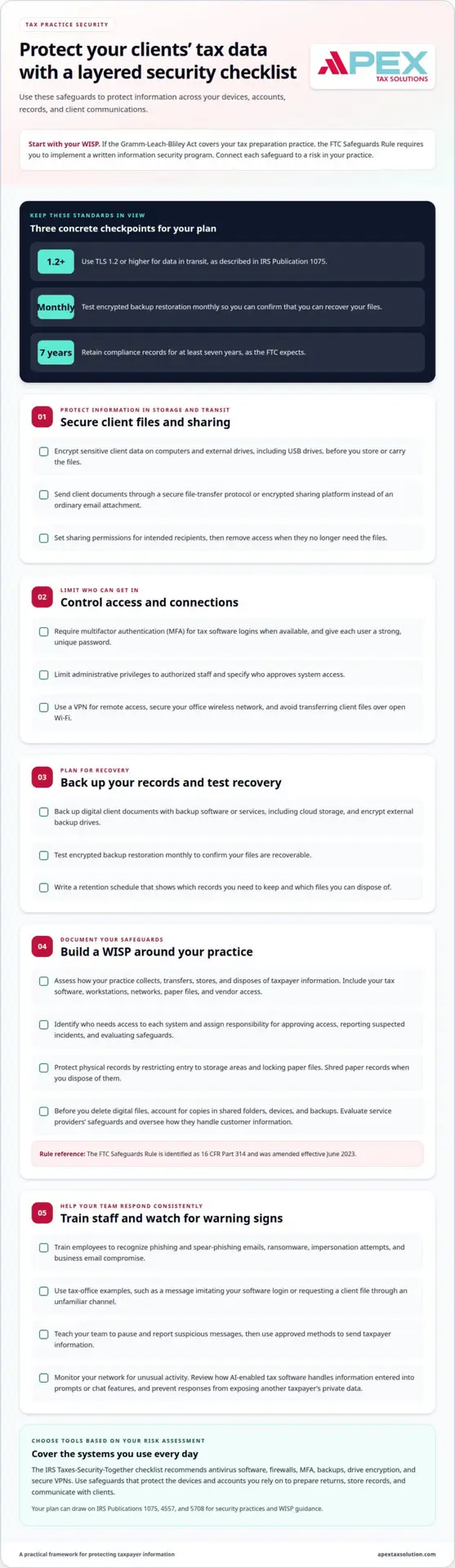
Your data security plan explains how you protect client information across devices, accounts, records, and communications. Use it to connect each safeguard to a risk in your tax practice.
Encryption and Secure Data Transfers
Encrypt sensitive client data to make stored files harder for unauthorized people to read. Encrypt files on computers and external drives, including USB drives, before storing or carrying them.
When you send client documents, use a secure file-transfer protocol or encrypted sharing platform rather than an ordinary email attachment. IRS Publication 1075 describes TLS 1.2 or higher as the standard for data in transit. Set sharing permissions for the intended recipients, and remove access when they no longer need the files.
Access, Backup, and Wireless Protections
Require multifactor authentication (MFA) for tax software logins when available, and give each user a strong, unique password. Limit administrative privileges to authorized staff. These steps help reduce exposure if a password is compromised or someone leaves a workstation unattended.
Back up digital client documents with backup software or services, including cloud storage, and encrypt external backup drives. Test encrypted backup restoration monthly to confirm your files are recoverable. For remote access, use a VPN to encrypt online communications routed through its service. Secure your office wireless network, and avoid transferring client files over open Wi-Fi.
Cybersecurity Tools and Insurance
Choose tools based on the risks identified in your assessment. The IRS Taxes-Security-Together checklist recommends antivirus software, firewalls, MFA, backups, drive encryption, and secure VPNs. Your setup should protect the devices and accounts you use to prepare returns, store records, and communicate with clients.
Evaluate service providers’ safeguards and oversee how they handle customer information, as IRS Publication 5708 advises. Your own tool and insurance costs depend on the systems, coverage, and services you select. For practices seeking external technical support, managed IT partners like Proactive Networking can help small and medium-sized businesses configure secure network infrastructure, reliable backups, and routine system updates.
Employee Cybersecurity Training
Train employees to recognize phishing and spear-phishing emails, ransomware, impersonation attempts, and business email compromise. Use examples from tax-office workflows, such as a message imitating your software login or requesting a client file through an unfamiliar channel.
Teach your team to pause, report suspicious messages, and use approved methods to send taxpayer information. IRS Publication 4557 includes phishing awareness and PTIN account monitoring among security procedures. With Cyber Security Training, you can help staff understand their role and apply your office’s security practices consistently.
FTC Safeguards Rule and GLBA
If the Gramm-Leach-Bliley Act (GLBA) covers your tax preparation practice, you must implement a written information security program under the FTC Safeguards Rule. Your safeguards should address risks across your systems, staff, records, and daily procedures.
Assessing Systems and Physical Safeguards
Assess how your practice collects, transfers, and stores taxpayer information to identify relevant risks. Include the tax software, workstations, networks, paper files, and vendor access your practice uses.
Protect the physical records in your office by restricting entry to storage areas and locking paper files. IRS Publication 4557 identifies physical security, employee management, and training as areas for your data security plan.
Write procedures your staff can follow. Specify who approves system access, how employees report a suspected incident, and how you evaluate safeguards. The FTC Safeguards Rule is identified as 16 CFR Part 314, and it was amended effective June 2023.
Safeguarding Networks, Devices, and Taxpayer Data
Protect the networks and devices you use for tax software and taxpayer records. IRS Publication 4557 outlines measures such as multifactor authentication, encryption, and backups. You can complement those measures with firewalls, antivirus software, and system updates.
Limit administrative privileges to authorized users, and monitor your network for unusual activity. Secure wireless networks and remote connections to reduce the risk of unauthorized access. Review how AI-enabled tax software handles information entered into prompts or chat features, and prevent responses from exposing another taxpayer’s private data.
Tax Record Storage and Disposal
Set procedures for storing, retaining, and disposing of tax records. Keep digital files in protected systems, limit access to people who need them, and secure backups. Use a written schedule to distinguish records you need to retain from files ready for disposal.
The FTC expects you to retain compliance records for at least seven years. Shred paper records due for disposal to prevent unauthorized retrieval. Before deleting digital files, account for copies in shared folders, devices, and backups.
Use IRS Publication 4557 to help organize safeguards for your information systems, recovery processes, and physical records. Document how your practice handles each record type so your team can apply the same procedures consistently.
Written Information Security Plans (WISPs)
Your Written Information Security Plan (WISP) documents how your practice identifies risks, protects taxpayer information, and responds to security issues. Use it to assign clear responsibilities and set procedures suited to your operations.
Written Policies and Risk Assessments
Build your WISP around how your practice handles information. Describe how you accept, transfer, store, and dispose of digital records, and identify who needs access to each system. A solo practice using cloud software faces different risks from an office with employees, multiple computers, and a network.
Record how you assess risks to customer information and evaluate whether your safeguards work. IRS Publication 5708, “Creating a Written Information Security Plan,” was released in August 2022 and includes a sample WISP template for small tax practices.
Address employee management and training, information systems, access controls, backup and recovery, physical security, and detection of unauthorized access. For example, state how you approve a new employee’s access and remove it when their role ends. This gives staff a written reference for routine decisions.
Assign responsibility for coordinating your information security program. IRS Publication 5708 says a tax business’s program should designate one or more employees to coordinate it. Name the responsible person in your plan and describe how they track assessments, policy updates, and staff training.
Use written policies to explain how your team manages passwords, authorized access, and reported concerns. Make each procedure specific enough to guide a real task, such as giving a seasonal worker access only to the files needed for their work.
Annual Risk Assessments
Review and update your written security plan annually. This assessment helps you account for changes in your systems, staff, vendors, and daily operations before they create gaps in your procedures.
Document where taxpayer information is kept, who can access it, and how it moves between systems. Record each risk, the safeguards in place, and any gap that needs attention. Include operational changes, such as adopting new tax software or adding remote access.
Use your findings to revise the plan and assign follow-up actions. IRS Publication 5708 says you should evaluate and adjust your security program as circumstances change, including changes in operations and security-testing results. Record what changed, who owns the next step, and how you will track completion.
The IRS paid preparer PTIN application instructions require you to acknowledge awareness that the law requires you to create and maintain a written information security plan. If you file 11 or more returns annually, you must maintain a current, signed WISP before the 2026 filing season opens.
Keep your signed plan and assessment records together, with access limited to authorized personnel. A revision date and documented follow-up help your team use current procedures throughout filing season.
Incident response plans and communication protocols
An incident response plan assigns actions for suspected theft, malware, or exposed client records. State data breach notification laws vary, so applicable requirements depend on the affected residents and the incident.
Recognizing Breach Warning Signs
Warning signs include unexpected IRS identity-verification letters, unrequested tax transcripts, or returns filed using your Electronic Filing Identification Number that you didn’t submit. IRS Publication 4557 identifies letters 5071C, 4883C, and 5747C as possible signs of tax-related identity theft.
Common attacks include phishing emails, spear phishing targeting a specific employee, and ransomware that blocks access to files. The IRS will never initiate contact through email. Treat unexpected requests for client data, login credentials, or urgent payments as suspicious, especially when a message imitates tax software or a government agency.
Record warning signs promptly. For example, note when an employee reports a suspicious attachment, which device was involved, and whether there was unusual account activity. A concise incident log helps your team establish what happened and decide which systems need immediate attention.
Incident Response Planning
Incident response planning defines who leads, which systems the team isolates, and how staff preserve relevant records. Add these procedures to your WISP so employees can act consistently during a breach instead of improvising under pressure.
Include clear steps for escalating an alert, restricting affected accounts, preserving evidence, and assessing which taxpayer information may have been exposed. Assign specific responsibilities to a coordinator and identify the internal contacts who need prompt notice. IRS Publication 4557 recommends creating a data theft recovery plan and assisting the IRS in protecting affected clients.
Test the response plan once a year. A tabletop exercise can walk staff through a simulated phishing incident, from the first report to account containment and client communication. Record gaps revealed during the exercise, then update procedures and assign follow-up actions.
Breach Documentation and Reporting
Breach documentation creates a reliable record of the incident, decisions, and communications. Capture when the team discovered the issue, which systems or files may be involved, what containment steps followed, and who approved each action.
If you detect client data theft, contact your local IRS stakeholder liaison immediately. Practitioners who receive IRS return information under an IRS agreement must notify TIGTA of unauthorized access or a breach as required by IRC §6103(k). Keep the applicable reporting path in your written response procedures.
Use a communication protocol that identifies who informs clients, what facts the message should include, and how recipients can reach your office through a trusted channel. Avoid speculation; explain what happened, what information may be affected, and what protective steps clients can take. IRS Publication 4557 lists IRS authentication letters as possible identity-theft indicators, so train staff to recognize and escalate those notices.
Maintain the incident record with your security documentation, including decisions about notifications and recovery. A consistent checklist helps your team account for each action, preserve a clear timeline, and improve procedures after the incident is closed.
Secure communication practices for clients
Clients need a clear way to distinguish genuine tax-office messages from impersonation attempts. Your communication program should explain which channels tax professionals use, what information they request, and how clients can independently verify unexpected contact.
Set expectations before clients send sensitive records. Tell each client whether your office uses a secure portal, encrypted email, or another approved file-sharing method. Explain how you’ll notify them about missing documents or return questions, and state that staff won’t request passwords or account codes in ordinary messages. A predictable process gives clients a trusted reference when a message seems unusual.
Give clients a simple verification rule: if a call or message is unexpected, pause and contact your office using a phone number they already trust. Someone impersonating you may use a cloned voice from a public webinar or video. Calling a known number adds a separate verification step before the client shares information or follows instructions.
Make the policy practical with examples clients can recognize:
- A text asks the client to open a link and enter tax-account credentials.
- An email requests a Social Security number through an unapproved channel.
- A caller pressures the client to act immediately or disclose a security code.
- A familiar voice requests an unusual payment or changes established instructions.
Tell clients not to reply to suspicious messages or open unexpected attachments. Instead, they should report the contact to your office through the agreed channel. Your team can document the message, alert other staff, and decide whether it relates to a broader cybersecurity threat. This approach helps distinguish legitimate requests from phishing without asking clients to judge technical details.
Artificial intelligence can make scam messages more convincing, including text exchanges that imitate normal conversations. Warn clients that a familiar name, writing style, or voice does not prove a message is genuine. For example, a voice message requesting tax documents should still follow your office’s established communication process.
Keep instructions consistent across email, phone calls, and client onboarding materials. If your office changes its approved portal or contact method, explain the change through a previously trusted channel. Avoid announcing a new process only through an unexpected message, which can resemble a scam. Align the policy with your security program, staff procedures, and backups for routine client communication.
Clear client guidance turns secure communication into a shared practice. Strengthen your tax office’s cybersecurity practices with consistent communication protocols clients can follow.
Ask clients to verify communications claiming to come from tax authorities and promptly report suspicious activity. Reinforce the methods your office uses and the unexpected communications to watch for, giving clients a clear basis for checking unfamiliar contact.
Apex Tax Solutions: Cyber Security Training
Apex Tax Solutions LLC offers cybersecurity training to help you strengthen how your team handles tax-office security risks. Training can help staff recognize phishing and impersonation attempts, protect sensitive client information, and follow your office’s security procedures.
Turn to Cyber Security Training when employees need practical guidance, or when your written policies need to become consistent daily habits. Wisp & Cybersecurity Training can also support your work on a Written Information Security Plan and related staff awareness. Clear roles and shared procedures help your team respond more consistently to suspicious activity.
Contact Apex Tax Solutions LLC to discuss cybersecurity training for your tax practice.
Make Security Part of Your Practice’s Routine
Make security ownership part of everyday operations, not a task reserved for filing season. Assign responsibility for keeping procedures current, helping staff apply them, and using lessons from suspicious activity to guide future decisions. Consistently applying tax preparer data security best practices helps your team build habits clients can rely on.
As your tax office grows, align the tools and support you use with how your team works. Apex Tax Solutions LLC offers comprehensive tax software and professional solutions, alongside cybersecurity training. Choose the support that fits your practice’s needs and helps your team maintain a thoughtful approach to protecting client information.
Ready to discuss a practical next step for your tax office? Contact Apex Tax Solutions LLC to explore support for your team. Keep building a practice where secure, trusted service is part of every client interaction.
Frequently Asked Questions
What are the IRS data security requirements for tax preparers?
Tax preparer data security best practices start with protecting taxpayer information through a written data security plan. IRS Publication 4557 outlines safeguards for information systems, staff, physical records, backups, and unauthorized-access response. Covered professional tax preparers also need a written information security program under the FTC Safeguards Rule and GLBA. Document who coordinates security and how staff report suspicious access, then connect those procedures to your office’s actual systems.
What must a tax preparer’s Written Information Security Plan (WISP) include?
Your WISP should explain how your practice assesses risks, assigns responsibility, and protects taxpayer information. IRS Publication 5708 says a security program should designate one or more employees to coordinate it, and should evaluate safeguards and adjust the program as operations change. Include procedures for staff training, system access, vendor handling, backups, and incident response. For example, document who removes access when an employee leaves and who records that change.
What FTC Safeguards Rule requirements apply to tax preparation firms?
Professional tax preparers covered by GLBA must implement a written information security program under the FTC Safeguards Rule. The program should identify and assess risks to customer information, establish safeguards, and monitor and test their effectiveness. IRS Publication 5708 describes designating a coordinator and adjusting the program when operations or testing results change. Your written procedures should clarify who tracks findings and how your practice documents corrective actions.
How should tax preparers protect client data with encryption, MFA, and access controls?
Use encryption to protect client files on devices and during electronic transmission, and require multifactor authentication for accounts when available. Give each worker a separate account with access limited to the records and functions needed for their role. For example, a seasonal employee who uploads documents may not need administrative privileges. Review permissions when duties change, and promptly remove access that is no longer appropriate.
What should tax preparers do after a data breach or taxpayer information theft?
Start your response procedures, contain affected access, preserve relevant records, and document what your team discovers. Effective tax preparer data security best practices include a clear process for escalating suspected theft. Contact your local IRS stakeholder liaison immediately if you detect client data theft. Practitioners receiving IRS return information under an IRS agreement must notify TIGTA of unauthorized access or a breach as required by IRC §6103(k). Identify affected clients and communicate through trusted channels.