A clear escalation path starts by matching the issue to the right owner. Service Bureau Partner Program technical escalation channels should distinguish software problems from partner questions, with each concern documented and routed to the person responsible. Keep the issue, its impact, steps already taken, and requested outcome together so the next person can act without restarting the conversation.
It’s frustrating when a technical issue stalls or a partner question has no clear owner. A reliable process depends on transparent communication, shared information, and clear responsibilities across the partnership, not simply more check-ins.
This article explains how to organize a technical escalation, approach a partner dispute, and locate the appropriate partner services contact information. You’ll also learn how clear ownership and consistent records can make it easier to move an issue forward and understand what should happen next.
Key Takeaways
- Distinguish a software issue from a partner dispute so you can choose an escalation path that fits the problem.
- Learn what details help clarify ownership and move a technical concern toward resolution.
- Find out how to locate relevant partner services contact information without relying on guesswork.
- Understand what the Service Bureau Partner Program covers and how it supports tax professionals.
- See how support hours and response-time expectations shape the next steps for an escalation.
Partner escalation and dispute resolution
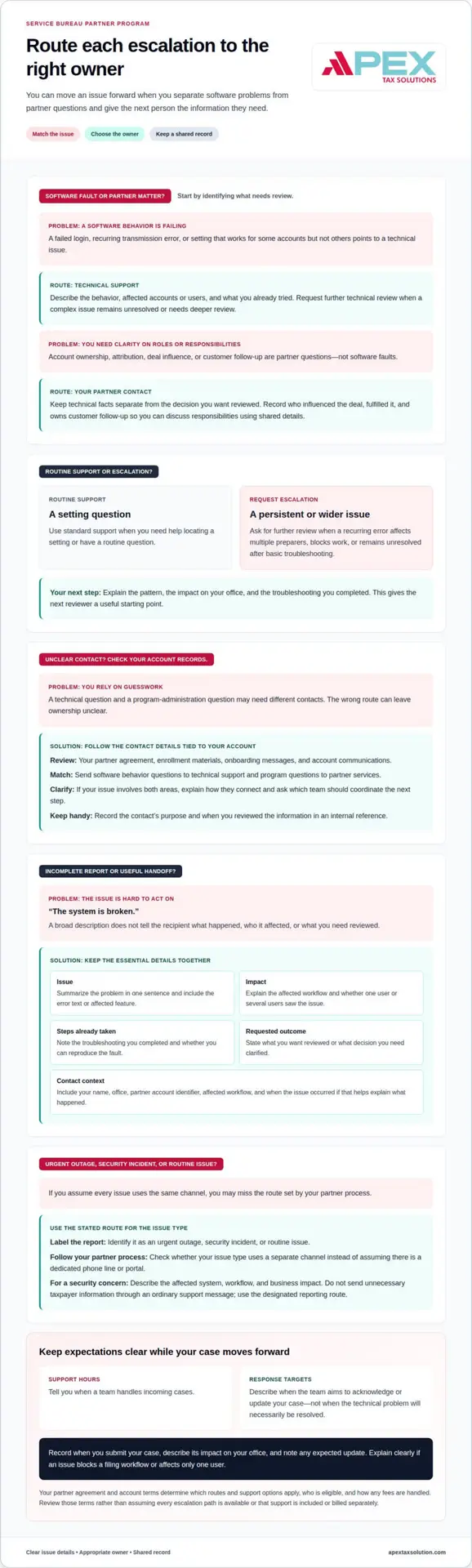
Use a clear escalation path to separate a software fault from a question about partner responsibilities. For example, report a failed login as a technical problem, but document account ownership concerns as a partner matter.
Partner Escalation Versus Customer Support
Use standard support for routine questions, and request escalation when a complex issue remains unresolved or needs deeper review. This distinction matters when a recurring transmission error affects multiple preparers or blocks work after basic troubleshooting.
For example, contact routine support when you need help locating a setting. If that setting works for some accounts but fails for others, explain the pattern and request further technical review. Include the affected accounts, error details, and steps you’ve already tried. This gives the next reviewer a useful starting point.
For a partner question, separate technical facts from questions about roles, attribution, or responsibilities. Keep a shared record of the issue, its impact, and the outcome you want. Your office can then discuss the matter with clear details instead of relying on conflicting recollections.
Technical Escalation Channel Options
An escalation channel is the designated route for sending a complex issue for review. Your partner agreement and account terms determine which routes and support options apply. They also set eligibility requirements, so don’t assume an active account gives you access to every escalation path.
Match your issue to the right contact. Use a technical support route for a reproducible software fault, and a partner contact for an unresolved account question. In either case, include a summary of the issue, its impact, the steps you’ve taken, and the outcome you’re requesting.
Your program terms also determine whether escalation support is covered by program fees or carries separate charges. Review the applicable terms to understand how fees are handled, rather than assuming support is automatically included or billed separately.
Support Hours and Response Targets
Support hours tell you when a team handles incoming cases. Response targets describe when the team aims to acknowledge or update your case. These measures differ: an acknowledgment doesn’t mean the technical problem will be resolved within the same period.
Record when you submit your case, describe its impact on your office, and note any expected update. If an issue blocks a filing workflow, explain that impact. If one user has a minor display problem, describe its narrower effect. This helps the reviewer assess priority based on the facts.
Issue-Specific Channels and US Limitations
Label your report as an urgent outage, security incident, or routine issue. Your partner process determines whether these issues use separate channels, so follow the stated route for each type instead of assuming there is a dedicated phone line or portal.
An escalation may take longer if you lack account access, provide incomplete diagnostic details, or can’t reproduce the fault. For a security concern, don’t send unnecessary taxpayer information through an ordinary support message. Describe the affected system, workflow, and business impact, then use the designated reporting route.
For a partner question, document who influenced the deal, fulfilled it, and owns customer follow-up. Your office can use those records to clarify responsibilities with the other parties. Shared reporting and consistent rules also help resolve disagreements based on evidence rather than assumptions.
Partner services contact information
Use the partner contact details connected to your account for help with program administration or a technical issue. Start with your enrollment materials and account communications, then choose the contact route that matches your question. This helps keep account matters separate from general inquiries and directs each request appropriately.
Where to look for the right contact
Review your partner agreement, onboarding messages, and account communications for the team or representative assigned to your relationship. Use those records to distinguish technical questions from program or account matters. For example, report a sign-in problem through the technical support route, and direct a question about program responsibilities to the partner services contact identified in your materials.
If you manage your office’s account, keep the relevant contact details in an internal reference. Record the contact’s purpose and the date you reviewed the information. This gives your team a consistent reference when an office manager handles administration and preparers need help with their work.
Match the contact to the issue
Before reaching out, describe the issue in one sentence. “I see an error when I transmit a return” gives the recipient a clearer starting point than “the system is broken.” For a partner matter, name the decision you want reviewed, such as who should handle customer follow-up or how your office should record account attribution.
Choose the contact route that fits your question. Send software behavior questions to technical support, and direct program questions to partner services. If your issue involves both areas, explain how they connect and ask which team should coordinate the next step. This keeps one concern from becoming disconnected conversations.
Prepare a useful contact record
Include your name, office, partner account identifier, affected workflow, and a concise description of the impact. Add when the issue occurred if that detail helps explain what happened. For example, state whether one preparer or several users saw the same error, and note the troubleshooting you completed.
- Technical issue: Describe the error text, affected feature, and steps that reproduce it.
- Account question: Identify the account or access role you need reviewed.
- Partner disagreement: Summarize the decision you want reviewed and the records that support your position.
Keep taxpayer information out of ordinary messages unless the designated process specifically requires it. Describe the workflow and error without unnecessary sensitive details. Save the case reference and each reply with your contact record so your office can follow the discussion.
If your first contact doesn’t resolve the issue, reply in the same conversation with the case reference and the decision or action you still need. This gives the next person a clear history and helps your office maintain continuity across technical and partner services.
What is the Service Bureau Partner Program?
A Service Bureau Partner Program provides a framework for working with a tax software provider and accessing partner support. Use the program terms to understand your responsibilities, the provider’s role, and how your office can raise program questions. The agreement defines the specific services and terms that apply to your partnership.
Your participation can affect more than software access. You may need to understand how onboarding, account administration, and operational questions fit into your office’s workflow. For example, a preparer who needs help using a software feature has a different need from an office owner asking about partner responsibilities.
Start by identifying the responsibilities you and the provider each handle. Your office manages its client relationships and internal processes. The provider handles the responsibilities described in your program terms. Clear ownership helps you direct a basic account question without turning it into a dispute about who should act.
How the partner relationship works
You work with the provider under the program’s terms, using the services described there to support your tax preparation operations. Your office applies those services to its own workflow. For example, if you run a small office, you may need to understand which staff members can use the software and who manages the account.
Use onboarding to put those responsibilities into practice. Identify who handles account setup, user access, training, and support questions. Keep a written record of decisions so your team knows where to direct a question and who can approve an account change.
What to understand before relying on the program
Read your agreement to understand the program’s scope, responsibilities, and limits. Focus on what the provider handles, what your office handles, how to route support questions, and how the program addresses changes or disagreements. For example, determine whether a concern involves software behavior or account ownership before raising it.
Clarify how information moves through your team. If you manage administration while your preparers use the software, identify who receives program updates and who can raise technical issues. This simple distinction can help prevent delays when your office needs a decision.
Assess the program against your office’s actual workflow. If you work alone, you may organize onboarding, access, and support differently from a multi-person team. Map who makes each decision, then compare those responsibilities with the written terms. You’ll have a practical basis for using the partnership and addressing questions without assuming every arrangement works the same way.
What technical escalation channels are available to Service Bureau partners?
Escalation routes depend on the partner program’s support process and the type of issue. A technical fault, an access problem, and a security concern may require different handling.
Choose the route by issue type
Partner programs commonly distinguish routine support, unresolved technical problems, account administration, and security reporting. These labels describe different purposes, not a promise that every program has separate phone numbers, inboxes, or portals. Use the route named in your partner materials for the issue you need addressed.
For example, a preparer who can’t sign in should report an access problem through the designated support route. A repeatable software error that continues after basic troubleshooting may need escalation to a technical reviewer. A question about account roles belongs with the team responsible for partner administration.
This distinction helps the receiving team understand what decision or investigation you need. If one issue involves two areas, such as an access failure after an account change, explain both the change and the resulting error in the same case. The support team can then route the request based on its cause.
Understand the channel formats
A partner’s process may use a case form, email, phone contact, or an assigned relationship representative. Each format serves a different purpose: a case record preserves technical details, while a direct conversation can clarify which team owns a complicated issue. Follow the designated process instead of sending the same request through several routes.
For a case form, describe the affected feature and the steps that reproduce the problem. For email, use a concise subject such as “Login error after account role change.” For a phone discussion, note the case reference and agreed next action. These details keep your report consistent across channels.
Prepare a complete escalation
A strong escalation gives the reviewer enough context to assess severity and reproduce the issue. Include your office or partner account identifier, affected user role, software area, error text, and business impact. For example, say whether the issue blocks one preparer or prevents your office from completing a specific workflow.
- Describe the issue: State what you expected and what happened instead.
- Record the sequence: List the steps that trigger the error and the troubleshooting completed.
- Protect sensitive details: Share only information the designated channel requires.
- Keep the record: Save the case reference and follow-up in one location.
Handle a security concern carefully. Use the program’s designated security reporting process, and avoid putting taxpayer data in ordinary messages. First describe the affected system or workflow. The appropriate team can direct any further information through its established process.
Keep ownership clear
If a case moves between support teams, ask which team owns the next action and record the handoff. For example, technical support may identify an account-permission issue that requires partner administration. A clear owner prevents duplicate requests and helps you follow progress without repeating the explanation.
Use the Service Bureau Partner Program’s stated escalation routes to identify applicable channels, access conditions, and submission methods. The right route is the one assigned to your issue and partner account, not an assumed channel borrowed from another program.
What are the support hours and response-time targets for technical escalations?
Support hours define when a team handles incoming cases, while response targets describe when it aims to reply. Your applicable schedule and target come from the partner program’s support terms, not a universal timetable. Distinguish an acknowledgment from a resolution: a first reply confirms review, while resolving a software fault may require investigation.
How support hours shape an escalation
A support window determines when a submitted case enters active handling. A case sent outside that window may wait until coverage resumes; one sent during coverage can enter the team’s queue sooner. For example, a preparer reporting a blocked workflow near closing time should include the current business impact so the reviewer can assess priority when handling begins.
Coverage can also depend on the channel and issue type. A routine account question may follow standard support hours, while a systemwide outage may use a separately defined reporting path. Use the program’s stated hours to plan, and include your time zone when it affects coordination between offices.
What a response target does and does not mean
A response target measures an expected communication point, such as an initial acknowledgment or status update. It does not automatically set the time needed to diagnose or resolve the issue. For example, a reviewer may acknowledge a repeatable error, then need details about the affected feature before identifying its cause.
Track the submission time, case reference, and any next-update time in one record. If the first reply requests information, provide the requested diagnostic details in the same case. A clear response helps the technical team continue its review without separating new evidence from the original report.
Factors that affect response and resolution
Severity, reproducibility, completeness, and ownership shape how a case progresses. A problem that prevents several users from completing a core workflow has a different operational impact from a display issue affecting one user. A precise description helps the support team assess that difference.
- Impact: Explain which users and workflows the issue affects.
- Reproduction: Give the steps that trigger the error and its wording.
- Timing: Record when the issue began and when you submitted it.
- Next action: Note the requested information or agreed follow-up.
These details help distinguish a slow reply from an unresolved technical investigation. For example, a case awaiting a software log needs a different next step from one awaiting assignment to a technical owner. Keep the case history together and follow the stated escalation process if the expected update passes without a response.
Plan office work around stated commitments
Use the support window and response target to plan internal coverage, not to promise staff or customers a resolution time. If an e-file transmission issue affects your office, arrange an internal fallback workflow while the case is under review. Record who owns that workaround and who will update affected preparers.
When the support team provides an update, record the next action and who owns it. This helps your office coordinate work while technical review continues.
Apex Tax Solutions: Service Bureau Partner Program
Apex Tax Solutions LLC offers a Service Bureau Partner Program for tax professionals seeking software and partner support in one relationship. It may suit your office if you want help understanding program responsibilities, organizing support needs, or building a more consistent workflow for your team.
Depending on your needs, TaxSlayer Pro Web and corporate software provide tax preparation options, while WISP and cybersecurity training support your office’s security practices. The right next step depends on your workflow and the support you need. Clear issue records and defined ownership can also make partner conversations more productive.
Contact Apex Tax Solutions LLC to discuss the Service Bureau Partner Program and your office’s needs.
Build a support process that grows with your office
As your tax practice evolves, keep the escalation process clear for everyone handling a technical issue. Make ownership part of your office workflow: decide who records the problem, who communicates updates, and who coordinates the next action. This structure helps your team stay focused on client service while a technical concern moves through review.
The Service Bureau Partner Program technical escalation channels can support that process when you understand how to use them and keep your team’s records consistent. If you’re evaluating software and partner support for your office, consider how those needs fit together before choosing your next step.
Contact Apex Tax Solutions to discuss the Service Bureau Partner Program and your tax office’s needs. A thoughtful support plan can help you move forward with greater clarity and confidence.
Frequently Asked Questions
How do partners contact technical support by phone, email, or portal?
Use the phone, email, or portal route designated for your partner account. The Service Bureau Partner Program’s technical escalation channels should match the issue, so choose the method identified for technical support rather than a general business inquiry. If you speak with support by phone, ask how to keep a written case record. For email or portal submissions, save your sent message or confirmation for follow-up.
What information should partners include when escalating a technical issue?
Describe what you were doing, what you expected, and what happened instead. Include the affected software area, user role, when the issue began, and whether it affects other staff. If a screenshot helps show the error, remove taxpayer details before sharing it through an approved support route. For example, explain whether a transmission stopped before completion or displayed an error after submission.
What steps should partners follow to track and resolve an escalated case?
Keep each update tied to the original case. Save the case reference, submission date, support replies, and any requested action in one internal record. Assign a staff member to monitor it and provide follow-up details through the same channel. Before closing the issue internally, test the affected workflow again and note the result. If the error returns, add the new timing and behavior to the existing case history.