
Completing a training session does not automatically mean your ERO team can apply your procedures. Effective compliance training for EROs turns your firm’s policies and relevant tax-preparation responsibilities into practical guidance employees can use every day.
You know training matters. The challenge is covering the right topics, fitting sessions into a busy season, and keeping clear records of what employees learned. This article covers the core areas, how to plan onboarding, refresher, and event-triggered training, and what to document beyond attendance. It also explains how to assess whether training works and respond when someone misses a session or needs additional support.
Key Takeaways
- Match training topics and formats to each team member’s responsibilities so the guidance applies to real tax-office tasks.
- Plan initial, refresher, and advanced sessions around role changes, policy updates, and emerging training needs.
- Address missed or ineffective training with follow-up support and corrective steps that help prevent repeat gaps.
- Track participation and assess whether staff can apply what they learned, not just whether they attended.
- Build a schedule that combines onboarding, recurring training, and timely sessions when workplace needs change.
What is Compliance Training?
Compliance training is structured learning that helps employees follow rules and procedures relevant to their roles. Effective compliance training for EROs connects tax-office workflows with privacy, security, and operational responsibilities.
Training should be interactive, specific to each role, and updated when procedures change. A preparer handling taxpayer documents needs different practical examples from an employee managing office systems.
Applicable ERO Requirements
Your IRS obligations depend on your e-file role and the procedures your business performs. Build training around current IRS guidance relevant to those responsibilities, and explain how employees should handle return information and follow your firm’s processes.
State requirements can add separate topics. New York State requires interactive sexual harassment training, according to the New York State Department of Labor. Maine workplaces with 15 or more employees must train new hires within 1 year, according to the Maine Legislature. These examples show why your program should account for employee location and applicable requirements, not just tax-season dates.
Training Topics and Privacy Protections
Connect taxpayer privacy and data security topics to specific actions. Use a sample intake scenario to show how an employee handles documents, limits access, and follows your process if information reaches the wrong person.
Cover your office’s procedures for secure account access, document handling, and reporting a suspected incident. Then tailor examples by department: preparers can practice protecting return details, while support employees can learn how to route sensitive requests. The aim is consistent practice, not a generic presentation.
A defined program with an owner, schedule, and completion record makes implementation easier. Assign each topic to employees whose duties involve it. Deliver the material through a live discussion, online module, or guided scenario, then use an interactive knowledge check that asks staff to choose an appropriate action.
A progress dashboard can show assigned courses, completions, overdue training, and assessment results by department. A manager, for example, can identify employees who have not completed a privacy module before handling taxpayer documents. Keep records focused on course name, completion status, and follow-up needs.
Audits assess whether employees apply the program, not just whether they attended. Review a sample workflow, compare it with your written procedure, and record any gaps. If an employee mishandles a document in a training scenario, provide focused retraining, document the corrective action, and revise the example if it revealed an unclear step.
Keep core topics consistent and add role-specific modules as needs change. A small office might use one shared session with separate scenarios; a growing office can assign modules by department. Effective compliance training for EROs also takes course format and scope into account. Free courses may be available, but assess whether their content fits your procedures before relying on one as your entire program.
Initial, refresher, and advanced training durations
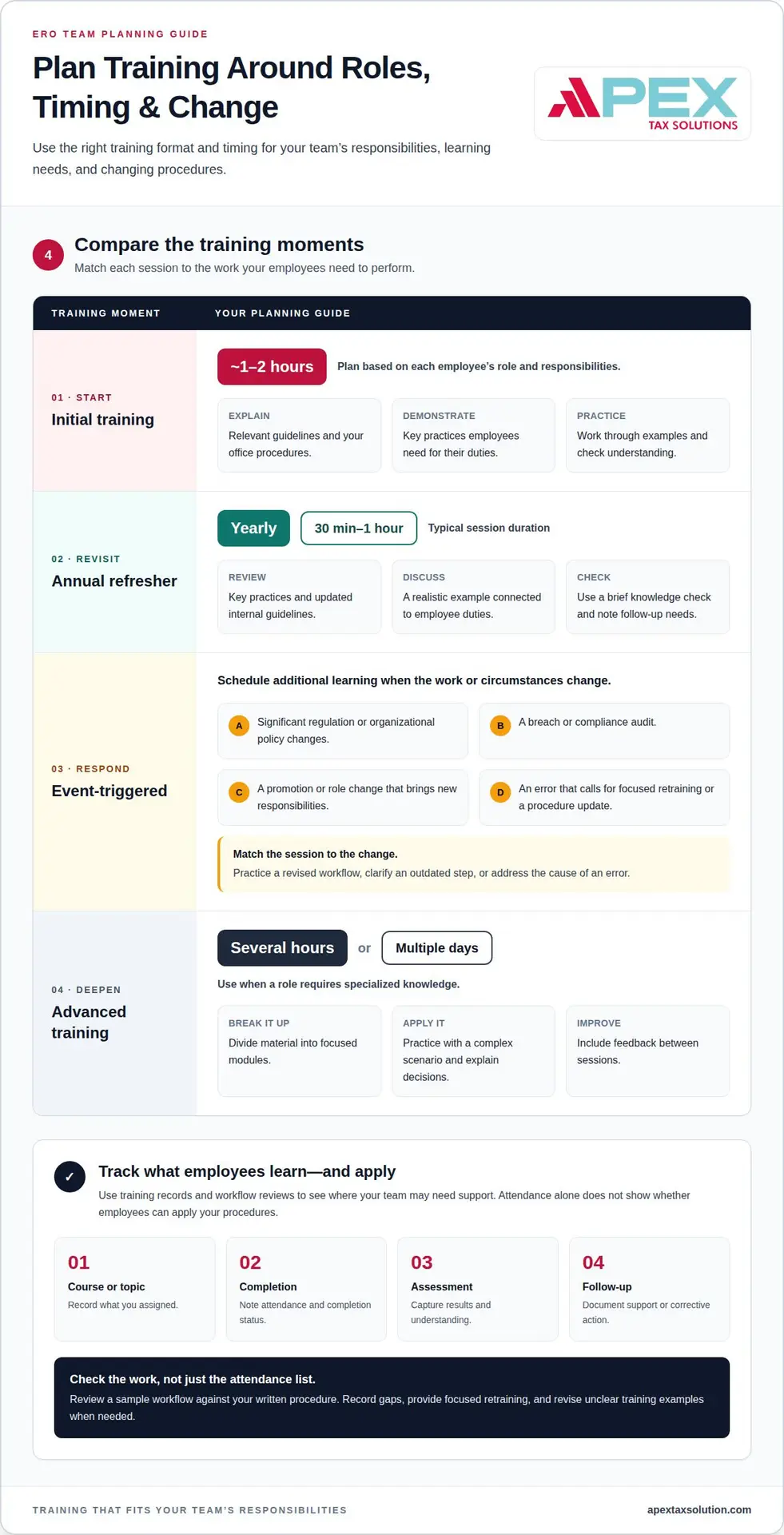
Training time should reflect the employee’s role, the topics covered, and the practice required. A new preparer learning office procedures needs a different schedule from an experienced employee handling complex compliance duties. Treat suggested durations as planning guidance and adjust sessions to your team’s responsibilities and learning needs.
For initial training, plan roughly 1-2 hours for a new employee, depending on their role and responsibilities. Use that time to explain relevant guidelines, demonstrate key practices, and let the employee work through examples. A new preparer might practice responding to a document-handling scenario, while an administrative employee may focus on their own assigned procedures.
Divide sessions into focused topics rather than one long presentation. Introduce a procedure, demonstrate it, then ask the employee to apply it in a sample situation. A short knowledge check can show whether they understand the steps or need another explanation. Record attendance and results to identify follow-up needs.
For recurring refreshers, plan a session yearly; annual compliance refresher sessions usually last 30 minutes to 1 hour. Use that time to revisit key practices, clarify updated internal guidelines, and discuss a realistic example. A short session can still be useful when employees actively work through a scenario instead of listening to a policy summary.
Keep refresher sessions focused on the employee’s duties and procedures. A preparer handling taxpayer documents may review privacy practices, while a team lead may revisit escalation steps. End with a brief knowledge check, then note questions that call for a procedure update or individual follow-up.
A calendar alone won’t capture every reason to retrain. Schedule additional learning when regulations or organizational policies change significantly, or after a breach or compliance audit. Promotions and role changes can also trigger retraining when an employee takes on new responsibilities. Match the session to the change: a revised workflow calls for practice with that workflow.
After an error, focus on its cause and the corrective action. If an employee follows an outdated step, clarify the current procedure and ask them to apply it to a similar example. If several employees make the same mistake, revise the shared training material. This addresses both individual learning needs and potential program gaps.
Advanced training may take several hours or span multiple days when a role requires specialized knowledge. Divide the material into modules, with practice and feedback between sessions. For example, an employee responsible for reviewing procedures can study a complex scenario, explain their decision, and discuss other possible responses with a trainer.
Track progress across sessions, not just completion. A schedule can show the assigned topic, attendance, assessment results, and any follow-up action. Use these records to plan the next refresher and adjust training when employee duties or practices change. If your team is refining its learning approach, explore training program planning.
Consequences of failing to provide required training
Missing a course can leave an employee unsure how to handle a real work task. A new preparer, for example, may not know which office procedure applies to a taxpayer document. That gap can lead to inconsistent handling, additional corrections, and delays for the team. The underlying issue is work employees cannot perform reliably.
Outdated training creates a separate risk. If your process changes but the program still teaches old steps, employees may follow guidance that no longer matches office practice. For example, a revised document workflow paired with an old course exercise creates a mismatch that makes consistent action harder.
Training gaps can also hinder your response when an issue occurs. If an employee cannot explain the procedure they were taught, a manager may need extra time to understand what happened. A dated course record, attendance entry, and follow-up note help establish what training the employee received and where the program needs attention.
During an internal review, missing records can make it difficult to tell an incomplete course from an incomplete record. A dashboard, for example, may show an assignment as open even though the employee attended a live session. Reconcile the attendance record with the course entry, then document the correction. Accurate records help managers assess the actual gap.
Respond promptly when an employee misses a required session. Reassign the relevant course, set a completion date, and record the follow-up. If the employee completed training but repeats the same mistake, use a focused scenario to test understanding. Address the cause, such as unclear instructions or insufficient practice.
Repeated errors across a department may indicate a broader program issue. If several employees make the same mistake, review the related course, procedure, and training example. Update the material, explain the change, and track completion. This helps prevent one unclear lesson from affecting an entire team.
Failing to provide required training can expose an organization to compliance violations. SUNY Downstate states that failure to meet its education and training requirements results in disciplinary action. That is an institutional policy, not a universal ERO penalty. Distinguish applicable official requirements from your own internal expectations.
Use a simple response path: identify the missed or misunderstood topic, assign targeted education, record completion, and assess the employee’s next attempt. For example, ask a preparer to work through the relevant office scenario after reviewing the course. Training is most useful when it connects learning to conduct and gives managers evidence of follow-through.
Demonstrating training effectiveness
Attendance shows who completed a course, not whether employees can apply what they learned. Assess understanding through a short knowledge check, a practical scenario, and a review of relevant work practices. For example, ask a preparer to explain the next step after spotting an inconsistency in a sample return workflow.
Start with clear learning objectives tied to written policies. If a course covers taxpayer information, define what employees should do when handling documents or reporting a concern. Then ask questions that test those actions rather than requiring employees to repeat policy language from memory.
Use realistic scenarios to test how employees apply what they learned. Present a sample situation, ask them to choose a response, and discuss why it fits your procedure. A privacy scenario might involve a document sent to the wrong recipient. The discussion shows whether the employee understands the process and knows when to escalate.
Keep evidence together in a training record. Include the course title, version, assigned employees, completion date, assessment result, and follow-up action. For a live session, record attendance and the scenario or exercise used. These details show what the program covered and how employees demonstrated understanding.
A completion certificate can document participation, but it cannot prove effective application on its own. Pair it with an assessment result or observed practice exercise. For example, retain the certificate alongside a completed scenario review. This gives managers a clearer picture of learning than attendance alone.
Review work processes for patterns that may indicate a training gap. If employees repeatedly miss the same step in a review workflow, compare it with the course and written policy. Determine whether the training was unclear, the procedure changed, or employees need more practice. Document the finding and response.
When a violation or mistake occurs, assess the training program without assuming it caused the problem. Identify the relevant policy, speak with the employee, and compare their action with the procedure taught. If the course omitted a necessary step, revise the material and assign targeted retraining. Record the change and completion.
Use a simple review cycle: set an objective, assess learning, observe application, and address gaps. A manager can compare assessment results with sample work, then adjust examples for the next session. This creates evidence of employee learning and program improvement while keeping records focused on relevant policies and actions.
Evidence over time matters. Healthcare compliance training should be able to withstand scrutiny. Clear assessment records, observed practice, and documented corrective steps support that standard.
Onboarding, annual, and ad hoc training schedules
A reliable schedule combines onboarding, recurring refreshers, and sessions triggered by workplace changes. An ERO office can map each course to employees’ duties and activities. A new preparer, for example, needs role-specific instruction before handling taxpayer information. Keep the schedule aligned with applicable requirements and internal procedures.
Use onboarding to introduce essential procedures before employees perform covered tasks independently. Set a sequence: explain the relevant policy, demonstrate the workflow, then use a practice scenario. A new employee handling taxpayer documents might rehearse the office’s secure handling steps. Record assignments and completion so managers can see who still needs instruction.
State requirements can affect onboarding deadlines. Maine workplaces with 15 or more employees must train new hires within 1 year, according to the Maine Legislature. Build applicable state requirements into the organization’s schedule, and account for employee location. A shared calendar can help managers distinguish a legal deadline from an internal target.
Plan an annual review as an opportunity to revisit procedures and reinforce security practices. A session can cover core topics, followed by a short scenario to help employees apply them. For example, ask staff to identify the right response when a taxpayer document reaches the wrong recipient. Treat this cadence as a planning choice, not a universal legal schedule.
Ad hoc training addresses a specific trigger instead of waiting for the next annual session. Triggers may include an internal policy change, a new employee responsibility, an audit finding, or a reported incident. If your office changes its document workflow, train affected employees on the revised steps before the new process becomes routine.
Match each session to the people and procedures affected. A role change may require targeted instruction for one employee, while a revised process may affect a whole department. Focus the session on the changed activity, demonstrate the new approach, and let employees practice it. This reduces unnecessary repetition and directs training where it is needed.
Use one training calendar to track onboarding assignments, annual refreshers, and ad hoc sessions. Include the topic, audience, due date, completion status, and follow-up action. Review it during regular management planning, then adjust upcoming sessions when policies or work activities change. This gives your organization a practical view of current training needs.
Build a role-based training schedule that fits your office’s onboarding, annual, and change-driven learning needs.
Connect completion to performance expectations. HIPAA requires training for new workforce members and after material policy changes, but does not set an annual retraining schedule.
Apex Tax Solutions
Apex Tax Solutions LLC brings tax software, training, and support together to help you strengthen your practice. As a Latino-owned, IRS-authorized e-file provider, Apex offers personalized service without call-center scripts, plus bilingual support in English and Spanish.
- Wisp & Cybersecurity Training: Support safer practices and ongoing learning for your tax office.
- Service Bureau Partner Program: Access support designed to help your business scale and retain revenue.
Choose resources that fit your goals and support your growth. Contact Apex Tax Solutions LLC to discuss tax software, training, and support for your business.
Build a Stronger Training Practice
Make learning part of how your tax office operates, not a task reserved for onboarding or tax season. Assign a clear owner, connect lessons to your team’s procedures, and revisit the plan when responsibilities or workflows change. This gives employees a practical path to build consistent habits and strengthen compliance training for EROs.
Apex Tax Solutions LLC supports tax professionals with software options including APEX Cloud Pro, APEX Cloud Pro, and Corp Software. Choose technology that fits how your office operates while keeping ongoing learning in view.
Choose a training and software partner that understands the demands of your tax practice. Contact Apex Tax Solutions LLC for guidance on the next step for your business. Keep building your team’s confidence, one practical improvement at a time.
Frequently Asked Questions
What compliance training is required for Electronic Return Originators (EROs)?
Required training depends on employees’ duties and the requirements that apply to your business. Build role-based learning around the procedures staff use, including handling taxpayer information, protecting account access, and escalating concerns. Consider state and workplace requirements that may apply to your team. A staff member who handles documents, for example, needs different practice scenarios from someone who manages office systems.
How do EROs complete IRS e-file provider training and certification?
Keep training completion separate from IRS e-file provider application or approval steps. Training can prepare you and your staff to follow office procedures, but a course certificate alone does not establish IRS provider status. Follow the current IRS e-file application instructions, and keep internal training records distinct from official application documents. This helps avoid confusion during onboarding or an internal review.
How often must EROs renew or update compliance training?
Set your schedule according to applicable requirements and workplace changes; there is no universal renewal interval for every training topic. If you revise how staff access taxpayer files, for example, update the relevant instruction before employees use the new process. Schedule recurring reviews of core practices, then assign additional learning when responsibilities change. Record the reason for each update to keep your training history clear.
What are the penalties for ERO compliance violations or data breaches?
Consequences depend on the incident, applicable obligations, and the response. Do not assume one fixed penalty applies to every ERO or data breach. Start by preserving relevant records, following your incident procedures, and identifying which systems and information were affected. Document corrective actions, such as changing access practices or retraining affected staff, and address applicable reporting obligations.
Which online ERO compliance training providers are reputable?
Look for courses that connect tax-office responsibilities with practical exercises, assess understanding, and provide completion records. Check that the material fits employees’ roles and covers the security practices your office needs. Apex Tax Solutions offers Wisp & Cybersecurity Training and Cyber Security Training for tax professionals. Use these as training resources, alongside your assessment of the requirements that apply to your business.