
Strong client relationships depend on consistent, secure processes, not just a smooth tax-season handoff. You can build trust over time by protecting sensitive information, communicating regularly, verifying client details, assessing whether each engagement is a good fit, and offering a secure way to share documents. When you set clear expectations, you can deliver more organized service.
Your clients value accurate, personal support. A thoughtful process can reduce avoidable follow-ups and help you manage your workload with confidence. Use these practical steps to safeguard client information, set a communication rhythm, confirm the details you need, and evaluate whether a relationship works for both you and your client. You’ll also learn how secure portals can organize document sharing and how tax software, training, and service-bureau support can strengthen your client experience.
Key Takeaways
- Build trust by collecting sensitive documents through secure channels and setting clear safeguards for client information.
- Use regular, personalized communication to clarify expectations and make tax-season work more manageable.
- Gather complete client details and follow up when information appears inconsistent or incomplete.
- Assess each relationship by considering the work involved, payment patterns, and the value you can provide.
- Use client portal access to organize document sharing and create a clearer process for clients and your team.
Confidentiality and quality control
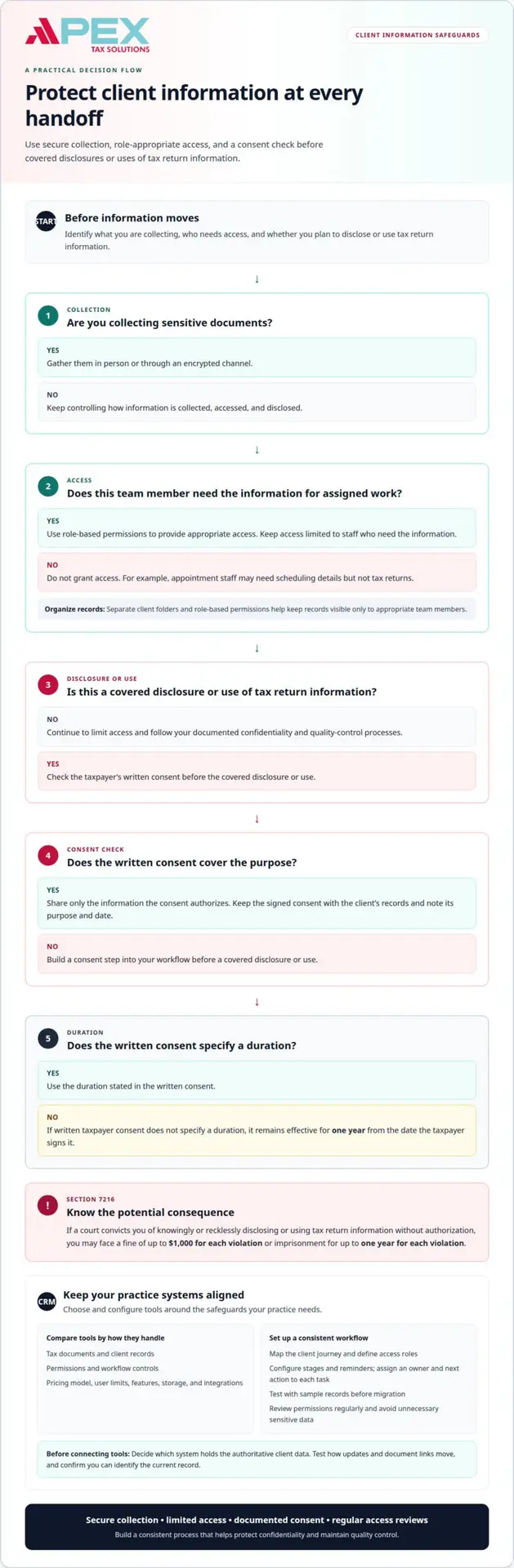
Protect client information by controlling how it is collected, accessed, and disclosed. Gather sensitive documents in person or through an encrypted channel, then limit access to staff who need the information for their assigned work. For example, appointment staff may need scheduling details but not access to tax returns. Separate client folders and role-based permissions help ensure that records are visible only to appropriate team members.
Take Section 7216 seriously. If a court convicts you of knowingly or recklessly disclosing or using tax return information without authorization, you may face a fine of up to $1,000 for each violation or imprisonment for up to one year for each violation. If written taxpayer consent does not specify a duration, it remains effective for one year from the date the taxpayer signs it.
The Internal Revenue Service provides guidance on the format and content of taxpayer consents to disclose or use tax return information for Form 1040 series filers. Build a consent step into your workflow before a covered disclosure or use. Keep the signed consent with the client’s records, note its purpose and date, and share only information the consent authorizes.
Compare general-purpose CRM software with tax-specific practice management tools based on how each handles tax documents, permissions, client records, and workflow controls. Choose the option that fits your practice’s safeguards and processes rather than relying on the product label alone.
If you work solo, choose a system you can manage consistently. If you run a larger firm, prioritize shared workflows and role-based access. CRM costs vary according to factors such as pricing model, user limits, features, storage, and integrations. Compare the total cost with the functions your team will actually use.
Before connecting a CRM to tax software, accounting tools, or email, decide which system holds the authoritative client data. Test how updates and document links move between tools, and confirm that you can identify the current record. This helps prevent duplicate entries and conflicting client details.
Set up your CRM by mapping the client journey, defining the records and access roles you need, configuring stages and reminders, and testing with sample records before migration. Use workflow stages to track leads, onboarding, deadlines, and renewals; assign an owner and next action to every task. Avoid importing unnecessary sensitive data, granting broad permissions, or automating messages before reviewing their content and recipients. Documented workflows and regular access reviews help protect confidentiality and maintain consistent quality control.
Personalized attention and regular client communication
Personalized service starts with finding out what has changed in each client’s situation. Ask focused questions rather than sending every household the same checklist. A client who started freelance work may need different follow-up from someone whose income and household remain unchanged. Review prior-year returns to spot recurring issues and prepare relevant questions before the meeting.
Set a communication rhythm that continues beyond filing season. Meeting with clients semi-annually or quarterly can spread work across the year and reduce last-minute pressure. Use a quarterly check-in to discuss recordkeeping, upcoming changes, or unanswered questions. You can also help clients get organized during these meetings, making later document collection more orderly.
Match the communication channel to the client’s preferences and the conversation. Use email for a brief scheduling update, and offer a phone or video meeting for a complex question. Direct clients to a portal for document exchange, and use an appropriate secure channel for sensitive details. Record each client’s preferred channel and use it consistently across your practice.
Ask empathetic questions when clients seem confused or stressed. Instead of asking, “Why didn’t you send this sooner?” try, “What made it difficult to gather this document?” Then agree on a practical next step, such as a short checklist of remaining records. Listen actively, clarify misunderstandings promptly, and keep your tone professional and understanding.
Set expectations in writing before beginning work. Document the service scope, deadlines, response times, and pricing, then revisit them if circumstances change. Tell clients which records you still need and when you need them to keep their returns moving. Clear messages help distinguish an urgent request from an informational update.
Communicate proactively during the busiest period for tax professionals, between December and April. Send targeted reminders about outstanding items and explain why each one matters to the client’s return. Outside that period, share timely guidance on mileage logs, receipts, or expense records. Strong client relationship management for tax preparers creates opportunities to address questions early and keep clients engaged throughout the year.
Make check-ins conversations about each client’s circumstances, not routine requests for paperwork. Personalize tax return preparation to the client’s financial situation. A personable manner can make it easier for clients to raise concerns and share changes early, encouraging them to return in future years. Follow through on what each client says and make the next discussion relevant to their circumstances.
You can accommodate your clients’ preferences through email, phone, video meetings, and portals. Whatever channel you choose, you can strengthen relationships by listening actively, clarifying misunderstandings promptly, and maintaining a professional, empathetic tone. Semi-annual or quarterly meetings can reduce tax-season pressure by spreading work throughout the year. You may include a midyear meeting in your normal fees, helping organize work while strengthening the client relationship.
Collecting and verifying basic client information
Start each engagement by asking clients for current identity, contact, household, and income details. Update records when they report changes to personal or contact information. Gather details separately for each dependent rather than entering a single household summary. For example, create an individual dependent entry, then compare it with the client’s supporting documents and prior-year return before preparing the current return.
Request and review financial documents before you begin return preparation. If a client received payments for services they provided, ask for Form 1099-MISC or Form 1099-K. Request Form 1099-R from eligible clients who received retirement income. If your client reports interest or another income source, ask which records support the amount and whether they have documents that clarify its source.
Compare reported amounts with the documents you receive instead of entering figures without review. Under AICPA Statement on Standards for Tax Services No. 3, make reasonable inquiries when information furnished for a return appears incorrect, incomplete, or inconsistent. For example, if a reported revenue amount differs from a Form 1099, ask the client to explain the difference. Record the explanation and the supporting documents you reviewed.
Ask focused questions about health coverage and unresolved tax matters. When you review a client’s health insurance coverage, request Forms 1095-A, 1095-B, or 1095-C and related details as relevant. Ask whether the client received notices or faced an audit from the IRS or state tax authorities, and whether any tax issue remains pending. If your client received advance premium tax credits, gather details needed to reconcile the advance credit with the credit they qualify to receive.
Use the prior-year return to guide follow-up questions, not to assume circumstances have stayed the same. Compare current documents with recurring items, such as retirement distributions or reported service income, then ask what has changed. If a document is missing, name the exact item and request it before continuing. This creates a clear record of what you received, what needs clarification, and which details still require client input.
Before completing intake, confirm that names, contact details, dependent entries, and supporting records align across the client’s file. Distinguish information supplied by the client from questions that still need answers. For example, mark a reported amount as awaiting clarification until you receive the relevant explanation or document. This structured review helps you catch inconsistencies early and prepare returns using information you have examined, not merely collected.
Assessing client profitability and fit
A full calendar does not always mean a healthy tax practice. Assess each relationship by comparing the time and attention a client requires with the revenue the work brings in. Include preparation, follow-up, document review, corrections, and payment collection. A straightforward return that arrives complete, for example, may require less staff coordination than one involving repeated requests and unresolved questions.
Review each relationship using consistent factors rather than judging it by one difficult interaction. Consider the services used, time required, payment timeliness, fee disputes, fee recovery, and potential to provide additional value. A client who pays late but responds well to a clear payment process may still be a good fit. Repeated disputes and extensive unpaid work may signal that the relationship needs a different scope or decision.
Track practical signals in each client file: the work requested, time spent, missing information, extra meetings, and whether invoices are paid on time. Use these records to identify patterns across returns and client types. If a particular subject area repeatedly requires expertise your practice lacks, assess whether training or a narrower service focus makes sense.
Specialization can improve efficiency when there is a viable market for the work. For example, if you regularly serve independent contractors, you can refine your intake questions and document workflows for that group. A focused practice can build repeatable processes, but the segment should fit your skills, capacity, and business goals. Review results over time, including the effort required to serve clients well.
Some demanding relationships may signal an unmet need rather than a poor fit. A client who asks complex questions, resists standard processes, or needs substantial explanation may benefit from advisory or consulting services. Explain how that work could support the client’s business goals, using examples relevant to their situation. Define the proposed scope clearly so both sides understand what the service covers.
If a relationship remains unproductive, ending it can free capacity for suitable clients and reduce staff strain. First review the engagement terms, outstanding work, payment history, and records needed to close the file responsibly. Document the decision and communicate it professionally. If the client’s needs exceed your expertise or capacity, a clear boundary protects service quality and helps you focus on work your practice can handle effectively.
When implementing effective client relationship management for tax preparers, it is essential to cultivate a client base that aligns with your capabilities and priorities. Apply the same review to your practice as a whole: compare the demands of each market segment with its revenue, and consider whether the work fits your capacity. You can improve efficiency by focusing on a market segment or area of expertise, provided there is a viable market. The goal is not to retain every engagement, but to choose work you can handle well and sustainably.
Apex Tax Solutions LLC may benefit from ending relationships when the workload is too high relative to the revenue generated. Before making that choice, consider whether a revised scope or a better-defined process would address the imbalance. If not, a professional transition can make room for clients who better match your expertise, capacity, and goals.
Client portal access
A client portal gives each engagement a designated place for exchanging documents and tracking requests. It can reduce scattered attachments and help you see which items remain outstanding. For example, a client can upload a wage statement to the relevant tax-year folder, while your team records whether it has been reviewed. Explain how clients should use the portal before requesting documents.
For client relationship management, prioritize CRM features that connect client profiles, communication history, document requests, task tracking, and deadlines. Access controls and a clear record of completed steps also help your team coordinate each engagement without relying on separate notes.
Organize portal folders by client and tax year, then group requested records by category. Separate folders for income documents, deductions, and follow-up questions can make the process easier to understand. Use consistent labels, such as “received,” “needs clarification,” and “reviewed,” so staff can identify the next action quickly.
Automated reminders can prompt clients about missing documents or approaching tax-season deadlines. Set each reminder to match a specific workflow stage, such as an initial request followed by a notice that one item remains outstanding. Review the wording and recipients before enabling automation, especially if a message could reveal sensitive information.
Give clients simple portal instructions, including where to sign in, how to upload a readable file, and whom to contact about login trouble. A short example can prevent confusion: ask clients to upload each document as a separate file instead of combining unrelated records. Keep instructions accessible for clients who prefer phone or email updates.
Assign portal tasks to named team members and record progress in the client’s workflow. If a document arrives with an unclear figure, mark it for follow-up rather than treating the request as complete. A reviewer can then see what arrived, what needs attention, and who owns the next step. This creates a practical quality-control trail without making clients repeat information.
Review portal access when an engagement ends or responsibilities change. Remove access that no longer serves the work, and retain records according to your firm’s policies. Test the client view before inviting anyone, so you can confirm that instructions, folders, and requests make sense. Plan a clearer client portal workflow around the steps your practice needs.
Apex Tax Solutions
Partner with Apex Tax Solutions LLC to strengthen your tax practice with software, support, and training. Whether you’re refining client workflows or building capacity to serve clients consistently, our Service Bureau Partner Program may be a fit. You can also explore Corp Software to support your practice’s operations.
Strong client relationships depend on repeatable processes and informed support. Aligning your tools with your team’s training can help you manage client work consistently. Contact Apex Tax Solutions LLC to discuss support for your tax practice.
Build a practice ready for what’s next
Make your next step a practical investment in how your practice serves clients. A consistent approach to client relationship management for tax preparers can evolve as your team, workflows, and client needs change. Choose tools and support that fit how you work today and give your practice a foundation to adapt.
Apex Tax Solutions LLC offers APEX Cloud Pro and APEX Corporate Desktop Premium for tax professionals. Consider how these options align with your practice, then decide where additional support could help you build sustainable processes and continue developing your business.
Whether you’re refining your current workflow or preparing for a new stage of growth, a clear conversation can help you identify a useful next step. Contact Apex Tax Solutions LLC to discuss support for your tax practice. Keep building with purpose, and create a client experience your business can grow with.
Frequently Asked Questions
What are the best CRM software options for tax preparation firms?
The right system supports your firm’s workflow without creating duplicate records. Compare client tracking, task assignment, document handling, access controls, and how the CRM works alongside your tax software. If you’re a solo preparer, you may prioritize a simple, manageable workflow; if you run a larger firm, you may need shared task visibility and staff permissions. Test a typical client journey before moving active records.
What data security and privacy requirements apply to CRM systems used by U.S. tax preparers?
Choose a CRM process that protects your tax return information and limits access to authorized work. Under Internal Revenue Code Section 7216, unauthorized use or disclosure can carry penalties for a convicted preparer. The Internal Revenue Service provides guidance on taxpayer consent format and content for certain disclosures or uses involving Form 1040 series returns. Document your access decisions, train your staff on handling records, and review permissions as roles change.