The most feature-rich portal may not be the right fit for your tax office. The most useful client engagement tools for tax offices connect secure document exchange, clear client updates, and team collaboration in a workflow your staff and clients can actually use.
Scattered messages and missing documents can slow tax work down. Client engagement tools for tax offices bring key interactions together, helping you guide each return from onboarding through follow-up with fewer handoffs.
This guide explains which features matter in a tax workflow and how to match them to your office’s needs. Compare client portals, secure messaging, document collection, e-signatures, workflow automation, and integrations, then use a practical decision guide to narrow your options. The aim is a connected process for individual and business returns, with clear communication and next steps.
Key Takeaways
- Prioritize a secure portal that brings document requests, client updates, and reusable templates into one clear process.
- Choose collaboration features that help your team track work across individual and business returns without scattering files and reminders.
- Look for secure messaging that keeps client conversations connected to preparation tasks and engagement documents.
- Assess onboarding forms, signatures, billing, and integrations as part of the full client workflow, not as isolated features.
- Match your software setup to the returns you prepare and the way your team works, including where it needs support and training.
Client portals and secure document exchange
A useful portal gives you one place for intake, document requests, and updates. Compare how each option handles access, reminders, templates, and connections to your tax software.
Document Collection and Reminders
Document collection tools help you organize requests by client and return type. You may request income records for an individual intake, while a business return may require accounting documents. Reusable templates help your staff start consistently, and automated reminders can prompt clients about missing items instead of making your staff track each request manually during tax season.
Some platforms focus on file collection; broader workflow systems connect requests to task tracking and client communication. Look for reminders tied to specific requests, so you can send clients relevant prompts rather than general messages. Organizers and questionnaires can gather answers alongside documents, keeping intake details connected to your return.
Client Portal Document Exchange
A client portal gives you and your clients a shared space to exchange documents and updates. Clients upload files, and your staff organize them by client and return. Secure file sharing, audit trails, and e-signatures make it easier for you to trace exchanges than scattered email attachments. Unlike a request-only tool, a portal gives your clients a place to return for ongoing communication.
Reusable templates for engagement letters, questionnaires, and document requests make it easier for you to manage recurring processes. Your staff can adapt a template to a client’s situation instead of rebuilding each request. Keep access instructions clear and group related forms together so your clients can complete intake without searching through separate messages.
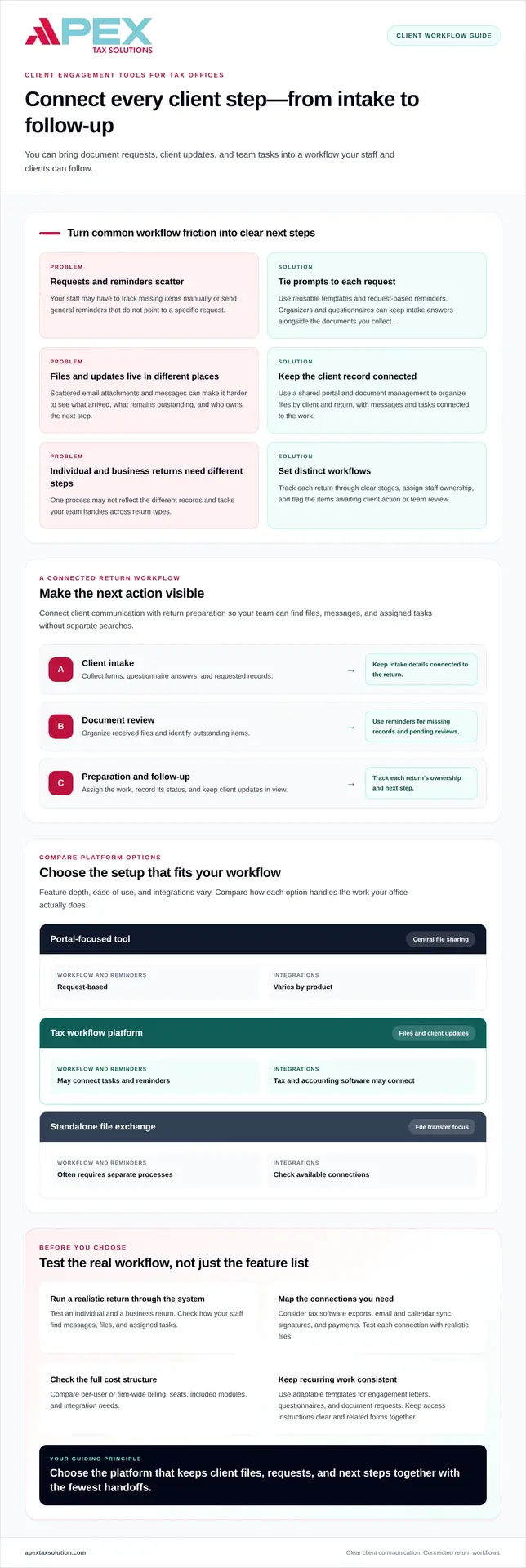
Feature depth, ease of use, and integrations vary by platform. Portal-focused tools emphasize document exchange; broader workflow platforms may connect requests, reminders, and task tracking. A platform may include e-signatures, organizers, automated reminders, and appointment scheduling, or you may need connected tools to provide them, so compare the actual workflow, not just feature labels.
| Platform option | Document exchange | Workflow and reminders | Integrations |
|---|---|---|---|
| Portal-focused tool | Central file sharing | Request-based | Varies by product |
| Tax workflow platform | Files and client updates | May connect tasks and reminders | Tax and accounting software may connect |
| Standalone file exchange | File transfer focus | Often requires separate processes | Check available connections |
List the connections your process needs, such as tax software exports, email and calendar sync, signatures, or payments. Test them with realistic files and workflows: a listed integration helps you only if it fits how your office works.
Pricing may be per user or firm-wide, with seats, included modules, and integration needs affecting costs. Compare the billing model with the features your team will use, including whether you get document collection, reminders, and signatures in a bundle or need separate tools.
Choose the platform that keeps your client files, requests, and next steps together with the fewest handoffs.
A single client collaboration system for your individual and business tax returns
Choose client engagement tools that connect your client communication with return preparation. Look for a system that brings portals, messaging, document sharing, and tax tasks into one workspace so you don’t have to scatter updates across separate tools.
Set up distinct workflows for your individual and business returns, then track each through clear stages. You might move an individual return from intake to document review and preparation; your business workflow may add accounting records and entity-specific tasks. Assign work to staff, record its status, and use reminders to flag items awaiting client action.
Use shared document management to connect files to the right client and return. Your staff can sort individual income documents separately from a business return’s accounting files. A central record also shows your colleagues what has arrived and what remains outstanding, helping you prevent duplicate requests when work changes hands.
- Workflow: Assign ownership and track each return’s next step.
- Reminders: Prompt your clients about missing records and your staff about pending reviews.
- Payment: Connect payment status to your client’s engagement or workflow record.
Integrations determine how well a collaboration system fits your tax software and office processes. Map the information you need to move between systems, including client records, return exports, email, calendar events, signatures, and payments. Test each connection with realistic files and a sample workflow before expanding its use across your firm.
Some tax practice platforms include client portals, messaging, and document sharing; others connect these features through integrations. Evaluate client engagement tools for your tax office by testing how each option handles an individual and a business return, including where your staff find messages, files, and assigned tasks. A connected system should make the next action visible without requiring separate searches.
Roll out changes at a pace your team can support. A contained pilot, such as a group of 1040 renewals, can reveal workflow gaps before you launch firm-wide. Define success measures first, map records for migration, remove duplicate client entries, and test exports into your tax software. Staff training and process refinements help you shape the system around actual work.
Choose a system that connects workflow tracking, document management, reminders, integrations, and payment visibility for the returns you prepare. Test it with realistic individual and business files to see whether those connections work in practice.
Client communication and secure messaging
Secure messaging keeps your preparation questions linked to the client and return they concern. For example, you can clarify an engagement letter or request an accounting record in a conversation tied to the relevant work.
IRS and FTC requirements depend on the rules that apply to your firm and the information you handle. A messaging feature alone does not establish compliance; you need communication practices and safeguards suited to your obligations.
Email and consumer messaging apps can scatter tax-related details across your inboxes, devices, and attachments. You could expose information or make it harder to track which version a client received if you mistype an address, forward a message, or copy it to a personal device.
Choose a secure messaging workflow that keeps conversations linked to the client record. You and your staff can find a question about an engagement letter, follow its resolution, and continue preparing the return without searching unrelated message threads.
- Preparation: Keep client answers beside the task they clarify.
- Engagement letters: Track questions and follow-ups with the relevant document.
- Returns: Connect communications to the correct client and tax matter.
- Compliance: Apply consistent access and record-handling procedures.
Before implementation, map how your tax office communicates at each stage. Identify where your staff discuss intake, request missing details, resolve preparation questions, and share return updates. Then configure message categories and staff access to fit your processes.
For example, you may need a reviewer to see a preparer’s question about accounting records while another staff member handles scheduling. Clear assignments help you prevent duplicate requests and keep each response tied to its purpose. If your platform records activity, you can use audit trails to see who sent or received a message and when.
Train your staff to use the secure channel consistently. Cybersecurity training can help your staff recognize risks such as suspicious links, misdirected messages, and unsafe file handling. Pair training with simple procedures: confirm the client record, keep sensitive details out of unrelated messages, and move return-specific discussions into the designated workspace.
During implementation, test the communication flow with a sample engagement letter and preparation question. Confirm that your staff can find the conversation, identify its client, and continue the return process without switching to personal messaging. A consistent process gives you a clearer record of client communication through preparation and follow-up.
Staff members at Apex Tax Solutions LLC can avoid the inefficiencies caused by switching between disconnected tools. When you compare tax workflow platforms, look for unified communication, smart document collection with automated reminders, workflow automation, and integrations with tax and accounting software. Consider how each capability fits the communication path you mapped, from intake through preparation and client updates. Keep your evaluation tied to your firm’s actual process, including who needs access to messages and where document requests belong.
A client portal for tax resolution work also supports secure document exchange and client updates. Include these in your communication plan, along with assigning messages to the right client record and applying consistent access and record-handling procedures. Make sure your staff know which channel to use for a document request, preparation question, or return update, and how to keep each exchange connected to the relevant work. A clear workflow makes the system easier for you to use and keeps communication linked to the tasks it supports.
Client onboarding and customizable forms
A structured onboarding process helps you move each new engagement from initial intake to active preparation. For example, you can use a workflow-driven form to collect contact details, return type, preferred communication method, and authorization to proceed in one sequence.
Customizable forms let you tailor questions to the work involved. You can ask about dependents and income sources on an individual intake, while a business questionnaire can collect entity details and accounting contacts. Use conditional fields where available so your clients see relevant prompts instead of a long, generic form.
Templates also help you keep engagement letters consistent. Create a standard starting document, then adapt its scope, services, and client details for each engagement. Add a signature step to see whether your client has completed the agreement, helping your staff distinguish signed engagements from those awaiting action.
- Intake: Collect information that helps your staff route work correctly.
- Forms: Tailor questions to each client and return type.
- Signatures: Track completion alongside each engagement record.
- Billing: Keep invoice and payment status visible to your assigned staff.
Keep invoicing and billing linked to each engagement record. Your staff can associate an invoice with the agreed service and see whether it is open or paid. If your platform connects to payment processing, check how it displays payment status in the workflow and which staff members can view it.
During tax season, you can support collaboration with clear ownership. Assign an intake coordinator to review submitted forms, a preparer to handle return work, and an office manager to follow billing tasks. Shared status indicators help everyone see the next step without relying on separate spreadsheets or repeated internal messages.
Build onboarding around the sequence your office actually follows. Start with intake, route the engagement letter for signature, assign preparation tasks, and link invoicing to each engagement. Test the process with a sample individual and business client to catch missing fields or unclear handoffs.
Before you adopt customizable forms, review how edits affect existing templates and active engagements. For instance, make sure a change to an income question does not remove a required prompt from another form. Use clear version labels and staff guidance to keep updates consistent across your team.
Choose onboarding tools that make each step visible to the right people. When you organize forms, signatures, invoicing, and collaboration around a defined process, your team can manage client work with fewer avoidable handoffs.
What client engagement tools can you use for your tax office in 2026?
No single tool suits every tax office. Compare options by how well they connect your client communication, return work, and staff processes. A portal-centered platform may suit your document exchange, while a broader practice system can link several client tasks.
Use the comparison below to match each category to a specific need, such as managing your individual return intake or coordinating your business engagements.
| Tool category | Strong fit | Trade-off to consider |
|---|---|---|
| Tax workflow platform | You can connect client tasks with return processes | You may find that integration depth varies |
| Client portal | You can centralize file exchange and updates | You may need separate task tracking |
| Tax preparation suite | You can support return preparation work | You may find that engagement features are limited |
| Accounting practice management system | You can organize assignments and deadlines | You may need to configure tax-specific steps |
| Customer relationship management system | You can track client history and follow-ups | You may need to set it up for return workflows |
| Secure file-sharing tool | You can move documents between clients and staff | You may find that it doesn’t manage engagement tasks |
| E-signature service | You can route engagement documents for signing | You may need to connect it to your client records |
| Scheduling and payment tools | You can coordinate appointments or payment steps | You may need to manage handoffs between systems |
If your firm handles individual and business returns, start by testing your workflow coverage. Follow an individual intake from the first request through preparation, then test a business engagement with accounting records and assigned staff tasks. Note where each option stores your messages, tracks progress, and links files to the right client.
Next, assess integrations using your real files and a realistic process. Confirm that required exports reach your tax software, then test your email, calendar, signature, and payment connections. A feature list cannot show whether information transfers cleanly between the systems your team uses.
Ease of use depends on how clearly your staff and clients can complete routine steps. Ask a preparer to find a client update, locate an uploaded document, and identify the next task. Have a client complete a sample intake and return a requested file. These tests reveal friction that a feature checklist can miss.
Choose a connected tax workflow platform if your priority is coordinating communication, documents, and preparation tasks. Separate tools may suit a focused need if your office can manage the handoffs. Define your success measures before a limited pilot, then use the results to guide a wider rollout.
APEX Tax Solutions: Software, Support, and Training
Choose Apex Tax Solutions LLC for tax software and practical business support in one place. Match your setup to the returns you prepare, then build your processes with software guidance and professional training.
For remote or multi-office teams preparing individual returns, you can use APEX Cloud Pro, a 100% cloud-based, 1040-only solution. Its flat $999 season price has no per-return fees. If your office handles business-entity returns, choose APEX Corporate Desktop Premium, a Windows-installed suite with offline capabilities and local data control. It supports established offices preparing returns such as 1120 and 1065.
You can also build operational support around your software choice. The Service Bureau Partner Program supports tax business owners who want to develop their practice, while personalized service gives you a human point of support instead of call-center scripts. Training helps you and your staff use your chosen tools with confidence.
- Remote 1040 workflows: Use APEX Cloud Pro across remote or multi-office teams.
- Business-entity returns: Choose APEX Corporate Desktop Premium for entity preparation and local data control.
- Practice growth: Use service-bureau support and training as you develop your business.
- Client engagement: GHL for Tax Offices supports client communication and office engagement workflows.
When you work with Apex Tax Solutions LLC, you partner with a Latino-owned business that has operated since 2015 and is an IRS-authorized e-file provider. You can access bilingual support in English and Spanish, helping you serve clients and staff who prefer either language.
Add WISP and cybersecurity training to your professional learning plan. It helps your office address cybersecurity education alongside tax software and operational support, connecting these needs to your broader business development.
If you prepare individual returns with a remote team, APEX Cloud Pro offers a cloud-based workflow. For business-entity preparation with local data control, APEX Corporate Desktop Premium provides a desktop option. The Service Bureau Partner Program can support you as you develop your tax business.
Contact Apex Tax Solutions LLC to discuss which software and support fit your tax office.
Frequently Asked Questions
What features should you look for in a tax workflow platform?
Prioritize features that help you track ownership and progress for each client. Choose a platform that shows who handles a task, what information you still need, and what action comes next. For example, you should be able to tell whether a return is awaiting client details or ready for review. Also assess staff permissions, search tools, and how the platform flags failed integrations or incomplete steps.
What Are Client Communication Platforms for Accounting Firms?
Use a client communication platform to coordinate conversations and related work in one managed space. Depending on the product, you may find messaging, appointment coordination, client records, and links to engagement tasks. You could route a scheduling question to your office coordinator while keeping a preparation question with the assigned tax professional. Link conversations to client work rather than relying on separate inboxes.
How do you securely collect and share sensitive client documents online?
Use an access-controlled client portal and establish a consistent document-handling process. Direct each client to the correct account, limit staff access to appropriate roles, and confirm that uploaded files appear under the intended client record. Give files clear names, such as “2025 income statement,” so your staff can identify them. Follow your office’s retention and access procedures, and train employees to avoid sending sensitive attachments through personal accounts.
How can you choose and implement a client engagement platform?
Choose a platform by testing the work your staff actually do, then plan a staged rollout. Assign an implementation lead, define staff roles, and decide which active client records to move first. During training, have employees complete common tasks with sample accounts, such as finding a client message or assigning a follow-up. After launch, review staff feedback and recurring delays, then adjust procedures and training.