
What if the hardest part of protecting taxpayer data isn’t choosing a security tool, but making sure your whole office uses it consistently? The IRS security guidelines for tax professionals can feel broad when you’re responsible for staff, devices, email, and remote access. You need clear steps, not another vague reminder to “be secure.”
IRS resources can help you understand recommended safeguards, while other federal requirements may shape your responsibilities. This checklist shows you how to apply that guidance to your tax practice, review your safeguards, and keep useful records of the steps you take. It also helps you build a year-round routine your team can follow.
You’ll find practical steps for your Written Information Security Plan (WISP), key security controls, staff procedures, and review records. Apex Tax Solutions LLC provides WISP and cybersecurity training to help your staff understand and follow office security procedures consistently. With clear ownership and regular check-ins, you can make security a manageable part of running your practice.
Key Takeaways
- Understand how IRS security guidelines for tax professionals fit alongside other requirements that may apply to your practice.
- Turn the IRS Security Six into office actions by assigning owners and retaining evidence of your safeguards.
- Connect your WISP policies to risks, controls, responsibilities, and regular reviews.
- Assess how you manage vendor access, remote work, staff changes, suspicious messages, and possible data exposure.
- Build a year-round routine for reviewing access, checking backups, refreshing staff knowledge, and updating your plan.
What IRS Security Guidelines for Tax Professionals Cover
Your practical goal is to protect taxpayer data with documented policies and safeguards that work in daily operations. The IRS security guidelines for tax professionals offer resources and recommendations to help shape your approach. They don’t, by themselves, define every legal requirement that may apply to your business.
Security guidance explains protective practices, a WISP documents your security program, and day-to-day controls put that program into action. A written plan can assign responsibilities and describe procedures, but it can’t protect information unless you implement and maintain the safeguards it outlines. For example, a policy may require secure access to taxpayer records; your office still needs to apply that policy to staff accounts, devices, and work routines.
Which official guidance should a tax professional review?
Start with current IRS resources for tax professionals, including Publication 4557, Safeguarding Taxpayer Data. This publication offers guidance to help you protect taxpayer information. The IRS Security Summit also provides security education through initiatives such as “Protect Your Clients; Protect Yourself,” which can help you recognize risks and strengthen office practices.
Use these resources as a starting point, and check the latest IRS pages before relying on a recommendation or publication detail. Guidance can change, so record what you reviewed and when. That record connects your office procedures to the resources informing them and gives you a reference when your technology or workflow changes.
How do IRS guidance, a WISP, and FTC requirements relate?
A Written Information Security Plan, or WISP, describes how your organization manages information security. Federal requirements may also apply under the Gramm-Leach-Bliley Act and the FTC Safeguards Rule, depending on your business activities. Don’t assume every requirement applies in the same way to every tax practice. Assess your organization’s circumstances and seek qualified guidance when you need help interpreting legal obligations.
Keep these materials distinct. IRS publications provide tax-professional security guidance. A WISP records your office’s approach, including who handles security responsibilities and how you review risks. Your controls are the measures and routines you put into operation. A template can help organize a plan, but it doesn’t automatically satisfy every applicable obligation or show that your safeguards work as intended.
- Use IRS resources to inform your security decisions, and check for current versions.
- Document your program in a WISP that reflects your practice and responsibilities.
- Put policies into action through safeguards and repeatable staff procedures.
APEX Tax Solutions provides WISP and cybersecurity training to help your team understand office procedures and follow them consistently. Treat guidance, documentation, and implementation as connected parts of your security approach, not interchangeable paperwork.
IRS Security Six Checklist: Put Core Safeguards Into Practice
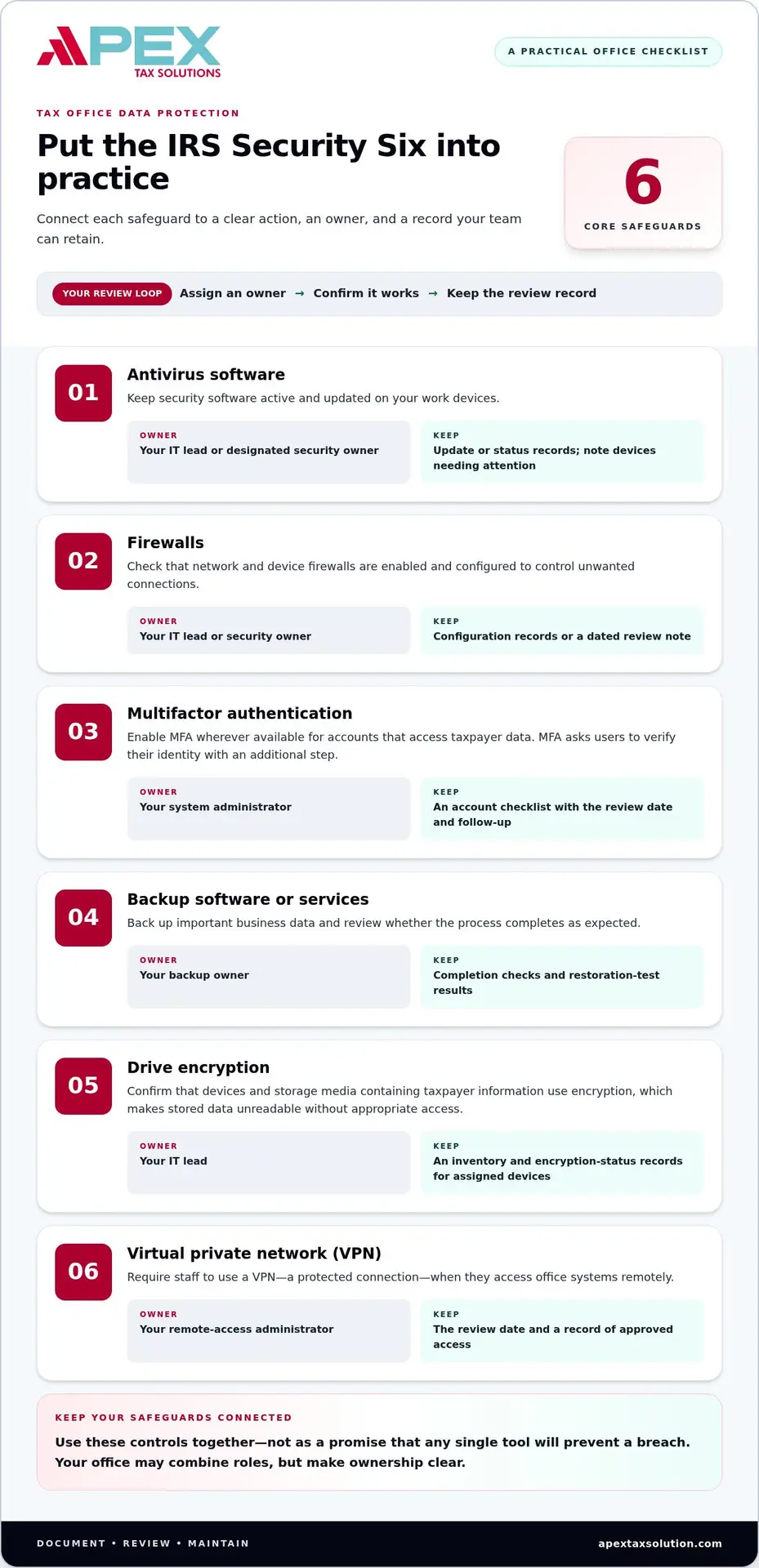
The IRS Security Six gives you a practical starting point for reviewing core protections in your tax office. Treat these measures as connected safeguards, not as a promise that any single tool will prevent a breach. Assign an owner to each control, confirm it works, and keep a record of the review.
Layered controls reduce your reliance on any single safeguard by giving your office multiple ways to protect taxpayer information. Use this checklist to connect each control to an action, a responsible role, and evidence you can retain. Your office may combine roles, but make ownership clear.
- Antivirus software: Keep security software active and updated on work devices. Your IT lead or designated security owner can review device status. Retain update or status records and note any device that needs attention.
- Firewalls: Check that network and device firewalls are enabled and configured to control unwanted connections. Assign the review to your IT lead or security owner, and retain configuration records or a dated review note.
- Multifactor authentication: Enable multifactor authentication (MFA), which asks users to verify their identity with an additional step, wherever available for accounts that access taxpayer data. Your system administrator can review coverage; retain an account checklist with the review date and any follow-up.
- Backup software or services: Back up important business data and review whether the process completes as expected. Your backup owner can record completion checks and restoration-test results, so your team understands how to retrieve needed files.
- Drive encryption: Confirm that devices and storage media containing taxpayer information use encryption, which makes stored data unreadable without appropriate access. Your IT lead can maintain an inventory and encryption-status records for assigned devices.
- Virtual private network (VPN): Require staff to use a VPN, a protected connection, when they access office systems remotely. Your remote-access administrator can review enabled accounts and settings; retain the review date and a record of approved access.
Check access, passwords, and authentication
Pair MFA with individual accounts and sensible password practices. Avoid shared logins when you can assign unique accounts, and review who can access tax software, email, file storage, and other systems holding client information. When someone changes roles or leaves, assign an administrator to update or remove access promptly. Keep a dated access-review record that names the reviewer and lists any remaining follow-up actions.
Protect devices, email, and taxpayer files
Security tools work best when staff know how to use them. Ask employees to pause before opening unexpected attachments or responding to requests for taxpayer information. They should verify unusual requests through a trusted channel. A designated training owner can record refreshers and attendance. Your backup owner should also make sure staff know who to alert if a file is missing or a restore is needed.
APEX Tax Solutions offers WISP and cybersecurity training to help your team follow office security procedures consistently.
Build a Tax Office WISP That Connects Policies to Controls
A useful Written Information Security Plan (WISP) should describe how your tax office actually handles information, not just how you hope it works on paper. Build it around your software, devices, vendors, and staff workflows so each policy points to a practical action and someone who owns it.
A useful WISP connects taxpayer information and identified risks to assigned responsibilities, working safeguards, and controls you review regularly. Use the plan as an implementation tool: it should tell your team what to do, who does it, and what evidence to keep. It doesn’t replace carrying out the procedures or assessing requirements that apply to your organization.
Document the data, risks, and people responsible
Start by tracing taxpayer information through your office. Note where it enters, such as a client portal or email; where staff use it, such as tax software or a workstation; and where your office stores it, including backups and paper files. Include vendors or services that can access information. This inventory shows you the pathways your safeguards need to cover.
Next, identify risks tied to those workflows. Consider whether staff send documents through email, use office devices remotely, or share access with a service provider. Describe each risk in plain language, then name the safeguard your office uses to address it. Replace broad statements such as “protect all data” with procedures that guide specific actions.
- Identify information: Record the types of taxpayer data your office handles and where they move or reside.
- Assess risks: Note relevant exposure points in software, devices, vendors, and staff routines.
- Select safeguards: Connect each risk to a specific policy or control your office can carry out.
- Assign owners: Name who approves security decisions and who performs routine checks.
- Document and review: Keep the plan, evidence, review dates, and follow-up actions together.
Make the written plan reflect actual office practices
Compare each procedure with what staff really do. If your WISP says employees store client files in an approved location, check that the team uses it instead of personal email or an untracked device. If a vendor needs access, document who approves it, what access the vendor receives, and who reviews it. When software, staffing, or workflows change, revisit the related policy and safeguards.
Keep evidence simple and useful. A dated access review, a staff-training record, a note that you updated a procedure, or a list of unresolved tasks can show how your office manages the plan. Include the responsible role and date so you can see who completed each action and when the next review is due.
Staff learning supports consistent execution. APEX Tax Solutions offers WISP and cybersecurity training, and its cybersecurity training guide for tax offices can help you connect staff education with written procedures. Use training to clarify how your team should handle real office tasks, then update your plan when a review reveals a gap.
Tax Professional Security Checklist for Vendors, Remote Access, and Incidents
Your security procedures need to cover more than routine device checks. Vendors, remote staff, changing roles, and suspicious messages can all affect how taxpayer information moves through your office. Use the table to make each scenario actionable: name a control, assign an owner, and retain evidence of what you reviewed or did.
| Scenario | Control to review | Owner | Evidence to retain |
|---|---|---|---|
| Vendor access | List vendors that handle, store, or can access taxpayer information. Confirm each vendor’s access matches its assigned work. | Security lead or vendor relationship owner | Vendor inventory, access approval, and review date |
| Remote work | Review remote accounts and connection procedures. Remove access that staff no longer need. | System administrator | Remote-access review and follow-up record |
| Staff role change or departure | Update permissions when responsibilities change or employment ends. | Manager and account administrator | Change request and access-removal confirmation |
| Suspicious message | Give staff a clear way to report unexpected links, attachments, or requests for information. | Security lead or designated staff contact | Report log and response actions |
| Suspected data exposure | Follow your incident procedure to assess the concern, limit further access where appropriate, and record decisions. | Incident lead | Incident timeline, actions taken, and notification decisions |
Review vendors and remote-work access
Keep vendor oversight tied to actual workflows. Record what information each vendor can access, why that access supports your work, and who approves it. Revisit permissions and vendor arrangements when you change systems, add a service, or shift staff responsibilities. For repeatable document handling, connect secure file steps to your tax office workflow automation guide so staff can follow a consistent process.
Prepare staff to report and respond to security incidents
Tell staff exactly who to notify if they suspect account misuse, receive a suspicious message, or misplace a device. Keep the first report simple: what happened, when the employee noticed it, and which device or account may be involved. Your incident lead can coordinate next steps, document containment actions, and preserve records of decisions.
Separate routine reviews from incident response. A scheduled access check helps you identify and correct ordinary permission issues; a suspected exposure calls for a prompt, documented response. Don’t assume one report or timeline covers every situation. Verify current IRS, FTC, and applicable state guidance for notification duties, deadlines, and thresholds before deciding what your office must report.
The IRS security guidelines for tax professionals are easier to put into practice when your staff know how to escalate concerns and your office records who made each decision. APEX Tax Solutions offers WISP and cybersecurity training to support consistent staff procedures.
Make IRS Security Guidelines a Year-Round Tax Office Routine
Security practices hold up when you make them part of regular office work, not a once-a-year paperwork exercise. Use the IRS security guidelines for tax professionals as a reference, then set a review rhythm that fits your operations. Assign an owner to each task and record completion, open issues, and next steps.
Your schedule can follow the tax year without adding unnecessary complexity. A short review before filing season helps you prepare; brief checks during busy periods keep procedures active; and a post-season review lets you capture lessons while workflows are still familiar.
Assign owners and schedule recurring reviews
Give each safeguard a named owner, even if one person handles several responsibilities. Set calendar reminders so routine checks don’t depend on memory. Use this cadence as a starting point, then adjust it to your office’s systems and workflow:
- Before filing season: Review staff accounts and access, check device security status, confirm backup procedures, and make sure your written plan reflects current systems and vendors.
- During filing season: Follow your routine backup and access-check schedule. Record exceptions, such as a new staff member, a changed role, or a system issue, and assign someone to resolve each one.
- After filing season: Review what changed, close out temporary access, document gaps or incidents, and update procedures that no longer match how your office works.
Don’t wait for a scheduled review if your business changes. Revisit access when staff responsibilities shift, review safeguards when you introduce a new system, and update your WISP when vendors, processes, or identified risks change. Keep a concise record with the date, owner, result, and follow-up action. This makes the routine easier to repeat and helps you see whether an issue remains open.
Use training to reinforce secure daily habits
Technical safeguards need staff participation. Refresh your team’s understanding of phishing, secure information handling, and incident reporting, then connect each topic to the procedures your office actually uses. For example, staff should know where to send a suspicious message for review and which approved process to use when handling client documents.
Keep a simple training record with the date, attendees, and topics covered. Use it to identify subjects that need another explanation, especially when you change systems or revise a procedure. Training supports implementation, but it doesn’t replace technical safeguards, assigned reviews, or checking current IRS and other applicable guidance.
APEX Tax Solutions offers WISP and cybersecurity training to help you reinforce consistent office practices. Explore APEX WISP and cybersecurity training to support your team as you build a security routine that continues beyond filing season.
Make Security Part of How Your Practice Grows
Your security approach can grow with your practice. As you add staff, change workflows, or adopt tools, review how your team handles taxpayer information and whether procedures still match daily work. The IRS security guidelines for tax professionals can help frame those reviews, alongside current guidance that applies to your practice.
Turn that intention into a manageable routine. Choose a recurring time to review open security tasks, note changes that affect your procedures, and assign an owner to each follow-up. Small, documented adjustments help keep security practices connected to how your office operates instead of letting procedures fall behind as the business changes.
You don’t have to build those habits alone. APEX brings tax software, service bureau support, and professional training together, including WISP and cybersecurity training for tax offices. That support can help you make staff learning part of your operating rhythm, not a one-time event.
Choose one next action today: assign an owner to an open task, schedule a review, or refresh a procedure your team relies on. For support as you strengthen those habits, Explore APEX WISP and cybersecurity training. Keep moving forward with a clear process and a team that knows its role.
Frequently Asked Questions
What are the IRS Security Six for tax professionals?
The IRS Security Six are six baseline safeguards promoted to help tax professionals protect taxpayer information: antivirus software, firewalls, multifactor authentication, data backup, drive encryption, and a virtual private network (VPN) for remote access. Use current IRS wording when you document your controls, since agency resources may be updated. For each measure, identify who checks it and what record shows the check took place.
Do tax professionals need a Written Information Security Plan?
Your practice may need a Written Information Security Plan (WISP) under requirements that apply to your business, including the FTC Safeguards Rule where applicable. A WISP describes how your organization manages information security, but having a document alone doesn’t establish that every legal obligation has been met. Review current FTC guidance for your business activities and seek qualified advice if you’re unsure how the rule applies to your practice.
Is IRS Publication 4557 a security checklist?
IRS Publication 4557, Safeguarding Taxpayer Data, is an IRS guide for tax professionals, not simply a box-checking form. Use it to inform your security decisions, then translate relevant recommendations into procedures that fit your office. For example, turn a broad recommendation into a written instruction that names the system or workflow involved, who handles the task, and how your office will confirm it.
How often should a tax office review its security plan?
Review your plan regularly and whenever a meaningful change affects how you handle taxpayer information. A new vendor, updated software, a staff departure, or a shift to remote work may change your risks or procedures. You can also schedule reviews around filing-season milestones to keep the task visible. Record the review date, changes made, and unresolved follow-up instead of relying on memory.
What should you do if taxpayer information may have been exposed?
Start by reporting the concern through your office’s designated incident channel so the responsible person can assess it promptly. Record what happened, when you learned of it, which accounts or devices may be involved, and what steps you took. Preserve relevant records and consult current IRS, FTC, and state guidance to determine applicable notification duties. Don’t assume a reporting deadline or threshold without checking the current rules for your situation.
Can tax professionals use cloud software and still protect client data?
Yes, you can use cloud software while protecting client data, but the hosting model alone doesn’t establish that your safeguards are adequate. Review how your office manages user access, authentication, staff devices, file handling, and vendor access. Make sure your written procedures match how your team uses the software, including remote workflows. Reassess those procedures when you change systems or how staff access client information.
What evidence should a tax office keep for its security procedures?
Keep records that show what your office did, who completed it, and when. Useful examples include dated access-review notes, backup check records, staff training attendance, procedure updates, and approvals for vendor or remote access. If a review identifies a gap, record the assigned follow-up and its status. Store these records so the people responsible for security can retrieve them without exposing taxpayer information unnecessarily.