
When your tax-season inbox fills up, adding staff may not solve the underlying workflow problem. Apply operational best practices for tax firms by standardizing client intake and document handling, assigning clear owners and deadlines, building in review checkpoints, and cross-training your team.
Accurate returns require more than tax expertise. When clients send documents through different channels, responsibilities are unclear, or deadlines pile up, your team has less time to give each return careful attention.
Learn how to build repeatable workflows, manage client documents and stagger deadlines, clarify team responsibilities, and prepare for peak-season risks. Training and backup plans can also help your team handle busy periods more consistently.
Key Takeaways
- Document each workflow from client intake through final delivery, and keep procedures easy for your team to access.
- Request client documents early, track missing items, and stagger work to create a steadier tax-season schedule.
- Assign clear owners and backup coverage for key tasks so responsibilities don’t get lost during busy periods.
- Use role-based system access, backups, and review checkpoints to strengthen data protection and quality control.
- Plan staff training and cross-training before workloads rise, so your team can adapt when schedules or responsibilities shift.
1. Workflow optimization and standard operating procedures
Operational best practices for tax firms start with mapping your process from first client contact through final delivery. Record who collects information, prepares and reviews the return, resolves questions, and communicates completion. A new-client process might include an intake form, document request, engagement approval, preparation assignment, review checkpoint, and delivery step. This sequence helps reveal repeated handoffs and unclear ownership.
Write standard operating procedures (SOPs) for recurring tasks and store them where employees can find them. Each SOP should identify the task owner, required inputs, completion steps, review expectations, and escalation route for missing information. Cover prospecting, onboarding, and client check-ins before, during, and after tax season. Templates, instructional guides, and short how-to videos help staff follow consistent processes.
Standardize procedures across your services without forcing every assignment into one template. Tax preparation, financial reporting, payroll processing, and advisory work each need defined steps and review criteria. Use a shared format for essential details, then add service-specific requirements. For example, a tax-return workflow can flag missing documents, while an advisory workflow identifies information needed before a meeting.
For month-end and year-end close work, use a checklist that names each task owner, due date, and completion status. Include recurring steps such as account reconciliations, supporting-document collection, and review sign-off. Reconcile bank and investment accounts monthly. Keep source documents connected to related journal entries so reviewers can trace figures to supporting records.
In your federal procedures, distinguish a preparer’s PTIN, your firm’s EFIN, and electronic-filing requirements. Build separate onboarding and access checks for each, and use current IRS requirements to determine what applies to you and your firm. Record who handles each credential and how that person keeps credentials and e-file access current.
Document the state licensing and continuing education rules that apply to your location and professional role. Record relevant state board requirements for CPAs, as well as any state tax-preparer registration or education rules that apply to your team. Assign someone to track credentials and education records, then include status reviews in onboarding and regular compliance checks.
Set tax preparation and advisory fees according to engagement scope, return complexity, deliverables, and expected review work. Define what each service includes, how you handle added requests, and when you communicate fees. A written engagement scope and consistent fee schedule help explain charges before work begins and route out-of-scope requests for approval.
Review your processes using measures such as overdue tasks, repeated document requests, review corrections, and time from intake to delivery. Review accounting policies and controls at least once a year, or after a major operational change. Pilot a revised procedure in a small workflow, gather staff feedback, and update the SOP before wider implementation. This review cycle puts operational best practices for tax firms into action.
2. Client documentation, extensions, and staggered deadlines
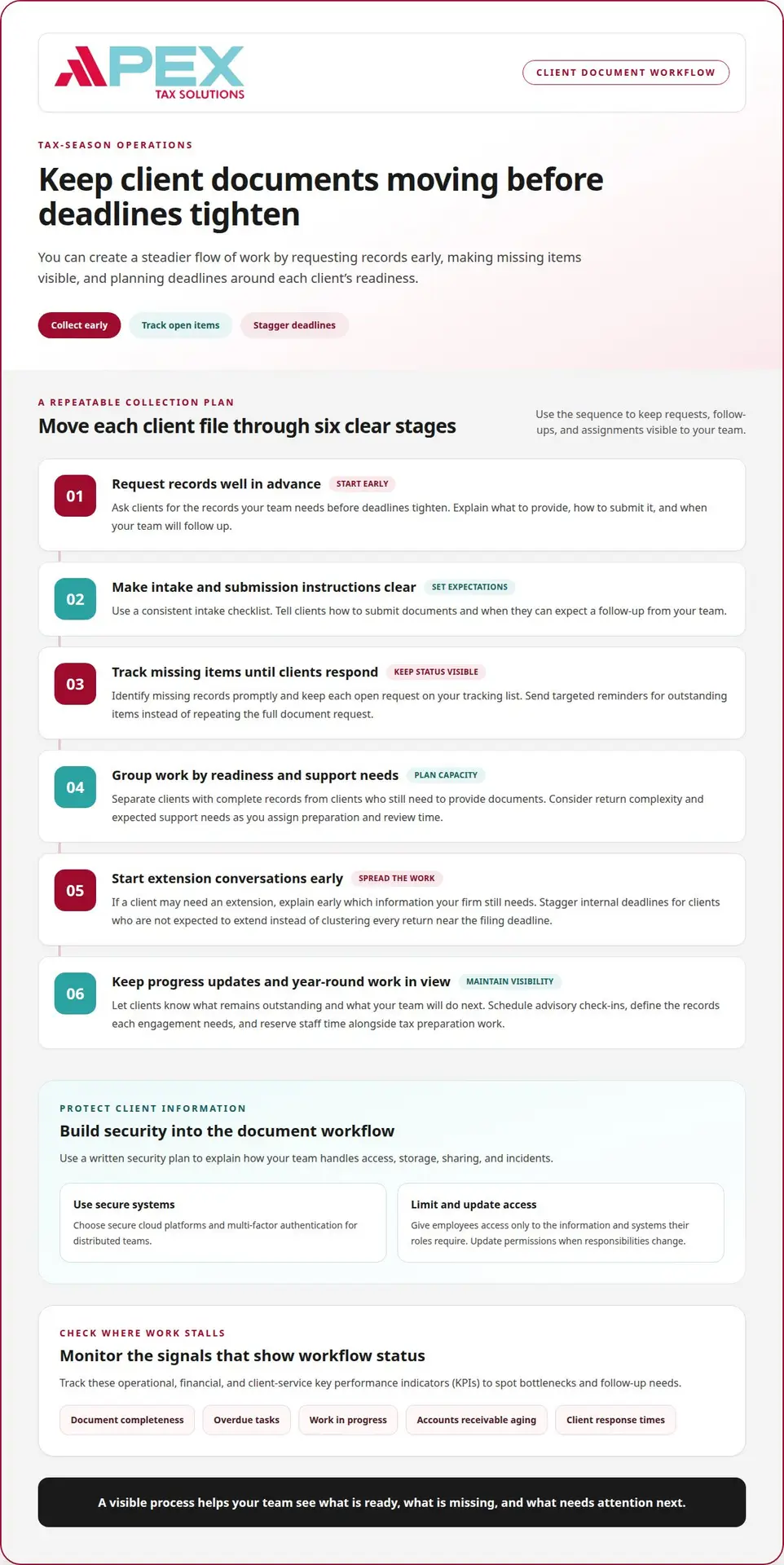
Client documents arrive at different times, so use a clear collection plan to keep work moving before deadlines tighten. Request records well in advance, identify missing items promptly, and track each open request until the client responds. A centralized document system keeps files accessible, shows which version is current, and preserves an audit trail for review. Operational best practices for tax firms make document status visible to your team.
Make client onboarding straightforward. Explain which documents clients need to provide, how to submit them, and when your team will follow up. Use a consistent intake checklist, then send targeted reminders for missing items instead of repeating the full request. Regular progress updates help clients understand what remains outstanding and what your team will do next.
Segment your workload by readiness, return complexity, and expected support needs. For example, group clients with complete records separately from those who still need to provide source documents. Use filing-period patterns and current work status to forecast capacity, assign preparation and review time, and spot bottlenecks early. These operational best practices for tax firms help you respond to changing workloads.
If a client may need an extension, start the conversation early and explain what information your firm still needs. Stagger internal deadlines for clients who aren’t expected to extend rather than clustering every return near the filing deadline. This creates a steadier flow of work and leaves room to address late documents or questions.
Plan capacity for year-round advisory work and off-season tasks. Set recurring client check-ins, define the records each advisory engagement requires, and reserve staff time alongside tax preparation work. Review incoming requests regularly so you can assign clear owners to urgent work, ongoing advisory commitments, and extension-related tasks.
Protect client information with a written security plan that explains how your team handles access, storage, sharing, and incidents. Use secure cloud platforms, multi-factor authentication, and documented access controls for distributed teams. Give employees access only to the information and systems their roles require, then update permissions when responsibilities change.
Measure your workflow with operational, financial, and client-service key performance indicators (KPIs). Track document completeness, overdue tasks, work in progress, accounts receivable aging, and response times. Use these measures to identify where work stalls, which open balances need attention, and how consistently your team keeps clients informed.
To strengthen your team’s data-protection awareness, consider cybersecurity training for tax teams. Pair training with written procedures and periodic access reviews, so employees understand the steps and their purpose. Review client feedback and recurring document delays regularly, then adjust reminders, intake instructions, or workload assignments to address the pattern.
3. Defining accounting roles and responsibilities
Clear role assignments show who owns each task, who reviews it, and who handles exceptions. For a business return, you might assign one preparer to gather records, another team member to review calculations, and a designated contact to resolve client questions. Written responsibilities help prevent duplicate work and keep critical tasks from falling between roles.
Map each workflow to the systems employees use. A document collection tool, for example, can feed client records into preparation software, while workflow tracking shows task status and reviewer assignments. Automation can handle routine steps such as extracting data from scanned documents or recording entries. Keep human review for decisions that require professional judgment.
Connected systems improve efficiency only when each role has appropriate access. Give preparers the modules they need to complete returns, and reserve approval permissions for assigned reviewers. Separate duties that could create control gaps: the person who enters accounts payable invoices should not also approve and issue the related checks. Document who authorizes transactions and who records them.
Assign primary owners and backup coverage for accounts receivable and accounts payable. Cross-train the receivables clerk to handle routine payables tasks temporarily, and teach the payables clerk to flag overdue client balances. A shared handoff note should identify pending invoices, follow-up dates, and unresolved approvals so coverage continues during vacations or staff transitions.
Recruiting supports growth, but retention also depends on clear development paths. During regular one-on-one meetings, discuss workload, training goals, and opportunities to take on review or client communication tasks. A preparer interested in advancement might shadow a reviewer, then complete supervised review assignments. Track progress through documented skills and completed training rather than informal assumptions.
Automation can reduce repetitive work, but it shouldn’t obscure accountability. Assign someone to monitor exceptions, correct data mismatches, and confirm that connected systems transfer records accurately. For example, route a scanned receipt that fails to match a client account to a named employee instead of leaving it in an unattended queue.
If you use an offshore accounting team, define the work, communication schedule, security controls, and review checkpoints before sharing assignments. Limit access to the records needed for each task, track progress in a shared workflow, and have an in-house reviewer compare completed work with client instructions. Resolve questions through a designated contact rather than scattered messages.
Review role assignments when your services, software, or staffing change. A responsibility map can show primary owners, backups, approval authority, and escalation paths in one place. Use it to identify single-person dependencies, then cross-train another employee on the affected workflow. This gives your team a practical way to improve handoffs and maintain oversight as processes evolve.
4. Peak-season technology, quality assurance, and risk management
During tax season, connect practice-management tools to the steps your staff already follows. A workflow system can show who owns each return, its review status, and what remains before delivery. If software systems don’t share information, assign an employee to resolve mismatches and record the correction. Clear ownership keeps technology from creating a separate, competing workflow.
Cloud-based tools can help distributed teams access current files and task updates. Protect access with documented permissions and multi-factor authentication, and limit each employee to the systems their role requires. Review permissions when responsibilities change or someone leaves. Keep regular online backups and daily offsite backups so your firm can restore current accounting data after a disruption.
Quality assurance requires checkpoints, not just a final glance. Assign a reviewer to confirm return information, client requirements, and supporting records before delivery. Track corrections by type, such as missing documents or inconsistent figures, then use those insights to adjust training or intake steps. A documented review trail also helps managers identify where a process needs attention.
Risk management starts with practical controls. Common exposures include unauthorized access, lost data, preparation errors, and interruptions that delay client work. Insurance requirements vary with applicable state rules, contracts, services, and the information your firm holds. Assess those factors when reviewing coverage, and document who responds to a security incident or system outage.
Prepare employees before peak workloads arrive. Give new staff a structured onboarding path with software practice, role-specific procedures, and supervised sample assignments. Schedule annual security training guided by IRS Publication 4557 and the FTC Safeguards Rule. During the season, use regular one-on-one meetings to surface workload concerns and clarify performance expectations before backlogs grow.
Strategic planning helps your team adopt technology without disrupting active work. Test a change in a limited workflow first, gather employee feedback, and resolve issues before expanding it. Set an owner, success measure, and review date for each change. For example, track overdue tasks and review corrections before and after introducing a workflow tool.
Use those measures to guide staffing and software decisions. Review seasonal workload patterns, task completion, and client-service feedback to identify pressure points. If review queues lengthen, adjust assignment capacity or move work earlier. If staff repeatedly correct the same data-entry issue, refine instructions and practice the step during onboarding. These strategies connect daily performance with deliberate operational improvement.
U.S. firms performing engagements under SASs, SSAEs, or SSARSs were required to have systems of quality management in place by December 15, 2025.
5. Training, cross-training, and succession planning
Start capacity planning with your organization’s records from prior filing periods and work schedules. Compare when assignments arrived, which work types took the most review time, and where queues formed. Use those patterns to forecast staffing needs, set realistic assignments, and reserve reviewer capacity before the next busy season.
Staffing works best when hiring, onboarding, and training follow a shared plan. Give each new preparer a clear role, a named mentor, and practice assignments in your accounting software. Before assigning live client work, walk through intake, preparation, review, and escalation procedures. This helps managers identify training gaps while employees learn the firm’s workflows.
Prepare for peak-season demand by matching staff skills to expected work. For example, assign experienced preparers to complex returns and schedule reviewers around anticipated completion dates. Track open assignments and review queues regularly. If one service line builds a backlog, shift trained staff to appropriate tasks or adjust schedules before delays spread.
Cross-training creates coverage when an employee takes leave or changes roles. Pair employees who handle related tasks, such as client document follow-up and return preparation, and have each person practice the other’s process. Keep written handoff instructions with current task status and pending decisions. A backup can then continue work without relying on informal messages.
Build succession planning into regular development conversations. Identify tasks that depend on one employee, then select a colleague to learn each critical responsibility. For instance, a senior preparer can demonstrate review procedures, observe practice reviews, and provide feedback before the colleague takes over coverage. Record the skills each employee has demonstrated and the next training step.
Training should keep pace with changes in software, tax procedures, and team responsibilities. Schedule focused practice before a new tool or process enters active use, and use sample scenarios to test staff understanding. Managers can also review completed work for recurring questions, then turn those lessons into short coaching sessions or clearer job aids.
Use workload and employee feedback to refine season planning. Regular one-on-one meetings can reveal unclear assignments, capacity pressures, or training needs before they affect client work. Compare planned staffing with actual assignment progress, then adjust schedules and support. These checks help accounting firms make practical decisions about hiring, staff development, and workload distribution.
Build your team’s preparedness with training for tax office teams. Connect learning to real workflows, document who can cover each essential role, and revisit the plan as your staffing and service mix change.
APEX Tax Solutions
Apex Tax Solutions LLC helps you connect tax software, training, and service-bureau support as you strengthen your firm’s operations. If your workflows need better tools or your team needs practical preparation, Apex offers Apex Corporate Desktop Premium, Wisp & Cybersecurity Training, and the Service Bureau Partner Program.
Explore support that aligns with your firm’s needs, whether you’re building capacity, preparing staff, or refining how you serve clients. Software, training, and service-bureau support work together to support tax professionals as their businesses grow.
Contact Apex Tax Solutions LLC to discuss support for your firm.
Put a More Resilient Workflow Into Practice
Your next improvement doesn’t need to begin with a firmwide overhaul. Choose one recurring pressure point, such as delayed handoffs or last-minute document follow-up, and make a focused change. Give it an owner, a review point, and a clear way for staff to share what works. After a busy week, identify where work slowed down and decide whether to adjust the process, assignment, or tool.
That focused approach helps you turn operational best practices for tax firms into habits your team can maintain beyond filing season. As your processes evolve, involve the people doing the work in decisions about tools, training, and client communication. Their day-to-day insight can help you build a more manageable operating rhythm and make room for your firm’s next stage of growth.
When you’re ready to explore support for your practice, Contact APEX Tax Solutions. Take the next step at a pace that works for your team, and keep building a firm prepared to serve clients with confidence.
Frequently Asked Questions
What are best practices for managing your tax firm workflows and client deadlines?
Use one shared work queue to show each return’s status, next action, and assigned employee. For example, flag returns waiting on client information separately from those ready for preparation or review. Set internal completion dates ahead of filing deadlines, then review the queue at regular team meetings. This helps you spot conflicting assignments early and reallocate work before deadlines become urgent.
What IRS requirements should you follow for tax preparer security, data privacy, and written information security plans?
You should document how you protect client information in a written information security plan, or WISP. IRS Publication 4557 offers guidance for safeguarding taxpayer data, while the FTC Safeguards Rule may also apply to covered financial institutions. Describe how you control access, store records, train employees, and respond to security incidents. Assign a person to maintain the plan and update it when your systems or work practices change.
What cybersecurity controls should you use to protect your clients’ financial and tax data?
Combine access controls with secure handling procedures. Require multi-factor authentication for accounts that hold your client records, give your employees unique logins, and remove access when someone leaves. Encrypt sensitive files in storage and during transfer, and keep backups separate from your everyday systems. Train your staff to recognize suspicious messages and report unexpected account activity. For example, confirm a client’s identity through an established channel before responding to an unusual request for sensitive records.
What quality-control and review procedures can you use to prevent errors and reduce your tax firm’s liability?
Use a documented review process to check figures against source records, confirm required client information, and record who approved the return. Add review steps for unusual income, corrected documents, or changes from prior-year filings. Keep a record of reviewer questions and how your staff resolved them. These procedures support consistent work and document your firm’s review, but they reduce risk rather than eliminate the possibility of errors or disputes.