
Access is easy to grant and easy to overlook later. Service Bureau Partner Program sub-user provisioning tools vary in how they create accounts, update permissions, and remove access when a preparer’s role changes or ends. The key is keeping access aligned with current responsibilities, not treating setup as a one-time task.
If you manage a network of preparers, inconsistent account processes can add administrative work and make oversight harder. This comparison explains how manual workflows, built-in dashboards, connected automation, and identity governance tools handle provisioning, and what to consider for implementation, security, compliance, and audits. It also offers a practical way to match an approach to your operation.
Key Takeaways
- Plan account access as a lifecycle: define how you’ll create, update, and remove accounts when a preparer’s responsibilities change.
- Before automating, map the applications people use, clarify access roles, and set approval steps that fit your workflow.
- Compare manual processes, built-in dashboards, connected automation, and identity governance tools by how well they fit your team’s needs.
- Assess security and audit needs alongside implementation effort, including how you’ll review access and record changes.
- Use the decision guide to identify whether your operation needs a simpler admin workflow or a more connected provisioning approach.
Automated account creation, updates, and removal
Access can be granted quickly, but accounts that need changes or removal can be overlooked. Automated provisioning links a person’s identity and responsibilities to application access, providing a repeatable process for account changes and removal.
A Service Bureau Partner Program helps a business manage tax software access across a network of preparers. Providers structure these programs differently, so compare their administration features and account lifecycle processes.
Program fees, pricing tiers, and setup costs vary by provider. Before choosing a model, compare license charges, activity-based fees, and onboarding costs.
Sub-user limits depend on each program’s account rules. Review how the program handles new preparers, role changes, and access removal.
Partner support may include administrative setup, onboarding, and training. Compare how each step helps you create accounts, assign access, and guide preparers through software setup.
Provisioning Software Options
Provisioning software can automate account creation, updates, and removal through connected applications or defined workflows. Compared with manual administration, it can apply access rules consistently across accounts. Choose based on the features you need, such as role-based access, approval steps, and timely access removal when someone leaves.
Application Provisioning
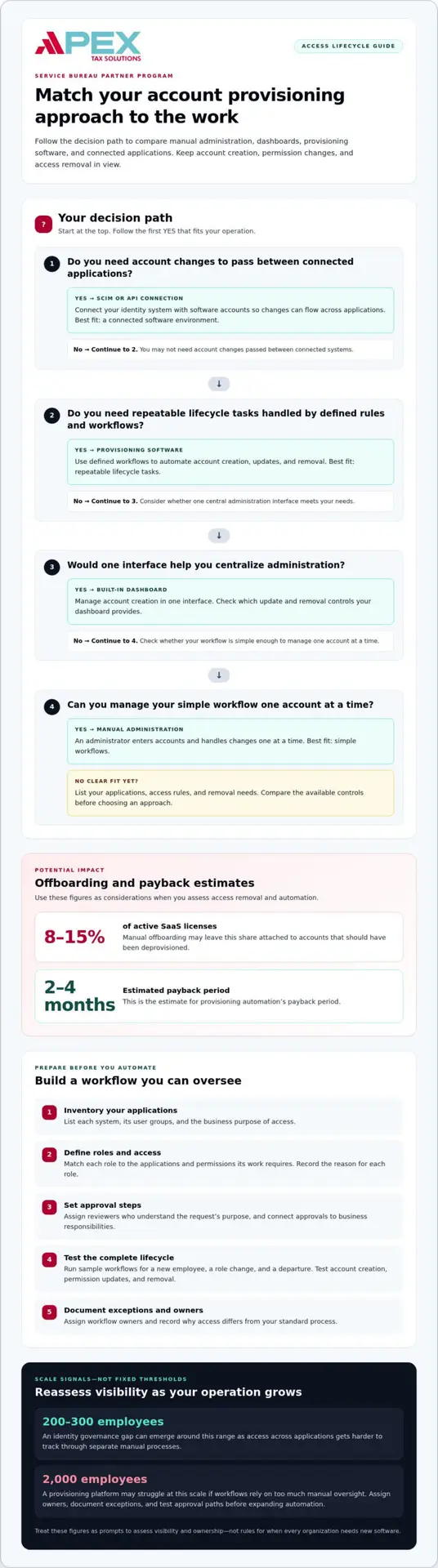
Application provisioning connects an identity system with software accounts, often through SCIM or API integrations. A standalone dashboard may centralize administration without connecting every application. List the applications your preparers use, then identify which connections can create, update, or remove access automatically.
Automation can also support license recovery. Manual offboarding may leave 8-15% of active SaaS licenses attached to accounts that should have been deprovisioned. The estimate for provisioning automation’s payback period is 2-4 months.
Automation is most useful when repeated account changes create manual work or delay access removal. Start with an application inventory, define roles, and map each role to the access it requires. Test account creation, permission updates, and removal in a sample workflow before expanding the process.
| Option | Account creation | Updates and removal | Best fit |
|---|---|---|---|
| Manual administration | Entered by an admin | Handled one account at a time | Simple workflows |
| Built-in dashboard | Managed in one interface | Depends on available controls | Centralized administration |
| Provisioning software | Automated by defined rules | Automated through workflows | Repeatable lifecycle tasks |
| SCIM or API connection | Passed between connected systems | Changes flow across applications | Connected software environments |
Choose an option that fits your applications, access rules, and need for consistent account removal.
Provisioning implementation challenges and best practices
Next, translate job responsibilities into practical access roles. A preparer may need tax software, while an administrator may need account-management capabilities. Avoid granting broad access just to speed up setup. Record the reason for each role, then link it to the applications and permissions it actually requires.
Once roles are defined, build approval workflows. Send a new employee’s access request to someone who understands the work, such as an office administrator for tax software. Establish a clear process for role changes and departures, tying approvals to business responsibilities rather than informal messages or memory.
Organizations can encounter an identity governance gap around 200-300 employees. At that scale, access across applications may become harder to track through separate manual processes. Treat that range as a signal to assess visibility and ownership, not as a rule that determines when every organization needs new software.
A provisioning platform may struggle at 2,000 employees if workflows depend on too much manual oversight. Reduce bottlenecks by assigning workflow owners, documenting exceptions, and testing approval paths before expanding automation. Microsoft environments, for example, may involve different account groups and application permissions; map those structures before connecting provisioning systems.
- Inventory applications: Name each system and its business owner.
- Define roles: Match each role to the access needed for its work.
- Set approvals: Assign reviewers who understand the request’s purpose.
- Test changes: Run sample requests for a new employee, a role change, and a departure.
- Review exceptions: Record why access differs from the standard workflow.
Include authentication requirements in the design. Decide which applications need stronger sign-in controls and align them with each role’s access. Then test the entire process: request, approval, account change, and removal. A test that stops at account creation will not show whether the workflow handles departures or unusual finance access correctly.
For a structured implementation, use the Service Bureau Partner Program to connect software, onboarding, and administrative setup.
First establish visibility across applications, then translate business roles into access models and introduce approval workflows. Each step should build on the review before it.
Provisioning tool categories and comparisons
Sub-user provisioning varies by platform. Some programs include administration tools, while others connect to external identity systems. Compare access management, onboarding, integrations, request handling, and account removal before choosing.
Provisioning Tool Categories
A built-in dashboard centralizes account requests and administrator actions within one platform. External provisioning software can link identity records to applications through integrations such as SCIM or APIs. Manual ticket workflows offer less automation but may suit smaller teams with straightforward access needs. Compare how each option handles role changes, approvals, and account removal.
Each option distributes the work differently. A dashboard gives administrators one place to manage sub-users, while a ticketing process records requests for review. Connected automation can carry approved changes between systems, reducing repeated data entry. For example, a role change approved in an identity platform may update connected applications automatically, while an unconnected account still requires separate administration.
Partner Program Provisioning Comparisons
Service Bureau Partner Programs differ in how they manage sub-users. Compare administrator controls, account activity visibility, and onboarding steps. A program with centralized account management works differently from one that routes every change through support tickets. These differences affect how independently you can add preparers, adjust access, and remove accounts.
Compare Service Bureau Partner Program sub-user provisioning tools with the same workflow tests: a new preparer request, a change in responsibilities, and a departure. Record who approves each request, where the administrator makes the change, and whether connected applications update. This reveals practical differences beyond a feature list. Assess administrator control, onboarding steps, and access removal.
- Administration: Identify which sub-user actions administrators can complete themselves.
- Onboarding: Compare setup steps and how preparers receive access instructions.
- Integrations: Note which identity systems or applications can exchange account changes.
- Requests and tickets: Track whether approvals happen in a workflow or through support requests.
- Removal: Compare how each option handles access when a preparer leaves.
For a small bureau, a clear dashboard and manual approval may provide enough control. A larger network using separate identity and tax applications may benefit more from integrations that carry approved changes across systems. Neither approach suits every structure. The deciding factor is whether the workflow fits your access model.
Choose a program that gives administrators appropriate control, records account decisions, and supports the integrations your workflow requires. Include the effort of repeated tickets in your comparison if onboarding depends on them. If a platform centralizes sub-user changes, prioritize clear roles and reliable removal processes.
Security, compliance, and audit trails
Provisioning now covers more than connecting applications. Provisioning 1.0 focused on application connections, speed, and coverage. Provisioning 2.0 prioritizes security and governance. For your service bureau, that means examining who receives access, why each role needs it, and how you review changes across the account lifecycle.
Compliance frameworks point to practical access questions. SOC 2, HIPAA, and GDPR ask organizations to identify who has access, why they have it, and how they review that access. Use those questions to shape user provisioning software workflows. For example, record the business reason and approver when a preparer receives access to an application.
Build an audit trail for every meaningful account event. Record the user’s identity, requested role, approving manager, affected application, and action taken, including whether access was created, changed, or removed. These details help reconstruct events later, such as a preparer moving from data entry to administrative duties.
Manual provisioning can leave gaps when administrators handle requests differently. A shared process keeps records consistent, even when changes are made manually. Assign an owner to each application, define who can approve access, and document exceptions. Review the records when roles change or accounts become inactive.
- Identity: Match each account to an individual user, not a shared login.
- Purpose: Record the work responsibility that justifies each permission.
- Approval: Preserve the manager or administrator’s decision.
- Change history: Record account creation, updates, and removal.
- Review: Revisit access when responsibilities or employment status change.
ISO 27001 can help organizations map provisioning to broader governance. Treat access records as part of that wider structure, rather than as isolated software events. If your bureau handles payment data, map provisioning controls to applicable PCI Security Standards Council requirements for payment data environments. This connects account administration with the systems and information those accounts can reach.
Use a repeatable review process. First, compare active accounts with current responsibilities. Next, confirm that each permission still has a business purpose. Then record the reviewer and any changes made. For example, if a preparer no longer uses a particular application, remove that access and retain the decision record.
Security reviews work best when operational ownership is clear. Assign a manager to resolve exceptions, set a review schedule that fits your processes, and track unresolved requests. A documented lifecycle helps administrators explain access decisions during an audit, while provisioning software can make records easier to maintain.
User account provisioning and deprovisioning
Assign each sub-user permissions that match their responsibilities. A role model might distinguish preparers, office administrators, and reviewers, giving each only the access required for their tasks. Service Bureau Partner Program sub-user provisioning tools should connect roles to specific permissions rather than relying on job titles alone.
For example, a preparer may need access to assigned tax applications, while an office administrator may manage account requests. A reviewer’s access could be limited to review tasks. Keep administrative permissions separate from preparation access, and do not grant broad access just to speed up onboarding.
Build workflows around the account lifecycle. For a new preparer, record the request, assign a role, obtain approval, and confirm access. When responsibilities change, update permissions to match the new duties. When someone leaves, remove access from each relevant application and record completion. This sequence helps prevent old permissions from carrying forward.
A contractor policy can set access to expire after 90 days unless someone extends the end date. Apply the same principle to temporary accounts: set an end date, assign an owner, and include an extension step. Service Bureau Partner Program sub-user provisioning tools can help organize these decisions when their account controls fit your workflow.
- Request: Record the person, business purpose, applications, and requested role.
- Approve: Route the request to a manager who understands the work.
- Provision: Grant only the permissions needed for assigned duties.
- Review: Reassess access after a department or responsibility change.
- Deprovision: Remove access when the work ends and document completion.
Department changes require careful handling. If a preparer moves into an administrative role, remove permissions tied to former duties before granting new access. Have a manager approve the business need and an administrator apply and record the change. This clear handoff helps the team manage exceptions without relying on informal messages.
To develop a consistent partner access workflow, plan your sub-user access process around roles, approvals, and timely removal.
Deprovisioning revokes access when it is no longer appropriate. Treat removal as an explicit control, not an informal follow-up: identify the applications tied to the account, confirm which access must end, and record completion. Keep the record with the related request or role change so administrators can understand why access was withdrawn. If someone has several responsibilities, review each one rather than assuming that removing a single role closes every access path. Clear ownership helps prevent accounts from remaining active after the work that justified them has ended.
Automation may help teams apply the same provisioning and removal steps consistently, while leaving approval and role decisions with the people responsible for them. Tripledot Studios reported that automating provisioning and deprovisioning increased IT efficiency by 40%. Consider whether automation can route approved requests, apply predefined permissions, and prompt administrators to confirm removal when access is no longer needed. Keep exceptions visible for review, and ensure that automated actions can be traced to an approved request. The goal is a process that is efficient without weakening oversight: grant access for an identified purpose, adjust it when responsibilities change, and close it when that purpose ends.
Apex Tax Solutions: TaxSlayer basado en Web
Apex Tax Solutions LLC offers TaxSlayer Pro Web and a Service Bureau Partner Program for tax professionals managing a preparer network. The program includes a dashboard, full administrative control for sub-user management, one-on-one onboarding, and administrative setup. Bilingual technical support is available in English and Spanish.
To participate, an active EFIN and signed service bureau agreement are required. “Minimum 250 funded bank products per season” applies to bonus eligibility, not program participation. Contact Apex Tax Solutions LLC to discuss the program and your sub-user administration needs.
Build a provisioning process that can grow with you
Turn your access model into a working routine. Assign an owner to each application, define who approves exceptions, and include account changes in staff transitions. Clear ownership helps keep workflows usable as your preparer network changes.
Use the Service Bureau Partner Program sub-user provisioning tools you compared to shape a pilot. Start with a representative workflow, such as onboarding a preparer with different responsibilities from other roles. Review how your team handles approvals, access changes, and departures, then refine the process before applying it more broadly.
Keep the process practical. If a workflow creates repeated tickets or unclear handoffs, adjust the approval path or role definitions. If your operation is ready to strengthen its service-bureau approach, explore next steps with Apex Tax Solutions. A clear, adaptable process helps you support your team with confidence as your business evolves.
Frequently Asked Questions
What Are the Most Common Challenges in User Provisioning?
Common challenges include mismatched identities, unclear roles, scattered application access, and delayed account removal. For example, a preparer may change email addresses while an older login remains active, creating duplicate records. Teams can also struggle when the same role name means different permissions in different applications. Assign an owner to each access decision and maintain a current map of people, roles, and systems.
What tools and APIs are available for provisioning and managing sub-users?
Common options include built-in administrative dashboards, identity management platforms, ticket workflows, and integrations using SCIM or APIs. A dashboard can centralize work within one application, while an identity platform can coordinate account changes across connected systems. Tickets help document requests when automation is unavailable. Match the tool to your applications and approval process, then test a sample change to identify any steps that remain manual.
What are the steps to add, edit, suspend, or remove a sub-user?
Start by confirming the person’s identity and business purpose, then select a role that matches their work. For an edit, change only the permissions affected by new duties. For a suspension, restrict access while preserving the account record for review. For removal, revoke access in each relevant system and document completion. Keep the request and approval with the account history so another administrator can understand the action.
What security, privacy, and audit requirements apply to sub-user accounts?
Protect each account with individual credentials, role-appropriate permissions, and records of access decisions. Keep a trail showing who requested, approved, and completed each change, and which application was involved. Limit access to sensitive client information to those who need it for their duties. Establish a review process for access records and define who can examine them. These practices help explain account decisions and identify access that no longer fits.
What common provisioning errors or risks should partners plan for?
Plan for duplicate accounts, incorrect role assignments, missed application connections, and access that remains active after a preparer leaves. A connector error may update one system while another retains old permissions. Use a completion check to compare the requested change with affected accounts. Set an exception process for failed updates, assign someone to resolve them, and record the outcome instead of assuming the workflow succeeded.
Are there limits on the number of sub-users or client accounts?
Limits depend on the program’s account rules. APEX says its Sub Service Bureau infrastructure has no per-user caps.