TaxSlayer Pro Web for EROs gives you cloud-based tax preparation you can access from internet-connected devices. You can prepare federal, state, and local 1040 returns, with tools such as a client portal and digital-signature compatibility to support a paperless workflow. Support is available in English and Spanish.
Choosing TaxSlayer Pro Web for EROs can make it easier to work across devices, but first confirm how access works, which returns your office needs to prepare, and what support is available. This article explains the workflow and client-facing tools to consider. Apex Tax Solutions LLC provides TaxSlayer ProWeb and other professional tax software, alongside training and support for tax businesses.
Key Takeaways
- Plan your workflow around internet access so you can work across connected devices and locations.
- Review how a cloud-based setup can support your office’s preparation and client-document processes.
- Know which federal, state, and local 1040 returns the software supports as you organize client work.
- Understand the available support options and how they can help you address software and tax-preparation questions.
- Explore Apex Tax Solutions LLC when you’re considering web-based tax software for your practice.
Accessing Pro Web across internet-connected devices
Cloud access lets you work from a device with an internet connection and a modern web browser instead of relying on one fixed workstation. For example, you can prepare a return at your office and continue work from another connected device. This flexibility can suit an ERO managing client work across locations or changing workstations during the day.
Start by matching devices to the tasks you perform. A laptop may suit detailed return preparation, while a tablet can be useful for reviewing work away from your desk. These are choices about your setup, not separate software versions. TaxSlayer ProWeb is web-based, so you access it through an internet connection and a modern browser.
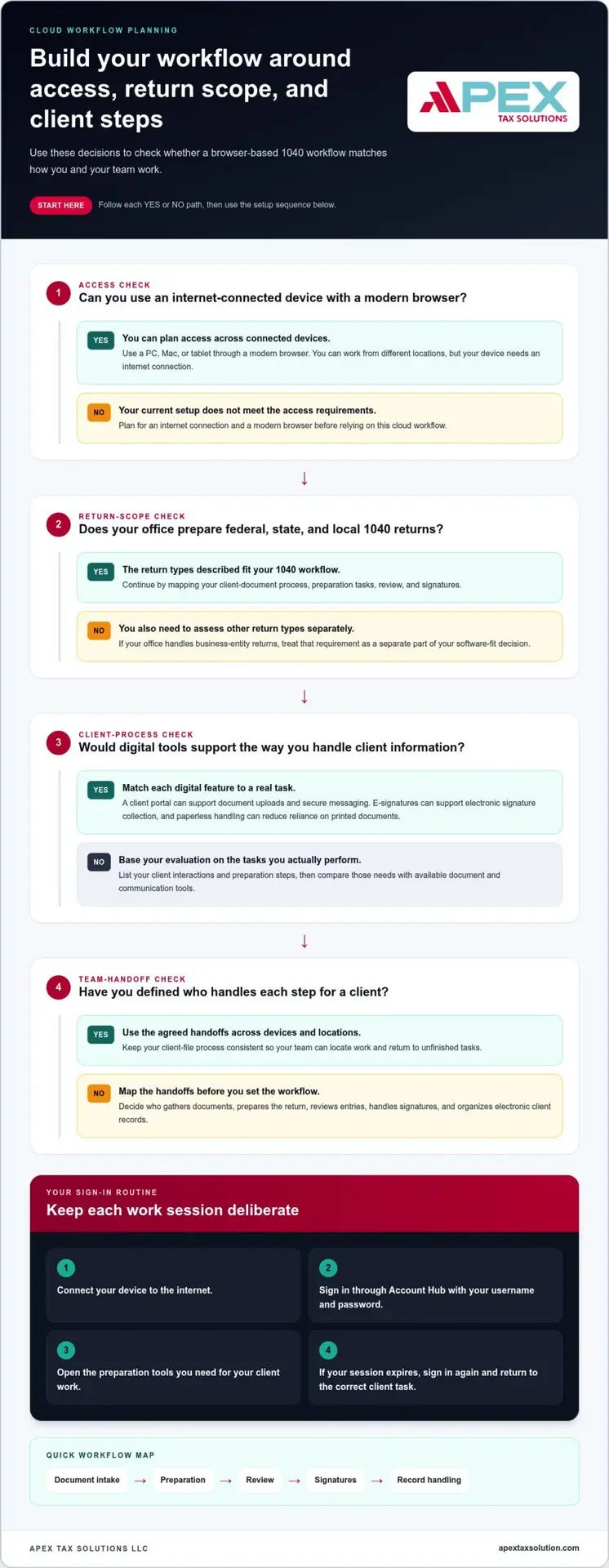
Account Hub uses a username and password for sign-in. Keep credentials available to authorized users, and establish a simple routine for beginning each work session:
- Connect the device to the internet before opening your work session.
- Use your Account Hub username and password to sign in.
- Open the tax-preparation tools you need for the day’s client work.
- Sign in again if an expired Account Hub session returns you to the login page.
When a session expires, Account Hub redirects you to the login page. If you switch devices, sign in again through Account Hub, then return to the correct client task. A consistent workflow helps you pick up where you left off without confusing files or work in progress.
Device flexibility can shape how your office plans work. An ERO can use an internet-connected device at a main office or another work location. For instance, review a return at your office, then handle another preparation task from a connected laptop elsewhere. Access depends on having an internet connection and a modern web browser.
Plan around the work each device needs to support. A larger screen can make forms easier to review, while a portable device can suit a mobile workday. These choices reflect your preferred setup, not a change in the cloud-based software. Use a consistent process to locate client files and return to unfinished work.
TaxSlayer Pro Web for EROs is a useful fit to consider when your office needs access beyond a single workstation. Before the season gets busy, map your routine: choose the devices you’ll use, identify where internet access is available, and establish how you’ll sign in. That preparation makes it easier to move between work locations while keeping each task deliberate and organized.
Cloud-based professional tax software
Cloud-based tax software puts your preparation workflow online rather than tying it to one installed workstation. For an ERO, that affects how you organize return preparation, client documents, and staff access. You can still create a consistent process for handling each client’s work across your office.
Tax preparation involves more than entering figures into a return. You may collect information, prepare a federal return, review entries, and obtain client approval. TaxSlayer ProWeb includes a client portal with document uploads, e-signatures, and secure messaging, supporting parts of that process without replacing your review of return information.
Consider a client who sends documents before an appointment. A portal can provide a digital route for client communication, while a paperless workflow can reduce reliance on printed documents. For clients dealing with missing expense records, resources from advisory firms like creditte show how taxpayers can navigate deductions without complete receipts. Digital-signature compatibility can also support signature collection electronically. Together, these tools can help you plan a sequence from receiving information to preparing and finalizing a return.
Cloud access means you can prepare returns on a connected device instead of relying on a single computer with locally installed tax software. For example, you might use an office computer for detailed entry and a connected laptop elsewhere. TaxSlayer ProWeb works on PCs, Macs, and tablets through a modern web browser. It requires an internet connection, not a particular office layout.
Before adopting a cloud workflow, map the steps your team follows for each client. Identify who gathers documents, who prepares the return, and who reviews it. Clear handoffs matter when multiple preparers work on a client file. Set a process your team can follow consistently across devices and work locations.
- Document intake: Decide how each client will provide tax information.
- Preparation: Assign the return to the preparer responsible for entering information.
- Review: Set a clear step for checking entries before completion.
- Signatures: Use digital-signature compatibility when it fits the client workflow.
- Record handling: Define how your office organizes electronic client documents.
When evaluating cloud software, compare its features with the tasks your office performs. Consider whether your workflow needs a client portal, e-signatures, secure messaging, or paperless document handling. List the tools that would support client communication and staff review, then use that list to guide your decision.
Cloud-based preparation is not the same as offering every type of tax return. The relevant return scope here is federal, state, and local 1040 preparation. If your office also handles business-entity returns, separate that requirement from a 1040 workflow when assessing software fit. Your return mix should guide the decision.
Use a practical evaluation: list your preparation steps, identify which client interactions can happen digitally, and decide where staff review fits. Then compare those needs with the portal, e-signature, and document features available. This keeps your software decision grounded in actual office tasks rather than assumptions about cloud tools.
Your evaluation can also include whether you want to support other tax professionals through a service bureau. APEX Tax Solutions LLC offers a Service Bureau Partner Program for tax businesses looking to grow and support other offices. If your role may extend beyond preparing returns in your own office, consider whether this model fits your plans. Keep that decision separate from day-to-day workflow questions, such as how your staff handles client documents and reviews returns.
With a service bureau arrangement, tax businesses can resell software under their own brand. APEX Tax Solutions LLC’s Service Bureau Partner Program includes software setup, dedicated support, and year-round mentorship. Consider whether supporting other offices fits the services you intend to provide, while separately evaluating the tools your staff needs for client communication, signatures, and document handling. The partnership can form part of your broader software plan, but it does not determine which preparation tools suit your office.
Customer support
You can get support in English or Spanish at no additional fee. Choose the language that helps you explain your question clearly. For example, describe a sign-in problem or a return-preparation task in the language you prefer. Clear wording helps you focus the conversation on the issue you need to resolve.
Start by identifying the kind of help you need. A technical question concerns software behavior, such as trouble signing in. A tax-preparation question concerns a step in preparing a return. Separating these topics helps you explain the issue clearly and gives the support conversation a useful direction.
Before seeking help, note the steps you took and what happened. Record the screen or feature involved, the result you expected, and where you got stuck. If your question involves a client return, describe the preparation issue without sharing unnecessary client information. This preparation helps you explain the problem concisely.
- Sign-in issue: Describe the step that prevents you from accessing your account.
- Software question: Name the feature and explain what you were trying to do.
- Preparation question: Summarize the return task and the step where you need guidance.
- Language preference: Choose English or Spanish for your support discussion.
Service Bureau Partner Program members can access year-round technical and tax support. Apex Tax Solutions LLC also provides dedicated assistance for multi-office tax companies. These resources address needs that can arise when you help several offices manage software or preparation questions.
For example, you might need help with a technical issue at one office and a preparation question from another. Keep a record of the affected office, the issue, and the steps already taken. Explain each concern separately to keep office-specific questions organized and create a useful reference for recurring issues.
If you operate a service bureau, Apex Tax Solutions LLC also offers year-round mentorship. Prepare topics tied to your operations, such as a software process your team needs to understand or a question affecting an office you support. Specific examples help keep the discussion relevant to your day-to-day work.
Use this routine to prepare for a support conversation:
- Decide whether you have a technical, tax-preparation, or operational question.
- Write down the software step or preparation task involved.
- Describe what happened and the result you expected.
- If multiple offices are involved, identify the affected office in your records.
- Choose English or Spanish for the discussion.
This routine helps you explain your question and keep the answer connected to your office procedures. As an independent ERO, you can use English- or Spanish-language support for software and preparation questions. If you run a service bureau, year-round support, specialized assistance for multi-office operations, and one-on-one training address broader needs. Match the resource to your question, then record the useful steps for your team.
Keep your notes ready so you can refer to the expected outcome and the steps taken without having to reconstruct them. If the discussion shifts to another concern, clarify whether it is technical, tax-preparation, or operational. For a service bureau, keep customer order questions distinct from software or preparation questions, and identify the purpose of each discussion.
TaxSlayer Pro service bureaus can offer customers discounts and incentives on program orders. When discussing a program order, keep that information tied to the customer’s question and distinguish it from support about a software step or return task. If a conversation involves an order, note what the customer is asking about and what clarification is needed. For other concerns, refer to the issue notes and explain the steps taken and the result expected. Keeping those subjects distinct can help focus each discussion and make it easier to follow up on the concern raised.
Tax preparation for federal, state, and local returns
Return scope matters when you choose professional tax software. TaxSlayer Pro software supports preparation of federal, state, and local 1040 tax returns. For an ERO, that means reviewing whether your client work centers on individual returns and the jurisdictions connected to those clients. A clear scope helps you plan your preparation workflow before client appointments begin.
Think of a client who needs a federal return and related state or local filings. You can organize the work by return type, then track each required preparation task. The software supports all three return categories for 1040 preparation. Your intake and review process still needs to identify which returns apply to each client.
Separate the scope question from the data-entry process. First, gather the client information needed for the federal return. Next, identify whether state or local preparation also belongs in the client’s file. Finally, review the return work together before marking the case complete. This sequence helps your team avoid treating every client’s needs as identical.
- Federal: Include the federal 1040 preparation task in your client workflow.
- State: Add state preparation when it applies to the client’s work.
- Local: Include local return preparation when the client needs it.
- Review: Track each applicable return category before finishing the file.
A simple intake checklist can help staff sort these tasks. Record the client’s preparation needs, then note whether federal, state, or local work is involved. For example, one file may need federal and state preparation, while another may include local work as well. Use the checklist to route each file through the appropriate review steps.
For an office with multiple preparers, consistent labels can make handoffs clearer. One preparer might handle initial information entry, while another reviews the return categories and completion status. Keep the federal, state, and local tasks visible in the same client workflow. That gives the team a shared view of what remains for each 1040 file.
Use this ordered process to structure your return preparation:
- Open the client file and identify the 1040 preparation work.
- Separate federal preparation from any state or local tasks.
- Assign each task to the preparer responsible for completing it.
- Review the relevant return categories before closing the work file.
This workflow also helps you assess software fit. If your practice focuses on 1040 returns, confirm that federal, state, and local preparation matches your intended service mix. If your work includes business-entity returns, treat that as a separate software requirement. A 1040-focused workflow and a business-return workflow serve different preparation needs, so make the distinction before selecting tools. Meanwhile, for practices or clients with broader international corporate reporting and auditing requirements, Bin Hamad Mathew Joseph and Associates Chartered Accountants provides professional chartered accounting services.
Before the season, use sample client scenarios to test your office process. Map one federal-only workflow, one federal-and-state workflow, and one that includes local preparation. These examples can reveal whether staff understand how to classify and review each client file. The software supports preparation across those 1040 categories, while your process determines how your team organizes the work.
Apex Tax Solutions LLC: TaxSlayer basado en Web
Apex Tax Solutions LLC offers TaxSlayer basado en Web for tax professionals considering web-based preparation. It may suit your practice if you want to work across internet-connected devices and prepare 1040 returns. Consider your return mix, office workflow, and support needs when evaluating this option.
If your practice handles business returns, Apex Tax Solutions LLC also offers Corp Software. You can explore its Service Bureau Partner Program if you support other tax offices, or Wisp & Cybersecurity Training for cybersecurity learning. Choose based on the work your office handles and the support you need.
Contact Apex Tax Solutions LLC to discuss software options for your tax practice.
Choose the Next Step for Your Practice
Your software decision can shape how you organize work and plan for growth. Use your practice’s needs to guide the conversation: TaxSlayer Pro Web for EROs may fit a web-based 1040 workflow, while Corp Software addresses a different software need. Apex Tax Solutions LLC offers TaxSlayer Pro Web, TaxSlayer basado en Web, and Corp Software for tax professionals evaluating their options.
Before choosing, consider which tasks you want your software to support and how you want to manage your preparation workflow. A focused discussion can help you connect those priorities with an appropriate offering. You can take the next step at your own pace and explore the options available for your tax business.
Explore tax software options with Apex Tax Solutions LLC and move forward with a setup that supports your practice.