
What if a suspected security incident leaves your tax office unsure who should act first? Developing an incident response plan for tax offices replaces guesswork with clear roles and coordinated decisions. When your team knows how to report a concern, preserve relevant information, and escalate it, you can respond with greater order under pressure.
You already know that protecting taxpayer information matters. The challenge is balancing that priority with daily operations while deciding what to contain, what to communicate, and how to recover. A practical plan gives staff a documented process to follow instead of asking them to make every decision on the spot.
In this article, you’ll learn how to assign response roles, set decision points for containment and communication, organize evidence, and plan recovery priorities. You’ll also see how to test and update your process before an incident occurs. Apex Tax Solutions LLC offers WISP and cybersecurity training to help you build staff awareness and support ongoing learning for your tax office.
Key Takeaways
- Separate incident response from prevention so staff know what to do when a safeguard may have failed.
- When developing an incident response plan for tax offices, assign an owner, define the plan’s scope, and make escalation steps easy to follow.
- Give staff a calm first-response sequence: report concerns internally, record known facts, and avoid deleting files or drawing unsupported conclusions.
- Use a tabletop exercise to check whether your team can locate the plan, reach the right people, and document decisions.
- Reinforce response roles with ongoing cybersecurity training so staff can practice the process before an incident occurs.
Why Your Tax Office Needs an Incident Response Plan
A suspicious sign-in, missing laptop, or unexpected change in tax software access can leave your team asking what to do next. Developing an incident response plan for tax offices gives you documented roles and steps for suspected or confirmed security incidents. Staff can raise concerns and follow an agreed process instead of making uncoordinated decisions under pressure.
A response plan doesn’t prevent incidents. Your safeguards help reduce security risks, while the plan guides your next steps if you suspect those safeguards may have failed. Assigning roles in advance reduces confusion because each person knows whom to alert, what information to record, and who makes the next decision.
Which incidents should your tax office plan for?
Set the scope around the information and tools your office depends on. Consider scenarios that could affect taxpayer data, staff email, tax software access, office devices, or your ability to serve clients. Examples include an unfamiliar account login, a malware warning on a workstation, a lost device, or a file containing taxpayer information sent to the wrong recipient.
Keep suspected incidents separate from confirmed incidents. A strange email may be a phishing attempt, but it doesn’t by itself prove that anyone accessed an account. A software outage may disrupt work without indicating that data was exposed. Your plan should prompt staff to record what they observed and escalate the concern, while leaving conclusions to the people responsible for assessing the facts.
- Data: A file with taxpayer information may have reached an unintended person.
- Email: An employee may notice unusual sent messages or a suspicious login alert.
- Access: A staff member may be unable to access tax software or may see unfamiliar account activity.
- Devices and operations: A missing laptop, malware warning, or interruption to office systems may require review.
How response planning differs from a WISP
Your Written Information Security Plan, or WISP, describes your broader information-security program, including how you manage safeguards for sensitive information. An incident response plan has a narrower operational purpose: it tells your team how to handle a potential incident, who coordinates decisions, and how staff pass along relevant observations.
Keep the documents aligned, but don’t treat them as interchangeable. Your WISP helps define the security practices that support your office; your response plan helps staff act when a concern arises. Practical cybersecurity training for tax offices can help staff understand their response roles and practice communicating concerns clearly. That preparation makes it easier to follow your documented process while your office establishes what happened.
How to Develop an Incident Response Plan for a Tax Office
Developing an incident response plan for tax offices means turning broad security intentions into steps your staff can find and follow. Keep the document concise enough to use during a busy filing period, but specific enough to show who coordinates decisions, where staff report concerns, and what information they should record. The CISA Incident Response Plan Basics also highlights preparation, assigned responsibilities, and continued improvement as parts of response planning.
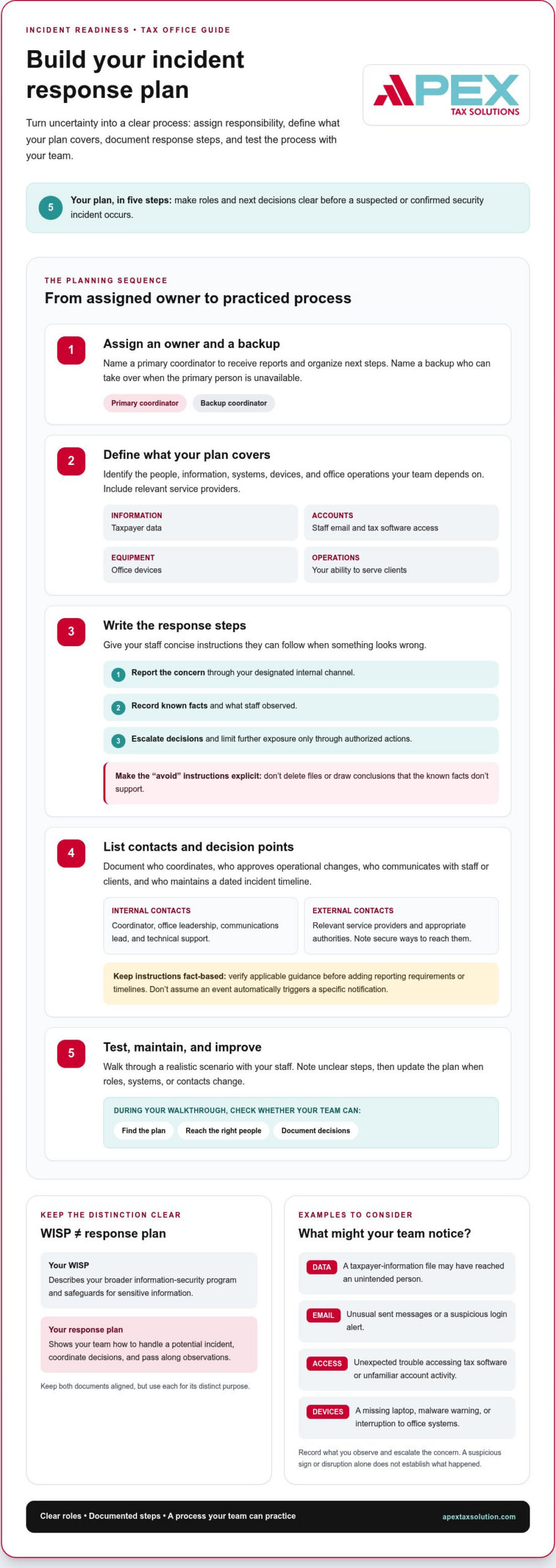
A usable plan identifies an owner, defines its scope, lists actions and contacts, and explains how your office will review the process. Build it in this order:
- Assign an owner. Name a primary coordinator and a backup. The coordinator receives reports and organizes next steps; the backup can take over if the primary person is unavailable.
- Define the scope. Identify the people, information, systems, devices, and office operations covered by the plan. Include the tax software and email accounts your staff rely on, along with relevant service providers.
- Document the response steps. Write concise instructions for reporting a concern, recording known facts, limiting further exposure through authorized actions, and escalating decisions. State what staff should avoid, such as deleting files or making unsupported conclusions.
- Identify contacts and decision points. List internal contacts by role, such as the coordinator, office leadership, communications lead, and technical support. Add relevant external contacts, including service providers and appropriate authorities, and note how to reach them securely. Don’t assume a particular event triggers a specific notification; verify applicable guidance before adding reporting instructions or timelines.
- Test and maintain the plan. Walk through a realistic scenario with staff, note unclear steps, and revise the document when roles, systems, or contacts change.
Assign response roles before an incident
Make decision authority clear. Specify who can approve operational changes, who communicates with staff or clients, and who keeps a dated incident timeline. A single person in a small office may hold several roles, but document a backup for each responsibility so the process doesn’t depend on one person being available.
Document contacts, systems, and decision points
Keep your contact list and system inventory easy to update. Record relevant software, devices, accounts, service providers, and secure ways to communicate if ordinary email or office systems become unavailable. Add prompts to help the coordinator assess whether a report suggests possible information exposure, account access, business disruption, or a need for outside assistance.
Review IRS Publication 4557 and current IRS guidance when shaping security procedures for your practice. Verify details before adding them to your response instructions, and keep the plan focused on actions staff can take within their assigned roles. APEX’s cybersecurity training for tax professionals can support your team’s ongoing security learning.
What to Do When a Tax Office Suspects a Security Incident
A suspected incident can create pressure to act fast, but uncoordinated fixes may erase useful information or make it harder to understand what happened. Follow your documented process: report the concern internally, record what you know, limit further exposure within your role, and escalate decisions to the appropriate people. You don’t need to prove a breach before raising a concern.
A calm first response starts with a clear report, a careful record, and actions matched to each person’s role. Keep suspicion separate from confirmation. An alert or unusual event deserves attention, but it doesn’t establish on its own that someone accessed or exposed taxpayer information.
- Report the concern. Contact your response coordinator through the channel in your plan. Share what you noticed, when you noticed it, and which account, device, or office process may be involved.
- Record known facts. Use your secure incident record to capture timestamps, observations, actions taken, and who received your report. Separate confirmed facts from open questions and decisions. For example, write “I received an unexpected sign-in alert,” not “Someone stole client data” unless you have evidence to support that conclusion.
- Limit further exposure within your authority. Follow your documented steps and authorized technical guidance. Don’t delete messages or files, investigate beyond your role, or make unapproved changes to a device or account.
- Escalate and assess impact. Use your plan’s contacts for technical support, tax software support, insurance, or other professional guidance. Have your coordinator assess whether the incident could affect taxpayer information or filing operations before your office communicates externally.
Contain the issue without destroying useful evidence
Choose containment actions based on the situation. A lost device may require a different response from a concern involving an account or workstation, so don’t apply a technical fix simply because it seems quick. Preserve relevant messages, alerts, and records using your documented procedures, then involve the people authorized to guide technical actions. Ask staff to report what they observe, not to conduct their own forensic investigation.
Decide who needs to be involved
After you escalate the concern, your coordinator can involve the right contacts and track their advice. Before communicating externally, establish what you know about possible effects on taxpayer information and filing operations. Review IRS Publication 4557 and current IRS and FTC guidance as you assess the steps that apply. Requirements can depend on the facts and circumstances, so don’t add unverified notification deadlines or assumptions to your response.
A smaller office still needs a defined process. Having fewer staff or systems doesn’t make improvisation safer. You may assign several responsibilities to one person, but give your team clear escalation paths and a way to record decisions. This structure helps you respond consistently while you establish the facts.
How to Test, Maintain, and Improve Your Incident Response Plan
A written plan only helps if your staff can use it. A short tabletop exercise lets your team rehearse decisions without changing live systems or interrupting tax preparation. It also shows you where instructions are unclear before staff need to rely on them during a real concern.
Run a realistic tabletop exercise
Choose a plausible scenario, such as a suspicious login to a work account or a missing device that may contain client information. Explain the situation, then let participants work through the plan as they would in practice. Keep the exercise focused on communication and decisions, not technical testing.
Ask staff to explain what they know, what they still need to learn, and whom they would notify. Can they find the right contact without searching old messages? Do they know where to record a decision or how to flag an unanswered question? These prompts help you assess whether your instructions work under realistic pressure.
- Can each participant quickly locate the current plan?
- Can staff identify the role responsible for coordinating the response?
- Can participants record decisions and outstanding questions clearly?
- Do contact details and escalation paths make sense for the scenario?
Watch for delays, missing contacts, unclear ownership, or steps that rely on information staff can’t readily access. Record these as process gaps, not individual failures. A supportive exercise gives your team room to ask questions and helps you improve the plan without assigning blame.
Turn lessons into plan updates and staff practice
After the exercise, summarize what worked and what needs attention. Assign an owner and due date for each improvement, then update the controlled copy of the plan so staff know which version to use. Remove outdated contacts and review the instructions after staffing or tax software changes, or when an actual incident reveals a gap.
Practice role-specific actions with your existing team and new staff. Your coordinator may walk through escalation, while other employees practice reporting an observation and documenting what they know. Keep instructions concise, and make sure staff can access the plan through the method you expect them to use.
Developing an incident response plan for tax offices is an ongoing process, not a one-time writing task. APEX WISP and cybersecurity training can help you build staff security knowledge and practice response roles as part of continued learning. Training supports preparedness, but it doesn’t guarantee compliance or a particular incident outcome. Explore cybersecurity training for tax offices to support your team’s learning, and strengthen your staff’s cybersecurity knowledge with APEX.
Build Incident Readiness With Ongoing Tax-Office Training
Your written plan becomes more useful when staff understand their roles and have practiced the process. Training helps turn instructions into familiar habits, such as reporting a concern through the right channel, handling taxpayer information carefully, and knowing when to pause and escalate rather than guess.
Keep prevention and response connected, but distinct. Your security safeguards help protect information during everyday work; your incident procedures guide staff if something seems wrong. As you build staff knowledge, refer to current IRS guidance for your office’s security practices. Training supports learning, but it doesn’t replace the controls and procedures your office needs.
Connect the response plan to everyday security learning
Use regular learning opportunities to reinforce what each role should do, rather than making every employee responsible for technical decisions. Staff can practice reporting an unexpected account alert, describing what they observed without drawing conclusions, and keeping taxpayer information out of casual conversations. Clear role boundaries help your team raise concerns promptly and route them to the right person.
Developing an incident response plan for tax offices works best as part of ongoing professional learning. APEX WISP and cybersecurity training can help you strengthen staff security knowledge and discuss how your team’s procedures apply in practice. APEX brings tax software, support, and training together for tax professionals, while your office remains responsible for following its documented controls and reviewing applicable IRS guidance.
Choose practical next steps for your office
You don’t need to overhaul every procedure at once. Start with a focused review involving the people responsible for response roles. Use the discussion to spot unclear instructions, confirm who owns each action, and decide what your team should practice next.
- Name a plan owner. Assign someone to coordinate the initial review and track revisions.
- Bring the right roles together. Include the people who coordinate decisions, provide technical support, communicate internally, and document actions.
- Choose one realistic scenario. Discuss a suspicious sign-in or misplaced device. Ask who receives the report, what facts staff should record, and how the concern moves through your escalation process.
Keep the conversation practical and nonpunitive. Your goal is to help staff feel confident raising concerns and make the written process easier to use during a demanding filing period. APEX’s cybersecurity training for tax offices offers a practical way to support your team’s continued learning as you strengthen incident readiness.
Make Your Next Readiness Step Count
A response plan becomes part of your office’s working habits when you keep learning, reviewing roles, and making time to practice. Start with one manageable step: bring your response-role owners together, choose a scenario, and agree on how your team will keep the plan useful as your office changes.
Developing an incident response plan for tax offices is ongoing work, and you can build your team’s cybersecurity knowledge with support. APEX Tax Solutions LLC offers WISP and cybersecurity training for tax businesses. As a Latino-owned business founded in 2015, APEX supports tax professionals as they continue to learn and strengthen their practices.
Explore training to help your staff understand its responsibilities and build confidence in your office’s processes. Explore cybersecurity training for your tax office and take a practical next step toward a more prepared team.
Frequently Asked Questions
What should an incident response plan for a tax office include?
Your plan should identify who coordinates decisions, how staff report concerns, and how your office tracks actions and open questions. Include an accessible contact list, the systems and service providers relevant to your work, and clear decision points for possible data exposure or disruption. Add a document owner and review date so staff can identify the current version, especially if you keep copies in multiple locations.
What should a tax preparer do first after suspecting a data breach?
Report the concern promptly through your office’s established escalation channel. Share observable details, such as the affected account or device, when you noticed the issue, and any alert or message involved. Don’t label the event a confirmed breach based on suspicion alone. Keep your notes factual, avoid changing or deleting potential evidence, and let the designated coordinator guide the next steps.
Does every tax office need an incident response plan?
Every tax office can benefit from a written process, including a solo preparer or a small practice without dedicated security staff. Match the plan to your office: document who receives a report, who acts as backup, and how you reach technical or software support. A concise process helps you avoid relying on memory during a stressful event. Check current guidance to understand which requirements apply to your practice.
How is an incident response plan different from a WISP?
Your WISP describes the wider security program and the safeguards your office uses to protect information. Your incident response plan turns a possible problem into operational directions for staff. For example, a WISP may describe how you manage account access, while the response plan explains who reviews a report of unusual account activity and how your team records the decision. Keep the documents coordinated, but give each a clear purpose.
How often should a tax office test its incident response plan?
Choose a review and exercise schedule that fits your office, then repeat the exercise when meaningful changes affect how your team works. Revisit the plan after staffing or software changes, or after an incident reveals a gap. Rather than focusing only on a calendar date, check whether staff can locate the plan, reach the right roles, and follow the instructions in a realistic scenario.
Does a tax office have to notify clients or the IRS after a data incident?
Whether you need to notify clients, the IRS, or another party depends on the incident facts and the requirements that apply to your office. Don’t assume every suspicious event triggers the same notification steps or timeline. Keep a clear record of what you know, assess whether the incident affected taxpayer information or disrupted filing operations, and review current IRS and FTC guidance alongside applicable state requirements before deciding how to proceed.
Can a small tax office create an incident response plan without an IT department?
Yes. You can document a practical plan without an in-house IT department by assigning internal coordination and recordkeeping roles, then listing the technical or software support contacts your office relies on. One person may hold several responsibilities, but include a backup and clarify when staff should escalate rather than attempt a technical fix. APEX WISP and cybersecurity training can help you build the knowledge to practice your team’s roles.