
A polished template can still leave gaps if it doesn’t reflect how your tax office handles client data. A data security plan for tax preparers template Nevada practices can use is a starting point, but you need to tailor it to your risks, systems, and safeguards.
It’s reasonable to ask whether a generic plan covers Nevada-specific concerns. Federal requirements, including the FTC Safeguards Rule, form part of the foundation for a written information security plan (WISP). Nevada rules may also affect your practice, so verify applicable requirements using current authoritative sources. IRS Publication 4557 offers practical guidance for translating safeguards into everyday procedures.
This guide provides a customizable WISP framework and a checklist of federal and Nevada-specific items to review. It also shows how to document office procedures, from controlling access to protecting information and responding to a possible security incident. Set a review routine so the plan stays aligned with changes to your practice. Apex Tax Solutions LLC WISP and cybersecurity training can help staff apply documented procedures, while qualified legal or cybersecurity professionals can advise on your office-specific obligations.
Key Takeaways
- Use a data security plan template as a framework, then tailor it to your office’s actual systems and procedures.
- Compare current federal guidance with Nevada-specific requirements, and verify details before relying on a template.
- Customize key plan fields, including your practice details, plan owner, approval date, and next review date.
- Put the plan into practice by assessing risks, assigning responsibilities, training staff, and reviewing procedures.
- Choose a template and support approach that fits your needs. WISP and cybersecurity training can help staff follow documented practices.
What a Nevada Tax Preparer Data Security Plan Should Do
You need to protect sensitive client information and give your team consistent instructions for handling it. A data security plan for tax preparers template nevada practices can adapt provides structure, but your plan should explain how your office identifies and manages information-security risks.
Working definition: A written information security plan (WISP) documents information-security risks and the safeguards your practice uses to address them. Use IRS Publication 4557 as practical guidance for safeguarding taxpayer data. You can also review the FTC’s official Safeguards Rule guidance and confirm how it applies to your practice.
A template is a starting point, not a guarantee of compliance or protection from every incident. A WISP is also different from tax-return software, which helps prepare returns; a privacy notice, which explains privacy practices; or a one-time cybersecurity checklist, which may not capture ongoing procedures. Your plan should connect the risks you identify with the safeguards and staff practices you use.
What information and systems should your plan cover?
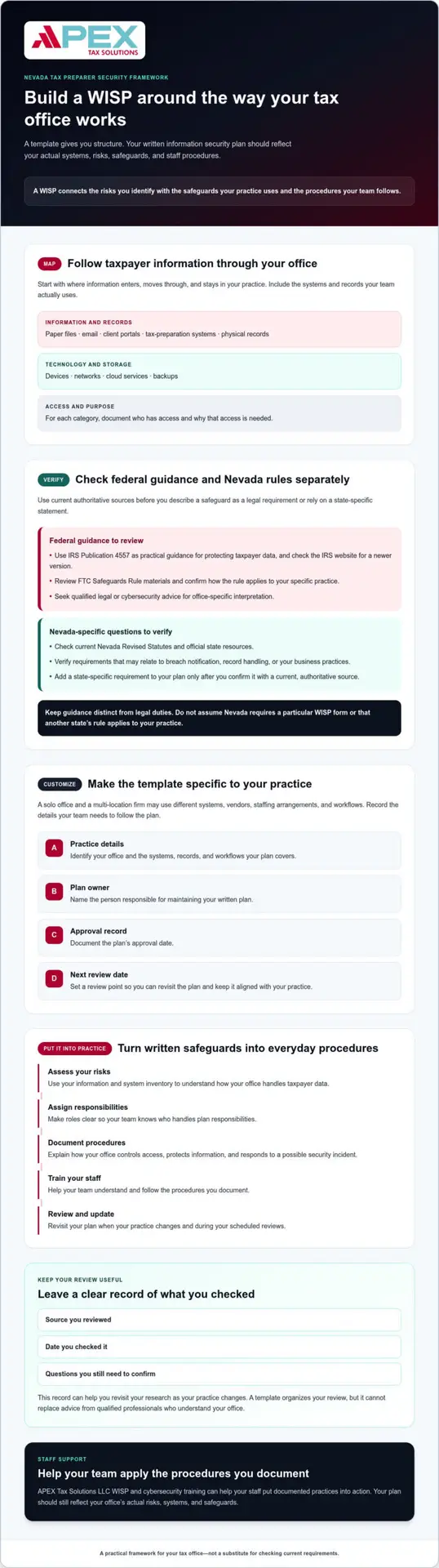
Map where taxpayer information enters, moves through, and stays in your office. Include paper files, email, client portals, tax-preparation systems, devices, networks, cloud services, backups, and physical records. For each category, identify who has access and why that access is needed.
For example, record which roles need access to return files, where signed documents are stored, and which devices staff use for work. Then describe the procedures your practice follows to protect information at each point. This inventory helps you check whether the plan matches your actual operations.
Why should a Nevada preparer avoid a generic, unreviewed template?
Your risks depend on how your practice works. A solo office and a multi-location firm may use different systems, vendors, staffing arrangements, and workflows. Update your plan when those operations change so staff can continue to follow its procedures.
Keep federal guidance separate from Nevada-specific legal questions. Check current IRS and FTC materials, then verify applicable Nevada statutes and breach-notification requirements through authoritative sources before relying on state-specific statements. A template can organize your review, but it can’t replace advice from qualified legal or cybersecurity professionals who understand your office. For professional practices and firms seeking specialized support to safeguard their IT infrastructure, learn more about comprehensive technology services.
Federal WISP Guidance and Nevada Requirements: What to Verify
Your plan should distinguish federal sources from Nevada-specific rules. This helps you avoid treating general security guidance as a legal duty or assuming that a rule from another state applies to your practice. Before relying on a data security plan for tax preparers template nevada offices can customize, check each requirement against current authoritative sources.
Federal guidance to confirm
Review the IRS’s current Publication 4557 and check the IRS website for a newer version. The publication offers practical guidance for protecting taxpayer data, but it isn’t a substitute for reviewing the laws and rules that apply to your practice.
Also consult the FTC’s FTC Safeguards Rule materials. Confirm how the rule applies to your specific business before describing a safeguard as a legal requirement. Seek qualified legal or cybersecurity advice for office-specific interpretation.
Nevada-specific rules to research
Check the current Nevada Revised Statutes and official Nevada state resources for provisions relevant to your data, records, and business practices. Verify statements about breach notification, record handling, or other state-law obligations against those sources or with qualified counsel.
Don’t assume Nevada requires a particular WISP form or that another state’s rule applies. Add a state-specific requirement to your plan only after confirming it with a current, authoritative source.
Make your research useful during future reviews by recording the source, the date you checked it, and what you still need to confirm. For each requirement, note the official source, the review date, and any question about how it applies to your office. Revisit your notes when your practice changes and during scheduled plan reviews.
- Source: Record the official publication, rule, statute, or agency page.
- Review date: Note when you checked the source and when you plan to verify it again.
- Applicability: Write down what you need to confirm about your practice before adding a requirement to your plan.
Don’t rely on an undated template for current obligations. Verify each requirement against current authoritative sources and your practice’s circumstances.
APEX WISP and cybersecurity training can help you translate documented procedures into consistent staff practices. Explore WISP and cybersecurity training as you build your review process, and refer legal questions to qualified professionals.
Data Security Plan for Tax Preparers Template Nevada: Sections to Customize
A useful WISP framework turns security goals into procedures your team can follow. Treat this data security plan for tax preparers template nevada practices can adapt as a working document, not preapproved legal language. Replace sample text with your office’s actual process, and flag questions that need current source verification or professional advice.
Start with practice details and clear labels
Use these fields to identify your plan and its owner. Mark each item as a template field, an implementation task, or a legal question so a blank or example isn’t mistaken for a completed safeguard.
- Template fields: Practice name and location: [enter details]; plan owner: [name and role]; approval date: [date]; next review date: [date].
- Implementation tasks: Confirm your information inventory, assign responsibilities, and record the safeguards your office actually uses.
- Legal questions to verify: List any federal or Nevada requirement you need to confirm, its authoritative source, the date you checked it, and who will follow up.
Document risks, policies, and safeguards
Build the plan around your operations. Record the information and systems you use, who has access, which vendors support your workflows, and how you assess risks. Then describe the safeguards you selected to address those risks. Include procedures staff can consistently follow for access, secure storage, retention, disposal, and backups.
- Scope and inventory: Identify taxpayer information, devices, networks, systems, cloud services, backups, and physical records in use.
- Roles and access: Note who handles each information category, why access is needed, and who reviews access when responsibilities change.
- Vendors and risk records: List relevant providers and document the risks you considered and the safeguards you chose.
- Handling procedures: Explain how your office stores, retains, disposes of, and backs up information in practice.
Illustrative control only: “The plan owner reviews staff access to the tax-preparation system when a role changes and records the review date and any access updates.” Use this example only if it matches your process. Otherwise, replace it with steps your office can carry out and document.
Plan for response and ongoing maintenance
Add a contact list, escalation steps, and fields for recording what happened, when you discovered it, who you contacted, and what actions you took. Verify notification duties against current authoritative sources or qualified advice before adding deadlines or legal conclusions to your response procedures.
Track staff training, plan approval, review dates, and updates after meaningful changes to your team, vendors, systems, or workflows. APEX’s cybersecurity training for tax offices can help make staff learning part of the process. Revisit each section regularly and keep the plan aligned with your office’s actual practices.
How to Put Your Tax Office Security Plan into Practice
A written plan is useful only when you and your team can follow it during everyday work. Use this sequence to turn your data security plan for tax preparers template nevada offices can adapt into clear responsibilities, practical procedures, and a routine for keeping the plan current.
- 1. Inventory: List the taxpayer information you handle, where you store it, the devices and services you use, and who can access each item.
- 2. Assess: Consider where information could be exposed in your workflows, such as when sending documents, working remotely, or using a vendor service. Record the risks you identify and why you selected each safeguard.
- 3. Assign: Name a plan owner to coordinate updates, maintain records, and make sure staff know their responsibilities. The owner can coordinate the work without personally handling every security task. Give each staff member clear instructions for the systems and information they use.
- 4. Document: Write procedures in plain language. Check user access, vendor relationships, and response contacts against the way your office operates.
- 5. Train: Walk staff through access rules, document handling, suspicious messages, and how to report concerns. Make instructions easy to find, and invite questions when a step doesn’t fit the workflow.
- 6. Test: Confirm that staff can find response contacts and explain how they would report a concern. Check that documented procedures match the tools and practices your office currently uses.
- 7. Review: Record the review date, updates, and open questions. Revisit the plan after meaningful changes to staff, systems, vendors, locations, or processes.
Make the plan workable for a small or remote office
Choose safeguards and procedures you can consistently maintain across your devices, locations, and work arrangements. For practices operating with limited internal technical staff, partnering with a managed service provider like JP Technical can help keep workstation, backup, and network protections up to date. Give staff direct instructions for accessing information, handling documents, recognizing suspicious messages, and reporting concerns. Clear steps matter more than complicated wording.
Tax software, whether cloud-based or installed on a computer, doesn’t replace office policies, staff training, or oversight. Use tax office workflow automation guidance to consider how documented processes can support consistent operations.
Set a review routine that fits your practice
Choose and document a review schedule that reflects current guidance and your risk-management process. Also trigger a review when your team, vendors, systems, office locations, or workflows change. Verify any legally mandated review frequency against current authoritative sources before including a specific interval.
APEX WISP and cybersecurity training can help you turn written procedures into repeatable staff practices. Explore WISP and cybersecurity training as you build your office’s plan and staff-learning routine.
Choose a Template, Training, and Support That Fit Your Practice
The right starting point depends on how much customization and ongoing help you need. A data security plan for tax preparers template nevada offices can adapt should organize your work, not imply that a form alone settles legal or security questions.
Assess the template before you rely on it
Check whether the template prompts you to describe your actual information, systems, responsibilities, safeguards, and response procedures. See whether it separates sample wording from legal references and points to authoritative sources for current guidance.
- Blank download: You control the content and updates, but you’ll need to build the structure, research sources, and tailor each section to your office.
- Guided template: Prompts can help organize key topics. Check who created it, whether it cites authoritative sources, and how you’ll keep references current.
- Professional support: Guidance can help you work through questions about your processes and plan upkeep. Confirm the provider’s scope and whether you still need separate legal or technical advice.
Be cautious of claims that a form alone guarantees compliance, prevents a breach, or fits every tax office. A template organizes information, but it can’t confirm that your safeguards match your risks or that a legal requirement applies to your practice.
Use training and expert advice for different needs
Training helps staff understand risks and follow documented procedures. For example, your team can practice how to handle an unexpected request for taxpayer information and report a concern using your office’s process. Then check whether staff can find and apply those instructions.
If you can’t confidently assess whether a legal requirement applies or a technical safeguard suits your systems, consult qualified legal or cybersecurity professionals. Apex Tax Solutions LLC offers WISP and cybersecurity training as an educational option for staff learning, not as a compliance guarantee or a replacement for office-specific professional advice.
Consider how your software, support, and staff training fit together in your security program. Choose an approach you can maintain, assign someone to revisit the plan, and keep source checks current. For tax-office training and support, partner with Apex Tax Solutions LLC as you build procedures your team can put into practice.
Make Your Security Plan a Working Part of Your Office
Your WISP should stay connected to the way your office works, not sit untouched after approval. Use the data security plan for tax preparers template nevada as a framework you can revisit, and verify current federal and Nevada requirements before relying on its legal references.
Keep your plan owner, staff, and procedures aligned as your practice changes. For questions that depend on your office’s specific legal or technical circumstances, consult qualified professionals.
Apex Tax Solutions LLC offers WISP and cybersecurity training for tax offices. You can also access software, support, and professional training through one provider. Explore WISP and cybersecurity training with Apex Tax Solutions LLC to support your team’s ongoing learning and help put documented practices into action.
Frequently Asked Questions
Is a written data security plan required for tax preparers?
Review current IRS and FTC guidance to determine which written security planning requirements apply to your practice. IRS materials discuss protecting taxpayer information, while applicable rules may set specific obligations based on your circumstances. Don’t treat a template or article as a legal determination. Check current official sources, document what you find, and consult qualified counsel if you need help deciding how a requirement applies to your office.
Does Nevada require tax preparers to use a specific WISP template?
Don’t assume Nevada requires a particular WISP form or that a generic template covers every state obligation. Check current Nevada statutes and official state resources for rules related to your information and business practices. Ask qualified counsel to verify any state-law interpretation you plan to rely on. Whatever framework you choose, tailor it to your actual systems, responsibilities, safeguards, and incident procedures.
What should a tax preparer data security plan include?
Your plan should describe the information and systems your practice uses, who manages security responsibilities, and how you assess risks and control access. Include the safeguards your office follows, relevant vendor considerations, staff training, incident-response steps, and a process for maintaining the plan. For example, document how staff handle taxpayer records and report a concern. Verify legal statements against current authoritative guidance before labeling them requirements.
Can I use a free WISP template for my Nevada tax office?
Yes, you can use a free template as a starting framework, but it can’t assess your office or confirm that its wording reflects current federal and Nevada requirements. Replace generic examples with your actual procedures, verify legal references, and assign an owner to each task. The data security plan for tax preparers template Nevada offices use should match their systems and workflows. Ask qualified legal or cybersecurity professionals about issues you can’t confidently resolve.
How often should a tax preparer update a data security plan?
Set a documented review schedule that fits your office and check whether current applicable requirements specify a review frequency. Revisit the plan when changes to staff, systems, vendors, workflows, locations, or the information you handle could affect your procedures. Record the review date, updates, responsible person, and open questions. Don’t assume one schedule fits every practice, and verify any legally mandated interval through authoritative sources.
What should a tax preparer do after discovering a possible data breach?
Follow your documented response process, preserve relevant information, and promptly involve the people responsible for security and legal decisions. Identify which systems and information may be affected, but avoid drawing unsupported conclusions. Notification duties depend on the facts and applicable law, which may include federal and Nevada requirements. Verify current IRS, federal, and state guidance, and seek qualified legal advice promptly to help assess the appropriate next steps.