
A locked door alone won’t protect every client record, device, or daily task in your tax office. Effective physical security measures for tax offices use layers of practical safeguards, from controlling who enters to securing paper files and equipment at the end of the day.
You know sensitive information needs protection. The challenge is deciding which safeguards to prioritize and making them easy for your team to follow. Use this checklist to review reception areas, workspaces, file storage, and other parts of your office.
You’ll also learn how to set clear staff and visitor procedures and connect physical safeguards to your broader security practices. Apex Tax Solutions LLC offers WISP and cybersecurity training to help tax professionals strengthen security awareness and reinforce those routines. With a thoughtful approach, you can make protection part of how your office works every day.
Key Takeaways
- Map who can enter each area, how work moves through your office, and where sensitive records or equipment could be exposed.
- Choose physical security measures for tax offices based on the risk each safeguard addresses, rather than relying on a locked door or cameras alone.
- Set clear opening, client-hour, and closing routines so your team knows when to secure records and how to handle visitors.
- Assign responsibility for routine security tasks and give staff a consistent way to report concerns.
- Use WISP and cybersecurity training to build staff awareness and connect daily physical safeguards with broader security practices.
Why physical security measures for tax offices need more than a locked door
Your tax office holds more than paperwork. Client files, workstations, printers, storage areas, and staff-only spaces can all expose sensitive information if someone gains access without a clear reason. Physical security measures for tax offices help you manage who enters, where people can go, and how you protect records and equipment during busy workdays and after hours.
A client waiting near a desk, a vendor delivering supplies, and an employee retrieving a file each create a different access situation. Review these everyday interactions alongside less routine circumstances, such as an office being left unattended or a device going missing. Physical safeguards and digital protections address different risks, but together they support the protection of client information.
What physical security protects inside a tax office
Physical safeguards control access to people, spaces, records, and equipment. Digital security controls protect information and systems through technology.
Consider where paper returns and supporting documents sit between tasks, whether a printer leaves pages visible, and which workstations or storage areas contain client information. Follow the route a visitor takes from the entrance to a meeting space. If that route passes desks, file storage, or equipment, review how you separate public and staff-only areas.
Different people need different levels of access. Clients may need a welcoming place to meet with you, while employees may need to reach work areas and records to complete their tasks. Vendors may enter for a specific business purpose. Make those distinctions clear in your procedures without disrupting normal service.
Why a single lock is not a complete security approach
A locked entrance can help control entry, but it can’t guide a visitor after someone opens the door. It also won’t secure a paper file left on a desk, prevent someone from viewing a screen, or remind staff to protect equipment at closing. Combine entry controls with practical routines for handling visitors, records, and devices.
Layered safeguards work together, but they can’t guarantee that every incident will be prevented. Start with routines your team can follow consistently, then address areas where sensitive information or equipment remains exposed. Even a small office can clarify who greets visitors, where staff store active files, and what they secure before leaving.
Physical controls don’t replace cybersecurity measures such as protecting accounts and systems. Digital tools, in turn, can’t secure a paper folder or limit access to a staff-only area. Review current IRS and Federal Trade Commission guidance to understand which security-plan requirements apply to your practice. Make that review part of your broader security planning, alongside workable protections for everyday office routines.
How to assess physical security risks in your tax office
A focused walkthrough helps you decide which physical security measures for tax offices to prioritize. Follow how people enter, move through your office, handle records, and leave at the end of the day. Review ordinary work as well as unusual situations, such as a delivery arriving while staff are assisting clients.
A risk-based assessment identifies what could be exposed, where exposure could happen, and which practical action should come next. It helps you focus on sensitive assets and workable improvements, but it can’t guarantee that every incident will be prevented.
Which office areas should you examine first?
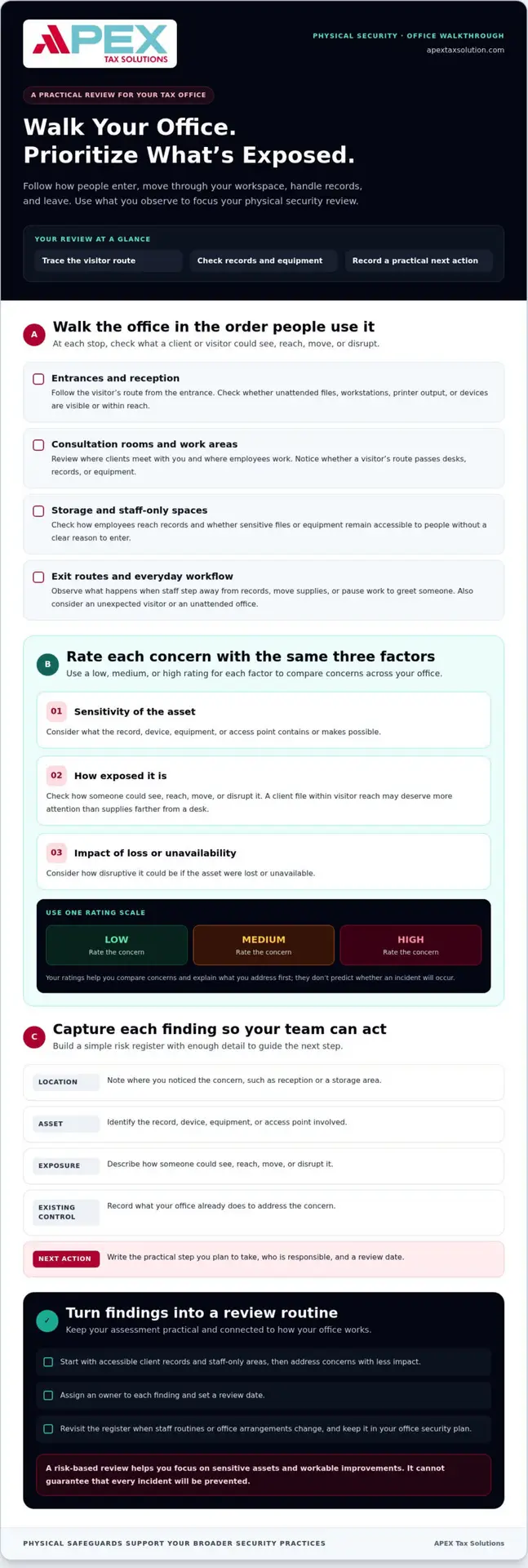
Walk through the office in the order someone might use it: entrances, reception, consultation rooms, work areas, storage, and exit routes. At each point, check whether a client or visitor could see or reach an unattended file, workstation, printer output, or device. Review staff-only spaces and how employees access them during normal work.
Observe the workflow, not just the rooms. Note when staff step away from records, leave a door open to move supplies, or pause a task to greet someone. These routine moments can reveal exposure that an after-hours walkthrough might miss. Also consider unusual situations, such as an unexpected visitor seeking access beyond the client-facing area.
How to prioritize risks without overcomplicating the review
Rate each concern as low, medium, or high across three factors: the sensitivity of the asset, how exposed it is, and how disruptive its loss or unavailability could be. For example, a file containing client information within visitor reach may warrant more attention than supplies stored farther from a desk.
Use the same scale across the office. The rating helps you compare concerns and explain why you’re addressing one before another; it doesn’t predict whether an incident will occur.
Create a simple risk register with enough detail for someone on your team to act on each finding. Include:
- Location: Where you noticed the concern, such as reception or a storage area.
- Asset: The record, device, equipment, or access point involved.
- Exposure: How someone could see, reach, move, or disrupt it.
- Existing control: What your office already does to address the concern.
- Next action: The practical step you plan to take, the person responsible, and a review date.
Start with accessible client records and staff-only areas, then address concerns with less impact. Assign an owner to turn each finding into a task, and set a review date so you can revisit it when staff routines or office arrangements change. Keep the register in your office security plan so the assessment supports ongoing planning rather than becoming a one-time exercise.
Strengthen staff awareness as part of your broader security practices with APEX’s WISP and cybersecurity training.
Which physical security measures for tax offices fit each risk?
Choose a safeguard for the exposure you identified, then pair it with a routine your team can follow. Access controls define who may enter; visitor procedures guide guests; secure storage protects records; and equipment practices address devices and shared work areas. Choose a combination that fits how your office operates rather than adding devices for their own sake.
A camera or locked door can support an office security plan, but neither replaces clear access procedures. A camera may record activity without controlling where a visitor goes. A locked entrance may limit entry until someone opens it. Your team still needs to manage visitors, secure unattended materials, and review who can access staff-only areas.
| Safeguard | Risk addressed | Practical use | Limitation |
|---|---|---|---|
| Keys or access codes | Uncontrolled entry to staff areas | Limit distribution and update access when roles change | Doesn’t track every use or secure unattended records |
| Visitor sign-in and escorting | Guests entering work areas without guidance | Record visits and keep guests in designated spaces | Depends on consistent staff attention |
| Lockable storage | Paper files within reach | Put records away when staff aren’t using them | Doesn’t protect a file left out before storage |
| Device and printer practices | Exposed equipment, screens, or printed pages | Collect printouts promptly and secure devices when unattended | Requires repeatable daily habits |
| Cameras, alarms, or protective hardware | Specific access or equipment concerns | Match options to a risk you’ve identified | No single device prevents every incident |
Entry, visitor, and staff-access controls
Decide who holds keys or knows access codes, and remove access when someone changes roles or no longer needs it. At reception, use a consistent process to greet visitors, record their arrival, and direct or escort them to designated areas. A sign-in record can help you review visits, but it doesn’t prove that every part of your office is secure or that each guest stayed in the appropriate space.
Set expectations for unusual situations, too. If an employee steps away while a visitor waits, make clear who will assist the guest and how staff-only access will remain controlled. Assigning responsibilities makes access practices easier to repeat.
Paper records, devices, and shared work areas
Store active files when you leave your desk, restrict access to file storage, and collect printed pages promptly. Position screens so visitors can’t casually view client information, and set a designated place for staff to secure devices when they aren’t using them. Establish a secure process for disposing of paper records, such as shredding sensitive documents instead of leaving them in open waste bins.
Consider cameras, alarms, or protective hardware only when they address a specific concern, such as monitoring an entry point or securing equipment. These tools complement staff procedures; they don’t replace them. APEX WISP and cybersecurity training can support staff awareness alongside your office practices.
How to put a tax-office physical security checklist into daily practice
A checklist works when your team can follow it during a busy day, not just when someone reviews the security plan. Assign an owner to each routine, keep the steps easy to find, and explain how staff should report a concern. That structure turns physical security measures for tax offices into repeatable actions rather than reminders people may overlook.
Daily opening, visitor, and closing routines
Organize checks around the workday so staff know what to do and when. Adapt the responsibilities to fit your office, but name someone for each task rather than assuming another person will handle it.
- Opening: Check entry points and staff-only areas. Look for signs of unexpected access, and put away records or devices left out before client-facing work begins.
- Client-facing hours: Greet visitors, record their arrival according to your procedure, and keep them in designated areas. Escort visitors who need to move beyond reception or a meeting space. If you issue a temporary key or other access item, assign someone to collect it when the visit ends.
- Between appointments: Return active files to their designated storage when you no longer need them. Check shared work areas for exposed papers, unattended equipment, or printouts awaiting collection.
- Closing: Secure paper records and devices, clear work surfaces, and check that staff-only spaces and entry points are secured according to your office procedure. Assign a specific person to complete the final check.
Records, incidents, and periodic review
Tell staff whom to notify if they find a missing record, misplaced key, or sign of possible unauthorized entry. The responsible person should document what staff found, where and when they noticed it, who received the report, and what immediate steps the office took. Ask staff to report observations promptly and avoid guessing about what happened.
Use your office’s established process to escalate concerns to the person responsible for the security program. Preserve relevant details, such as the location of a missing file or which access item can’t be accounted for. Keep unresolved concerns open until the responsible person records the follow-up.
Review the checklist and access arrangements when staff roles, office layout, or workflows change. Confirm that key handling still matches current responsibilities, then update task owners and review dates. Coordinate physical routines with your broader security plan while keeping digital controls in their appropriate procedures. For complementary staff education, use the cybersecurity training guide for tax offices to support consistent security awareness across your team.
Keep the checklist accessible and invite staff to flag steps that don’t fit how the office works. Their feedback can help you refine routines and keep responsibilities clear as daily operations change.
How APEX training can support a stronger tax-office security routine
Staff need more than a written procedure. They need to understand how security expectations connect to their work and how to respond when a situation doesn’t match the plan. Structured learning can help your team build confidence and make security awareness part of its professional habits.
Physical safeguards fit within a broader security program alongside administrative and technical protections. Align your office procedures with your documented plan, and review current IRS and Federal Trade Commission materials to understand guidance that may apply to your practice.
Connect physical routines to your broader security plan
Your plan should reflect how your office operates. Make sure staff understand their responsibilities and how physical practices connect with protections for information and systems. Coordinate procedures without duplicating digital controls, and review them when your work practices change.
Requirements can depend on your circumstances, so consult current IRS and FTC guidance. Education can support your team’s understanding, but it doesn’t replace tailored legal guidance or advice about your facility’s security needs. Get qualified legal advice when you need help interpreting obligations for your specific situation.
Build staff confidence through practical training
Practical learning helps your team connect security expectations with professional operating practices. Use it to reinforce how staff can recognize concerns, follow established procedures, and raise questions when a process is unclear. APEX’s WISP and cybersecurity training supports staff awareness as part of your broader security program.
Choose learning that supports clear communication and consistent understanding. Keep staff education connected to the procedures they use, and review those procedures as your office’s needs evolve.
Continue building your team’s security awareness with APEX training and support. Practical learning can help you reinforce everyday habits and support your tax office’s ongoing security work.
Make security part of how your office grows
Your office routines will change as your team, client needs, and workspaces evolve. Use those changes as a prompt to keep learning: invite staff to flag unclear steps, then use their feedback to keep your security practices workable. Consistency grows when people understand what to do and how their actions help protect client information.
Treat physical security measures for tax offices as an ongoing practice, not a one-time project. Build staff awareness alongside written procedures so your team can apply them confidently as daily operations shift. APEX offers WISP and cybersecurity training to support tax professionals’ broader security education.
Take your next step with training that complements your office’s security work. Explore APEX WISP and cybersecurity training for tax professionals to keep building a thoughtful, sustainable approach to protecting your practice and the people who rely on it.
Frequently Asked Questions
Is physical security required for a tax office?
Requirements depend on the laws and rules that apply to your business and the information it handles. Review current IRS and FTC guidance, including whether relevant Safeguards Rule provisions apply to your operations. Don’t assume one checklist meets every obligation. Use your written security plan to document safeguards and responsibilities suited to your practice, and seek qualified legal advice if you need situation-specific interpretation.
What are the most important physical security measures for a small tax office?
Start with controls for the most sensitive areas: limit access to staff-only spaces, secure paper records when you aren’t using them, and set clear visitor procedures. Include routines for printers, devices, keys, and end-of-day checks. Your priorities depend on your layout and work practices. Walk through your office, note exposed records or equipment, and assign a responsible person and follow-up action to each concern.
Can a tax office use security cameras instead of access controls?
No. Cameras may help you observe selected areas, but they don’t control who enters or stop someone from reaching unattended records. Consider cameras as one possible layer alongside visitor procedures, restricted access, and secure storage. Match camera use to an identified risk, and establish appropriate rules for handling footage. Don’t treat cameras as a complete security program or a guarantee against theft, unauthorized access, or data exposure.
How should a tax office handle visitors who need to enter staff areas?
Set a consistent process before visitors arrive. Keep guests in designated client-facing areas when possible, record visits according to your office policy, and escort visitors who need access to restricted spaces. Before accompanying a visitor, staff can put away visible client paperwork and avoid leaving the guest alone near workstations or storage. Assign someone to manage the process, explain the steps to employees, and revisit them as operations change.
What happens if a client tax document goes missing from the office?
Follow your written incident process promptly and report the missing document to the person responsible for your security plan. Record what you know, including when someone last accounted for the document, where staff handled it, who may have accessed the area, and which records could be involved. Separate observations from assumptions. Then follow reporting obligations that apply to your circumstances and seek qualified guidance if you’re unsure what steps to take.
How often should a tax office review its physical security measures?
Review your safeguards when your office layout, staffing, access needs, or record-handling processes change, and schedule recurring reviews that fit your documented security program. For example, a staff departure may prompt you to reassess who holds keys or can enter restricted spaces. Check whether written responsibilities still match daily practice. Keep dated notes of findings, assigned follow-up actions, and completed changes so your team can track each review.
Are locked filing cabinets enough to protect tax records?
No. A locked cabinet helps secure the files inside it, but it doesn’t address who can enter the room, how staff control cabinet keys, or whether records sit elsewhere during the workday. Consider who needs access and how your team returns keys after use. Pair secure storage with consistent handling practices, and review how your office protects records before filing and after staff retrieve them.