
To protect client data at your tax office, create and implement a written information security plan (WISP). Federal regulations require professional tax preparers to develop plans for safeguarding client information. A WISP gives your office a clear framework for handling data, managing access, and responding to a breach.
Client records need careful protection. The challenge is turning that responsibility into consistent steps your team can follow, from securing accounts to spotting suspicious activity. This guide explains how to build and maintain a WISP, assess cybersecurity risks, strengthen account security with multifactor authentication, and respond to a suspected breach or tax identity theft. It also covers practical safeguards for email, devices, employee access, and backups, helping you make security part of your everyday workflow.
Key Takeaways
- Build a written security plan that sets clear rules for handling client information, limiting access, and responding to incidents.
- Assess physical and digital risks regularly, and make sure your breach response plan assigns clear responsibilities.
- Watch for warning signs of tax identity theft, including unexpected e-file acknowledgements and unusual system behavior.
- Strengthen account security with multifactor authentication, unique passwords, and access limited to authorized users.
- Protect paper and electronic records with secure handling practices, reliable backups, and a plan for recovering data.
1. Written Information Security Plans (WISPs)
To protect client data at your tax office, limit access, use strong unique passwords, encrypt attachments, and maintain secure backups. Keep personally identifiable information, including Social Security numbers, out of email messages and attachments.
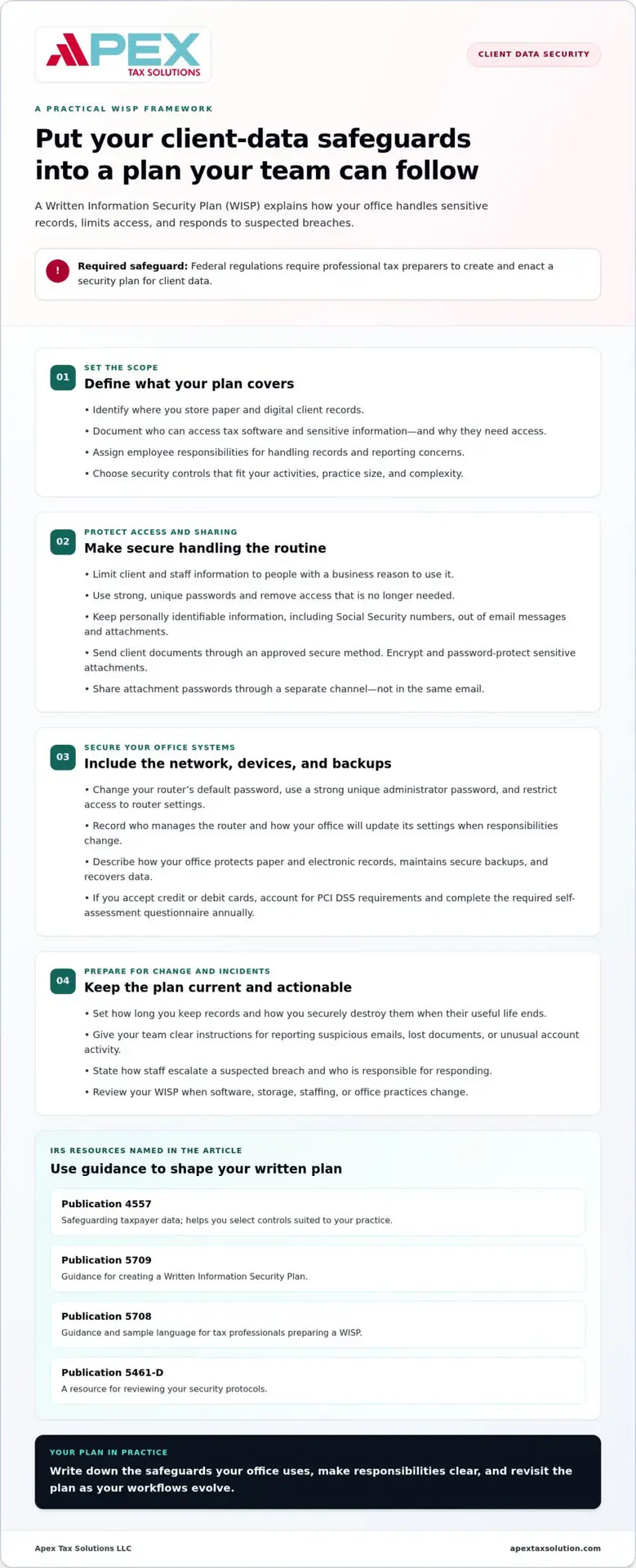
Federal Trade Commission regulations require you, as a professional tax preparer in the United States, to create and enact a security plan for client data. A Written Information Security Plan, or WISP, puts those protections in writing. Use it to explain how your office handles digital and paper records, assigns employee responsibilities, and responds to a suspected breach. In August, the IRS and Security Summit reminded tax professionals of their responsibility to protect client data with a WISP.
Use IRS publications to shape your plan. IRS Publication 4557, Safeguarding Taxpayer Data: A Guide for Your Business, advises you to choose security controls based on your activities, practice size, and complexity. IRS Publication 5709 guides you in creating a WISP, while Publication 5708 provides guidance and sample language for tax professionals preparing one. The IRS also lists Publication 5461-D for reviewing security protocols. Use these materials to build a plan around the information your office handles.
Make your WISP specific enough for staff to follow. Identify where you store client documents, who can access tax software, and how your team sends sensitive records. For example, require staff to send client documents only through an approved secure method, not as ordinary email attachments. Encrypt and password-protect attachments containing client information. Share each password through a separate channel, not in the same email.
Secure your wireless network at its entry point. Change your router’s default password, set a strong, unique password for administrative access, and restrict access to router settings. Default login details can expose network controls to anyone who knows the manufacturer’s standard credentials. Record who manages the router and how your office will update its settings when staff responsibilities change.
Your plan should state how long you keep records and how you destroy them. Establish a retention and destruction policy, then securely dispose of records when their useful life ends. Limit access to client and staff information to employees with a business reason to use it. If your office accepts credit or debit cards, account for PCI DSS requirements and complete the required self-assessment questionnaire annually.
Review your WISP when your software, storage methods, staffing, or office practices change. Give employees clear instructions for reporting suspicious emails, lost documents, or unusual account activity. A current written plan helps you protect client data at your tax office as workflows evolve. Apex Tax Solutions LLC offers WISP and cybersecurity training to help tax professionals put these procedures into practice.
2. Cybersecurity assessments and breach response
Tax professionals face targeted attempts to steal client records and impersonate taxpayers. Attackers may trick staff into revealing computer or IRS e-Services passwords, steal EFINs or CAF numbers, or take remote control of office systems. A preseason review helps identify weak points before they disrupt return preparation or expose sensitive information.
Assess both physical and digital security. Review who can enter the office, where paper files sit, which employees can access tax software, and how your network connects devices. Test whether former employees still have active accounts, and remove their access immediately. The IRS lists NISTIR 7621, a National Institute of Standards and Technology publication, as a small-business information security resource.
Use a repeatable preseason checklist to strengthen your safeguards:
- Review user accounts and remove access that no longer serves a business need.
- Check computers, tax software, firewalls, and antivirus protection for needed updates.
- Look for unfamiliar devices, unexpected remote-access tools, and unusual login activity.
- Confirm your team knows how to report suspicious messages and system behavior.
- Verify that your recovery procedures identify who can access backups and restore files.
Train staff to recognize phishing, which uses deceptive messages to steal credentials or prompt unsafe actions. Show employees how to inspect sender details, avoid unexpected attachments, and report messages requesting passwords or taxpayer records. Use practical examples, such as a message imitating an IRS notice or asking a preparer to open an unfamiliar document. Tax professionals should practice safe email habits inside and outside the office.
Tax professionals who use IRS e-Services should register for QuickAlerts to receive news and threat updates. Teach staff to flag unexpected account-access changes, unfamiliar password-reset requests, or messages they did not send. Regular exercises help employees recognize these warning signs and report them promptly instead of dismissing them as routine office glitches.
Before an incident, assign an incident lead and document the first response steps. If you suspect unauthorized access, isolate the affected device from the network, preserve relevant messages and activity records, and note when you discovered the problem. Avoid deleting files or resetting equipment before documenting what you observed. Clear responsibilities reduce confusion while you determine which systems and records may be involved.
Next, assess the scope: identify affected accounts, systems, files, and time periods. Secure compromised credentials, review access logs, and track the actions taken. Your written response procedure should explain how staff escalate concerns and communicate internally. Afterward, review what happened and update controls or training to address the specific weakness.
Build those habits through recurring, role-specific cybersecurity practice. Employees who handle intake, prepare returns, or manage office systems encounter different risks, so use examples tied to their work. Structured cybersecurity learning can help your team turn threat awareness into practical response skills.
3. Protecting client data and preventing tax identity theft
Collect tax records through a secure intake method, restrict access to staff who need the information, and store files in protected locations. Maintain a written retention policy, then securely destroy records when their useful life ends.
To assess an office’s safeguards, look for clear procedures covering document transfers, staff access, record retention, and incident reporting. Review how the office explains these practices and handles personal and financial information. A defined process shows how records are managed from intake through disposal.
Tax identity theft occurs when someone uses stolen taxpayer information, such as a Social Security number, to file a fraudulent return and claim a refund. Criminals may target tax practices because stolen client data can help them impersonate taxpayers. IRS Publication 4557 defines taxpayer data as any information obtained or used to prepare a return, not only personally identifiable information. Treat intake forms, income records, and filing details as sensitive information.
Use IRS guidance in IR-2024-193 to recognize warning signs affecting your practice. Look for unusually numerous e-file acknowledgements, suspicious IRS letters received by multiple clients, or returns rejected because someone already used a client’s Social Security number. Investigate if clients respond to emails your office never sent. Also review unusually slow or unexpected computer and network behavior, especially alongside other warning signs.
If you spot a sign, record what happened and preserve relevant messages or records. Identify which accounts, client files, and systems may be involved. Then follow your internal incident procedures and secure affected access. IRS Publication 5293 offers tax professionals a data theft resource guide to help organize response steps and consider what information may matter.
Clients can add identity safeguards with an IRS Identity Protection PIN. According to the Internal Revenue Service, this six-digit number helps verify a taxpayer’s identity when filing a federal return. The IRS generates a new PIN each calendar year, and you must obtain yours directly. Your tax professional can’t obtain it on your behalf. Share it only with the IRS and your trusted tax preparation provider.
A credit freeze restricts access to your credit file, while identity monitoring can help you notice certain changes or suspicious activity. These tools address credit-file risks, not every possible misuse of stolen tax details. Treat them as additional identity safeguards alongside careful record handling and prompt reporting of unusual tax-account activity.
Retain documents according to your written policy and use a secure disposal method when their useful life ends. To evaluate a tax office, look for specific explanations of who handles your information, how documents are transferred, and how the office responds to a suspected exposure. These practices help you understand how the office protects your personal and financial information.
4. Multifactor authentication for tax office accounts
A password alone can leave an accounting system exposed if someone steals or reuses it. Multifactor authentication (MFA) adds another identity check, so account access depends on more than one factor. For example, a user enters a password and then a code sent to an approved device. That extra step helps protect tax software, email, and other accounts holding client information.
According to the Federal Trade Commission, its Safeguards Rule generally requires tax preparation firms to use MFA to protect access to customer information, unless they use an approved equivalent control. The Federal Trade Commission’s June 2023 change requires tax professionals to use multifactor authentication to protect clients’ sensitive information. Include the requirement in your written security plan, and document any approved equivalent control your firm uses.
Start with accounts that could expose multiple records: tax software, email, file storage, remote access, and administrator tools. In each service’s security settings, enable MFA for every user, not just the office owner. Follow the setup prompts to register an approved second method, then test sign-in before relying on it. Apply the process to every team member’s account, including seasonal staff who access taxpayer information.
Choose a verification method your staff can use reliably and control carefully. A code sent to a registered device provides a second check after the password. If an employee changes phones or loses a device, use the service’s account recovery process and remove the old device from the account. Staff should never approve unexpected sign-in prompts and should report requests they did not initiate.
Pair MFA with unique passwords. Use a different password for every account, because reuse can let one stolen credential unlock other services. Tax office passwords should contain at least 15 characters. A strong passphrase can be easier to remember than a string of unrelated characters, but it still needs to be unique. The security plan should identify who can reset credentials and how staff report suspected compromise.
Set access by role. A preparer who needs return software may not need administrator access to user settings or storage systems. Review permissions when duties change, and end access promptly when an employee leaves. If several preparers use a shared workstation, require each person to sign in with an individual account and complete the second verification step. Individual accounts create clearer access records than shared logins.
Train staff to use MFA without weakening it. Explain that a password and a code are separate verification methods, and neither should be shared with coworkers. During onboarding, guide each employee through signing in on their work device and show them how to report a lost device or suspicious prompt. Cybersecurity training can reinforce these steps with realistic account-access examples and help your team apply security measures consistently.
5. Physical, electronic, and skimming data breaches
A misplaced paper file, stolen computer, or compromised payment terminal can expose taxpayer information. A criminal may use those records to impersonate clients, access accounts, or support fraudulent tax returns. Protect each source differently: secure paper files, control device access, and inspect payment equipment.
Keep printed returns and intake forms in locked storage whenever they are not in use. Don’t leave files on reception desks, in open vehicles, or beside shared printers. Assign a staff member to transport records, and document each handoff when files move between offices. Follow your written retention policy to securely destroy records after their useful life ends.
For electronic records, lock work computers whenever you step away and secure devices when you leave the office. A laptop left in a vehicle or an unattended workstation can expose saved files. Maintain electronic backups and a recovery plan for system interruptions or restricted access. Test the plan by confirming who restores files, where backups are stored, and how your team resumes work.
Skimming captures payment-card information through a compromised or substituted card-reading device. If your office accepts card payments, inspect each terminal for unfamiliar attachments, damage, or changes to its usual appearance. Limit access to sensitive cardholder data to people with a business need. Businesses that accept credit or debit cards must comply with PCI DSS and complete a self-assessment questionnaire annually.
Prepare your notification and recovery process before an incident. Assign a response lead, identify how your office will determine which taxpayers may be affected, and decide who will communicate with them. Preserve relevant system activity and messages, then assess potentially exposed files, devices, or payment records. The IRS began notifying taxpayers affected by its data breach in April 2024. That example underscores why you need a clear process to identify affected people and communicate with them.
After a breach, restore access carefully. Secure affected accounts, replace compromised devices or payment equipment, and review how the criminal gained access. Update procedures to address the weakness, whether it involved a missing file, an unattended computer, or a suspicious terminal. Record response actions so your team can apply lessons to future incidents and improve recovery plans.
Unauthorized access can disrupt your tax preparation work, expose personal information, and create identity-theft risks for clients. A documented response helps you determine the scope and organize recovery while keeping affected taxpayers in view. Strengthen your breach response planning with practical cybersecurity guidance for tax offices.
Apex Tax Solutions: TaxSlayer basado en Web
Apex Tax Solutions LLC offers professional web-based preparation platforms for tax professionals choosing software for their office workflows. Software is only one part of protecting taxpayer records; your written security plan, account controls, and staff practices remain essential.
If your team needs to strengthen its security knowledge, APEX WISP and Cyber Security Training can connect written safeguards with practical staff awareness. Use that learning to reinforce how employees handle sensitive records, recognize suspicious activity, and follow office procedures. For offices seeking broader operational support, the Service Bureau Partner Program is another option.
Choose support that matches your current need, whether you’re evaluating tax software, developing staff security practices, or building your office operations. Contact Apex Tax Solutions LLC to discuss the next step for your tax office.
Make security part of your next business decision
Protecting client information is an ongoing business practice, not a task to finish once and set aside. As your office changes its workflows, staff, or technology, keep security procedures aligned with the way you work. That steady attention helps protect client data at your tax office and supports the trust clients place in your team.
Your software and operational needs should fit the way your practice prepares returns and serves clients. APEX Tax Solutions offers TaxSlayer Pro Web and Corp Software for tax professionals, along with support options to help you build your office operations. Choose a next step that matches your goals, whether you’re reviewing software or strengthening your team’s security knowledge.
Contact Apex Tax Solutions to explore the right fit for your practice. Contact Apex Tax Solutions and keep building a secure, capable tax office with confidence.
Frequently Asked Questions
What federal rules protect taxpayer data at a tax office?
Federal protections include the FTC’s Safeguards Rule and Internal Revenue Code Section 7216. The FTC rule requires covered tax preparation firms to protect customer information through a security program, including multifactor authentication or an approved equivalent control. Section 7216 makes certain knowing or reckless uses or disclosures of tax return information by preparers a misdemeanor. State laws may add WISP requirements, so your office should account for the states where it operates.
What IRS Publication 4557 safeguards must tax preparers follow?
IRS Publication 4557 provides guidance, rather than a one-size-fits-all checklist of controls. It advises preparers to select safeguards based on their activities, practice size, and complexity. For example, an office with remote staff may need clear rules for accessing files outside the workplace, while a paper-heavy practice should address physical record handling. Use the publication to assess your risks and document why your chosen protections fit your operations.
What are the FTC Safeguards Rule requirements for tax preparation firms?
The FTC Safeguards Rule generally requires tax preparation firms to use multifactor authentication to protect access to customer information, unless they use an approved equivalent control. MFA asks users to prove their identity through separate methods, such as a password and a code. Include the selected control in your security program, assign responsibility for maintaining it, and record how staff access sensitive systems. The chosen control must protect customer information.
How should a tax office create and maintain a written information security plan (WISP)?
Start with IRS Publication 5709 for WISP creation, then use Publication 5708 for guidance and sample language. Describe the information your office handles, who oversees safeguards, and how staff should respond to an incident. Assign an owner to review the plan when software, staffing, or storage practices change. IRS Publication 5461-D can guide security-protocol reviews. Keep the written plan accessible to responsible staff, but store it securely.
What cybersecurity training and access controls should tax office staff use?
Train staff to recognize phishing, protect taxpayer information inside and outside the office, and report suspicious activity through a clear internal process. Use role-based access so each preparer can reach only the records and software functions needed for assigned work. For example, intake staff may need document access but not administrative account settings. Review access when duties change, and use practice scenarios to show how to handle unexpected requests for credentials or client records.
What should a tax office do after a client data breach, and who must be notified?
Contain the suspected exposure, preserve relevant records, and identify which accounts, systems, and taxpayers may be affected. Assign a response lead to coordinate the investigation and prepare clear communications. Your office should identify affected taxpayers and follow the applicable reporting process for relevant authorities. Notification duties can vary with the incident and governing requirements, so document decisions, dates, and the people responsible for each communication.
What are the penalties for tax preparers who fail to protect client data?
Consequences depend on the conduct and applicable law. Internal Revenue Code Section 7216 makes certain knowing or reckless uses or disclosures of tax return information by preparers a misdemeanor. Taxpayers may also have two years from discovering a breach to file a lawsuit for unauthorized inspection or disclosure; compensation is capped at $1,000 per incident, with possible punitive damages and legal fees. These provisions concern specific conduct, not every security incident.