
What if your WISP looks complete on paper but doesn’t reflect how your tax office actually handles client data? Understanding WISP requirements for tax businesses means turning security expectations into clear responsibilities and routines that fit your team, technology, and daily work.
You may already know that a Written Information Security Plan should help protect sensitive taxpayer information. The challenge is deciding what your plan should address, who owns each action, and how to avoid relying on a generic template that misses risks in your office.
This guide explains the purpose and key elements of a WISP, including risk assessment, safeguards, staff training, vendor oversight, and incident response. You’ll also learn how to put those practices into operation and where to consult official guidance, including IRS Publications 4557 and 5709, as you evaluate current obligations.
Apex Tax Solutions LLC offers WISP and cybersecurity training to help you make security practices clearer and more actionable for your tax business. Use that training to build routines that reflect how your office works and help staff understand their responsibilities.
Key Takeaways
- Understanding WISP requirements for tax businesses starts with matching your written plan to the information and workflows your office actually handles.
- Use the plan to clarify who is responsible for security tasks and how your team should carry them out.
- Connect each office risk to a suitable safeguard category instead of relying on a one-size-fits-all control.
- Turn your WISP into a working routine by assigning owners, documenting practices, and reviewing changes to your operations.
- Practical WISP and cybersecurity training can help your team apply written procedures consistently in everyday work.
Understanding WISP Requirements for Tax Businesses: What the Plan Does
A Written Information Security Plan (WISP) is your documented approach to identifying information-security risks and protecting sensitive business and taxpayer information. It connects security goals to the people, procedures, and safeguards your tax office uses. Understanding WISP requirements for tax businesses means describing how your office handles information, rather than simply repeating broad security advice.
Your team handles details such as Social Security numbers, income records, tax returns, and contact information. Staff may access these records while preparing returns, communicating with clients, or working with service providers. Documenting how your business protects information clarifies what staff should do, who is responsible, and where to raise concerns.
What a WISP means for your tax preparation business
A WISP isn’t a software feature, an insurance policy, or a one-time security task. Your tax software may include security controls, but the plan also needs to address how your office manages access, trains staff, and responds to concerns. Insurance may address certain financial consequences, but it doesn’t describe or carry out your security procedures.
Your written plan can turn broad goals into practical instructions. For example, it can identify who approves staff access to taxpayer records, how employees should handle information when working remotely, and whom to notify if they suspect a security issue. These examples are planning considerations, not universal procedures. A solo preparer and a business with employees or multiple offices may face different risks.
A template can give you a starting structure, but it can’t assess your office for you. Review each section against the information you handle, the way staff work, and the systems and service providers your business uses. A document alone doesn’t establish that your safeguards work or guarantee regulatory compliance.
How to understand IRS guidance and legal applicability
IRS publications explain security practices in a tax-office context. Publication 4557, Safeguarding Taxpayer Data, offers IRS guidance on protecting information. Publication 5709, How to Create a Written Information Security Plan for Data Safety, provides plan-related guidance. Read the current versions before relying on specific details.
Guidance and legal obligations aren’t interchangeable. The Gramm-Leach-Bliley Act (GLBA) and the FTC Safeguards Rule provide a federal framework for protecting customer information. Whether particular provisions apply to your business depends on the governing requirements and your circumstances. Don’t infer your legal duties from a template or checklist alone.
Before making a legal conclusion, review current IRS materials and the applicable FTC rule and guidance. If you need an interpretation for your specific business, seek qualified legal advice. This helps you use official tax-professional guidance while evaluating which obligations apply to your office.
WISP Requirements for Tax Businesses: The Plan Components to Address
A useful WISP gives your security program enough structure to guide decisions without becoming a generic checklist. Use the prompts below to describe your business, then verify specific legal or technical obligations against current authoritative guidance before calling them requirements.
Useful plans connect identified risks to assigned safeguards and owners. That connection helps you see why a procedure exists, who carries it out, and how it fits your tax office’s work. Understanding WISP requirements for tax businesses means making those details specific to your operations instead of copying language that may not match them.
Document ownership, scope, and risk assessment
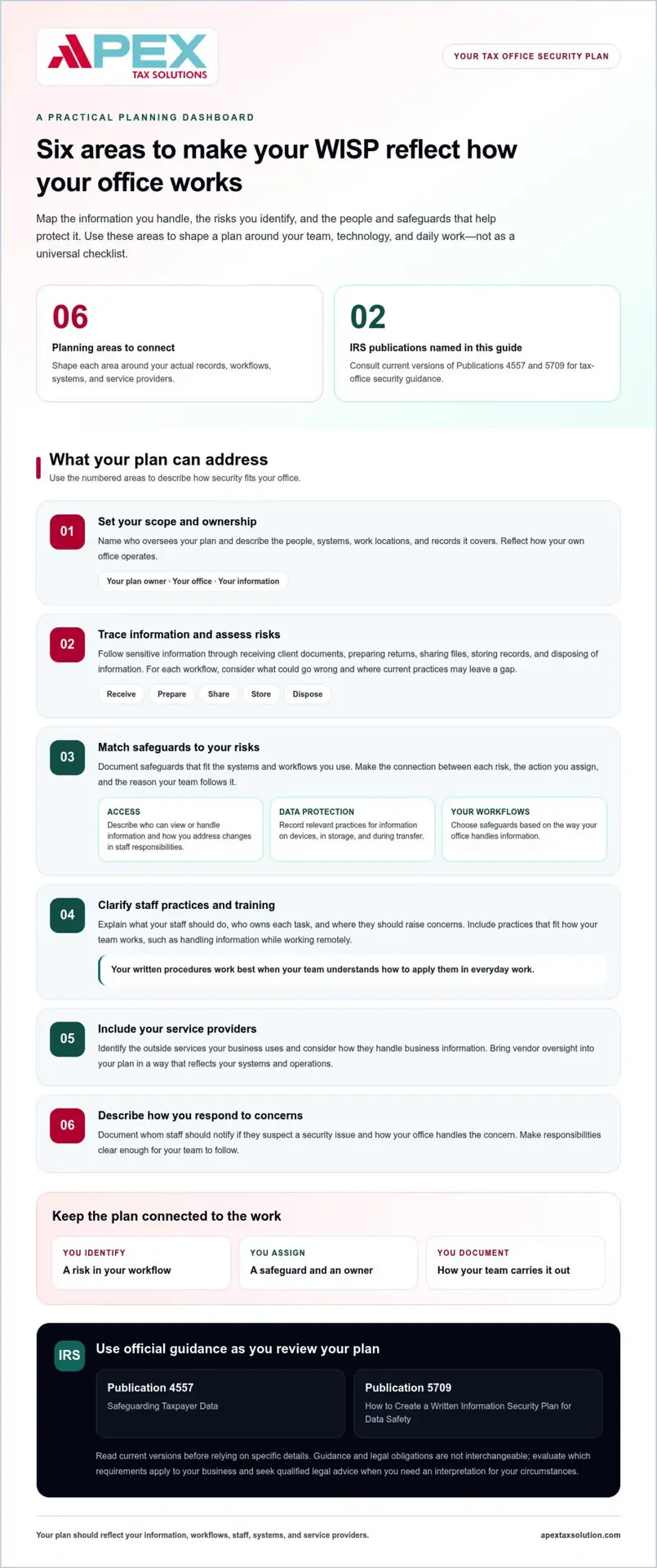
Start by naming the person who oversees the plan and describing which people, systems, work locations, and records it covers. Your scope might include preparers, seasonal staff, taxpayer documents, office computers, remote access, and outside services that handle business information. Adjust the details to match how your office operates.
Next, trace where sensitive information moves and where it could be exposed. Map common workflows, such as receiving documents, preparing returns, sharing files with clients, storing records, and disposing of information. For each workflow, ask what could go wrong and which current practices might leave a gap. Document how you reached your conclusions instead of assuming every office faces identical threats or applying an unsupported formula.
Use those findings to set priorities. If staff access records from different locations, for example, document the access practices and safeguards that apply to that workflow. Make the connection between each risk and assigned action clear enough for your team to follow.
Record safeguards, staff practices, and response procedures
Your plan can describe the safeguards your office uses and the routines that help staff apply them. Use these prompts to build an office-specific outline, not as a claim that every item applies in the same way to every business:
- Access: Explain how you decide who can view or handle taxpayer and business information, and how you address access when staff responsibilities change.
- Data protection: Record relevant practices for protecting information on devices, in storage, and during transfer, based on your systems and workflows.
- Staff practices: Describe how you teach employees to handle sensitive records, recognize suspicious activity, and raise concerns.
- Service providers: Identify outside providers that may access information and document how you manage that relationship, where applicable.
- Incident response: State how staff should report a suspected incident, who receives the report, and what steps your business will take to assess and respond.
- Review: Note who revisits the plan and how you record changes to systems, staffing, or business processes.
These prompts help you organize a practical plan, but they don’t determine which safeguards a law requires in your situation. Check current IRS publications, including Publication 4557, and applicable FTC materials before making legal claims or specifying mandatory controls. APEX Tax Solutions’ WISP and cybersecurity training can help you turn security concepts into clearer staff practices.
Matching WISP Safeguards to Your Tax Office Risks
A safeguard is most useful when it responds to a risk in your actual workflow. Start with the information involved, where it moves, and who handles it. Then consider which safeguard category could reduce exposure. Let your documented risk assessment and any requirements that apply to your business guide specific control choices.
Your office structure matters. A solo preparer may focus on protecting records in a home office and limiting access to their own devices. An office with multiple employees also needs clear staff permissions and procedures for shared work. A remote or multi-office team may need to account for how employees access and share information across locations. These situations call for different considerations, not a universal control checklist.
Prioritize access, devices, and information handling
Consider whether each person needs access to every record or system. Role-based access means granting permissions according to someone’s work responsibilities, rather than giving everyone the same level of access. Pair that approach with procedures for handling, storing, and sharing client information, including how staff should manage paper records and report misplaced documents or devices.
Use the examples below to connect a possible exposure with the workflow and safeguard category to examine. They’re planning prompts, not a one-size-fits-all prescription.
Risk: A staff member can view records unrelated to their work. Workflow or information: Access to taxpayer files and office systems. Safeguard category: Administrative access practices, such as assigning permissions based on job responsibilities.
Risk: A device containing sensitive information is lost or used by someone unauthorized. Workflow or information: Preparing returns on office or work devices. Safeguard category: Technical and physical protections appropriate to your devices and how your team uses them.
Risk: Staff share client documents through an unclear process. Workflow or information: Receiving, storing, or sending tax records. Safeguard category: Written handling procedures and staff awareness practices.
Risk: Work continues from more than one location. Workflow or information: Remote access to records and systems. Safeguard category: Access, device, and information-handling practices suited to your remote workflow.
Assess vendors, remote work, and outside access
Map where a service provider or outside service interacts with your information. For example, consider whether a provider stores records, supports a system that contains them, or can access an account during support work. Document the relationship and the oversight steps your business uses, where applicable. A provider’s role doesn’t remove the need to understand your own information flows.
Cloud software may form part of your workflow, but it doesn’t describe every way your staff handle information. An IT provider may support your systems without defining your office procedures. Compare the protections and responsibilities across those relationships, then record any gaps you identify.
Choose specific controls based on your documented risk assessment and applicable requirements. Check current IRS publications and FTC materials before describing a particular control as legally required. This keeps your WISP grounded in your office’s needs without presenting an example as a rule for every tax business.
How to Put a WISP Into Practice and Keep It Current
A WISP becomes useful when you turn its written safeguards into work your team can carry out. Follow a clear sequence, record key decisions, and revisit the plan when your office changes. These steps offer a practical management approach. Don’t treat a suggested review schedule as a legal requirement unless current authoritative guidance establishes it for your business.
- Map information: Trace how your office receives, uses, stores, shares, and disposes of business and taxpayer information.
- Assess risks: Consider where each workflow, system, or record could be exposed, and note gaps in current practices.
- Assign owners: Give each safeguard a responsible person or role, so staff know who carries out and oversees the task.
- Document controls: Describe the procedures your team should follow in language they can understand and use.
- Train staff: Walk employees and relevant contractors through the practices that apply to their work, and give them a clear way to raise concerns.
- Review and update: Revisit the plan when operations or risks change, and record what you adjust.
Turn the written plan into repeatable office routines
Write each safeguard as a practical instruction: what needs to happen, who handles it, and what supporting procedure guides the task. For example, explain who reviews access when a staff member takes on a new responsibility, or how an employee should report a document sent to the wrong recipient. Clear steps help your team act consistently instead of relying on memory.
Training helps staff understand why procedures matter and how to apply them during everyday work. Communicate expectations to employees and relevant contractors in terms that fit their responsibilities. Keep records appropriate to your business, such as who owns the plan, when you trained staff, and what you reviewed or updated. These records can help you track follow-through, but they don’t establish by themselves that every legal obligation has been met.
Review changes and respond to security concerns
A documented review connects changes in your operations to safeguards that may need updating. Consider revisiting your plan when you adopt new systems, change staffing or workflows, add remote work, or identify a new risk. These are sensible management triggers, not a claim about a legally prescribed review frequency.
If a staff member reports a suspected security concern, follow your documented response procedures. Afterward, record relevant lessons and consider whether your instructions, assigned responsibilities, or training need an update. Focus the review on what changed and what your team should do differently.
APEX Tax Solutions offers cybersecurity training for tax offices to help your team put written procedures into practice. Practical learning can make security responsibilities clearer for you, your staff, and relevant contractors.
Build WISP Confidence With Practical Tax Office Training
A written plan can guide your security practices, but your team also needs to understand how those practices fit its daily work. Practical training helps you explain responsibilities clearly, so staff know how to handle information and follow the procedures you’ve documented. It supports stronger habits, but training alone doesn’t satisfy every security or regulatory obligation.
Make security learning relevant to your tax business
Connect training to the work your office actually performs. An independent preparer may need to focus on managing records and device access, while a team with multiple employees may also need shared procedures for handling documents and reporting concerns. Use familiar office workflows to make instructions clear and easier for each person to apply.
For example, walk staff through how your office expects them to receive client documents, store them, and share them with authorized people. Explain what they should do if a document goes to the wrong recipient or they notice activity that seems unusual. A clear reporting path helps staff act promptly instead of guessing or delaying.
Understanding WISP requirements for tax businesses also means knowing the limits of training. A class can help your team understand security responsibilities and practice established procedures, but you still need to maintain safeguards that suit your business and evaluate the obligations that apply to it. Revisit instructions when your systems or work processes change, and make space for staff to raise questions.
Continue learning with APEX Tax Solutions
APEX Tax Solutions offers WISP and cybersecurity training for tax offices. Use this training to strengthen your understanding of security practices and translate written procedures into staff routines.
Whether you work as an independent preparer, an ERO, or a tax-business owner, focus on learning that connects to your responsibilities and office operations. Consider how your team will apply the information after training, who can answer process questions, and how you’ll reinforce expectations as staff and workflows change.
Security learning works best as part of an ongoing effort. Pair training with clear procedures, assigned responsibilities, and thoughtful reviews of how your office handles information. Explore APEX Tax Solutions’ WISP and cybersecurity training as you continue building practical security routines for your tax business.
Keep Building Your Office’s Security Confidence
Your next security improvement doesn’t need to begin with another document. Start with one focused conversation about how your team handles sensitive information during an ordinary workday. Ask where a procedure feels unclear, which responsibility needs a clear owner, or what change could affect an existing practice.
Those answers can help you choose a practical learning priority for your office. Invite staff to share questions as they arise, and make security part of how your business learns and adapts. Understanding WISP requirements for tax businesses is an ongoing effort to make your written approach meaningful in daily operations, not a task you complete once and set aside.
APEX Tax Solutions offers WISP and cybersecurity training for tax professionals. Explore WISP and cybersecurity training with APEX Tax Solutions to help your team strengthen its security practices and build routines that fit your tax business.
Frequently Asked Questions
Is a WISP the same as a cybersecurity policy?
Not necessarily. A WISP describes your business’s overall approach to information-security risks, while a cybersecurity policy may set expectations for one topic, such as password use or document sharing. Organizations may use these terms differently, so look at what a document actually covers rather than relying on its title. Understanding WISP requirements for tax businesses includes checking current official guidance to determine which written practices apply to your office.
Can a small tax business create its own WISP?
Yes. You can document your own approach, provided you base it on how your office works rather than copying a template without review. For example, consider whether you prepare returns alone, use seasonal staff, store paper files, or let employees work remotely. A template can prompt useful questions, but it can’t decide which obligations apply or assess your safeguards. Use current IRS and FTC materials, and seek qualified legal or technical advice when needed.
Does the IRS provide a WISP resource for tax professionals?
Yes. IRS resources for tax professionals include Publication 4557, Safeguarding Taxpayer Data, and Publication 5709, How to Create a Written Information Security Plan for Data Safety. Find the current versions through IRS.gov before relying on their guidance. These publications can inform your planning, but a publication or sample plan doesn’t establish that your specific business meets every applicable legal obligation. Evaluate your own circumstances and requirements.
Can one WISP cover a tax business with multiple offices?
It can describe shared practices, but your plan should also account for meaningful differences among offices. For example, one office may use different systems, handle paper records, or follow a distinct document-transfer process. Make the scope clear, then record office-specific procedures or risks where they matter. Don’t assume a single document automatically covers every operation. Review its contents against how each office works and the requirements that apply to your business.
What should you do if you suspect client information was exposed?
Follow your incident-response procedures and promptly alert the person responsible for security. Preserve relevant records, such as suspicious emails or system notices, rather than deleting them or investigating beyond your role. The right next steps, including any notification duties or deadlines, depend on the incident and applicable requirements. Consult current official sources and qualified legal or technical professionals for guidance specific to the facts.
Does using tax software or a cloud provider replace a WISP?
No. Software and outside services may play a role in your security practices, but using them doesn’t automatically document how your business protects information. For example, you still need to understand which employees access client records and how your office handles files outside the software. Map how providers interact with sensitive information, document relevant oversight, and verify applicable responsibilities using current authoritative guidance.
How can tax preparers tell whether a WISP is practical?
Check whether a staff member can use it to make a clear decision during real work. For instance, could a new employee find the procedure for sharing a client document or know whom to notify about a suspicious message? Your plan should connect instructions to actual tasks and assigned roles. If staff can’t locate or understand a procedure, revise how you explain or organize it. Ask qualified counsel about legal sufficiency.