
What if your next client handoff didn’t depend on someone remembering one more follow-up? A CRM for tax preparers gives you and your team a shared view of client conversations, next steps, and office tasks. It won’t prepare returns, and it shouldn’t replace your tax preparation software. It helps organize the work around it.
Client communication can get harder to track as filing season picks up. When updates live in separate inboxes or depend on memory, your team may not know who needs a response or what should happen next. A clear workflow makes those responsibilities easier to see and manage.
This guide explains how a CRM fits into a tax practice, how it differs from tax preparation software, and how to shape a practical workflow from first contact through follow-up. You’ll also learn how Apex Tax Solutions LLC connects technology, training, and support, and how GHL for Tax Offices can support marketing automation and client acquisition. The goal is a more organized client experience, with tax software focused on preparing returns and your CRM coordinating relationships and handoffs.
Key Takeaways
- Use a CRM for tax preparers to make client communication, follow-ups, and next steps easier for your team to track.
- Map a clear client journey from first inquiry to follow-up, with an owner and next action at each stage.
- Separate relationship and workflow tasks from return preparation, then assess how your tools support visibility and accurate records.
- Start with one recurring workflow, test it with your team, and refine it before applying the process more broadly.
- Explore how GHL for Tax Offices, alongside APEX software, training, and service-bureau support, can support your practice’s growth.
What a CRM for Tax Preparers Should Do During Tax Season
A client asks whether you received their information. Another still needs to send a document. Meanwhile, a teammate has answered a question but hasn’t recorded what should happen next. During busy periods, keeping conversations and handoffs visible can take as much attention as the work itself.
A CRM for tax preparers organizes client relationships, communication, and follow-up. It helps your team see who a client is, what you’ve discussed, who owns the next step, and whether that step is still open. This shared context helps you manage the service around a return without confusing relationship management with tax preparation.
Where client follow-up gets difficult
Email threads hold conversations, spreadsheets track selected details, and individual reminders prompt specific people. The challenge is that these tools can separate a client’s question from its owner or next action. If someone is away or another team member takes over, the context may not travel with the task. That creates workflow friction, not an automatic filing failure.
For example, a prospective client emails to ask what information to provide before an appointment. One team member replies, then gets pulled into another task before assigning a follow-up. A CRM record gives the team a place to capture the inquiry, note who will respond, and mark the next action. Anyone who needs to help can see the status instead of piecing it together from separate inboxes.
The value is continuity. Your team can identify whether a client is waiting for a response, whether someone needs to request missing information, or whether a handoff needs attention. The CRM doesn’t decide the tax work. It makes the communication around that work easier to coordinate.
What a CRM does, and what it does not do
A CRM organizes information and interactions connected to client relationships. In a tax office, you can use it to track inquiries, client communications, assigned follow-ups, and handoffs. A useful record makes the next step clear, rather than leaving your team to rely on memory.
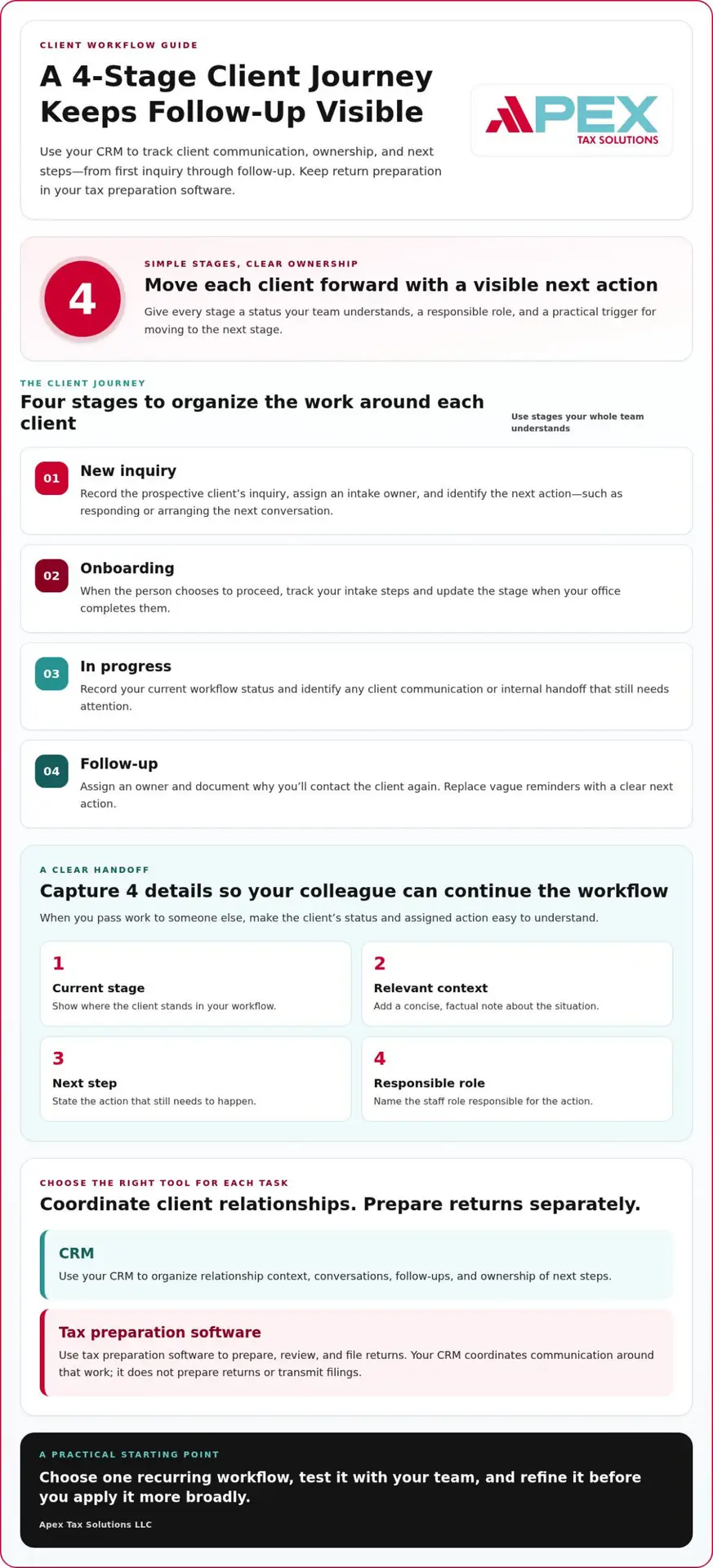
Tax preparation software has a different job. You use it to prepare, review, and file tax returns. A CRM can coordinate communication and office workflows around those activities, but it doesn’t prepare a return or transmit a filing. Keeping those responsibilities distinct helps you choose the right tool for each task and set clear expectations across your team.
- CRM: Organizes relationship context, conversations, follow-up, and ownership of next steps.
- Tax preparation software: Supports the preparation, review, and filing of returns.
Think of the CRM as your team’s coordination layer. When each client question has a visible status and assigned next action, you can manage handoffs with greater clarity while keeping return work in the software designed for it.
How a Tax Preparer CRM Connects Leads, Clients, and Office Workflows
A client journey can involve several people before your team completes its work. A clear workflow shows how a new inquiry becomes an active client, what the office has handled, and which follow-up remains. With a CRM for tax preparers, you can make those transitions visible instead of relying on separate reminders and memory.
Organize the client journey around clear stages
Choose stage names your whole team understands. Each stage should signal the client’s current status, identify the role responsible for moving work forward, and clarify what prompts a status change. Keep the stages practical: describe work your office actually does, not every possible detail of a return.
- New inquiry: A prospective client contacts your office. An intake owner records the inquiry and assigns the next action, such as responding or arranging the next conversation.
- Onboarding: The person chooses to proceed and your team starts its intake process. The assigned staff member tracks the onboarding steps and updates the stage when your office has completed them.
- In progress: Your team is providing service. The responsible preparer or staff member records the current workflow status and identifies any client communication or internal handoff still needed.
- Follow-up: The current service stage is complete, and your team has a defined reason to continue the relationship. Assign an owner and document the purpose of the next contact rather than leaving a vague reminder.
Set a simple rule for each transition. For example, move an inquiry to onboarding when the person agrees to begin your intake process, not merely because someone sent an initial reply. These triggers give your team a consistent way to understand the pipeline without inventing deadlines or assuming every client follows an identical path.
Make team handoffs easier to follow
A handoff works best when the next person can quickly understand the client’s status and the action assigned to them. Record the current stage, a concise note about relevant context, the next step, and the staff role responsible. Update the record when that action changes, so a colleague can continue the workflow without searching through personal reminders.
Documented ownership turns a handoff from “someone should follow up” into a clear next step for the right person. Consistent notes also help your team distinguish an unanswered client question from an item someone has already addressed. Keep notes factual and useful: capture the communication context and action, not unnecessary personal detail.
Keep sensitive tax documents separate from general CRM contact and communication records. Use the CRM to track a document-related status or note that a next step is needed, while handling the actual files through your office’s designated process for sensitive documents. This distinction helps your team coordinate work without treating a relationship record as a document repository.
If you’re shaping a workflow around client acquisition, GHL for Tax Offices connects CRM planning with marketing automation for your tax business.
How to Evaluate CRM for Tax Preparers Alongside Tax Software
Choosing tools gets easier when you start with the work each one needs to support. A CRM for tax preparers should help your team manage client relationships and communication. Tax preparation software should support return work. Connect the workflows with a clear handoff rather than forcing both jobs into one system.
Compare the work each system is designed to support
Use this simple comparison to clarify responsibilities before assessing specific tools. Your team should know where to record relationship activity, where to complete return work, and how to pass a client from one workflow to the next.
CRM responsibilities: Track prospective client inquiries, relationship context, communication, follow-up, assigned owners, and the status of office workflow tasks.
Tax preparation software responsibilities: Support tax return preparation, review, and electronic filing.
Handoff between systems: Record the relevant workflow status and next action in the appropriate place. For example, when a client moves from onboarding into return preparation, staff should know who takes responsibility and where the preparation work belongs.
Keep the boundary practical. Your CRM can indicate that a client has reached a particular stage or that staff need to follow up, but it doesn’t prepare or transmit a return. Likewise, tax preparation software isn’t a substitute for a shared process that tracks who owns a client conversation. A defined handoff helps prevent duplicate updates and makes it easier for staff to continue work with context.
Choose criteria that match your tax practice
Evaluate tools against the way your office actually works. Consider how many people need access, whether staff work in one office or remotely, what languages your team uses with clients, and how often one person hands work to another. The right fit should make your existing process clearer, not add steps your team won’t maintain.
- Workflow fit: Can you represent your real client journey with stages your staff understand?
- Team visibility: Can the right people identify a client’s status, assigned owner, and next action?
- Communication needs: Can your team record useful context for the conversations and follow-ups it manages?
- Record upkeep: Can staff update information consistently without duplicating notes across several places?
- Role clarity: Can you distinguish relationship tasks from return preparation and show where one workflow passes to the other?
Test the process with a familiar scenario, such as a new inquiry that becomes an active client. Have each staff member identify where they would record the current status, what they would do next, and how a colleague would understand the handoff. If the process feels confusing or repetitive, simplify it before expanding it across the practice.
Good tool selection starts with clear responsibilities and manageable records. A feature list alone can’t tell you whether your team will use a system consistently, and no CRM feature guarantees compliance or business growth. Choose a setup your staff can maintain, then review whether it gives your office the visibility and workflow support it needs.
How to Set Up a CRM Workflow for Your Tax Preparation Practice
A useful CRM workflow fits the way your office already serves clients. Start small, make ownership clear, then improve the process with your team’s feedback. Setting up a CRM for tax preparers doesn’t require redesigning every office task at once.
Map and document the current process first
Choose one recurring client workflow, such as handling a new inquiry. List the touchpoints your team handles, from first contact to the next appropriate follow-up. Mark where another staff member takes over, and note where questions, delays, or unclear responsibilities tend to arise. Focus on what your team observes without assuming a single cause.
Then use a manageable setup sequence:
- Map the work: Write down the common client touchpoints and handoffs.
- Choose stages: Name a few clear statuses that describe the workflow from your office’s perspective.
- Assign owners: Identify the role responsible for advancing each stage and recording the next action.
- Test the process: Walk through a typical client scenario with the staff who handle it.
- Refine the steps: Remove confusing or repetitive requirements before expanding the workflow.
For example, your inquiry workflow might move from “new inquiry” to “response needed,” then to “onboarding” when the person proceeds. The assigned team member records the status and next action at each point. If the inquiry needs another staff member’s attention, that handoff becomes part of the documented workflow rather than a private reminder. Establish what your team needs before adding product-specific automation.
Roll out the process with your team
Explain each stage in plain language: what it means, what triggers a status change, who owns it, and what information staff should record. Set a shared expectation that the owner updates the status and next action when work changes. This gives colleagues a consistent reference and helps them continue the process without guessing.
Ask staff to test the workflow and point out where a label feels unclear or an update asks them to repeat information. Use that feedback to simplify the steps and clarify ownership. Keep the first version focused on one recurring process. Once your team can use it consistently, decide whether another workflow needs the same structure.
This staged approach also gives you a grounded way to think about tax office workflow automation: first define the process, then decide which steps benefit from automation. Explore workflow support for your tax office as you plan a process that suits your practice.
How APEX Helps Tax Preparers Connect CRM and Practice Growth
Your CRM workflow is one part of building a tax practice that can grow with you. Since 2015, APEX Tax Solutions has connected professional tax software, training, and service-bureau support to help you strengthen your business operations.
Connect CRM planning to tax-office needs
APEX offers GHL for Tax Offices, an implementation designed to support marketing automation and client acquisition for tax businesses. As you plan your CRM workflow, define how your office handles new interest and outreach, then assign the process and ownership your team needs. GHL supports that business focus; it doesn’t replace tax preparation software or return work.
APEX’s GHL for Tax Offices resources offer more detail on implementation. APEX helps you build a clearer path for attracting clients and organizing your business, with workflows shaped around your practice’s needs.
Build a support system around your practice
Tax software, tax preparer training, and service-bureau support serve different needs, but each can contribute to a stronger professional operation. APEX is an IRS-authorized e-file provider and offers personalized support without call-center scripts. Its software, training, and service-bureau resources can support you as your practice develops and you work to scale your business while retaining revenue.
As a Latino-owned company, APEX offers support in English and Spanish. Consider the people and learning behind your tools as well as the technology itself. Explore how GHL for Tax Offices fits your marketing and client acquisition needs, and build your next step with a partner focused on supporting tax professionals.
Explore GHL solutions for tax offices and shape an organized, growth-ready practice.
Make Your Next Workflow Decision With Confidence
Your next step doesn’t need to be a full practice overhaul. Choose one client journey to improve, agree on what a clear handoff looks like, and use that experience to guide future workflow decisions. A thoughtful CRM for tax preparers should fit the way your team works and be simple enough to maintain.
As your practice evolves, revisit the process with your team. Identify which steps stay clear, where ownership becomes uncertain, and what records staff actually use. Small, deliberate adjustments can help you build a workflow that remains useful as your office changes.
Start with one manageable improvement and keep building from there. Explore GHL solutions for your tax office and plan the next step for your practice.
Frequently Asked Questions
Is a CRM for tax preparers the same as tax preparation software?
No. A CRM for tax preparers supports the client relationship side, while tax preparation software is where you complete return tasks and e-file. For example, use the CRM to note that a client asked about an appointment and assign a staff follow-up; use tax software for the return itself. Keeping that boundary clear helps you avoid treating a communication update as evidence that tax work has been completed.
Can a solo tax preparer benefit from using a CRM?
Yes. A solo preparer can use a CRM to keep inquiries, client preferences, and planned follow-ups in one organized process, even without a team to coordinate. After speaking with a prospective client, for instance, you can record how they heard about your office and what you agreed to do next. Start with the information and workflow you’ll actually maintain, so the system supports your routine instead of becoming another administrative burden.
Can a tax office use a CRM outside tax season?
Yes. You can use a CRM outside filing season to manage new client inquiries, plan outreach, and track follow-ups related to your tax practice. If someone asks about working with your office for an upcoming season, you can record the inquiry and the next appropriate contact. Keep your process focused on communication and client acquisition rather than treating the CRM as a substitute for tax preparation or bookkeeping work.
What client information belongs in a tax preparer CRM?
Keep CRM records focused on information your team needs to manage the relationship: contact details, preferred communication method, language preference, inquiry source, conversation notes, and the next action. A brief note that a client prefers an email update, for example, can help staff communicate consistently. Limit sensitive details to what your workflow requires, and keep tax documents and return information in the appropriate systems and processes your office uses to handle them.
Does a CRM automatically send tax returns to the IRS?
No. A CRM doesn’t prepare or transmit tax returns simply because you record a client’s status in it. Your team uses tax preparation software for return preparation and electronic filing. You can use a CRM to note that a return-related step needs attention, but update any filing status only after the responsible staff member verifies that action in the appropriate workflow. That distinction helps prevent a tracking note from being mistaken for a completed filing.
How can a CRM support a bilingual tax office?
A CRM can help your office record a client’s preferred language and communication preferences, giving staff useful context before they respond. You might also use consistent notes to record the language of a conversation and the follow-up the client expects. A CRM doesn’t translate communication or ensure accuracy on its own. Your team still needs to communicate clearly in the appropriate language and keep the client record current.