
Your tax software should prepare returns, not become the catch-all for every client conversation. During a busy season, messages can spread across email, texts, and calls, while appointment coordination and follow-ups compete with return work. The right GHL features for tax client communication can help you organize those interactions without confusing your CRM with the software you use to prepare taxes.
If you want a clearer way to manage client communication, start by separating conversations, return preparation, and document exchange. A CRM can help you organize conversations and reminders, while tax software and a client portal support return work and document handling. APEX Tax Solutions implements GoHighLevel (GHL) for tax offices to help automate marketing, streamline client acquisition, and organize office communications.
In this article, you’ll learn which GHL capabilities can support your client journey, where they fit alongside tax software, and how to plan a practical, responsible workflow. You’ll also see how to structure routine communication and appointment coordination while keeping sensitive tax work in the appropriate systems.
Key Takeaways
- Evaluate GHL features for tax client communication by the tasks they support, such as contact records, email and SMS, appointment scheduling, and workflow automation.
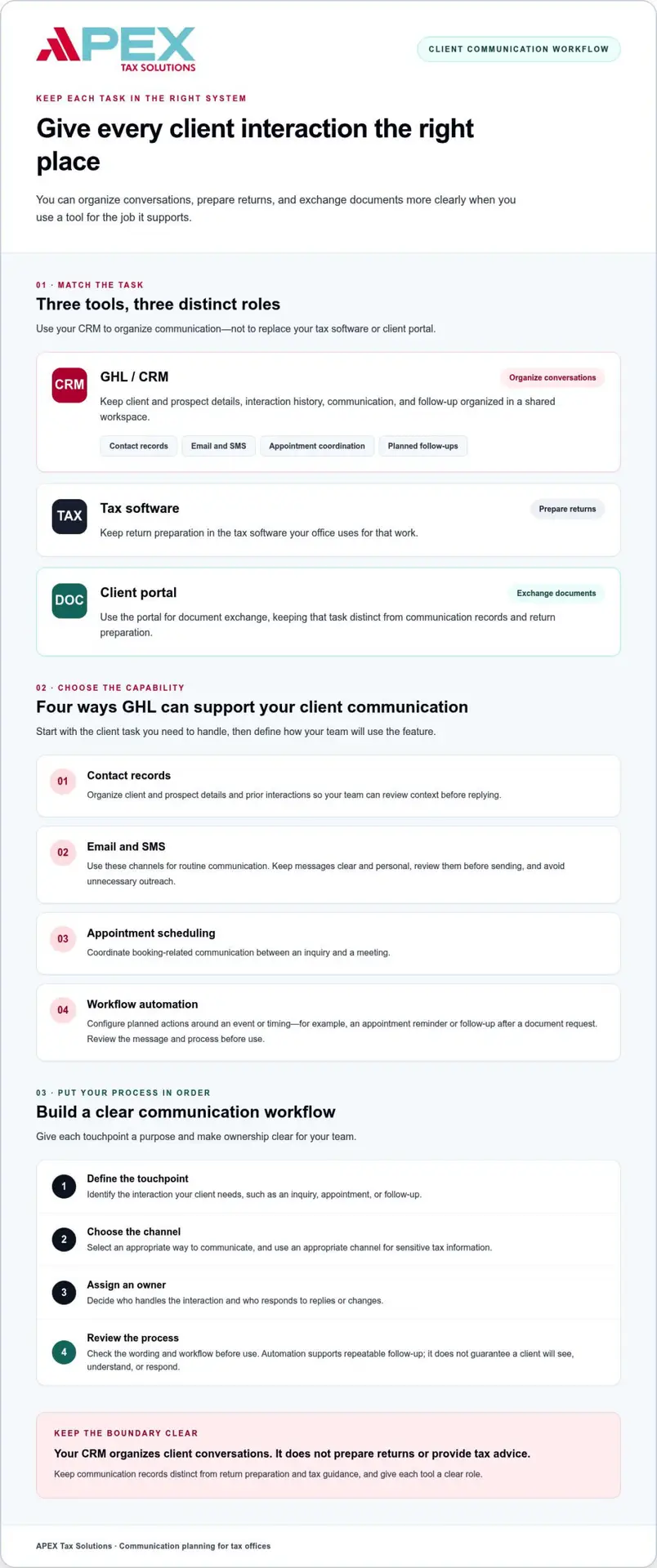
- Map each client interaction to the right tool: use a CRM for communication, tax software for return preparation, and a client portal for document exchange.
- Build a practical workflow by defining each touchpoint, choosing a channel, assigning an owner, and reviewing how the process works.
- Keep routine communication clear and purposeful, and use an appropriate channel for sensitive tax information.
- APEX’s GHL implementations help tax offices connect communication planning with marketing, client acquisition, and daily operations.
Why GHL Features Matter for Tax Client Communication
Client questions, document requests, and follow-ups all need attention, often while you’re preparing returns and coordinating appointments. When conversations begin in different places, it can be difficult to see what a client asked, what your team already answered, and what still needs action. GHL features for tax client communication can give those interactions a more organized structure.
GHL, short for GoHighLevel, is a customer relationship management (CRM) and communication platform. A CRM gives your team a shared workspace for organizing information about clients and prospects, along with records of interactions. It helps you manage communication, but it does not replace tax software, a client portal, or your professional judgment.
Where tax-office communication tends to become fragmented
Separate inboxes, phone calls, and appointment records can leave pieces of a client conversation in different places. One preparer may know about a question from a call while another team member sees only the latest email. The challenge isn’t simply receiving messages. It’s keeping enough context to follow through consistently.
Example: A client asks about an appointment by phone, sends a follow-up question by email, then replies to a text reminder. If your team tracks each exchange separately, someone may need to piece together the conversation before responding.
What a CRM contributes to client relationships
A CRM helps you organize client and prospect interactions in a shared workspace. Your team can review communication history, understand the context, and identify the next step.
A CRM helps your tax office organize client conversations; it doesn’t prepare returns or provide tax advice. Keep communication records distinct from return preparation and tax guidance. That boundary helps your team use each tool for its intended role and prevents a conversation log from being mistaken for tax work.
A well-planned client journey gives each interaction a clear purpose. It might begin with an initial inquiry, continue with appointment coordination, and move into document-request follow-up. After a visit, your team may confirm the next step or invite the client to get in touch with a question. GHL can support communication planning across these touchpoints, while your tax software remains the workspace for preparing returns.
A defined process also makes responsibilities clearer. Your team can decide who handles an inquiry, where to record an update, and what follow-up makes sense. Consistency matters, but it doesn’t guarantee that a client will read or respond to a message. Use clear wording, choose an appropriate channel, and assign staff to review and act on replies.
Think of GHL as a way to bring more order to the communication around tax work, not as a replacement for the work itself. With a defined client journey, your team can follow interactions from first contact through post-visit follow-up.
Which GHL Features Can Support Tax Client Communication?
Start with your client’s task, not a long feature list. GHL can support parts of a tax office’s communication process, including contact organization, messaging, appointment coordination, and planned follow-ups. Choose capabilities that address a specific need, then define how your team will use them.
Choose a communication feature to solve a defined client task, such as recording an inquiry, coordinating an appointment, or following up on a request. This keeps your evaluation practical and helps your team build a manageable process.
Messaging and contact records for consistent follow-up
Contact records give staff a place to organize client details and prior interactions, making it easier to understand the context before replying. Email and SMS can serve as channels for routine communication. Keep messages clear and personal: review them before sending, tailor them to the client’s situation, and avoid unnecessary outreach.
For example, a staff member responding to an appointment question can review whether the client already received an answer or requested a follow-up. An organized record helps your team understand that communication history without treating it as tax-return information or advice. Set a consistent policy for what staff record and who is responsible for responding.
Scheduling and workflow automation for client touchpoints
Appointment scheduling can help your office manage booking-related communication between an inquiry and a meeting. Workflow automation means configuring actions to follow a defined event or timing. For instance, your team might set a reminder around an appointment or plan a follow-up after a document request, then review the message and process before use.
Ground the setup in your office’s actual process. Decide which events should prompt communication, who reviews the wording, and how staff will handle replies or changes. Automation can support repeatable follow-up, but it doesn’t guarantee that a client will see, understand, or respond to a message.
Give each capability a clear role. Contact records provide context, email and SMS offer messaging channels, scheduling helps coordinate appointments, and configured workflows support planned follow-ups. Align these tools with your team’s responsibilities and the way your tax office serves clients.
Keep communication useful and human-reviewed as you shape your approach. Professional resources such as The Tax Adviser by AICPA can offer broader tax-practice context, while your office decides how to apply communication tools in its client journey.
APEX Tax Solutions implements GHL for tax offices, connecting communication planning with marketing, client acquisition, and office operations. Explore GHL support for tax offices to see how APEX can help organize your communication approach.
GHL, Tax Software, or a Client Portal: What Belongs Where?
Clear tool boundaries help you organize client communication without confusing it with tax preparation. Use GHL as a CRM and communication layer, tax software as your return-preparation workspace, and a client portal for designated document-related interactions. When each tool has a distinct role, your team can assign responsibility and manage handoffs more confidently.
| Tool | Primary role | Communication-related use |
|---|---|---|
| GHL | CRM and communication layer | Organize prospect follow-up and appointment communication |
| Tax software | Return-preparation workspace | Support the preparation and filing process |
| Client portal and mobile app | Document and client interaction touchpoint | Support document uploads, e-signatures, and secure messaging |
What GHL can organize versus what tax software handles
Use GHL to coordinate communication tasks, such as responding to a prospect inquiry or discussing an appointment. Those interactions help your team manage the client relationship, but they don’t prepare a return or provide tax advice. Keep return work within your tax software and your office’s established review process.
This separation makes ownership clearer. A staff member can handle an appointment question through the communication process, while a preparer manages return work in the appropriate tax software. GHL supports the work around return preparation; it does not replace the tools or professional judgment involved in preparing a return.
When a client portal is the better document touchpoint
For document-related interactions, use the client portal and mobile app, which support document uploads, e-signatures, and secure messaging. This gives clients a designated place for those activities. It also helps your team distinguish document exchange from general appointment reminders or marketing messages, which serve different purposes.
Keep the distinction practical. An appointment reminder belongs in your office’s communication workflow; a client’s document upload or e-signature belongs in the portal process. Don’t assume that a document shared through one tool automatically transfers to another. Your team should follow its established steps for handling information and completing return work.
Before choosing a tool for a client interaction, identify what the task requires: a conversation, return preparation, or document exchange. Assign the task to the appropriate workspace and make sure staff understand the handoff. This simple division can reduce confusion without adding unnecessary steps to your client journey.
As you review your return-preparation setup, consider how APEX Cloud Pro fits your office’s needs. Keep client communications, document handling, and tax preparation in their intended systems so clients and staff can follow the process with confidence.
How to Plan a Useful and Responsible GHL Communication Workflow
A communication workflow should make the next step clear for both your client and your team. Before using GHL features for tax client communication, map the purpose of each message, decide who owns it, and set a human review point. Treat sensitive tax information with care, and use an appropriate channel for the information being shared.
Map each message to a client need and responsible team member
Start with a specific purpose, such as responding to an inquiry, coordinating an appointment, or following up on a request. Assign a staff owner and decide when that person should review or respond. This keeps messages from becoming unattended tasks and helps your team distinguish routine outreach from a client matter that needs individual attention.
- Define the touchpoint. Identify the client need, such as confirming an appointment or requesting a document. Keep the message focused on that purpose.
- Choose the channel. Select a channel that fits the interaction and your office’s process. Direct clients to the appropriate portal for sensitive document exchanges instead of placing tax details in general outreach.
- Assign an owner. Name the team member responsible for the message and any reply. Decide who steps in if the client raises a question that needs a personal response.
- Review before use. Check the wording, recipient selection, and timing before activating a workflow. Make sure the message gives the client a clear next step and doesn’t include unnecessary sensitive details.
- Refine the process. Review how the workflow serves clients and staff. Update unclear wording, ownership, or channel choices when the process creates confusion.
Review automation and protect client trust
Automation should support a defined office process, not decide how to handle every client situation. Before activating a workflow, have a person review its message and intended recipients. Give clients a clear way to reach your office when they need help beyond a routine prompt.
For example, an appointment reminder can state the appointment details and explain how to contact your office with a question. A document-request message can direct the client to the appropriate document-sharing process without including sensitive tax information in the message itself. Treat these as workflow examples and confirm that your team’s actual process reflects them.
Keep safeguards in their proper context, too. Multi-factor authentication and bank-level encryption are APEX platform safeguards, not GHL communication features. Don’t assume a communication platform automatically provides the protections or handling your tax office needs for every type of information.
Build staff confidence by pairing a clear workflow with ongoing learning, including cybersecurity training for tax offices. APEX connects tax-office operations with specialized GHL implementations and related support. Explore GHL support for your tax office to see how communication planning can fit your team’s process.
How APEX Helps Tax Offices Put GHL Communication to Work
Choosing communication tools is only part of the work. You also need a plan that fits how your office serves clients, gives staff clear responsibilities, and keeps CRM communication distinct from return preparation. APEX Tax Solutions brings tax-office context to GHL implementation, helping you connect communication planning with the way your business operates.
A tax-office-focused GHL implementation
APEX implements GHL for tax offices, focusing on marketing automation, client acquisition, and office communications through integrated CRM tools. This tax-office focus helps you connect communication planning with real business needs instead of treating a general feature list as a ready-made workflow. Start by identifying your communication goals and the points where client interactions need more structure.
Build the implementation around your process. For example, you can define how your team handles prospect follow-up or organizes routine office communications. Make the scope clear so staff understand which tasks GHL supports and which remain in tax software or a client portal. That distinction helps everyone follow the same process.
Support that connects software, training, and communication
Communication tools work best when your team understands how they fit alongside tax software and daily responsibilities. APEX brings tax software, training, bilingual support, and service-bureau resources together, giving you connected support as you adopt tools and help staff use them confidently. Support and training are available in English and Spanish.
APEX is Latino-owned and has served tax professionals since 2015. Its partner-focused approach connects implementation with the realities of running a tax office. You can work through your team’s communication needs and build a clearer adoption plan with support that goes beyond a software handoff.
As you evaluate GHL, bring your team’s communication priorities into the conversation. Identify where client interactions need more organization, which staff members will own them, and how GHL should sit beside your tax software and client portal. Then use training and support to help your team understand the setup and apply it consistently.
With a clear plan, GHL can support communication while your tax software remains the return-preparation workspace. If you’re ready to discuss how a tax-office-focused implementation can fit your operations, Partner with APEX Tax Solutions.
Choose Your First Communication Improvement
Your next step doesn’t need to be a full-scale technology change. Choose one recurring client interaction that deserves a clearer process, then decide what a better experience should look like for both your staff and your clients. That focused starting point can help you evaluate which GHL features for tax client communication fit your office and how they should work alongside your existing tax-preparation process.
Keep your goals practical as you plan: make the next action clear, give a team member ownership, and leave room to adjust the approach as your needs evolve. A thoughtful setup can support consistent communication while keeping people, good judgment, and appropriate handling of client information at the center.
APEX Tax Solutions can help you connect GHL implementation with your tax-office operations. Partner with APEX Tax Solutions to discuss a communication approach that fits your team and supports the way you serve clients.
Frequently Asked Questions
Is GHL suitable for tax client communication?
GHL can support your office when its communication tools align with how your team handles client conversations. Evaluate the fit with one defined use case, such as tracking a new inquiry, and consider whether staff can follow the process consistently. GHL features for tax client communication should match your team’s needs and capacity, not add steps without a clear purpose.
Can GHL replace tax preparation software?
No. GHL is not the workspace for completing and filing tax returns. Keep tax calculations, return entries, and filing steps in your tax software. If a client asks about a return through a CRM conversation, treat the message as a request for staff attention and consult the appropriate tax-preparation record before responding. Don’t rely on CRM notes as a substitute for return data.
What GHL features can help a tax office communicate with clients?
Useful categories include contact organization, messaging, scheduling, and automation. Before adopting a capability, identify the client interaction it should support and what your staff need to record afterward. For example, distinguish an inquiry that needs a response from an appointment change that requires an update to office records. This helps you prioritize tools with a clear operational purpose.
Can tax preparers automate appointment reminders with GHL?
GHL scheduling and workflow tools can support appointment reminders. Base the process on your office’s booking practices: decide what information clients need, how they can report a change, and who handles changes or missed appointments. Test the workflow with an internal example before using it with clients. This can help your team catch unclear wording or routing and make sure the message reflects current appointment details.
Is GHL a secure place to send tax documents?
Don’t assume that every communication platform or configuration suits every tax document. Use your office’s established document-sharing process, and avoid including sensitive identifiers or return details in a routine message. Make sure staff know which channel to direct clients to when they ask how to submit paperwork. This is practical information-handling guidance, not a legal or regulatory determination about a specific setup.
How can a tax office use GHL without making client communication feel impersonal?
Keep messages brief and specific to the client’s immediate need instead of sending broad sequences that sound detached. A routine note can explain the next action, while staff respond to circumstances that don’t fit a standard message. Avoid placing tax conclusions in templated outreach. Clients should understand why your office contacted them and what they can do next, while still receiving personal attention that builds trust.
Does APEX provide GHL support for tax offices?
Yes. APEX Tax Solutions implements GHL for tax businesses, with tools that support marketing automation, client acquisition, and office communications. Outline the communication challenges your team wants to address and how the CRM should fit your operations. APEX also brings tax software, training, and bilingual support into its broader model. Explore APEX’s approach to GHL for tax offices and take the next step toward a more organized communication process.