
Adding software won’t fix a workflow that leaves clients unsure what to do next. Improving tax office efficiency with GHL starts with organizing routine communication and follow-ups around your tax software, not replacing the platform you use to prepare returns. Clear processes help keep client engagement, document collection, and team handoffs moving smoothly.
It’s understandable to want a simpler way to manage busy-season tasks while giving every client attentive service. A practical system clarifies the next step for clients and staff, whether you’re collecting documents, scheduling a virtual meeting, or tracking a return through your office’s process.
This article covers ways to connect GHL with tax software, strengthen client communication, support paperless and virtual services, and document processes your team can follow. You’ll learn where GHL fits, why tax preparation software remains essential, and how to spot workflow friction before it slows your office.
Key Takeaways
- Map each step from client intake to return completion to spot repetitive tasks and unclear handoffs.
- Use GHL to organize client communication and follow-ups while keeping tax preparation work in your tax software.
- Make document requests, appointment reminders, and virtual service steps clear so clients know what to do next.
- Centralize process notes and record workflow problems during tax season to guide improvements before the next one.
- Choose tax software and support that fit your office’s return types, team structure, and service needs.
1. Tax software integration and workflow optimization
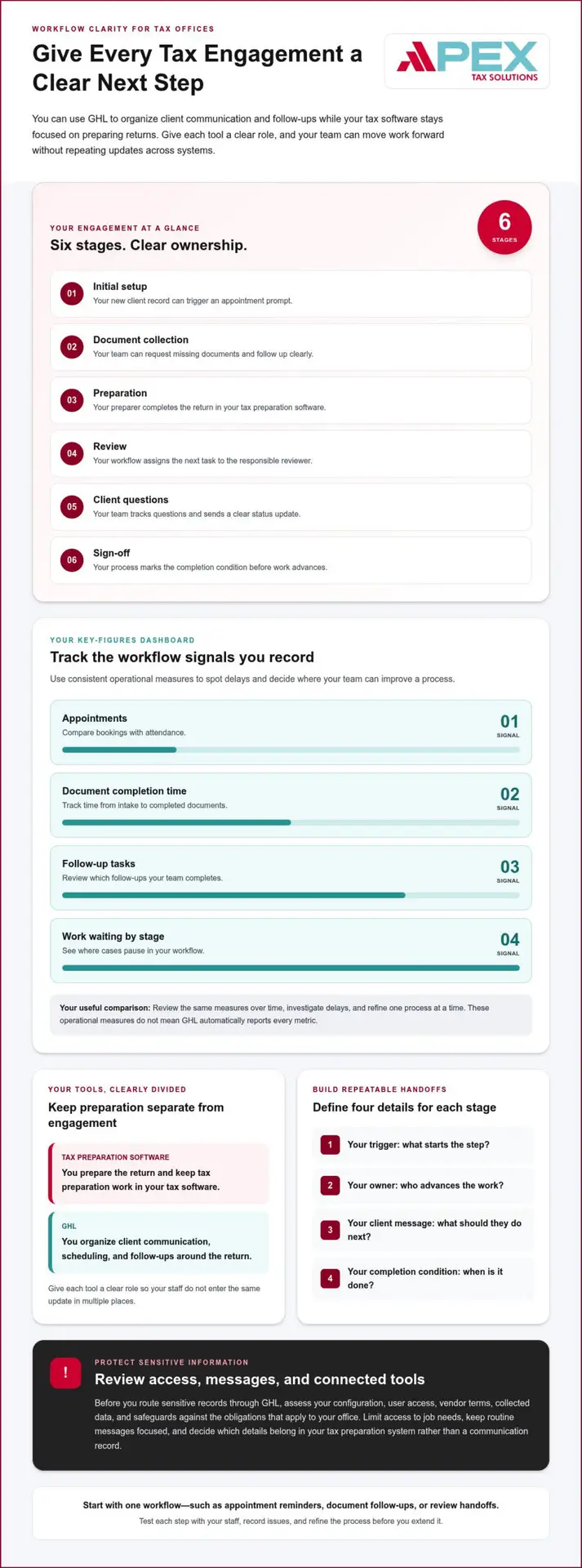
Start by separating return preparation from the communication around it. Separating return preparation from client communication can help offices organize appointments and follow-ups. Giving each tool a clear role helps prevent staff from entering the same update in multiple places.
Using GHL for tax client data does not, by itself, establish compliance with IRS expectations, the FTC Safeguards Rule, or privacy requirements. Before routing sensitive records through it, assess your configuration, user access, vendor terms, collected data, and safeguards against the obligations that apply to your office.
Use scheduling and shared calendar access to help staff see each tax professional’s availability. Email or SMS reminders can confirm meetings or prompt clients to attend. For intake and follow-ups, link each request to a clear next action, such as requesting missing documents or notifying staff when a client replies.
Keep tax preparation separate from engagement administration. A tax engagement, for example, might move from initial setup to document collection, preparation, review, client questions, and sign-off. An audit engagement can have its own stages and checkpoints. Assign an owner to each stage so staff know who advances the work and when.
A standardized workflow makes these steps repeatable without assuming every client has identical needs. For each stage, define the trigger, task owner, client message, and completion condition. A new client record might trigger an appointment prompt; a completed document review might prompt a status update. Staff can then handle exceptions deliberately instead of improvising routine steps.
Useful GHL metrics depend on what your office records consistently. Track appointment bookings and attendance, time from intake to document completion, completed follow-up tasks, and cases waiting at each workflow stage. Compare the same measures over time, then investigate delays. These are operational measures, not proof that GHL automatically reports every metric.
Consider risks such as excessive user access, compromised accounts, misdirected messages, and sensitive details copied into routine communications. Limit access to job needs, keep messages focused, and define what belongs in the tax preparation system rather than a client communication record. Review connected tools and staff practices as part of your security process.
For a U.S. tax office, GHL for Tax Offices can organize client engagement around tax software. Start with one process, such as appointment reminders, document follow-ups, or review handoffs. Test each step with staff, record issues, and refine the workflow before extending it to tax or audit engagements.
Technology and engagement quality
Technology supports engagement quality when it helps your team focus on judgment, review, and useful client communication. A workflow, for example, can flag a return waiting for reviewer attention, while your tax preparation software remains the place to prepare it. This division makes work requiring action visible without treating automation as a substitute for professional review.
GHL and tax practice management or CRM software can serve different roles. GHL can organize client relationships and automated communication, while tax practice management software typically focuses on tax-specific work, such as return status and preparation tasks. Compare each system with your actual process, including which records it holds and how staff move work between tools.
Start with one quality checkpoint. When a preparer marks a return ready for review, assign the next task to a reviewer and define what “ready” means. A short checklist might cover document completeness, unresolved client questions, and reviewer notes. This makes the handoff visible and helps prevent a return from advancing with open items.
Technology can also give professionals more time for analysis that adds value to client conversations. Staff might spend less time locating a status update and more time explaining what information a client still needs to provide. The benefit depends on designing the workflow around the team’s decisions, not automating every action without considering its purpose.
Use shared calendars and appointment confirmations to coordinate staff and client commitments. Tax offices can give staff office-wide access to each tax professional’s calendar, then send reminders by email or SMS. Keep messages focused on the appointment and next action. This supports a smoother engagement without putting sensitive tax details in routine notifications.
Technology may also help teams use their skills more effectively, supporting staff attraction and retention. Build this into workflow design: identify tasks requiring professional judgment, then separate them from repeatable administrative steps. For example, automate a reminder to review a file, but leave the review decision to the qualified staff member responsible for it.
Measure engagement quality through observable workflow signals. Review where tasks pause, how often staff return files for missing information, and whether clients receive clear updates at each stage. Use those observations to adjust one process at a time. If your current tax software needs a stronger workflow partner, explore tax software and workflow support as an addition to your operations.
Technology can help firms unlock thousands of hours within tax and audit engagements by improving efficiency and quality. Technology-enabled work that fully uses professionals’ skills and experience can help firms attract and retain staff. AI-powered tax research can surface relevant summaries by synthesizing expert guidance and analysis drawn from primary sources and editorial commentary, giving professionals a way to bring relevant material into their analysis.
H.R. 3855 in the 114th Congress suggested that the IRS explore modern technologies, including email and interactive website programs, to provide taxpayer receipts. The IRS’s antiquated and inconsistent computer and business systems affected virtually every one of its 100,000 employees, underscoring the importance of reliable systems. Tax offices can also collect visitor feedback using online surveys or kiosks at the office, providing another way to identify where the client experience may need attention.
3. Centralized paperless engagement systems
A paperless process works best when staff can identify the current status and location of each engagement record. Define where your office stores tax documents, tracks client communication, and holds the prepared return. For example, staff can record that an organizer arrived while keeping the actual tax documents in your designated document system.
Centralization means one clear process, not necessarily one tool holding every file. Tax and audit engagement software can support end-to-end paperless workflows, while your office decides how communication, documents, and preparation work connect. Document those roles before changing existing processes. This prevents a client message from becoming the only record of a document’s status.
Build the workflow around the engagement’s stages. At setup, create a consistent client record and identify the assigned staff member. During document collection, mark each requested item as received, outstanding, or needing clarification. During preparation and review, record handoffs and open questions. At sign-off, record completion according to your office’s established procedure.
Use a short intake checklist to improve record accuracy. Include the client identifier your office uses, the engagement type, the assigned preparer, and the next action. Avoid putting sensitive details in general task titles or routine messages. A task such as “review uploaded income document” directs staff without unnecessarily repeating private information.
Set naming and version rules before staff upload or handle files. Use a consistent client folder structure, for example, and distinguish a revised document from an earlier copy. Ask staff to confirm the client record before saving a file. These small steps help prevent misplaced documents and confusion about which version supports the current review.
Use workflow tracking to make engagement progress visible without copying every tax detail into a CRM. A staff member can update a task when a client responds, then direct the tax document to the approved storage location. The next person assigned can see the status and continue the process. This supports coordinated operations while keeping each system’s role clear.
Before adopting a centralized process, walk through a sample engagement with the people handling intake, preparation, and review. Note where they search for files, repeat updates, or wait for a handoff. Then adjust the workflow and document the revised steps. A clear process helps your team find accurate status information and gives new staff a practical reference.
Settle the workflow decisions and make the agreed process easy for staff to follow. Audit engagement software can provide firms with an end-to-end paperless system and centralized, streamlined tax and audit workflows. To use this approach, map the engagement stages your office needs to support and identify how each connects to document storage, communication, preparation, and review. Focus on clear ownership, accurate status updates, and deliberate handoffs instead of adding steps without a defined purpose. Review the workflow with the staff who use it, then refine unclear instructions before applying it across engagements. A consistent approach helps staff know where to continue work and how to keep the engagement record current.
4. E-filing, virtual consultations, and virtual queues
Online services can reduce unnecessary office visits and give taxpayers clearer ways to move through filing. Use GHL to coordinate client communication, then direct clients to your tax preparation software or approved document system for tax work and records. Keep these roles distinct so clients know where to book, ask questions, and provide documents.
To reduce missed appointments and speed up document collection, connect booking with a confirmation and reminder sequence. After a client books, send the appointment details, then follow up with a concise checklist and the approved way to submit records. Track outstanding items so staff can target reminders to clients who still need to act.
Online appointment scheduling lets taxpayers reserve a visit in advance, while shared staff calendars help your office coordinate availability. In GHL, organize appointment types by the service being scheduled, such as an initial discussion or document review. Make the location or virtual meeting instructions clear in the confirmation, and provide an easy way to reschedule.
For remote clients, virtual consultations can replace some in-person visits. Set expectations before the meeting: explain what the client should prepare, how to join, and what the discussion will cover. Afterward, assign a follow-up task for any missing information. Keep tax advice and filing decisions with the tax professional, not an automated message.
E-filing lets taxpayers submit documents electronically and can reduce the need for in-person visits. Use your client communication workflow to explain the next step and remind clients where to submit documents. Don’t ask clients to send sensitive tax records through ordinary messages. Direct them instead to the document process your office has designated.
A virtual queue can help manage in-office visits during busy periods. Pair advance scheduling with a clear check-in process, then let staff update the client’s status from arrival through service. Digital kiosks can support check-in by issuing a queue number, while email or SMS can communicate appointment changes.
Automation should support service, not decide tax questions. A reminder can ask a client to upload a missing document, for example, but a preparer should review the record and determine what it means under applicable tax laws. Keep messages factual, current, and specific about the client’s next action.
Review the workflow after a filing cycle. Compare appointment attendance, time spent waiting for documents, and client questions about where to submit records. If clients repeatedly miss the same instruction, revise the message or checklist. These practical adjustments help GHL support a smoother path from booking to consultation and filing.
Identifying and documenting workflow pain points
Fix the workflow causing repeat work, not just the first symptom staff notice. During tax season, keep a simple issue journal with the date, task, software involved, and what happened. For example, note when staff re-enter client details between a CRM and tax preparation software. These entries reveal where your office loses time and where a process change may help.
Look for common friction across your tools. Manual re-entry, poor integrations, disruptive software updates, low software utilization, and limits on simultaneous users can all interrupt work. Record the specific task affected, such as a preparer waiting for a colleague to access a shared file. That context helps distinguish a training need from a technical or process problem.
Use a consistent format for each journal entry. Record the step that stalled, the role handling it, the client impact, and the workaround staff used. If a missing document triggers repeated calls, note when the request went out and what follow-up resolved it. Avoid storing sensitive tax details in a general issue log.
Review entries with the people who do the work. Ask the intake coordinator, preparer, and reviewer to trace an example from the first client contact through completion. Compare their accounts. A handoff may look clear in writing but still leave staff unsure who owns the next action.
Group issues by cause, such as unclear instructions, duplicate entry, missing access, or a delayed client response. Choose one recurring problem to address first. For example, revise the document request process if the same item regularly arrives after preparation begins. Define the change, its owner, and the signal that will show whether it helped.
GHL can support this review when your office uses it to organize client communication and workflow activity. Use the information your team records consistently to examine unanswered follow-ups, stalled stages, or appointments needing attention. Treat these signals as prompts to investigate, not automatic proof of the cause. A staff discussion can confirm whether the process, communication, or access needs adjustment.
At the end of the season, review the issue journal before changing several processes at once. Keep entries that reveal recurring friction, document the adjustment, and share the revised steps with staff. This gives your team a practical record for improving tax office efficiency with GHL while leaving room to refine procedures based on real work.
If you’re ready to organize client communication and capture workflow activity, explore GHL workflow support for tax offices.
Apex Tax Solutions: TaxSlayer basado en Web
Apex Tax Solutions LLC offers web-based professional software for tax experts who want reliable systems backed by dedicated support and training. You can pair a clearer client workflow with comprehensive platform guidance and personalized assistance, completely avoiding frustrating call-center scripts.
- Software, support, and professional training under one roof.
- IRS-authorized e-file provider with bilingual support in English and Spanish.
- Latino-owned business founded in 2015.
- Corporate software options for offices that prepare business returns.
Choose support that fits your office’s needs while improving tax office efficiency with GHL. Contact Apex Tax Solutions LLC to discuss your platform options and your overall tax workflow goals.
Make your next workflow improvement intentional
The next step is to treat process design as part of the client experience, not just an internal efficiency project. As you consider improving tax office efficiency with GHL, decide what a well-supported client journey should feel like, from the first interaction to the final follow-up. That purpose can guide which tasks you automate and where your team’s personal attention matters most.
Give your staff a voice in shaping the changes. People who work directly with clients can spot friction a workflow diagram may miss, such as confusing instructions or unclear ownership. Invite their feedback, refine your approach, and make sure everyone understands how the updated process supports your service standards.
With the right software and a thoughtful plan, you can build a more consistent experience while keeping your team focused on meaningful client support. Contact Apex Tax Solutions to discuss a path that fits your tax office. Take the next step with clarity and confidence.
Frequently Asked Questions
How can a tax office set up GHL workflows for tax-season operations?
Set up separate workflows for new inquiries, returning clients, and clients waiting on an office response. For each, define the entry point, assigned staff member, next action, and condition that closes the task. For example, route a new inquiry to an intake owner, then create a reminder if no appointment is booked. Test each path with sample records before staff use it with live clients.
Can GHL integrate with tax preparation software, e-signature tools, and payment processors?
GHL can help coordinate client communications around your tax preparation software, e-signature tool, or payment processor, but automatic data exchange depends on the specific systems and supported connections. Decide which system is the source of truth for client data, signed forms, and payment status. If a connection isn’t available, document a staff handoff, such as recording completion in the office workflow after confirming it in the relevant system.