
Your tax practice needs more than a filing-season safety net. Year-round support for tax professionals can help you strengthen your systems, build skills, and plan for growth between seasons, when you have more room to review how your office works.
Tax expertise is only one part of running a successful practice. Software questions, office operations, security, and professional development all compete for your attention. Apex Tax Solutions LLC brings tax software, training, and service-bureau resources together to support your work throughout the year.
In this article, you’ll learn what practical support can include and how to make it useful beyond the busiest months. We’ll look at software onboarding and administrative setup, mentorship, tax preparer training, and cybersecurity education. You’ll also find ways to assess your current support and make a focused plan for your next season.
Key Takeaways
- Build year-round support for tax professionals around the distinct needs of your practice, not just the filing-season rush.
- Separate official tax guidance, software assistance, professional training, and business mentorship so each supports a different part of your work.
- Evaluate your support system for relevance, accessibility, security, and continuity. Tax software alone won’t cover every operational or learning need.
- Create a flexible cycle for reviewing your practice, preparing for upcoming work, operating effectively, and learning from each season.
- Connect software onboarding, one-on-one administrative setup, training resources, and mentorship to support your practice throughout the year.
Why Year-Round Support for Tax Professionals Matters Beyond Filing Season
When filing season ends, the work of running your tax practice doesn’t stop. You still need to maintain your software, improve office processes, plan for the next season, and keep developing your professional knowledge. Without a clear support system, these priorities can get pushed aside until a question or deadline makes them urgent.
Year-round support is planned help that keeps your tax practice learning, operating, and preparing between filing seasons. Instead of responding only when a problem arises, you build readiness around your professional, operational, and business needs.
What does year-round support mean for a tax practice?
Think of support as a continuing resource, not a promise of constant or instant assistance. The right mix depends on your practice, and each kind of support has a distinct role.
- Professional learning: Build your tax knowledge and identify topics to study as your practice evolves.
- Software help: Learn to use your tax software and address practical questions about its features and setup.
- Security education: Develop awareness of ways to protect sensitive client information, including through cybersecurity training.
- Business mentoring: Think through practice goals, workflows, and opportunities for improvement with ongoing guidance.
These resources complement one another, but none replaces accurate, current tax guidance. For questions about tax rules, use authoritative sources such as the IRS and review relevant guidance for the issue at hand. You can find official information and tools through IRS resources for tax professionals.
Why do support needs change during the year?
During filing season, immediate needs may take priority: preparing returns, resolving software questions, and keeping office work organized. Between seasons, you can shift attention toward reflection and preparation. Review where your workflow slowed down, identify software or training questions, and set goals for improving how your practice operates.
Your priorities also depend on your practice. An independent preparer may focus on building individual skills and refining a manageable workflow. A larger office may need to coordinate software setup, staff learning, security education, and consistent processes across a team. Your client work and team structure help determine which needs deserve attention first.
That’s why year-round support for tax professionals should be flexible, not built around a one-size-fits-all schedule. Consider what your office needs now, what you want to improve before the next busy period, and which resources can help you make steady progress. A deliberate rhythm helps you prepare without treating every between-season task like an emergency.
What Year-Round Tax Preparer Support Should Cover
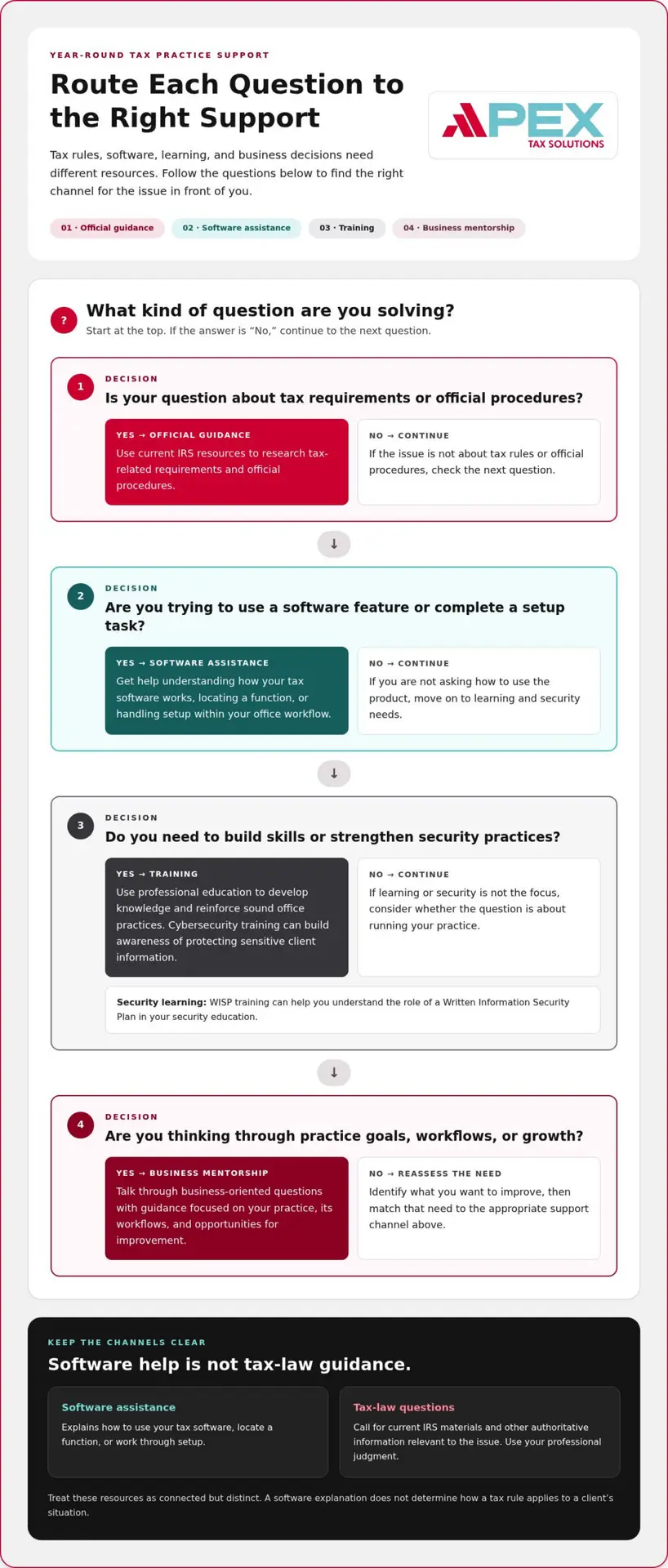
A complete support system gives you the right kind of help for the question in front of you. Tax rules, software use, professional development, security practices, and business decisions each call for different resources. Treating them as separate but connected needs helps you avoid relying on one source for answers it isn’t designed to provide.
Official guidance: Use current IRS resources to understand tax requirements and official procedures. This is your reference point for tax rules, not a software support channel.
Software assistance: Get help understanding how your tax software works and how to use it within your office workflow. This can help you make practical use of the tools available to your practice.
Training: Build your knowledge and reinforce sound office practices through professional and cybersecurity education.
Business mentorship: Talk through practice goals, workflows, and growth considerations with guidance focused on running your business.
These categories work together, but they aren’t interchangeable. A software question about entering information belongs in a different channel than a question about how a tax rule applies to a client’s situation. The IRS provides resources for tax professionals, including official information and tools you can use to research tax-related requirements.
How do software support and tax guidance differ?
Software support helps you use a product. You might ask how to locate a function, manage a setup task, or work through an office process. Tax-law guidance addresses what rules apply and how you should interpret them for a particular situation. Software support explains how to use your tax software; current authoritative sources and your professional judgment inform tax-law decisions.
Keep the distinction clear when you prepare a return. If you encounter a tax question, consult current IRS materials and other authoritative information relevant to the issue. Don’t treat a software explanation as a ruling on tax law, and don’t expect a software provider to determine an outcome for a client.
Where do training, cybersecurity, and mentorship fit?
Training helps you develop skills and strengthen how you handle work in your office. Cybersecurity education focuses on protecting sensitive information and building sound security practices. WISP training can help you understand the role of a Written Information Security Plan in your security education. Mentorship, by contrast, focuses on business-oriented questions such as refining workflows or considering how your practice can grow.
For example, you might use software assistance to learn a product function, training to improve your team’s familiarity with a process, security education to reinforce careful data handling, and mentorship to consider whether that workflow fits your business goals. Each resource addresses a different part of your practice.
If you want support that connects tax software, training, and practice resources, explore APEX Tax Solutions’ professional support as you shape a system that fits your office.
How to Evaluate Year-Round Support for Your Tax Office
Buying tax software gives your office an important tool, but it doesn’t automatically create a complete support system. You also need to consider how you’ll build skills, address security practices, get help with product use, and plan your business. Use this framework to identify gaps and assess whether your support fits your practice.
Which support gaps should you identify first?
Start by mapping needs across software use, training, security, and business operations. Separate issues that need timely assistance from topics you can plan to learn and longer-term practice goals. A solo preparer may prioritize useful individual resources, while a multi-office team may need coordinated setup and consistent information across staff.
How can you assess whether support fits your practice?
Look for support that reflects the work your office actually performs. Review onboarding, training resources, and service descriptions so you understand what each includes. Give more weight to clear, useful guidance than to broad promises, and distinguish stated availability from assumptions about instant responses or guaranteed results.
Evaluate your support in five areas:
- Needs: List recurring questions and tasks across software, professional learning, security, and business operations. Note which needs interrupt work and which you can address through planned development.
- Access: Understand how each resource is provided and when it is available. Base your expectations on clear service descriptions, not assumptions that help is constant, immediate, or available in every situation.
- Relevance: Check whether the support matches your return types, office workflows, and team structure. A resource is more useful when it addresses the work you perform rather than offering general information that leaves practical questions unresolved.
- Security: Consider whether security education supports the way your office handles sensitive information. Look for learning that helps you strengthen awareness and practices, while treating security as an ongoing part of your operations.
- Continuity: Assess whether support can help you address both current needs and future priorities. A useful system connects product assistance, learning, and business development rather than focusing only on a single urgent question.
Use this quick checklist to turn the framework into an action plan:
- Software: Can you identify where to get help understanding product features and office setup?
- Training: Have you identified skills or processes you want to strengthen?
- Security: Does your learning plan include security-focused education relevant to your office?
- Business: Do you have a way to review workflows and consider practice goals?
- Expectations: Do you understand the scope and availability of each resource without relying on assumed response times or outcomes?
Your answers show where to focus next. Year-round support for tax professionals is most useful when you can match each need to the right resource, understand its scope, and plan how it fits into your office. That clarity helps you build a support system around your actual work instead of relying on software alone.
How to Build a Practical Year-Round Support Plan
A useful plan gives your practice a repeatable rhythm without locking you into fixed dates or a one-size-fits-all calendar. Organize your work around four stages: review what happened, prepare for what’s ahead, operate with clear support routes, and learn from each season as it unfolds. Adjust the sequence to your office size, team, and priorities.
- Review: Look back at the prior season with your team, if you have one. Note where workflows slowed down, which software or administrative steps raised questions, and what training would have helped. Ask the people doing the work what they would change next time.
- Prepare: Turn those observations into a focused plan. Choose software processes to review, identify tax preparer training needs, and refresh security awareness. For tax questions, make current authoritative guidance part of your preparation rather than relying on memory or informal assumptions.
- Operate: Set clear routes for questions as work moves forward. Know where to direct software-use issues, tax research, and office-process concerns. If you work with a team, clarify who should record recurring questions and share relevant learning resources before busy periods begin.
- Learn: Capture useful lessons as they arise, not only after the season ends. A short record of recurring issues, effective processes, and topics that need more attention can make your next review more specific and actionable.
What can you review between filing seasons?
Keep the review manageable. Revisit software and administrative processes with the people who use them, then select a few improvements that fit your capacity. Consider whether your team needs more practice with a task, clearer internal instructions, or renewed cybersecurity education. For tax-related questions, consult current authoritative guidance relevant to the issue rather than treating old notes as a substitute.
How can you keep support useful during the next season?
Make the plan easy to use while work is active. Keep internal routes for product questions, tax research, and operational issues distinct, and make relevant training resources accessible to staff before they need them. When a question points to a gap, record it for follow-up instead of letting it disappear once the immediate task is complete.
Your system doesn’t need a complicated calendar to be consistent. A brief review, a few clear priorities, and a simple way to capture lessons can help you adapt the plan as your practice changes. That’s the practical value of year-round support for tax professionals: you can connect what your office learns with what it prepares to do next.
See how APEX Tax Solutions’ professional resources can fit into your plan for software, training, and practice support.
How APEX Tax Solutions Supports Tax Professionals Throughout the Year
Your support plan works best when software, learning, and practice resources connect. APEX Tax Solutions brings these areas together for tax professionals, with post-purchase onboarding, one-on-one administrative setup, and training resources to help you get started. You can also use year-round mentorship, cybersecurity training, and the Service Bureau Partner Program as your practice develops.
How can connected software and training support your workflow?
Choose software that fits the returns your office prepares and the way your team works. APEX Cloud Pro is a 100% cloud-based, 1040-only solution with unlimited federal and state e-filings for the tax season. It works through a modern web browser with a reliable internet connection, making it suitable for remote or multi-office teams. If your office prepares business-entity returns, APEX Premium Desktop is the relevant product to consider. Its corporate-return component must be installed on a Windows PC.
Matching software to your return types helps you avoid expecting one solution to cover every workflow. After purchase, APEX provides login credentials, onboarding, one-on-one administrative setup, and training resources to help you get started. You can use those resources to build familiarity with the tools and identify process questions before your office gets busy.
What does an ongoing APEX relationship bring together?
APEX connects product assistance with learning and broader practice support. You can access bilingual support in English and Spanish during business hours, and use year-round mentorship to think through business priorities. Mentorship supports business planning, not tax-law decisions. Cybersecurity training gives you a security-focused learning resource, while WISP training helps you address Written Information Security Plan education.
Your needs may change as your practice grows. You might begin by learning your software and setting up administrative processes, then add training, cybersecurity education, mentorship, or a service-bureau partnership to your plans. APEX’s Service Bureau Partner Program supports tax businesses seeking to grow their operations. For tax requirements and client matters, continue to use current authoritative sources and your professional judgment.
- Software: Select a solution aligned with the returns your office prepares.
- Setup: Use onboarding and one-on-one administrative setup to establish your software environment.
- Learning: Draw on training resources and cybersecurity education as your practice develops.
- Business support: Consider mentorship and service-bureau resources in light of your goals.
This connected approach gives you a practical way to turn year-round support for tax professionals into resources that serve your office beyond a single filing season. You can build product familiarity, strengthen your team’s learning, and consider business support as your priorities shift.
Explore APEX Tax Solutions’ software, training, and practice support to find resources that fit your tax office.
Build on Your Progress Between Seasons
Your next season starts with the choices you make before the pace picks up. Choose one practice goal you can act on now, such as strengthening a workflow, deepening a skill, or planning how your team will share what it learns. A focused next step can turn ongoing development into a practical part of running your business.
Year-round support for tax professionals gives you a foundation to keep adapting as your office and priorities change. The right partner can help connect your tools, learning, and business goals so you can approach future work with greater clarity. APEX Tax Solutions has served tax professionals since 2015, bringing software, training, and support together for your continued progress.
You don’t have to map every step at once. Start with the area that would make the biggest difference to your practice, then build from there. Partner with APEX Tax Solutions for software, training, and year-round support.
Frequently Asked Questions
Can tax software support replace IRS guidance?
No. If a product question connects to a tax issue, keep a brief record of the issue and the authoritative material you reviewed. Note the relevant IRS page or publication and any follow-up needed, while avoiding unnecessary taxpayer details in your notes. This gives you a clearer trail for later review and helps your team understand how you researched the question without treating a software answer as tax authority.
Is year-round mentorship the same as tax preparation training?
Use the outcome you need to decide which resource fits. If you want to improve a specific task, such as using a software function or following an office procedure, look for relevant training. If you’re weighing a broader business decision, such as how to organize responsibilities as your practice grows, mentorship may offer a useful space to think it through. You can draw on both for different goals.
What should I prepare before asking for support?
Gather the details that make the issue reproducible: the product or process involved, the steps you took, the result you expected, and what happened instead. If you see an error, capture its wording. Include only the taxpayer information needed to explain the question, and use an appropriate channel for sensitive details. A concise description helps you explain the problem clearly and reduces back-and-forth.
How can a multi-office tax team keep support consistent?
Give a team member responsibility for maintaining shared procedures, and label updates so staff can identify the current version. For example, if an office changes an administrative workflow, record the revised steps and tell affected team members where to find them. Invite staff to flag unclear instructions. This creates a practical feedback loop and helps offices apply shared processes without assuming every location works in exactly the same way.
Does ongoing support guarantee that my practice will remain compliant?
No support resource can guarantee that result. You can use training and operational guidance to strengthen how your office works, but your practice still needs a process for checking relevant requirements and addressing questions appropriately. Consider documenting who handles updates, where your team records decisions, and how you review procedures. These steps help you manage your responsibilities without treating support as a substitute for your own oversight.
When should tax preparers review their support plan?
Use meaningful changes as prompts for a focused check, rather than waiting for a single annual review. Revisit the plan when you add a staff member, introduce a new workflow, change your software setup, or notice the same question coming up repeatedly. Ask whether your existing resources still fit the work and whether staff know how to use them. This lets you adjust support in response to real operating needs.